Solved 320GB HD almost full

bootsmom

Senior Citizen Member
Member
Local time
5:26 PM
Messages
50
Location
Canada
I have a bad problem. :cry: I have only 17.7GB free on a 320GB HD.

This is day 3 of my problem. I have run AVG, scanned with Housecall and ESET NOD32, MBAM, HjT and am clean.

I ran WinDirStat today and most of my resources are occupied by over 168GB of .rcd files. I cannot locate any information about these specific types of files, but as near as I can figure, they have something to do with the backups of Avanquest Fix-it Utilities file undeleter (which I have DISABLED) and/or MXCYCLE. I remember having similar problems with MXCYCLE back about 10 years ago, don't remember how to fix this though.

I'm not sure if it is safe for me to delete these .rcd files in the application data folder. I need help quickly because I'm running out of resources here. Any ideas?

TIA,
Bootsmom
 

Attachments
  • Image2.jpg
    Image2.jpg
    96.7 KB · Views: 75

My Computer

Computer Manufacturer/Model Number
Dell Vostro 220
OS
Windows 7 Pro 64-bit
CPU
Intel Pentium III Xeon, 2600 MHz (7.5 x
Motherboard
Intel Eaglelake
Memory
3036 MB
Graphics Card(s)
Intel
Sound Card
Realtek High Definition Audio
Monitor(s) Displays
ASUS VH1920 (April 2011)
Screen Resolution
1366 x 768(recommended)
Hard Drives
WDC WD3200AAKS-75L9A0 (298 GB, IDE)
Case
Dell desktop
Cooling
unknown
Keyboard
Microsoft
Mouse
Logitech rollerball
Other Info
Classic Theme
The only info I could find was this:
The RCD file type is primarily associated with 'Arcade' by Kirk Martini, University of Virginia. Arcade is a computer program that models structures in real time using computational methods from computer games. It is a free program. The RCD file is binary input represeting a physical model for dynamic analysis.

The path in your post, C:\_BACKUP.RC led me to this:
The directory C:_Backup.rc stores your restore script/backups for Anvanquest System Suite 8
 

My Computer

Computer type
PC/Desktop
Computer Manufacturer/Model Number
Lenovo IdeaCenter 450
OS
Windows 10 Pro X64
CPU
Intel Quad Core i7-4770 @ 3.4Ghz
Memory
16.0GB PC3-12800 DDR3 SDRAM 1600 MHz
Graphics Card(s)
Intel Integrated HD Graphics
Sound Card
Realtek HD Audio
Monitor(s) Displays
HP 22" LCD
Screen Resolution
1680 x 1050
Hard Drives
250GB Samsung EVO SATA-3 SSD
2TB Seagate ST2000DM001 SATA-2
1.5TB Seagate ST3150041AS SATA
Keyboard
Dell USB
Mouse
Lenovo USB
Internet Speed
Cable via Road Runner 3MB Upload, 30MB Download
Antivirus
Windows Defender, MBAM Pro, MBAE
Browser
Seamonkey
Other Info
UEFI/GPT
PLDS DVD-RW DH16AERSH
thanks for your reply Ztruker..

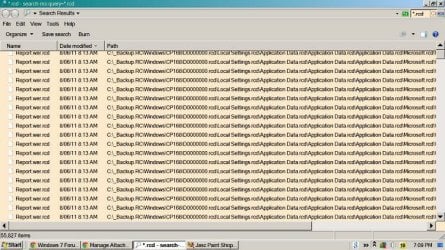
That's interesting because I don't use Avanquest System Suite 8, I am running Avanquest Fix-it Utilities 9 Professional. I believe they might be the 'undo' files after I use the registry cleaner. In any case, I have over 22,000 individual files which begin with C:\_Backup...(with a file extension of .rcd) taking up a LOT of space..... do you know if it is safe for me to delete them from my application data folder?
 

My Computer

Computer Manufacturer/Model Number
Dell Vostro 220
OS
Windows 7 Pro 64-bit
CPU
Intel Pentium III Xeon, 2600 MHz (7.5 x
Motherboard
Intel Eaglelake
Memory
3036 MB
Graphics Card(s)
Intel
Sound Card
Realtek High Definition Audio
Monitor(s) Displays
ASUS VH1920 (April 2011)
Screen Resolution
1366 x 768(recommended)
Hard Drives
WDC WD3200AAKS-75L9A0 (298 GB, IDE)
Case
Dell desktop
Cooling
unknown
Keyboard
Microsoft
Mouse
Logitech rollerball
Other Info
Classic Theme
To avoid conflicts down the track, is there a way to delete these backups from within the application? Never ever heard of that app, let alone used it, but it would be odd if that option was omitted.

Manually deleting them shouldn't hurt windows, but it may cause issues with the app.
 

My Computer

Computer type
PC/Desktop
Computer Manufacturer/Model Number
Systems by SmartEyeball
OS
8 Pro x64
CPU
i7 3770K 4.6GHz
Motherboard
ASUS P8Z77 WS
Memory
16GB G.Skill Trident X 2666mhz
Graphics Card(s)
x2 EVGA 780 Ti Superclocked SLI
Sound Card
SB X-FI Surround 5.1 PRO USB / ATH-AD900 Headphones
Monitor(s) Displays
x3 Dell U2410 / 58" Samsung
Screen Resolution
5760*1200/ 1920*1200
Hard Drives
2x Intel 520 240GB (RAID 0) * 2x WD Caviar Blacks 2TB (RAID 0) * 2TB WD Caviar Black * Sony Optirac DVD
PSU
Silverstone Strider Evolution 1200W
Case
Thermaltake Level 10 GT Snow Edition
Cooling
Noctua NH-D14
Keyboard
Topre Realforce // Ducky Shine MX Black // Filco Ninja TKL
Mouse
Thermaltake Theron (Highly Recommended) + Razer Imperator
Antivirus
MSE
Browser
IE, FF, WaterFox
Other Info
GT Extreme V2 Sim Racing Cockpit + 40" LCD and K/B Mouse stand ▼
Fanatec CSR Elite Wheel + Clubsport V1 Pedals + CSR shifter/7G-H ▼Saitek X52 Pro ▼ TrackIR 5 Pro
Buttkicker v2 Seat Rumbler with Dedicated 5.1 and Sub Woofer attached to frame ▼
=
Bloody Big Grin
Wow, that's a lot of registry cleaning! So it is a backup before every cleaning, and assuming your PC is running ok, delete all but the last one and confirm it is creating 1 each time you use the cleaner. It's report.wer.rcd, so maybe a backup of Windows Error Report? Can you manually navigate to C:\_Backup folder and see if the files are dated. I can't see the full path because your screen shot is of a minimized window. What is the full path? (Screenshot with window maximized) A Guy
 

My Computer

Computer type
PC/Desktop
OS
Windows 10 Home x64
CPU
INTEL Core i5-750 Quad-Core 3.37GHz
Motherboard
ASUS P7P55D
Memory
HyperX Fury Black Series 8GB (2 x 4GB) 1866Mhz
Graphics Card(s)
EVGA GeForce GTX 750 Superclocked 1GB 128-Bit GDDR5
Monitor(s) Displays
LG 32MA68HY 32" IPS
Screen Resolution
1920 x 1080
Hard Drives
Samsung 840 Evo 120GB, SEAGATE 500GB Barracuda® 7200.12, SATA 3 Gb/s, 7200 RPM, 16MB cache
PSU
ANTEC TruePower New TP-550, 80 PLUS, 550W
Case
ANTEC Three Hundred Illusion
Cooling
COOLER MASTER Hyper 212 Plus, 4 x 120mm 1 x 140mm Noctua's
Internet Speed
85 + Mbps
Antivirus
Avast
Browser
Vivaldi
thanks for your responses folks. I finally managed to expand all folders and found that the culprit was Fix-it Utilities Recovery Commander wreaking the havoc. Needless to say something must have gone wrong with my Fix-it install, as I did NOT have Recovery Commander set to recover anything. I found approx 168GB of Fix-it backups, including File Undeleter backups as well (again: not selected in the settings). Seems Fix-it 9 had a mind of its' own.

In any case, I had help from a friend last evening who told me it is safe to delete all the .rcd backups. Unfortunately for me, it's going to take quite some time, as most filenames are too big for the recycle bin, so I bypassed it, but still getting the nag message. *sigh* thanks again :)

Boots
 

My Computer

Computer Manufacturer/Model Number
Dell Vostro 220
OS
Windows 7 Pro 64-bit
CPU
Intel Pentium III Xeon, 2600 MHz (7.5 x
Motherboard
Intel Eaglelake
Memory
3036 MB
Graphics Card(s)
Intel
Sound Card
Realtek High Definition Audio
Monitor(s) Displays
ASUS VH1920 (April 2011)
Screen Resolution
1366 x 768(recommended)
Hard Drives
WDC WD3200AAKS-75L9A0 (298 GB, IDE)
Case
Dell desktop
Cooling
unknown
Keyboard
Microsoft
Mouse
Logitech rollerball
Other Info
Classic Theme
Uninstall Avanquest Fix-it Utilities 9 Professional and you're problem will go away :D

In my opinion it rates right up there with snake oil and whoopie cushions as do most Fix-It tools.

If you hold down the Shift key while deleting a file or folder, it bypasses the Recycle Bin completely. You are not even prompted to make a choice.
 

My Computer

Computer type
PC/Desktop
Computer Manufacturer/Model Number
Lenovo IdeaCenter 450
OS
Windows 10 Pro X64
CPU
Intel Quad Core i7-4770 @ 3.4Ghz
Memory
16.0GB PC3-12800 DDR3 SDRAM 1600 MHz
Graphics Card(s)
Intel Integrated HD Graphics
Sound Card
Realtek HD Audio
Monitor(s) Displays
HP 22" LCD
Screen Resolution
1680 x 1050
Hard Drives
250GB Samsung EVO SATA-3 SSD
2TB Seagate ST2000DM001 SATA-2
1.5TB Seagate ST3150041AS SATA
Keyboard
Dell USB
Mouse
Lenovo USB
Internet Speed
Cable via Road Runner 3MB Upload, 30MB Download
Antivirus
Windows Defender, MBAM Pro, MBAE
Browser
Seamonkey
Other Info
UEFI/GPT
PLDS DVD-RW DH16AERSH
To avoid conflicts down the track, is there a way to delete these backups from within the application? Never ever heard of that app, let alone used it, but it would be odd if that option was omitted.

Manually deleting them shouldn't hurt windows, but it may cause issues with the app.


Thanks for your question smarteyeball. Uh no... there isn't a way to delete them from within the app (you'd think huh?). I've been using Fix-it for the utilities only for as long as it's been available....certainly over 10 years now....without incident (until now).

more replies follow....and an update.
 

My Computer

Computer Manufacturer/Model Number
Dell Vostro 220
OS
Windows 7 Pro 64-bit
CPU
Intel Pentium III Xeon, 2600 MHz (7.5 x
Motherboard
Intel Eaglelake
Memory
3036 MB
Graphics Card(s)
Intel
Sound Card
Realtek High Definition Audio
Monitor(s) Displays
ASUS VH1920 (April 2011)
Screen Resolution
1366 x 768(recommended)
Hard Drives
WDC WD3200AAKS-75L9A0 (298 GB, IDE)
Case
Dell desktop
Cooling
unknown
Keyboard
Microsoft
Mouse
Logitech rollerball
Other Info
Classic Theme
thanks for your thoughts "A Guy" .

In the past week I have been able to delete the files only. As of this writing the _Backup.RC folder contains no more files, but 558 folders which are "undeletable" due to their names being too long for the recycle bin. When I try to delete them by bypassing the recycle bin, same result: unable to delete. They won't delete in safe mode either (more about that later). By deleting the FILES only, I was able to recover 45 GB, so now I'm up to 72GB space from a paltry 17GB.

I have requested help from Avanquest, but....won't hold my breath.

In the past week (with the help of a tech buddy) I have run CHKDSK and sfc /scannow, sent him the logs and he determined any errors reported were fixed (there weren't all that many).

I did the online scan with Housecall....no infection. I have run ESET and AVG (full computer scan) Malwarebytes (full scan) and HiJack this....all scanned clean.

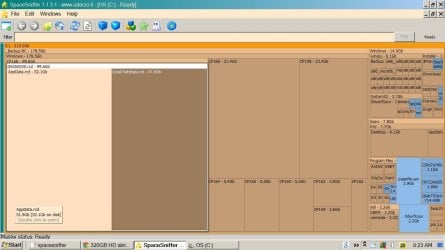
I have also taken many screenshots of WinDirStat results, this one below is the most recent. One thing I found odd is that the time shown (last change) is usually 4 hours ahead of the time I ran the scan, and that has been the case since scan 1 on August 12.

My most recent WDS scan is below.

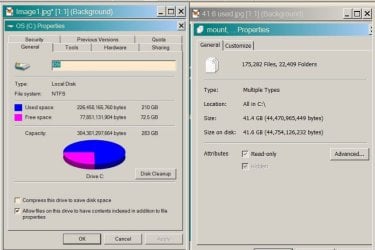
Note line two......178GB of "unknown" ...that's what I'm missing. I am completely lost, tired and frustrated. Note the discrepancy in disk sizes in the properties screenshot (sorry they are so big ! yikes)
 

Attachments

  • WinDirStat Aug 17-11 in safe mode.jpg
    WinDirStat Aug 17-11 in safe mode.jpg
    95.4 KB · Views: 31
  • C.jpg
    C.jpg
    50.3 KB · Views: 22

My Computer

Computer Manufacturer/Model Number
Dell Vostro 220
OS
Windows 7 Pro 64-bit
CPU
Intel Pentium III Xeon, 2600 MHz (7.5 x
Motherboard
Intel Eaglelake
Memory
3036 MB
Graphics Card(s)
Intel
Sound Card
Realtek High Definition Audio
Monitor(s) Displays
ASUS VH1920 (April 2011)
Screen Resolution
1366 x 768(recommended)
Hard Drives
WDC WD3200AAKS-75L9A0 (298 GB, IDE)
Case
Dell desktop
Cooling
unknown
Keyboard
Microsoft
Mouse
Logitech rollerball
Other Info
Classic Theme
For detecting disc space, download the free Space Sniffer. Run the program, and you can single click the space you want to see details, or double click it to get a full screen detail. Right click on individual files to get the path.

For deleting the "undeletable" folders, suggest either Unlocker , or Lock Hunter. Both should identify the locking process, and allow you to close it. Or at the least, delete on restart.

A Guy
 

My Computer

Computer type
PC/Desktop
OS
Windows 10 Home x64
CPU
INTEL Core i5-750 Quad-Core 3.37GHz
Motherboard
ASUS P7P55D
Memory
HyperX Fury Black Series 8GB (2 x 4GB) 1866Mhz
Graphics Card(s)
EVGA GeForce GTX 750 Superclocked 1GB 128-Bit GDDR5
Monitor(s) Displays
LG 32MA68HY 32" IPS
Screen Resolution
1920 x 1080
Hard Drives
Samsung 840 Evo 120GB, SEAGATE 500GB Barracuda® 7200.12, SATA 3 Gb/s, 7200 RPM, 16MB cache
PSU
ANTEC TruePower New TP-550, 80 PLUS, 550W
Case
ANTEC Three Hundred Illusion
Cooling
COOLER MASTER Hyper 212 Plus, 4 x 120mm 1 x 140mm Noctua's
Internet Speed
85 + Mbps
Antivirus
Avast
Browser
Vivaldi
Last ditch possibility for deletion of the folders is a Live Linux CD or USB Stick - takes windows out of the loop.

Of course this is a last resort option but with care can give required results.

   Warning
Only use as last resort and only after backing up everything you can
 

My Computers

System One System Two

  • Computer type
    PC/Desktop
    Computer Manufacturer/Model Number
    ChillBlast - Custom to my design
    OS
    Windows 11 Pro x64 [Latest Release and Release Preview]
    CPU
    Ryzen 9 5950X, 3.8 - 5.2 MHz
    Motherboard
    Asus Prime X570-Pro
    Memory
    64GB [2 x 32GB] DDR4 3200MHz
    Graphics Card(s)
    4GB NVIDIA GEFORCE GTX 1650 Ti
    Sound Card
    On-board SPDIF to 5.1 System + HDMI [5.1 system]
    Monitor(s) Displays
    32" UHD 32 Bit HDR Monitor + 43" UHD 4K 32Bit HDR TV
    Screen Resolution
    2 x 3840 x 2160 @60Hz
    Hard Drives
    1TB M2 SSD OS, 500GB Fast Access SSD, 2 x 8TB Data + Various Externals from 1TB to 4TB, 10TB NAS
    PSU
    NZXT C750 80 PLUS Gold 750W Modular PSU
    Case
    Workstation Case [Matt Black]
    Cooling
    NZXT Kraken X63 280mm CPU Cooler +2x Quiet Case fans
    Keyboard
    Logitech Wireless MX Keys & K400 + others
    Mouse
    Logitech Wireless MX Master 3S
    Internet Speed
    920 MB Down 50 MB Up
    Antivirus
    BitDefender Total Security Pro
    Browser
    Chrome (always run latest Non-Beta)
    Other Info
    Also run ...
    Laptop - Quad 8GB - Windows 10 Pro x64
    Nexus 7 Android tablet x2
    Samsung 10.2" tablet
    Blackview TAB 8 4G Android Tablet c/w Keyboard
    Wacom Intuos Pro Medium Pen Pad
    Wacom Intuos Pro Small Pen Pad
    Wacom Expresskeys Remote
    Loopdeck+ Graphics Controller
    Shuttle Pro v2 Control
  • Computer type
    Laptop
    System Manufacturer/Model Number
    Dell XPS 17 10750H
    OS
    Windows 11 Pro x64 Latest RP
    CPU
    Intel I7 10750H 5.0GHz
    Motherboard
    Dell XPS
    Memory
    32GB [2x16GB] DDR4 2933 MHz
    Graphics Card(s)
    nVidia GTX1650Ti 4 GB GDDR6
    Sound Card
    Stock [Realtek] 4 Speaker
    Monitor(s) Displays
    17" IPS UHD+ Infinity Edge Touchscreen
    Screen Resolution
    3840 x 2400
    Hard Drives
    2TB M2 NVMe, 4TB External + various 500GB & 1TB External NVMe (also have access to spinner HDD from
    PSU
    Stock
    Case
    Stock XPS Aluminium & Carbon Fibre
    Cooling
    Stock - Active Fan Control
    Keyboard
    Backlit + Various Logitech
    Mouse
    Stock Track Pad + Logitech MX Trackball
    Internet Speed
    72 MB Down 18MB Up
    Browser
    Chrome
    Other Info
    Also run ...
    Laptop - Quad 8GB - Windows 10 Pro x64
    Nexus 7 Android tablet x2
    10.2" tablet
    Sony Z3 Android Smartphone
    Wacom Intuos Pro Medium Pen Pad
    Wacom Intuos Pro Small Pen Pad
    Wacom Expresskeys Remote
    Loopdeck+ Graphics Controller
    Shuttle Pro v2 Control Pad
    10TB NAS
Next time, stay away from such system tuning software, except maybe CCleaner. Microsoft has done it right this time, win7 runs great out of the box, and stays that way.

Just install a free antivirus software such as MSE, Avira or Avast. Use a standard user account. Together with the built-in firewall, that's all you need to keep your machine fast and secure.

Create a system image once in a while. Do your data backup more often. Remember it's a question when, not if, a file becomes corrupted or hd stops working.
 

My Computer

OS
Windows 7 Professional 64bit
For detecting disc space, download the free Space Sniffer. Run the program, and you can single click the space you want to see details, or double click it to get a full screen detail. Right click on individual files to get the path.

For deleting the "undeletable" folders, suggest either Unlocker , or Lock Hunter. Both should identify the locking process, and allow you to close it. Or at the least, delete on restart.

A Guy


Barman 58
I'm not sure what a Live Linux CD is, and my USB stick only holds 4GB, not 178GB LOL, so I would take it to a tech before I would attempt that, thanks for the suggestion though.

A Guy
thank you for your suggestion of SpaceSniffer. I ran it. It confirmed my suspicions: the backup is occupying 178GB of my 320GB HD. At least now I know for sure where my missing disk space is :)

I ran unlocker and lockhunter, couldn't delete the _Backup.RC folder, nor any of the subfolders. I was able to unlock the folder (which was locked by Explorer.exe) but still can't delete any (folders).

I asked Avanquest for help but so far they have been less than "helpful". Despite pointing them to this thread, they seem to be unable to understand what the problem is.
 

Attachments

  • space sniffer results (top left).jpg
    space sniffer results (top left).jpg
    93.5 KB · Views: 11

My Computer

Computer Manufacturer/Model Number
Dell Vostro 220
OS
Windows 7 Pro 64-bit
CPU
Intel Pentium III Xeon, 2600 MHz (7.5 x
Motherboard
Intel Eaglelake
Memory
3036 MB
Graphics Card(s)
Intel
Sound Card
Realtek High Definition Audio
Monitor(s) Displays
ASUS VH1920 (April 2011)
Screen Resolution
1366 x 768(recommended)
Hard Drives
WDC WD3200AAKS-75L9A0 (298 GB, IDE)
Case
Dell desktop
Cooling
unknown
Keyboard
Microsoft
Mouse
Logitech rollerball
Other Info
Classic Theme
FYI a "Live CD" or "Live USB Stick" is an operating system that boots & runs directly from either a CD or Stick.

This allows you to work on the files on a system without any of the system protection that would normally prevent access to the files.

As you say this is probably an option for a local technician as incorrect use can cause serious damage to the system.
 

My Computers

System One System Two

  • Computer type
    PC/Desktop
    Computer Manufacturer/Model Number
    ChillBlast - Custom to my design
    OS
    Windows 11 Pro x64 [Latest Release and Release Preview]
    CPU
    Ryzen 9 5950X, 3.8 - 5.2 MHz
    Motherboard
    Asus Prime X570-Pro
    Memory
    64GB [2 x 32GB] DDR4 3200MHz
    Graphics Card(s)
    4GB NVIDIA GEFORCE GTX 1650 Ti
    Sound Card
    On-board SPDIF to 5.1 System + HDMI [5.1 system]
    Monitor(s) Displays
    32" UHD 32 Bit HDR Monitor + 43" UHD 4K 32Bit HDR TV
    Screen Resolution
    2 x 3840 x 2160 @60Hz
    Hard Drives
    1TB M2 SSD OS, 500GB Fast Access SSD, 2 x 8TB Data + Various Externals from 1TB to 4TB, 10TB NAS
    PSU
    NZXT C750 80 PLUS Gold 750W Modular PSU
    Case
    Workstation Case [Matt Black]
    Cooling
    NZXT Kraken X63 280mm CPU Cooler +2x Quiet Case fans
    Keyboard
    Logitech Wireless MX Keys & K400 + others
    Mouse
    Logitech Wireless MX Master 3S
    Internet Speed
    920 MB Down 50 MB Up
    Antivirus
    BitDefender Total Security Pro
    Browser
    Chrome (always run latest Non-Beta)
    Other Info
    Also run ...
    Laptop - Quad 8GB - Windows 10 Pro x64
    Nexus 7 Android tablet x2
    Samsung 10.2" tablet
    Blackview TAB 8 4G Android Tablet c/w Keyboard
    Wacom Intuos Pro Medium Pen Pad
    Wacom Intuos Pro Small Pen Pad
    Wacom Expresskeys Remote
    Loopdeck+ Graphics Controller
    Shuttle Pro v2 Control
  • Computer type
    Laptop
    System Manufacturer/Model Number
    Dell XPS 17 10750H
    OS
    Windows 11 Pro x64 Latest RP
    CPU
    Intel I7 10750H 5.0GHz
    Motherboard
    Dell XPS
    Memory
    32GB [2x16GB] DDR4 2933 MHz
    Graphics Card(s)
    nVidia GTX1650Ti 4 GB GDDR6
    Sound Card
    Stock [Realtek] 4 Speaker
    Monitor(s) Displays
    17" IPS UHD+ Infinity Edge Touchscreen
    Screen Resolution
    3840 x 2400
    Hard Drives
    2TB M2 NVMe, 4TB External + various 500GB & 1TB External NVMe (also have access to spinner HDD from
    PSU
    Stock
    Case
    Stock XPS Aluminium & Carbon Fibre
    Cooling
    Stock - Active Fan Control
    Keyboard
    Backlit + Various Logitech
    Mouse
    Stock Track Pad + Logitech MX Trackball
    Internet Speed
    72 MB Down 18MB Up
    Browser
    Chrome
    Other Info
    Also run ...
    Laptop - Quad 8GB - Windows 10 Pro x64
    Nexus 7 Android tablet x2
    10.2" tablet
    Sony Z3 Android Smartphone
    Wacom Intuos Pro Medium Pen Pad
    Wacom Intuos Pro Small Pen Pad
    Wacom Expresskeys Remote
    Loopdeck+ Graphics Controller
    Shuttle Pro v2 Control Pad
    10TB NAS
Hmmm, usually either Unlocker or LockHunter will give the option to delete on reboot. OK, here's an idea, download the free FileKiller. Open the exe file, navigate to the folder with all the files, left click and highlight several as a test. Click on Kill Files on Grid.

2ypngk0.jpg


Click Yes on confirmation popup.

2nrbqf.jpg


See if it will delete them. If so, left click and highlight them all, and then delete away. Let us know. I'm sure we can figure out how to get them deleted. A Guy
 

My Computer

Computer type
PC/Desktop
OS
Windows 10 Home x64
CPU
INTEL Core i5-750 Quad-Core 3.37GHz
Motherboard
ASUS P7P55D
Memory
HyperX Fury Black Series 8GB (2 x 4GB) 1866Mhz
Graphics Card(s)
EVGA GeForce GTX 750 Superclocked 1GB 128-Bit GDDR5
Monitor(s) Displays
LG 32MA68HY 32" IPS
Screen Resolution
1920 x 1080
Hard Drives
Samsung 840 Evo 120GB, SEAGATE 500GB Barracuda® 7200.12, SATA 3 Gb/s, 7200 RPM, 16MB cache
PSU
ANTEC TruePower New TP-550, 80 PLUS, 550W
Case
ANTEC Three Hundred Illusion
Cooling
COOLER MASTER Hyper 212 Plus, 4 x 120mm 1 x 140mm Noctua's
Internet Speed
85 + Mbps
Antivirus
Avast
Browser
Vivaldi
FYI a "Live CD" or "Live USB Stick" is an operating system that boots & runs directly from either a CD or Stick.

This allows you to work on the files on a system without any of the system protection that would normally prevent access to the files.

As you say this is probably an option for a local technician as incorrect use can cause serious damage to the system.


oh ! :o thank you for the explanation LOL.
 

My Computer

Computer Manufacturer/Model Number
Dell Vostro 220
OS
Windows 7 Pro 64-bit
CPU
Intel Pentium III Xeon, 2600 MHz (7.5 x
Motherboard
Intel Eaglelake
Memory
3036 MB
Graphics Card(s)
Intel
Sound Card
Realtek High Definition Audio
Monitor(s) Displays
ASUS VH1920 (April 2011)
Screen Resolution
1366 x 768(recommended)
Hard Drives
WDC WD3200AAKS-75L9A0 (298 GB, IDE)
Case
Dell desktop
Cooling
unknown
Keyboard
Microsoft
Mouse
Logitech rollerball
Other Info
Classic Theme
hello again "A Guy"
thank you for the FileKiller. Unfortunately it kills only files, not folders.

I have discovered an even more complicated mess since I was last here though... brace yourself !! Thank you so much for your help....and your patience :)

I will start off by saying that I have never liked using Windows system backups, because I just do NOT understand all the complicated instructions. I have been using EASEUS backup to a 1TB XHD each week. I backup my desktop (where I keep everything) to my USB thumbdrive daily. I've been doing it that way for a long time because I'm comfortable with it. I repeat: I will NEVER be comfortable with Windows system backups.

Well... somehow this computer was set to back up every day, (it may have come from Dell that way for all I know) and that's why I have 178 GB of backups to get rid of.

As a diagnostic, and on a hunch, I created a restore point this morning at 955 am, then turned off system restore. System backup is off.

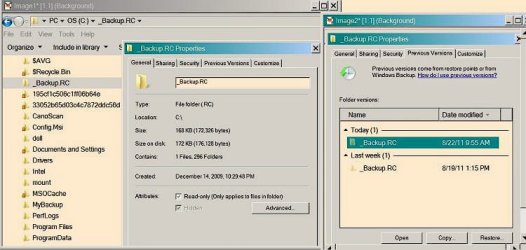
I discovered that the folder in question is NOT an Avanquest recovery commander backup (also RC) - it is a system folder with the attribute RHSD. No wonder I couldn't delete it. Oddly, I was able to delete the files within it.

R read only
H hidden
S system
D ? directory ?

There is a screenshot of the folder attached to this posting.

contents of the folder:

title contains create date previous versions tab

CP156 12 folders sept 26, 2010 aug 22, 2011 955 am
CP158 12 folders oct. 10, 2010 as above
CP159 12 folders oct. 10, 2010 as above
CP160 12 folders dec. 8, 2010 as above
CP162 12 folders + jan 25, 2011 as above
CP163 12 folders april 9, 2011 as above
CP164 12 folders april 16, 2011 as above
CP165 12 folders may 7, 2011 as above
CP166 12 folders july 9, 2011 as above
CP168 177 folders aug 6, 2011 as above


fyi the properties of that backup folder say there are 7805 items in there


+ AVG command line scan (safe mode) identified this:

C:\_Backup.RC\Windows\CP162\D0000000.rcd\AppData.rcd\Local.rcd\Application Data.rcd\Application Data.rcd\Application Data.rcd\Application Data.rcd\Application Data.rcd\Application Data.rcd\Application Data.rcd\Application Data.rcd\Application Data.rcd\Application Data.rcd\Application Data.rcd\Application Data.rcd\Application Data.rcd\Application Data.rcd\Application Data.rcd\Application Data.rcd\Application Data.rcd\Application Data.rcd\Application Data.rcd\Application Data.rcd\Application Data.rcd\Application Data.rcd\Application Data.rcd\Application Data.rcd\Application Data.rcd\Application Data.rcd\Application Data.rcd\Application Data.rcd\Application Data.rcd\Application Data.rcd\Google.rcd\Chrome.rcd\Application.rcd\8.0.552.237.rcd\gears.dll.rcd Corrupted executable file Object was moved to Virus Vault.

I have no idea what to do next to get rid of these restore points. When I go into System Restore it shows only the latest restore point of this morning....August 22, 2011 @955 a.m.

*sigh*
 

Attachments

  • backup.rc properties.jpg
    backup.rc properties.jpg
    43.1 KB · Views: 10
Last edited:

My Computer

Computer Manufacturer/Model Number
Dell Vostro 220
OS
Windows 7 Pro 64-bit
CPU
Intel Pentium III Xeon, 2600 MHz (7.5 x
Motherboard
Intel Eaglelake
Memory
3036 MB
Graphics Card(s)
Intel
Sound Card
Realtek High Definition Audio
Monitor(s) Displays
ASUS VH1920 (April 2011)
Screen Resolution
1366 x 768(recommended)
Hard Drives
WDC WD3200AAKS-75L9A0 (298 GB, IDE)
Case
Dell desktop
Cooling
unknown
Keyboard
Microsoft
Mouse
Logitech rollerball
Other Info
Classic Theme
Ahhh, an interesting wrinkle, good job on the detective work. There must be a task scheduled to make these backups. You'd have to do some digging to find it though. Suggest you open the Task Scheduler:

Start> All Programs> Accesories> System Tools> Task Scheduler

You will see a section titled Active Tasks

262lbid.jpg


One of these will be your task. Hopefully obviously named (or another member will know the name and post here). That task will be scheduled to run every day if it is running everyday as you say. You'd want to stop the task creating these backups as deleting the folder will be useless if it is then recreated.

To delete this folder, I believe you'd have to log in to the hidden Administrator account, and then should be able to delete the folder.

Hold tight, I am going to post to the Gurus here asking for more help.

A Guy
 

My Computer

Computer type
PC/Desktop
OS
Windows 10 Home x64
CPU
INTEL Core i5-750 Quad-Core 3.37GHz
Motherboard
ASUS P7P55D
Memory
HyperX Fury Black Series 8GB (2 x 4GB) 1866Mhz
Graphics Card(s)
EVGA GeForce GTX 750 Superclocked 1GB 128-Bit GDDR5
Monitor(s) Displays
LG 32MA68HY 32" IPS
Screen Resolution
1920 x 1080
Hard Drives
Samsung 840 Evo 120GB, SEAGATE 500GB Barracuda® 7200.12, SATA 3 Gb/s, 7200 RPM, 16MB cache
PSU
ANTEC TruePower New TP-550, 80 PLUS, 550W
Case
ANTEC Three Hundred Illusion
Cooling
COOLER MASTER Hyper 212 Plus, 4 x 120mm 1 x 140mm Noctua's
Internet Speed
85 + Mbps
Antivirus
Avast
Browser
Vivaldi
Ahhh, an interesting wrinkle, good job on the detective work. There must be a task scheduled to make these backups. You'd have to do some digging to find it though. Suggest you open the Task Scheduler:

Start> All Programs> Accesories> System Tools> Task Scheduler

You will see a section titled Active Tasks

262lbid.jpg


One of these will be your task. Hopefully obviously named (or another member will know the name and post here). That task will be scheduled to run every day if it is running everyday as you say. You'd want to stop the task creating these backups as deleting the folder will be useless if it is then recreated.

To delete this folder, I believe you'd have to log in to the hidden Administrator account, and then should be able to delete the folder.

Hold tight, I am going to post to the Gurus here asking for more help.

A Guy


oh wow what a find......I have 85 scheduled tasks! I did not set these up.

thank you so much - I found the following entry !
sorry I'll try to calm down here, got a little excited :o

task: system restore
next run time: 935 this evening (aug 22)
trigger: at 1:35 pm every day - after triggered, repeat every 1 hour indefinitely ~!

I found another called

task: SR (system snapshot on startup)
next run time is blank
trigger: at system startup

I went into "Task Scheduler Library" , found "system restore" and SR and disabled them both YAY !
not to worry I have one restore point left, created this morning.

I found 48 entries similar to this : (numbers)
{F36D6867-389C-4400-9769-F9997A39482D}
trigger: when the task is created or modified

I examined their properties and they are programs like Windows Live Mail, Paint Shop Pro, etc. I deleted some of them already.

thank you for everything you are doing to help, much appreciated.

Boots
 
Last edited:

My Computer

Computer Manufacturer/Model Number
Dell Vostro 220
OS
Windows 7 Pro 64-bit
CPU
Intel Pentium III Xeon, 2600 MHz (7.5 x
Motherboard
Intel Eaglelake
Memory
3036 MB
Graphics Card(s)
Intel
Sound Card
Realtek High Definition Audio
Monitor(s) Displays
ASUS VH1920 (April 2011)
Screen Resolution
1366 x 768(recommended)
Hard Drives
WDC WD3200AAKS-75L9A0 (298 GB, IDE)
Case
Dell desktop
Cooling
unknown
Keyboard
Microsoft
Mouse
Logitech rollerball
Other Info
Classic Theme
you are doing well.

You are on the right track.

Via Task Scheduler,
simple Disable all tasks (don't worry your computer won't crash and burn) despite what some of the old-timers think and I'm older than nearly all of them.

Now you go back and delete all of those you don't recognize. Once again, thou shalt sweat it not.
----------------------------------------
Make yourself a System Repair disc.
---------------------------------------
CREATE A SYSTEM REPAIR DISC

START | type System Repair | Enter key | Create Disc button

-------------------------------------
Boot from the System Repair disc.
-------------------------------------


GO TO A COMMAND PROMPT USING A SYSTEM REPAIR DISC

1) Insert System Repair Disc into optical reader.
2) Shutdown computer.
3) Boot up computer from the System Repair Disc
If your computer doesn’t boot from the optical drive, then
Immediately after pushing your Power ON button,
start tapping the F2 key to get to the BIOS to change the boot order

On some computers, Immediately after pushing the Power ON button, start tapping the F12 key and choose CD/DVD to change the boot order only for this time.
4) Wait while a mini-version of Windows is loaded and finally the SYSTEM RECOVERY OPTIONS dialog appears.
5) NEXT | SYSTEM RECOVERY OPTIONS dialog
will search your system for installed versions of Windows.
6) select the Use recovery tools that can help fix problems starting Windows radio button |
7) NEXT | Choose Command Prompt

Run desired commands and type EXIT when finished.
Remove the System Repair Disc.
Shutdown computer.
Power on computer.


Go to a command prompt and see if you can't get rid of many of those troublesome files.

Also Win 7 Backup is much, much better than thqt from vista or xp. In fact, Win 7 Backup and Restore works perfectly. This is the only backup that I use or will recommend. If you get around to that point, there is a marvelous tutorial here on making a System Image backup.
http://www.sevenforums.com/tutorials/663-backup-complete-computer-create-image-backup.html
 

My Computer

Computer Manufacturer/Model Number
Toshiba Satellite S875D-S7239 laptop
OS
MS Windows 7 Ultimate SP1 64-bit
CPU
AMD A10-4600M
Motherboard
AMD Pumori (Socket FT1)
Memory
6.00 GB Dual-Channel DDR3 @ 798MHz (11-11-12-28)
Graphics Card(s)
AMD Radeon HD 7660G
Sound Card
High Definition Audio Device
Monitor(s) Displays
Generic PnP Monitor (1600x900@60Hz)
Screen Resolution
1600x900@60Hz
Hard Drives
SSD 119GB Corsair CSSD-V128GB2 ATA Device
Keyboard
Standard PS/2 Keyboard
Mouse
HP Wireless Optical Mobile Mouse Model FHA-3410
Internet Speed
What the local pub, local coffee shop offers.
Other Info
Optical Drive:MATSHITA BD-CMB UJ160B ATA Device


Also have an Asus ha1002xp netbook with Win 7 Ultimate installed.
Back
Top