JavaScript is disabled. For a better experience, please enable JavaScript in your browser before proceeding.
You are using an out of date browser. It may not display this or other websites correctly.
You should upgrade or use an
alternative browser .
3rd monitor setup GTX 780
New member
Member
VIP
Thread Starter
The graphics card i use GTX 780 DVI D port that i'm trying to use on it has never been tested on a VGA circuit. So i've just gotta see once i get that micro USB.
Windows 7 64 bit Overclocked Intel® Core™i7-4770k Quad Core ( 16GB KINGSTON HYPERX BEAST DUAL-DDR3 2400MHz X. 3GB NVIDIA GEFORCE GTX 780 - 2 DVI, HDMI, DP - PC/Desktop Windows 7 64 bit Overclocked Intel® Core™i7-4770k Quad Core ( ASUS® Z87-A: ATX, USB3.0, SATA6GB/S, SLi, XFIRE 16GB KINGSTON HYPERX BEAST DUAL-DDR3 2400MHz X. 3GB NVIDIA GEFORCE GTX 780 - 2 DVI, HDMI, DP - Asus VG248QE 24-inch 3D LED Monitor - Black (1920x1080, 8000 1st Hard Disk 240GB INTEL® 520 SERIES SSD (upto 550MB/sR | 520MB/sW) CORSAIR 750W RM SERIES™ MODULAR 80 PLUS® GOLD, COOLERMASTER CM STORM TROOPER - GAMING ENTHUSIAST CASE Corsair H80i Hydro Series High Performance. Thermal Paste
R.I.P.
Guru
Gold Member
VIP
So you`re saying using HDMI you can only go up to a certain resolution, but with vga you can go higher and the window you drag over will fit ?
Windows 10 Pro x64 Intel Core i7 6700K GSkill TridentZ RGB 16GB 3600 16-16-16-36 EVGA GTX 980 Ti SC x2 PC/Desktop Skylake Special #666 Windows 10 Pro x64 Intel Core i7 6700K Asus Sabertooth Z170 Mark 1 GSkill TridentZ RGB 16GB 3600 16-16-16-36 EVGA GTX 980 Ti SC x2 Realtek High Definition AOC G2460PG 1920 x 1080 144Hz Samsung 860 Pro 256GB, Seagate Barracuda 4TB x2 EVGA 1000 P2, EVGA White Custom Braided Cables Corsair Vengeance C70 Gunmetal Black Corsair H100i v2, Corsair ML120 x2, Thermal Grizzly Kryonaut Logitech G910 Orion Spectrum Logitech G700s Verizon Fios Quantum Gateway 75/75 Windows Defender, Malwarebytes Free 3.8.3 Chrome Corsair SP120 x4, LG Blu-ray Drive, Durabrand HT-395 100 Watt Dolby Digital Amp, Corsair H2100 Wireless 7.1 Headset
New member
Member
VIP
Thread Starter
Yeh HDMI recommends alot lower res than the DVI I cable i was using but i'm using that DVI I port for my smaller monitor as that is purely VGA and needs that port.
So thats why i got a DVI D adapter from amazon so i could connect my LCD which is VGA output to that DVI D port.
Well i connected that adapter last night and it was causing my screen to flicker on and off? Maybe it needs that micro USB? I will get one today
Windows 7 64 bit Overclocked Intel® Core™i7-4770k Quad Core ( 16GB KINGSTON HYPERX BEAST DUAL-DDR3 2400MHz X. 3GB NVIDIA GEFORCE GTX 780 - 2 DVI, HDMI, DP - PC/Desktop Windows 7 64 bit Overclocked Intel® Core™i7-4770k Quad Core ( ASUS® Z87-A: ATX, USB3.0, SATA6GB/S, SLi, XFIRE 16GB KINGSTON HYPERX BEAST DUAL-DDR3 2400MHz X. 3GB NVIDIA GEFORCE GTX 780 - 2 DVI, HDMI, DP - Asus VG248QE 24-inch 3D LED Monitor - Black (1920x1080, 8000 1st Hard Disk 240GB INTEL® 520 SERIES SSD (upto 550MB/sR | 520MB/sW) CORSAIR 750W RM SERIES™ MODULAR 80 PLUS® GOLD, COOLERMASTER CM STORM TROOPER - GAMING ENTHUSIAST CASE Corsair H80i Hydro Series High Performance. Thermal Paste
New member
Member
VIP
Thread Starter
Ok i connected that adapter but its causing my screen to flash on and off like flickering? I got it working for a few mins but it started flickering
Windows 7 64 bit Overclocked Intel® Core™i7-4770k Quad Core ( 16GB KINGSTON HYPERX BEAST DUAL-DDR3 2400MHz X. 3GB NVIDIA GEFORCE GTX 780 - 2 DVI, HDMI, DP - PC/Desktop Windows 7 64 bit Overclocked Intel® Core™i7-4770k Quad Core ( ASUS® Z87-A: ATX, USB3.0, SATA6GB/S, SLi, XFIRE 16GB KINGSTON HYPERX BEAST DUAL-DDR3 2400MHz X. 3GB NVIDIA GEFORCE GTX 780 - 2 DVI, HDMI, DP - Asus VG248QE 24-inch 3D LED Monitor - Black (1920x1080, 8000 1st Hard Disk 240GB INTEL® 520 SERIES SSD (upto 550MB/sR | 520MB/sW) CORSAIR 750W RM SERIES™ MODULAR 80 PLUS® GOLD, COOLERMASTER CM STORM TROOPER - GAMING ENTHUSIAST CASE Corsair H80i Hydro Series High Performance. Thermal Paste
New member
Member
VIP
Thread Starter
Its okay now guys i changed the res
Windows 7 64 bit Overclocked Intel® Core™i7-4770k Quad Core ( 16GB KINGSTON HYPERX BEAST DUAL-DDR3 2400MHz X. 3GB NVIDIA GEFORCE GTX 780 - 2 DVI, HDMI, DP - PC/Desktop Windows 7 64 bit Overclocked Intel® Core™i7-4770k Quad Core ( ASUS® Z87-A: ATX, USB3.0, SATA6GB/S, SLi, XFIRE 16GB KINGSTON HYPERX BEAST DUAL-DDR3 2400MHz X. 3GB NVIDIA GEFORCE GTX 780 - 2 DVI, HDMI, DP - Asus VG248QE 24-inch 3D LED Monitor - Black (1920x1080, 8000 1st Hard Disk 240GB INTEL® 520 SERIES SSD (upto 550MB/sR | 520MB/sW) CORSAIR 750W RM SERIES™ MODULAR 80 PLUS® GOLD, COOLERMASTER CM STORM TROOPER - GAMING ENTHUSIAST CASE Corsair H80i Hydro Series High Performance. Thermal Paste
New member
Member
VIP
Thread Starter
Maybe not. It keeps flickering after a few minutes of being ok
Windows 7 64 bit Overclocked Intel® Core™i7-4770k Quad Core ( 16GB KINGSTON HYPERX BEAST DUAL-DDR3 2400MHz X. 3GB NVIDIA GEFORCE GTX 780 - 2 DVI, HDMI, DP - PC/Desktop Windows 7 64 bit Overclocked Intel® Core™i7-4770k Quad Core ( ASUS® Z87-A: ATX, USB3.0, SATA6GB/S, SLi, XFIRE 16GB KINGSTON HYPERX BEAST DUAL-DDR3 2400MHz X. 3GB NVIDIA GEFORCE GTX 780 - 2 DVI, HDMI, DP - Asus VG248QE 24-inch 3D LED Monitor - Black (1920x1080, 8000 1st Hard Disk 240GB INTEL® 520 SERIES SSD (upto 550MB/sR | 520MB/sW) CORSAIR 750W RM SERIES™ MODULAR 80 PLUS® GOLD, COOLERMASTER CM STORM TROOPER - GAMING ENTHUSIAST CASE Corsair H80i Hydro Series High Performance. Thermal Paste
New member
Member
VIP
Thread Starter
My main monitor and the LCD screen thats hooked upto the adapter
Windows 7 64 bit Overclocked Intel® Core™i7-4770k Quad Core ( 16GB KINGSTON HYPERX BEAST DUAL-DDR3 2400MHz X. 3GB NVIDIA GEFORCE GTX 780 - 2 DVI, HDMI, DP - PC/Desktop Windows 7 64 bit Overclocked Intel® Core™i7-4770k Quad Core ( ASUS® Z87-A: ATX, USB3.0, SATA6GB/S, SLi, XFIRE 16GB KINGSTON HYPERX BEAST DUAL-DDR3 2400MHz X. 3GB NVIDIA GEFORCE GTX 780 - 2 DVI, HDMI, DP - Asus VG248QE 24-inch 3D LED Monitor - Black (1920x1080, 8000 1st Hard Disk 240GB INTEL® 520 SERIES SSD (upto 550MB/sR | 520MB/sW) CORSAIR 750W RM SERIES™ MODULAR 80 PLUS® GOLD, COOLERMASTER CM STORM TROOPER - GAMING ENTHUSIAST CASE Corsair H80i Hydro Series High Performance. Thermal Paste
New member
Guru
Gold Member
VIP
Did you receive the usb cable yet? Are the above with or without cable?
Windows 7 Ultimate x64 SP1 AMD Phenom 2 1090T 2x8GB Kingston HyperX Fury Black 1600Mhz Unga... MSI GTX 970 Gaming 4G PC/Desktop Custom Build Windows 7 Ultimate x64 SP1 AMD Phenom 2 1090T Gigabyte GA-890FXA-UD5 2x8GB Kingston HyperX Fury Black 1600Mhz Unganged MSI GTX 970 Gaming 4G Realtek On-Board HD 7.1 Audio / Logitech G35 3xAcer GD245HQ 1920x1080 Samsung 850 Pro 512GB SSD - OS / HighPower 1000W Cooler Master HAF 932 Noctua NH-D14 Logitech G19 Logitech G500 100/4 Mbit Cable (100GB quota) ZoneAlarm Extreme Security / MBAM Pro / MBAE Free / SAS Free IE 11 - Firefox - Chrome Logitech F710/ G27/ G940/ Z5500 // TrackIR 5 // Nvidia 3D Surround Vision
New member
Member
VIP
Thread Starter
Thats with the micro USB its all hooked up. But now both monitors keep turnint off and on
Windows 7 64 bit Overclocked Intel® Core™i7-4770k Quad Core ( 16GB KINGSTON HYPERX BEAST DUAL-DDR3 2400MHz X. 3GB NVIDIA GEFORCE GTX 780 - 2 DVI, HDMI, DP - PC/Desktop Windows 7 64 bit Overclocked Intel® Core™i7-4770k Quad Core ( ASUS® Z87-A: ATX, USB3.0, SATA6GB/S, SLi, XFIRE 16GB KINGSTON HYPERX BEAST DUAL-DDR3 2400MHz X. 3GB NVIDIA GEFORCE GTX 780 - 2 DVI, HDMI, DP - Asus VG248QE 24-inch 3D LED Monitor - Black (1920x1080, 8000 1st Hard Disk 240GB INTEL® 520 SERIES SSD (upto 550MB/sR | 520MB/sW) CORSAIR 750W RM SERIES™ MODULAR 80 PLUS® GOLD, COOLERMASTER CM STORM TROOPER - GAMING ENTHUSIAST CASE Corsair H80i Hydro Series High Performance. Thermal Paste
New member
Guru
Gold Member
VIP
First try that adapter alone, remove/disable the other displays (if possible). Start adding after you make sure it is working.
Windows 7 Ultimate x64 SP1 AMD Phenom 2 1090T 2x8GB Kingston HyperX Fury Black 1600Mhz Unga... MSI GTX 970 Gaming 4G PC/Desktop Custom Build Windows 7 Ultimate x64 SP1 AMD Phenom 2 1090T Gigabyte GA-890FXA-UD5 2x8GB Kingston HyperX Fury Black 1600Mhz Unganged MSI GTX 970 Gaming 4G Realtek On-Board HD 7.1 Audio / Logitech G35 3xAcer GD245HQ 1920x1080 Samsung 850 Pro 512GB SSD - OS / HighPower 1000W Cooler Master HAF 932 Noctua NH-D14 Logitech G19 Logitech G500 100/4 Mbit Cable (100GB quota) ZoneAlarm Extreme Security / MBAM Pro / MBAE Free / SAS Free IE 11 - Firefox - Chrome Logitech F710/ G27/ G940/ Z5500 // TrackIR 5 // Nvidia 3D Surround Vision
New member
Member
VIP
Thread Starter
How can i try that adapter alone it needs to be plugged in with my LCD 2nd monitor
Windows 7 64 bit Overclocked Intel® Core™i7-4770k Quad Core ( 16GB KINGSTON HYPERX BEAST DUAL-DDR3 2400MHz X. 3GB NVIDIA GEFORCE GTX 780 - 2 DVI, HDMI, DP - PC/Desktop Windows 7 64 bit Overclocked Intel® Core™i7-4770k Quad Core ( ASUS® Z87-A: ATX, USB3.0, SATA6GB/S, SLi, XFIRE 16GB KINGSTON HYPERX BEAST DUAL-DDR3 2400MHz X. 3GB NVIDIA GEFORCE GTX 780 - 2 DVI, HDMI, DP - Asus VG248QE 24-inch 3D LED Monitor - Black (1920x1080, 8000 1st Hard Disk 240GB INTEL® 520 SERIES SSD (upto 550MB/sR | 520MB/sW) CORSAIR 750W RM SERIES™ MODULAR 80 PLUS® GOLD, COOLERMASTER CM STORM TROOPER - GAMING ENTHUSIAST CASE Corsair H80i Hydro Series High Performance. Thermal Paste
New member
Guru
Gold Member
VIP
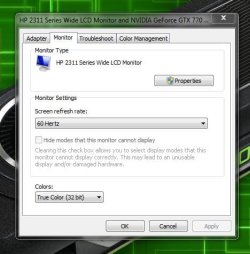
Did you check refresh rates (in advanced settings) and screen resolution options? Do they work in safe mode?
Windows 7 Ultimate x64 SP1 AMD Phenom 2 1090T 2x8GB Kingston HyperX Fury Black 1600Mhz Unga... MSI GTX 970 Gaming 4G PC/Desktop Custom Build Windows 7 Ultimate x64 SP1 AMD Phenom 2 1090T Gigabyte GA-890FXA-UD5 2x8GB Kingston HyperX Fury Black 1600Mhz Unganged MSI GTX 970 Gaming 4G Realtek On-Board HD 7.1 Audio / Logitech G35 3xAcer GD245HQ 1920x1080 Samsung 850 Pro 512GB SSD - OS / HighPower 1000W Cooler Master HAF 932 Noctua NH-D14 Logitech G19 Logitech G500 100/4 Mbit Cable (100GB quota) ZoneAlarm Extreme Security / MBAM Pro / MBAE Free / SAS Free IE 11 - Firefox - Chrome Logitech F710/ G27/ G940/ Z5500 // TrackIR 5 // Nvidia 3D Surround Vision
New member
Member
VIP
Thread Starter
Yeh i tried 60 and 75 also tried a few res within monitors specs. Hmm not sure!
Windows 7 64 bit Overclocked Intel® Core™i7-4770k Quad Core ( 16GB KINGSTON HYPERX BEAST DUAL-DDR3 2400MHz X. 3GB NVIDIA GEFORCE GTX 780 - 2 DVI, HDMI, DP - PC/Desktop Windows 7 64 bit Overclocked Intel® Core™i7-4770k Quad Core ( ASUS® Z87-A: ATX, USB3.0, SATA6GB/S, SLi, XFIRE 16GB KINGSTON HYPERX BEAST DUAL-DDR3 2400MHz X. 3GB NVIDIA GEFORCE GTX 780 - 2 DVI, HDMI, DP - Asus VG248QE 24-inch 3D LED Monitor - Black (1920x1080, 8000 1st Hard Disk 240GB INTEL® 520 SERIES SSD (upto 550MB/sR | 520MB/sW) CORSAIR 750W RM SERIES™ MODULAR 80 PLUS® GOLD, COOLERMASTER CM STORM TROOPER - GAMING ENTHUSIAST CASE Corsair H80i Hydro Series High Performance. Thermal Paste
New member
Member
VIP
Thread Starter
I've hooked it up with my HDMI cable and its working perfectly
Windows 7 64 bit Overclocked Intel® Core™i7-4770k Quad Core ( 16GB KINGSTON HYPERX BEAST DUAL-DDR3 2400MHz X. 3GB NVIDIA GEFORCE GTX 780 - 2 DVI, HDMI, DP - PC/Desktop Windows 7 64 bit Overclocked Intel® Core™i7-4770k Quad Core ( ASUS® Z87-A: ATX, USB3.0, SATA6GB/S, SLi, XFIRE 16GB KINGSTON HYPERX BEAST DUAL-DDR3 2400MHz X. 3GB NVIDIA GEFORCE GTX 780 - 2 DVI, HDMI, DP - Asus VG248QE 24-inch 3D LED Monitor - Black (1920x1080, 8000 1st Hard Disk 240GB INTEL® 520 SERIES SSD (upto 550MB/sR | 520MB/sW) CORSAIR 750W RM SERIES™ MODULAR 80 PLUS® GOLD, COOLERMASTER CM STORM TROOPER - GAMING ENTHUSIAST CASE Corsair H80i Hydro Series High Performance. Thermal Paste
R.I.P.
Guru
Gold Member
VIP
So where are you at with this ?
Windows 10 Pro x64 Intel Core i7 6700K GSkill TridentZ RGB 16GB 3600 16-16-16-36 EVGA GTX 980 Ti SC x2 PC/Desktop Skylake Special #666 Windows 10 Pro x64 Intel Core i7 6700K Asus Sabertooth Z170 Mark 1 GSkill TridentZ RGB 16GB 3600 16-16-16-36 EVGA GTX 980 Ti SC x2 Realtek High Definition AOC G2460PG 1920 x 1080 144Hz Samsung 860 Pro 256GB, Seagate Barracuda 4TB x2 EVGA 1000 P2, EVGA White Custom Braided Cables Corsair Vengeance C70 Gunmetal Black Corsair H100i v2, Corsair ML120 x2, Thermal Grizzly Kryonaut Logitech G910 Orion Spectrum Logitech G700s Verizon Fios Quantum Gateway 75/75 Windows Defender, Malwarebytes Free 3.8.3 Chrome Corsair SP120 x4, LG Blu-ray Drive, Durabrand HT-395 100 Watt Dolby Digital Amp, Corsair H2100 Wireless 7.1 Headset
New member
Member
VIP
Thread Starter
I decided to go with my HDMI cable. I can fit in my main software window and just about my other thing too. It will do infact its good lol
Windows 7 64 bit Overclocked Intel® Core™i7-4770k Quad Core ( 16GB KINGSTON HYPERX BEAST DUAL-DDR3 2400MHz X. 3GB NVIDIA GEFORCE GTX 780 - 2 DVI, HDMI, DP - PC/Desktop Windows 7 64 bit Overclocked Intel® Core™i7-4770k Quad Core ( ASUS® Z87-A: ATX, USB3.0, SATA6GB/S, SLi, XFIRE 16GB KINGSTON HYPERX BEAST DUAL-DDR3 2400MHz X. 3GB NVIDIA GEFORCE GTX 780 - 2 DVI, HDMI, DP - Asus VG248QE 24-inch 3D LED Monitor - Black (1920x1080, 8000 1st Hard Disk 240GB INTEL® 520 SERIES SSD (upto 550MB/sR | 520MB/sW) CORSAIR 750W RM SERIES™ MODULAR 80 PLUS® GOLD, COOLERMASTER CM STORM TROOPER - GAMING ENTHUSIAST CASE Corsair H80i Hydro Series High Performance. Thermal Paste
R.I.P.
Guru
Gold Member
VIP
No clue.
Capture.JPG
40.9 KB
· Views: 7
Windows 10 Pro x64 Intel Core i7 6700K GSkill TridentZ RGB 16GB 3600 16-16-16-36 EVGA GTX 980 Ti SC x2 PC/Desktop Skylake Special #666 Windows 10 Pro x64 Intel Core i7 6700K Asus Sabertooth Z170 Mark 1 GSkill TridentZ RGB 16GB 3600 16-16-16-36 EVGA GTX 980 Ti SC x2 Realtek High Definition AOC G2460PG 1920 x 1080 144Hz Samsung 860 Pro 256GB, Seagate Barracuda 4TB x2 EVGA 1000 P2, EVGA White Custom Braided Cables Corsair Vengeance C70 Gunmetal Black Corsair H100i v2, Corsair ML120 x2, Thermal Grizzly Kryonaut Logitech G910 Orion Spectrum Logitech G700s Verizon Fios Quantum Gateway 75/75 Windows Defender, Malwarebytes Free 3.8.3 Chrome Corsair SP120 x4, LG Blu-ray Drive, Durabrand HT-395 100 Watt Dolby Digital Amp, Corsair H2100 Wireless 7.1 Headset
New member
Member
VIP
Thread Starter
Windows 7 64 bit Overclocked Intel® Core™i7-4770k Quad Core ( 16GB KINGSTON HYPERX BEAST DUAL-DDR3 2400MHz X. 3GB NVIDIA GEFORCE GTX 780 - 2 DVI, HDMI, DP - PC/Desktop Windows 7 64 bit Overclocked Intel® Core™i7-4770k Quad Core ( ASUS® Z87-A: ATX, USB3.0, SATA6GB/S, SLi, XFIRE 16GB KINGSTON HYPERX BEAST DUAL-DDR3 2400MHz X. 3GB NVIDIA GEFORCE GTX 780 - 2 DVI, HDMI, DP - Asus VG248QE 24-inch 3D LED Monitor - Black (1920x1080, 8000 1st Hard Disk 240GB INTEL® 520 SERIES SSD (upto 550MB/sR | 520MB/sW) CORSAIR 750W RM SERIES™ MODULAR 80 PLUS® GOLD, COOLERMASTER CM STORM TROOPER - GAMING ENTHUSIAST CASE Corsair H80i Hydro Series High Performance. Thermal Paste