3rd Party Update Disable

ZMan

New member
Member
VIP
Local time
7:57 PM
Messages
225
I work in a environment that allow different users to log in to our systems. I'm trying to make it so that issues like Java asking to update on each person's system and other things like Flash be totally disable. Is there a way to turn off all third party notification and updated blows across all user accounts?

Windows 7 Pro 64-Bit :sarc:
 

My Computer

OS
windows 7 professional x32
msconfig/Start Up. See what you have starting when booting.
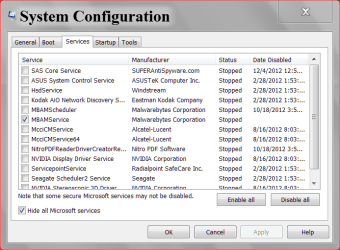
msconfig/Services. Be sure you put a check mark in Hide All Microsoft Services. What you have left is 3rd party services. Just make sure somebody checks for updates manually. I use this.
http://www.filehippo.com/updatechecker/

Capture.PNG NOW.PNG

Capture.PNG NOW 2.PNG
 

My Computer

Computer type
PC/Desktop
Computer Manufacturer/Model Number
Home made Desktop
OS
Windows 10 Pro. 64/ version 1709 Windows 7 Pro/64
CPU
Intel i7-6800K @ 4.3
Motherboard
ASUS X-99 Deluxe II
Memory
Corsair Platinum 16 gig @2400
Graphics Card(s)
EVGA GTX 1070 OC
Monitor(s) Displays
Asus 27" LED LCD/VE278Q
Screen Resolution
1920-1080 or 1280-720 HDMI
Hard Drives
INTEL SSD 730-240 Gb Sata 3.0/
PSU
EVGA Platium 1200W
Case
Phanteks Luxe Tempered Glass 8 fans/ one radiator
Cooling
XSPC/ Water Cooled CPU
Keyboard
Das 4 Professional
Mouse
Logitech M705/MX Anywhere 2-S
Internet Speed
100 mbits
Antivirus
Microsoft Security Essentials/ Malwarebytes Premium 3.0/ SAS
Browser
I.E. 11 default/Firefox/ ISP Time Warner Cable/Spectrum
Other Info
LG BluRay Burner/
Sound system-KLipsch-THX/
Icy Dock ssd Hot Swap bays.
Let say we want the users to have access to Real Player but stop getting do you want to update. Like Firefox as well we want to disable auto updates but not disallow them from using the software that goes with it. Would this disable everything across the board?
 

My Computer

OS
windows 7 professional x32
Back
Top