Can print from 3rd-party "exe" print utility; not from LibreOffice etc

Itundic

New member
Member
Local time
6:36 AM
Messages
61
Can print from 3rd-party "exe" print utility; not from LibreOffice etc

Hi,

I don't know why, but nothing I send to my printer, will print. Not even show up in "document(s) in queue".

It's an ancient printer - an Epson Stylus Color 680/777 - but it hasn't given me any problems in all these years and it has worked properly until recently.

No document or email (from Outlook.com) will print, except for calibration sheets and alignment sheets, which I can send via a separate, third-party utility called "SSC Service Utility".

It seems that I can still send commands from the service utility down the printer cable, but I can't print from the programs I regularly use - Libre Office, Adobe Acrobat Reader and Notepad. They've all been updated to check if that is the problem, but it hasn't solved it.

I've made sure the printer is switched on and everything still appears to be in good working order when I print from the service utility. No error messages anywhere.

When the problem arose, everything I sent to be printed did briefly flash up in "document(s) in queue", in "Devices and Printers" in the Control Panel, but the printer remained idle. Now they don't appear in the queue at all, even though I haven't fiddled with anything.

I assume it's something on the laptop, maybe the registry, but I'd need to be guided around there before I started to mess with that. I'd really appreciate some help.

Thanks.
 

My Computer My Computer

At a glance

Windows 7 Home Premium 64bitCore i38GB DDR3Intel HD
Computer type
Laptop
Computer Manufacturer/Model Number
Acer Aspire 5741
OS
Windows 7 Home Premium 64bit
CPU
Core i3
Memory
8GB DDR3
Graphics Card(s)
Intel HD
Ok mate obviously I am going to ask if you have updated the driver for the printer?? I would do that first but to be honest printers are not that expensive so I would personally be looking at a new one and save yourself the grief.

However that depends on your budget of course but if you go down that track then remember cheap printer high cost inks higher cost printer usually much easier/efficient on the inks.

Myself I have an HP Officejet 8600 Pro and it does everything and prints beautifully besides scanning copying etc but as I sad the choice and budget is your of course.
 

My Computer My Computer

At a glance

Desk1 7 Home Prem / Desk2 10 Pro / Main lap A...Desk1 i5 3750K / Laptop i7 GTX 860M / Desk2 i...Desk1 8GB (1866) / Desk2 16GB (1333) / Laptop...Desk 1& 2NVidia GTX 650 & Laptops on board Intel
Computer type
PC/Desktop
Computer Manufacturer/Model Number
Own build (new) Desk1 / Asus ROG Win 7 / Desk2 1st build
OS
Desk1 7 Home Prem / Desk2 10 Pro / Main lap Asus ROG 10 Pro 2 laptop Toshiba 7 Pro Asus P2520 7 & 10
CPU
Desk1 i5 3750K / Laptop i7 GTX 860M / Desk2 i5 2500
Motherboard
Desk1 Asus P877-V / Desk2 Gigabyte H67 UD3H / Laptop ?
Memory
Desk1 8GB (1866) / Desk2 16GB (1333) / Laptop 8Gb DDR3
Graphics Card(s)
Desk 1& 2NVidia GTX 650 & Laptops on board Intel
Sound Card
Desk 1 & 2 -XONAR DG Realtek High Def audio Laptop
Monitor(s) Displays
Desk 1 Benq HD 2450 / Desk2 Philips 24" / Laptop 17.5"
Screen Resolution
1920x1080 D1 & D2 & Laptop 1
Hard Drives
Desk1 Samsung 120GB 830 SSD
Asus ROG 256GB 850 Pro SSD
Desk2 Samsung 840 256 SSD
Toshiba 120GB EVO
PSU
Desk 1 Corsair HX 1050/ Laptop ? / Desk 2 Corsair HX 650
Case
Desk 1 Cooler HAF XM ? Toshiba laptop / Desk2 Coolermaster
Cooling
Fans on all Desk1 -2 Desk2 - all Coolermasters 5 Laptop ?
Keyboard
Desk 1 MS Sidewinder X6 Desk 2 MS Sidewinder X 4
Mouse
Desk 1&2 - Gigabyte MS 900 gamer - laptop - Logitec wireless
Internet Speed
ADSL2+
Other Info
One other Desktop (tester) and spare Toshba laptop both with SSD's
Running Kaspersky 2016 ISS on all machines config'd identically
Logitec audio stereo systems on each machine (x3)
Canon MG5250MFC
Router/modem TP-Link running WPA2SK
Hi,

Thanks, but I'd prefer to fix this printer, rather than ditch it. It is incredibly cheap to use and suits my needs.

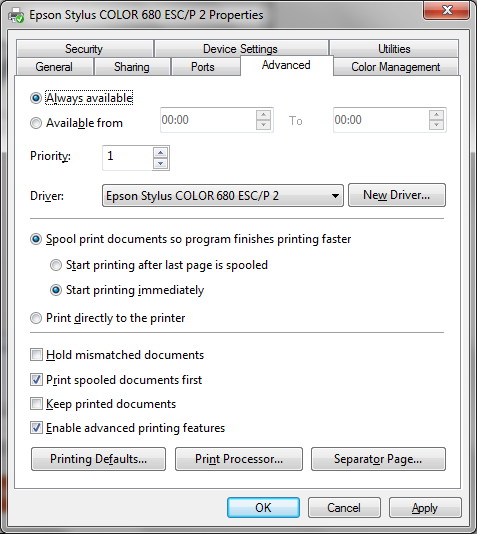
I've checked the driver in previous years, but it has always been up to date and it's still 'ticked' in "Devices and printers". Plus, I can still print pages, albeit only from the service utility.

oddyu6i.jpg
 

My Computer My Computer

At a glance

Windows 7 Home Premium 64bitCore i38GB DDR3Intel HD
Computer type
Laptop
Computer Manufacturer/Model Number
Acer Aspire 5741
OS
Windows 7 Home Premium 64bit
CPU
Core i3
Memory
8GB DDR3
Graphics Card(s)
Intel HD
Have you verified that the Printer Spooler Service is running?
 

My Computer My Computer

At a glance

W10 Pro desktop, W11 laptop, W11 Pro tablet (...3.7Ghz 8700K i7, i7-11800H, i7-1065G716G desktop, 16G laptop, 4G tabletAMD Radeon RX580, RTX 3060, Intel Iris Plus
Computer type
PC/Desktop
Computer Manufacturer/Model Number
Home Built desktop, Dell G15 5511 Gaming laptop,MS Surface Pro 7 tablet
OS
W10 Pro desktop, W11 laptop, W11 Pro tablet (all 64-bit)
CPU
3.7Ghz 8700K i7, i7-11800H, i7-1065G7
Motherboard
ASUS TUF Z370-Pro Gaming in desktop
Memory
16G desktop, 16G laptop, 4G tablet
Graphics Card(s)
AMD Radeon RX580, RTX 3060, Intel Iris Plus
Sound Card
High Definition Audio (Built-in to mobo)
Monitor(s) Displays
Samsung U32J59 32" (2x), 15.6", 12"
Screen Resolution
3840x2160, 3840x2160, 1920x1080, 2160x1440
Hard Drives
500G SSD for OS; 2T, 10T & 15T HDDs for Data on Desktop, 1TB SSD laptop, 128G SSD tablet.
PSU
Corsair CX 750M
Case
Antec 100
Cooling
CM 212+
Keyboard
IBM Model M - used continuously since 1986
Mouse
Microsoft Pro IntelliMouse
Internet Speed
400M down 8M up
Antivirus
Windows Defender
Browser
FireFox
Other Info
Built my first computer (8Mhz 8088cpu, 640K RAM, 20MB HDD, 2 360K floppy drives) in 1985 and have been building them for myself, relatives and friends ever since.
If you log into Windows as 'Administrator', or perhaps as a different user, can you print to it?
 

My Computer My Computer

At a glance

Linux Mint 18.2 xfce 64-bit (VMWare host) / W...Haswell4 GB
Computer type
PC/Desktop
Computer Manufacturer/Model Number
Dell
OS
Linux Mint 18.2 xfce 64-bit (VMWare host) / Windows 8.1 Pro 32-bit (VMWare guest)
CPU
Haswell
Memory
4 GB
Monitor(s) Displays
Acer 23"
Screen Resolution
1920 x 1080
Hard Drives
Two hard drives, 1TB each: One for Linux, one for my data.
Keyboard
IBM Model M
Antivirus
Sophos (Linux), Trend Micro (Windows)
Browser
Firefox, Opera
Other Info
I use Samba to share my data drive with the other computers at my house and with my guest session in VMWare Workstation Player.
I'm logged-in as the Administrator by default, but the problem arose, in-spite of this.

And I've just created a new account, but the problem is identical to that on my main account.

Sorry, I haven't heard of a "printer spooler", but I've looked it up and am not sure where to start. The printer doesn't seem to crash or give any error messages, though that could be because it is very basic.

How do I confirm the printer spooler functions normally?

EgRzfhk.jpg
oayJ775.jpg
 

My Computer My Computer

At a glance

Windows 7 Home Premium 64bitCore i38GB DDR3Intel HD
Computer type
Laptop
Computer Manufacturer/Model Number
Acer Aspire 5741
OS
Windows 7 Home Premium 64bit
CPU
Core i3
Memory
8GB DDR3
Graphics Card(s)
Intel HD
I'm logged-in as the Administrator by default, but the problem arose, in-spite of this.

It could be that the problem arose because of this. Whenever you are logged in as Administrator, you have full power on the computer. Not only does that mean that you can accomplish any task, but also that you can do all sorts of damage. It is possible therefore that you inadvertently did something which caused the problem, or that some malware was able to cause some damage because it came in while you were logged in as Administrator.

This is probably not the case here. But I wanted to point out that it is not advisable to do your daily normal work while logged in as Administrator.

Here is a tutorial about clearing and resetting the print spooler. Perhaps it will be helpful.

Print Spooler Queue - Clear and Reset
 

My Computer My Computer

At a glance

Linux Mint 18.2 xfce 64-bit (VMWare host) / W...Haswell4 GB
Computer type
PC/Desktop
Computer Manufacturer/Model Number
Dell
OS
Linux Mint 18.2 xfce 64-bit (VMWare host) / Windows 8.1 Pro 32-bit (VMWare guest)
CPU
Haswell
Memory
4 GB
Monitor(s) Displays
Acer 23"
Screen Resolution
1920 x 1080
Hard Drives
Two hard drives, 1TB each: One for Linux, one for my data.
Keyboard
IBM Model M
Antivirus
Sophos (Linux), Trend Micro (Windows)
Browser
Firefox, Opera
Other Info
I use Samba to share my data drive with the other computers at my house and with my guest session in VMWare Workstation Player.
You're probably right about not being logged-in as an admin. Too lazy to type the password each time, I'm afraid.

I've cleared the Print Spooler Queue, using "Option 2", where I found eight files, not thinking there would be any. No joy though.

I sent a test LibreOffice doc and the printer icon appeared in the systray for a while, but nothing appeared in the "document(s) in queue". I sent it a second time and got the same. Similarly with a PDF.

Strangely the "PRINTERS" folder is empty after these print attempts.
C:\Windows\system32\spool\PRINTERS
 

My Computer My Computer

At a glance

Windows 7 Home Premium 64bitCore i38GB DDR3Intel HD
Computer type
Laptop
Computer Manufacturer/Model Number
Acer Aspire 5741
OS
Windows 7 Home Premium 64bit
CPU
Core i3
Memory
8GB DDR3
Graphics Card(s)
Intel HD
I have had the same mysteries with my Epson 850. Cured either by finding out that some how the program,Libre Office or Adobe had strangely and unknowing defaulted to the XPS printer. If this was not evident, I have a small stand alone program to remove all unused USB drivers. Doing this and reconnecting the printer fixed it. Also works for unrecognized thumb drives. I don't remember where I found it, probably Major Geeks or gHacks But if you want to PM your email address I can probably send a copy.
Art.
PS If you do send PM tell me here as I don't usually log in, just to read.
 
Last edited:

My Computer My Computer

At a glance

Win7 sp1 Pro 64bit / XP sp2 Pro (games only)Intel Core 2 Duo E8400 @ 3.00GHz8.00 GB Dual-Channel DDR2 @ 400MHz (5-5-5-18)1024MB GeForce GTX 560
Computer type
PC/Desktop
Computer Manufacturer/Model Number
Home built
OS
Win7 sp1 Pro 64bit / XP sp2 Pro (games only)
CPU
Intel Core 2 Duo E8400 @ 3.00GHz
Motherboard
Intel Corporation DP35DP (CPU1)
Memory
8.00 GB Dual-Channel DDR2 @ 400MHz (5-5-5-18)
Graphics Card(s)
1024MB GeForce GTX 560
Sound Card
NVIDIA High Definition Audio
Monitor(s) Displays
SyncMaster (2048x1152@60Hz)
Hard Drives
240GB Sandisc Extreme Pro SSD
244GB Seagate ST3250410AS
488GB Seagate ST500DM002-1BD142
931GB Western Digital WDC WD1003FZEX
PSU
Corsair 720
Case
ATX
Keyboard
HID Keyboard Device Logitech
Mouse
HID-compliant mouse Microsoft
Other Info
TSSTcorp CDDVDW SH-S223L

HL-DT-ST BD-RE BH12LS35
Neither of the progs have changed the printer assigned to them, unfortunately. I wish it was that simple.

I've PMed you my email. Thanks in advance for the prog. I'll give it a go.
 

My Computer My Computer

At a glance

Windows 7 Home Premium 64bitCore i38GB DDR3Intel HD
Computer type
Laptop
Computer Manufacturer/Model Number
Acer Aspire 5741
OS
Windows 7 Home Premium 64bit
CPU
Core i3
Memory
8GB DDR3
Graphics Card(s)
Intel HD
Sorry late reply mate biut do you have access to a print test page on that printer?? if so try it and if it not going to do that then I would be looking at checking the connecting cable if you are hard wiring it instead of wifi. It could be if you are using a cable that just needs reseating sometimes things are simpler than you like to realise. ;)
 

My Computer My Computer

At a glance

Desk1 7 Home Prem / Desk2 10 Pro / Main lap A...Desk1 i5 3750K / Laptop i7 GTX 860M / Desk2 i...Desk1 8GB (1866) / Desk2 16GB (1333) / Laptop...Desk 1& 2NVidia GTX 650 & Laptops on board Intel
Computer type
PC/Desktop
Computer Manufacturer/Model Number
Own build (new) Desk1 / Asus ROG Win 7 / Desk2 1st build
OS
Desk1 7 Home Prem / Desk2 10 Pro / Main lap Asus ROG 10 Pro 2 laptop Toshiba 7 Pro Asus P2520 7 & 10
CPU
Desk1 i5 3750K / Laptop i7 GTX 860M / Desk2 i5 2500
Motherboard
Desk1 Asus P877-V / Desk2 Gigabyte H67 UD3H / Laptop ?
Memory
Desk1 8GB (1866) / Desk2 16GB (1333) / Laptop 8Gb DDR3
Graphics Card(s)
Desk 1& 2NVidia GTX 650 & Laptops on board Intel
Sound Card
Desk 1 & 2 -XONAR DG Realtek High Def audio Laptop
Monitor(s) Displays
Desk 1 Benq HD 2450 / Desk2 Philips 24" / Laptop 17.5"
Screen Resolution
1920x1080 D1 & D2 & Laptop 1
Hard Drives
Desk1 Samsung 120GB 830 SSD
Asus ROG 256GB 850 Pro SSD
Desk2 Samsung 840 256 SSD
Toshiba 120GB EVO
PSU
Desk 1 Corsair HX 1050/ Laptop ? / Desk 2 Corsair HX 650
Case
Desk 1 Cooler HAF XM ? Toshiba laptop / Desk2 Coolermaster
Cooling
Fans on all Desk1 -2 Desk2 - all Coolermasters 5 Laptop ?
Keyboard
Desk 1 MS Sidewinder X6 Desk 2 MS Sidewinder X 4
Mouse
Desk 1&2 - Gigabyte MS 900 gamer - laptop - Logitec wireless
Internet Speed
ADSL2+
Other Info
One other Desktop (tester) and spare Toshba laptop both with SSD's
Running Kaspersky 2016 ISS on all machines config'd identically
Logitec audio stereo systems on each machine (x3)
Canon MG5250MFC
Router/modem TP-Link running WPA2SK
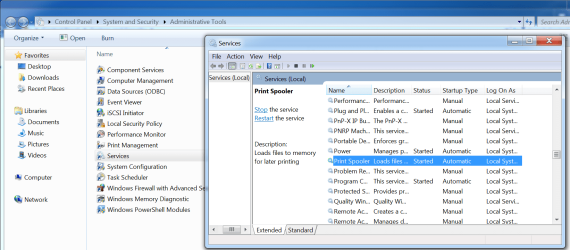
You can check on the Print Spooler by going here: Control Panel->System and Security->Administrative Tools->Services. Check to make sure the Printer Spooler service is running.
 

Attachments

  • prt spool.png
    prt spool.png
    90.4 KB · Views: 1

My Computer My Computer

At a glance

W10 Pro desktop, W11 laptop, W11 Pro tablet (...3.7Ghz 8700K i7, i7-11800H, i7-1065G716G desktop, 16G laptop, 4G tabletAMD Radeon RX580, RTX 3060, Intel Iris Plus
Computer type
PC/Desktop
Computer Manufacturer/Model Number
Home Built desktop, Dell G15 5511 Gaming laptop,MS Surface Pro 7 tablet
OS
W10 Pro desktop, W11 laptop, W11 Pro tablet (all 64-bit)
CPU
3.7Ghz 8700K i7, i7-11800H, i7-1065G7
Motherboard
ASUS TUF Z370-Pro Gaming in desktop
Memory
16G desktop, 16G laptop, 4G tablet
Graphics Card(s)
AMD Radeon RX580, RTX 3060, Intel Iris Plus
Sound Card
High Definition Audio (Built-in to mobo)
Monitor(s) Displays
Samsung U32J59 32" (2x), 15.6", 12"
Screen Resolution
3840x2160, 3840x2160, 1920x1080, 2160x1440
Hard Drives
500G SSD for OS; 2T, 10T & 15T HDDs for Data on Desktop, 1TB SSD laptop, 128G SSD tablet.
PSU
Corsair CX 750M
Case
Antec 100
Cooling
CM 212+
Keyboard
IBM Model M - used continuously since 1986
Mouse
Microsoft Pro IntelliMouse
Internet Speed
400M down 8M up
Antivirus
Windows Defender
Browser
FireFox
Other Info
Built my first computer (8Mhz 8088cpu, 640K RAM, 20MB HDD, 2 360K floppy drives) in 1985 and have been building them for myself, relatives and friends ever since.
I'm sorry, too, for the late reply. You think you've found the time to devote to something, then suddenly everything else crops up. Excuses, I know.

Thanks for the DriveCleanup prog. I've researched it a bit and it definitely looks like I need some help with it. It's a command-line tool and I'm not sure what to do - don't want to erase something vital. I also downloaded what I think is the GUI version, but it's called DeviceCleanup and gives a massive list of things for erasure. Is this the same prog, or have I looked at the wrong thing?

I've checked the Print Spooler again and there doesn't seem to be any problem there. I've repeated the process - cleared everything waiting to be printed, restarted the service and sent new docs - but nothing has changed.

I still can't print anything from LibreOffice, Adobe Reader, etc; only calibration sheets from my 3rd-party printer utility.
 

My Computer My Computer

At a glance

Windows 7 Home Premium 64bitCore i38GB DDR3Intel HD
Computer type
Laptop
Computer Manufacturer/Model Number
Acer Aspire 5741
OS
Windows 7 Home Premium 64bit
CPU
Core i3
Memory
8GB DDR3
Graphics Card(s)
Intel HD
I have not got an answer as such my friend but please be VERY careful using that software as most of them are really not what they make out they are.

If you have got it then I would be looking at using CCleaner Download CCleaner - Free, powerful PC cleaner and optimizer if not then try it first and please do the chkldsk and sfc again (use the /f and /r switch in the chkdsk)
SFC /SCANNOW : Run in Command Prompt at Boot - Windows 7 Help Forums
&
Disk Check - Windows 7 Help Forums
&
Disk Cleanup - Open and Use - Windows 7 Help Forums
 

My Computer My Computer

At a glance

Desk1 7 Home Prem / Desk2 10 Pro / Main lap A...Desk1 i5 3750K / Laptop i7 GTX 860M / Desk2 i...Desk1 8GB (1866) / Desk2 16GB (1333) / Laptop...Desk 1& 2NVidia GTX 650 & Laptops on board Intel
Computer type
PC/Desktop
Computer Manufacturer/Model Number
Own build (new) Desk1 / Asus ROG Win 7 / Desk2 1st build
OS
Desk1 7 Home Prem / Desk2 10 Pro / Main lap Asus ROG 10 Pro 2 laptop Toshiba 7 Pro Asus P2520 7 & 10
CPU
Desk1 i5 3750K / Laptop i7 GTX 860M / Desk2 i5 2500
Motherboard
Desk1 Asus P877-V / Desk2 Gigabyte H67 UD3H / Laptop ?
Memory
Desk1 8GB (1866) / Desk2 16GB (1333) / Laptop 8Gb DDR3
Graphics Card(s)
Desk 1& 2NVidia GTX 650 & Laptops on board Intel
Sound Card
Desk 1 & 2 -XONAR DG Realtek High Def audio Laptop
Monitor(s) Displays
Desk 1 Benq HD 2450 / Desk2 Philips 24" / Laptop 17.5"
Screen Resolution
1920x1080 D1 & D2 & Laptop 1
Hard Drives
Desk1 Samsung 120GB 830 SSD
Asus ROG 256GB 850 Pro SSD
Desk2 Samsung 840 256 SSD
Toshiba 120GB EVO
PSU
Desk 1 Corsair HX 1050/ Laptop ? / Desk 2 Corsair HX 650
Case
Desk 1 Cooler HAF XM ? Toshiba laptop / Desk2 Coolermaster
Cooling
Fans on all Desk1 -2 Desk2 - all Coolermasters 5 Laptop ?
Keyboard
Desk 1 MS Sidewinder X6 Desk 2 MS Sidewinder X 4
Mouse
Desk 1&2 - Gigabyte MS 900 gamer - laptop - Logitec wireless
Internet Speed
ADSL2+
Other Info
One other Desktop (tester) and spare Toshba laptop both with SSD's
Running Kaspersky 2016 ISS on all machines config'd identically
Logitec audio stereo systems on each machine (x3)
Canon MG5250MFC
Router/modem TP-Link running WPA2SK
Simple to use. Change the file ext on DriveCleanUp.txt to DriveCleanUp.exe (had to change for email)
Unplug all USB items EXCEPT mouse and keyboard.
Right click on renamed file and select Run as Administrator
All unused USB drivers will be cleared and will reinstall as you connect each item.
I have had and used over the past four years and never a problem.
Art.
 

My Computer My Computer

At a glance

Win7 sp1 Pro 64bit / XP sp2 Pro (games only)Intel Core 2 Duo E8400 @ 3.00GHz8.00 GB Dual-Channel DDR2 @ 400MHz (5-5-5-18)1024MB GeForce GTX 560
Computer type
PC/Desktop
Computer Manufacturer/Model Number
Home built
OS
Win7 sp1 Pro 64bit / XP sp2 Pro (games only)
CPU
Intel Core 2 Duo E8400 @ 3.00GHz
Motherboard
Intel Corporation DP35DP (CPU1)
Memory
8.00 GB Dual-Channel DDR2 @ 400MHz (5-5-5-18)
Graphics Card(s)
1024MB GeForce GTX 560
Sound Card
NVIDIA High Definition Audio
Monitor(s) Displays
SyncMaster (2048x1152@60Hz)
Hard Drives
240GB Sandisc Extreme Pro SSD
244GB Seagate ST3250410AS
488GB Seagate ST500DM002-1BD142
931GB Western Digital WDC WD1003FZEX
PSU
Corsair 720
Case
ATX
Keyboard
HID Keyboard Device Logitech
Mouse
HID-compliant mouse Microsoft
Other Info
TSSTcorp CDDVDW SH-S223L

HL-DT-ST BD-RE BH12LS35
Here's what I got from CleanDrive.

Firstly, I disconnected my mains-powered hub from my laptop and the cable from each used USB socket on the hub, plus the flashdrive on one of the laptop USBs, then ran the program. I ran both the "exe" that Wandering one gave me and a fresh download.

Fresh download (45 KB) - I ran this purely in the 'test' mode.

It stated:
11 USB devices to remove
7 USB hubs to remove
11 Disk devices to remove
0 CDROM devices to remove
0 Floppy devices to remove
178 Storage volumes to remove
7 WPD devices to remove
795 Items to remove from registry


The one Wandering one sent to me (28 KB) - I forgot to right-click "Run as Admin", but it immediately cleaned some items.

bi0vYf1.jpg


It stated:

Removed 11 USB devices [I count 18 in the screengrab]
Removed 7 USB hubs
Removed 11 Disk devices
Removed 0 CDROM devices
Removed 0 Floppy devices
Removed 10 Storage volumes
Removed 7 WPD devices
Removed 12 Keys from registry
.
.
.
11 USB devices not removed
7 USB hubs not removed
11 Disk devices not removed
10 Storage volumes not removed
7 WPD devices not removed


Re-ran with Admin privileges

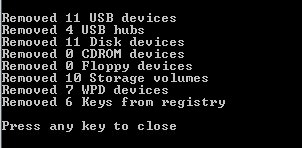
np85CPd.jpg


Removed 11 USB devices
Removed 4 USB hubs
Removed 11 Disk devices
Removed 0 CDROM devices
Removed 0 Floppy devices
Removed 10 Storage volumes
Removed 7 WPD devices
Removed 6 Keys from registry


I reconnected the hub and cables for the printer, 2 portable drives, the mouse and flashdrive and everything installed successfully. The only notification of a driver re-installation I didn't get was for the printer, though I can still send commands to the printer down the cable, from the 3rd-party utility. All seem to interface with the laptop perfectly and work as they're supposed to - aside from the printer still not printing anything from my main programs.

I've re-sent Libre office, PDF and Notepad docs, but no avail. The "PRINTERS" folder remains empty. Nothing from these programs reaches the spooler.

I've tried the printer cable in the 5th and 6th ports of the USB hub, but no joy, and confirmed the ports work, by connecting the mouse to them.

I connected the printer cable directly to the laptop, but with no change. Tried all the progs again and checked the Print Spooler Queue, but the "PRINTERS" folder was still empty.

If I've done everything correctly above, what should I try next?

Sorry, I haven't had the time for SFC/SCANNOW or chkdsk and I don't have an installation disk, unfortunately. With my limited knowledge, I'm not sure if these will help, even though they are valuable checks, as I've used them with XP, many moons ago.
 

My Computer My Computer

At a glance

Windows 7 Home Premium 64bitCore i38GB DDR3Intel HD
Computer type
Laptop
Computer Manufacturer/Model Number
Acer Aspire 5741
OS
Windows 7 Home Premium 64bit
CPU
Core i3
Memory
8GB DDR3
Graphics Card(s)
Intel HD
Sorry, I haven't had the time for SFC/SCANNOW or chkdsk and I don't have an installation disk, unfortunately. With my limited knowledge, I'm not sure if these will help, even though they are valuable checks, as I've used them with XP, many moons ago.

Yep well I would have done those first up but anyway do go ahead with them and for an installation disk just get and ISO you will find a site in this if it doesn't work reply to the thread the authour is probably the most brilliant person on the forum.
Clean Install Windows 7 - Windows 7 Help Forums

I take it you still have the key for the install??
 

My Computer My Computer

At a glance

Desk1 7 Home Prem / Desk2 10 Pro / Main lap A...Desk1 i5 3750K / Laptop i7 GTX 860M / Desk2 i...Desk1 8GB (1866) / Desk2 16GB (1333) / Laptop...Desk 1& 2NVidia GTX 650 & Laptops on board Intel
Computer type
PC/Desktop
Computer Manufacturer/Model Number
Own build (new) Desk1 / Asus ROG Win 7 / Desk2 1st build
OS
Desk1 7 Home Prem / Desk2 10 Pro / Main lap Asus ROG 10 Pro 2 laptop Toshiba 7 Pro Asus P2520 7 & 10
CPU
Desk1 i5 3750K / Laptop i7 GTX 860M / Desk2 i5 2500
Motherboard
Desk1 Asus P877-V / Desk2 Gigabyte H67 UD3H / Laptop ?
Memory
Desk1 8GB (1866) / Desk2 16GB (1333) / Laptop 8Gb DDR3
Graphics Card(s)
Desk 1& 2NVidia GTX 650 & Laptops on board Intel
Sound Card
Desk 1 & 2 -XONAR DG Realtek High Def audio Laptop
Monitor(s) Displays
Desk 1 Benq HD 2450 / Desk2 Philips 24" / Laptop 17.5"
Screen Resolution
1920x1080 D1 & D2 & Laptop 1
Hard Drives
Desk1 Samsung 120GB 830 SSD
Asus ROG 256GB 850 Pro SSD
Desk2 Samsung 840 256 SSD
Toshiba 120GB EVO
PSU
Desk 1 Corsair HX 1050/ Laptop ? / Desk 2 Corsair HX 650
Case
Desk 1 Cooler HAF XM ? Toshiba laptop / Desk2 Coolermaster
Cooling
Fans on all Desk1 -2 Desk2 - all Coolermasters 5 Laptop ?
Keyboard
Desk 1 MS Sidewinder X6 Desk 2 MS Sidewinder X 4
Mouse
Desk 1&2 - Gigabyte MS 900 gamer - laptop - Logitec wireless
Internet Speed
ADSL2+
Other Info
One other Desktop (tester) and spare Toshba laptop both with SSD's
Running Kaspersky 2016 ISS on all machines config'd identically
Logitec audio stereo systems on each machine (x3)
Canon MG5250MFC
Router/modem TP-Link running WPA2SK
Back
Top