Solved 4 missing device drivers on dell laitude c610

BenRbtz

New member
Local time
2:57 PM
Messages
20
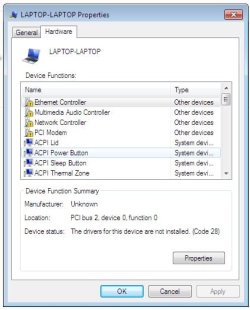
I have a dell latitude c610 laptop that I formatted and did a fresh install of windows 7 home edition. I have 4 missing drivers one of them been the network adaptor so I cannot connect to the internet to update any drivers. I have tried various drivers off the dell website but still no joy. Please can you help me as I am pulling hair out here - cheers in advance :)
 

Attachments

  • device manager.jpg
    device manager.jpg
    33.7 KB · Views: 22

My Computer My Computer

OS
Windows 7 Home Premium 32/64bit
Hi BenRbtz , Have you tried installing the missing drivers in compatibility mode ? or right clicking on the devices in device manager and selecting " Update Driver " ? Many of the older Dell laptops are not supported for Win7 But that does not mean they will not run Win 7 .It's just Dell being over cautious :)
 

My Computer My Computer

Computer type
PC/Desktop
Computer Manufacturer/Model Number
self build
OS
win 7 ultimate32bit, Win8.1pro wmc 32bit
CPU
amd phenom x4 9600
Motherboard
asus m2n32-sli deluxe
Memory
corsair twinxs 2x2gb
Graphics Card(s)
2x nvidia 1gb 8500gt
Sound Card
onboard
Monitor(s) Displays
23" PB Viseo 233d
Screen Resolution
1920x1080
Hard Drives
maxtor sata 500gb
maxtor sata 320gb
fujitsu sata200gb
PSU
oryxx tornado 750w
Case
thermaltake xaser lll
Cooling
artic freezer64 pro + 7 case fans
According to Dells website there are no win 7 drivers for your model, in fact drivers were only released up to xp. Drivers & Downloads.
There is some information here on finding compatible drivers but I think what pebbly has suggested using the compatibility mode will be your only option but even that will be a struggle with no vista drivers to try. Looking for Windows 7 Drivers? | Dell

Danny
 

My Computer My Computer

Computer Manufacturer/Model Number
acer aspire 5935g
OS
Windows 7 Home Premium x64 SP1
CPU
intel(R)core(TM)2 duo CPU T6600 @ 2.20GHz
Motherboard
intel gm45/gm47 revision 07
Memory
3 gb ddr3
Graphics Card(s)
ati radeon hd4570/512mb
Monitor(s) Displays
lop156wh2-tle1 15.3 flat
Screen Resolution
1366x768
Hard Drives
OCZ-Agility3 60gig ssd
320gig external hdd
500gig external hdd
Mouse
Optical
Internet Speed
30Mbps Down/30Mbps Up

My Computer My Computer

Computer Manufacturer/Model Number
acer aspire 5935g
OS
Windows 7 Home Premium x64 SP1
CPU
intel(R)core(TM)2 duo CPU T6600 @ 2.20GHz
Motherboard
intel gm45/gm47 revision 07
Memory
3 gb ddr3
Graphics Card(s)
ati radeon hd4570/512mb
Monitor(s) Displays
lop156wh2-tle1 15.3 flat
Screen Resolution
1366x768
Hard Drives
OCZ-Agility3 60gig ssd
320gig external hdd
500gig external hdd
Mouse
Optical
Internet Speed
30Mbps Down/30Mbps Up
You may also have to go to each individual hardware manufacturer's website to find drivers, such as Realtek, if your laptop uses a Realtek network driver. At that point, Windows Update might find the rest.
 

My Computer My Computer

OS
Windows 7 Ultimate x64 SP1
CPU
Intel Core i7-2600
Motherboard
Gigabyte GA-P67A-UD3P-B3
Memory
12 GB Patriot Extreme DDR3-1333
Graphics Card(s)
Nvidia GTX 470
Monitor(s) Displays
Dell UltraSharp 2209WA
Hard Drives
OCZ Agility3 240 GB, WD5001AALS, WD7501AALS
PSU
OCZ ModStream 700W
Case
CoolerMaster HAF 912 Advanced
Cooling
CoolerMaster Hyper 212 Plus
Hello BenRbtz,

I also have driver compatibilty issue for acer to install window XP since the preinstall window is window 7 and tried to find compatible drivers , i suppose that this might be able to use with unknown device including with dell.

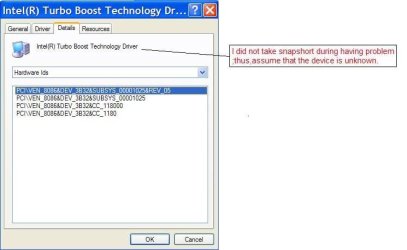
1. Right click of unknown device then select property. Please note that the picture is taken from window XP , weather the tab is different in Window 7 , i am not pretty sure .

missing device driver.JPG

2. In "details" tab chose "hardware ID" then copy the hardware ID to search in google which provide many websites. I tried some yet still have compatibility problem even suggested from Nvdia or intel.

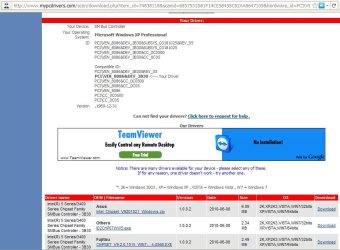
The most easiest way that i tried is searching the result shown from Your PC Drivers - Free Drivers Download then download driver scanner , install and scan.

download driver scanner.JPG

3. The scanner will provide the link to compatible device driver download page.

select driver.JPG

4. Select one of them then download.

Hopefully , this would help you more or less. :)


Last edited:

My Computer My Computer

Computer type
PC/Desktop
Computer Manufacturer/Model Number
Acer Aspire 4740G , Acer Aspire4930
OS
Windows 7 Ultimate 32 bit , Window 7
CPU
Intel(R) Core(TM) i5 CPUM 430 @ 2.27GHz, Intel core duo pro
Motherboard
Acer Aspire 4740 Acer Aspire4930
Memory
2.00 GB,
Graphics Card(s)
NVIDIA GeForce 310M
Sound Card
(1) Realtek High Definition Audio (2) NVIDIA High Definiti
Monitor(s) Displays
Mobile PC Display
Screen Resolution
1366x768
Hard Drives
WDC WD5000BEVT-22A0RT0 ATA Device , 500 GB
Mouse
TECFON
thanks everyone :D
 

My Computer My Computer

OS
Windows 7 Home Premium 32/64bit
Back
Top