4 monitors but only two working with mouse

nokia3310

New member
Local time
6:17 PM
Messages
5
I setup 4 displays using the DELL UltraSharp 1708FP 17" LCD MONITOR and got 3 graphics adapter HP USB Graphics Adapter (NL571AT) specifications - HP Small & Medium Business productshttp://h10010.www1.hp.com/wwpc/us/e...69-332462-332469-3913299-3913300-3913303.html for 3 monitors and connected 1 monitor direct to computer.

I run windows 7 professional on core 2 duo 2.33GHz and 8GB RAM PC.

So what is going on? what is the problem?

The 4 monitors all come on and shows my wallpaper but the mouse can only go to 2 monitors at a time and the 2 can switch around but only 2 works at a time.
What am i doing wrong? Why do i have this problem?

I see Intel Q35 Express Chipset Family GMA 3100 Also 3 of the monitors says digital and the 1 connected directly says analog, but i doubt that can be the problem since all monitors come on and the 2 that the mouse can go to can switch from 1 and 2 or 3 and 4
 

My Computer My Computer

At a glance

win 7 prof 64bit
OS
win 7 prof 64bit
Hello nokia, welcome to Seven Forums!

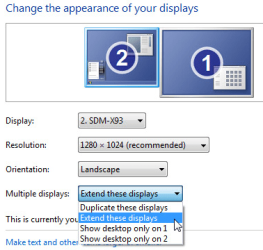
Like in this picture, did you change any of the settings?
setupmultiplemonitorswindows7_thumb.png

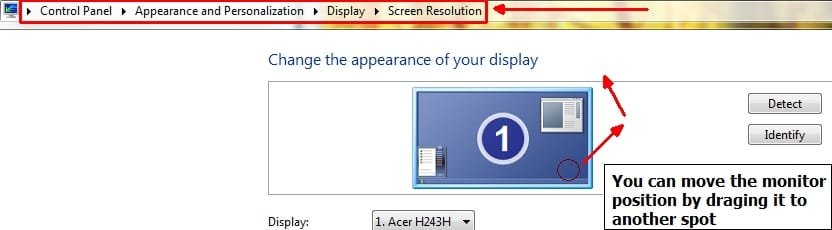
What kind of graphics card do you have? Is it AMD, Nvidia, or built in? What is it exactly? There should be more settings in a seperate control panel for graphics dependant upon what you have. There are ways to change location of the monitors. Just setting them to the left or right of your main monitor doesn't tell the computer which side they are on, you will need to change the settings for it. You can set up monitors to be above, below, left or right of your main monitor. Let me know if you manage to find the settings.
 

My Computer My Computer

At a glance

Microsoft Windows 8.1 Pro 64-bitIntel(R) Core(TM) i3-4130 CPU @ 3.40GHz8.00 GBNone
Computer type
PC/Desktop
Computer Manufacturer/Model Number
Custom Asus Build
OS
Microsoft Windows 8.1 Pro 64-bit
CPU
Intel(R) Core(TM) i3-4130 CPU @ 3.40GHz
Motherboard
B85M-E
Memory
8.00 GB
Graphics Card(s)
None
Sound Card
Realtek High Definition Audio
Monitor(s) Displays
Asus 23.6" Monitor
Screen Resolution
1920 x 1080 x 32 bits (4294967296 colors) @ 60 Hz
Hard Drives
INTEL SSDSC2BW180A4
Samsung SSD 840 PRO Series
PSU
Seasonic S12II-380Bronze
Case
Lian Li
Cooling
Fan, Passive
Keyboard
Logitech K120
Mouse
Microsoft Touch Mouse
Internet Speed
4ms Ping, 19.0 Mbps Download, 19.0 Mbps Upload
Antivirus
Eset Endpoint
Browser
Internet Explorer, Chrome
thanks for the reply

the settings are set properly. Yes it shows 4 monitors and extended and everything is fine settings wise.

if you read the thread very carefully you will see i talked about the graphics adapter i used and the graphics card i have. HP USB Graphics Adapter (NL571AT) specifications - HP Small & Medium Business products

that graphics adapter can power up to 6 monitors so i have 4.
Also remember i said all of the monitors come on and they all show the wallpaper...looking like they should all work right...but the only thing the mouse will only go to 2 of the monitors.

graphics card that came with the computer is Intel Q35 Express Chipset Family GMA 3100 and that is why i am using the graphics adapter which works great for 2 monitors but i just got 2 extra monitors and now the mouse only go to 2 of them.
 

My Computer My Computer

At a glance

win 7 prof 64bit
OS
win 7 prof 64bit
Yes, I understood fully what you meant, and knew about the 6 monitor limit on the adapter, and even visited the link. I read everything you said, twice. Since all of these monitors are connected by a single adapter, it is likely that the info I gave you in the post abobe wont work correctly. Simply, all 4 monitors, though they turn on and the specifications say they work, just might not be able to function how you would like them to, with how they are set up. Try moving the mouse to the edge of the screen on all of your monitors and see if it continues and any direction. You will gain more control with actually plugging the monitors in to the graphics card. You might even get multiple cards to accomodate all monitors. I've heard where people have hooked up monitors to the integrated graphics card as well as expansion cards. But hooking all monitors into a single port via an adapter may not work very well. The settings will only effect individual ports, and not multiple monitors plugged into an adapter.
 

My Computer My Computer

At a glance

Microsoft Windows 8.1 Pro 64-bitIntel(R) Core(TM) i3-4130 CPU @ 3.40GHz8.00 GBNone
Computer type
PC/Desktop
Computer Manufacturer/Model Number
Custom Asus Build
OS
Microsoft Windows 8.1 Pro 64-bit
CPU
Intel(R) Core(TM) i3-4130 CPU @ 3.40GHz
Motherboard
B85M-E
Memory
8.00 GB
Graphics Card(s)
None
Sound Card
Realtek High Definition Audio
Monitor(s) Displays
Asus 23.6" Monitor
Screen Resolution
1920 x 1080 x 32 bits (4294967296 colors) @ 60 Hz
Hard Drives
INTEL SSDSC2BW180A4
Samsung SSD 840 PRO Series
PSU
Seasonic S12II-380Bronze
Case
Lian Li
Cooling
Fan, Passive
Keyboard
Logitech K120
Mouse
Microsoft Touch Mouse
Internet Speed
4ms Ping, 19.0 Mbps Download, 19.0 Mbps Upload
Antivirus
Eset Endpoint
Browser
Internet Explorer, Chrome
no not all monitors are connected to one adapter....each adapter is for each monitor...i have 3 adapters and the 4th monitor is connected directly to computer

i have tried moving the mouse around over a billion times. Also as i said all 4 monitors come on no problem at all...all screens showing my wallpaper...so the only thing is that mouse doesn't go to the other 2 monitors thats all
 

My Computer My Computer

At a glance

win 7 prof 64bit
OS
win 7 prof 64bit
Alrighty nokia,

Let me know if you see 4 monitors listed here:
s (2).jpg

Make sure each monitor is set as "extended"
 

My Computer My Computer

At a glance

Microsoft Windows 8.1 Pro 64-bitIntel(R) Core(TM) i3-4130 CPU @ 3.40GHz8.00 GBNone
Computer type
PC/Desktop
Computer Manufacturer/Model Number
Custom Asus Build
OS
Microsoft Windows 8.1 Pro 64-bit
CPU
Intel(R) Core(TM) i3-4130 CPU @ 3.40GHz
Motherboard
B85M-E
Memory
8.00 GB
Graphics Card(s)
None
Sound Card
Realtek High Definition Audio
Monitor(s) Displays
Asus 23.6" Monitor
Screen Resolution
1920 x 1080 x 32 bits (4294967296 colors) @ 60 Hz
Hard Drives
INTEL SSDSC2BW180A4
Samsung SSD 840 PRO Series
PSU
Seasonic S12II-380Bronze
Case
Lian Li
Cooling
Fan, Passive
Keyboard
Logitech K120
Mouse
Microsoft Touch Mouse
Internet Speed
4ms Ping, 19.0 Mbps Download, 19.0 Mbps Upload
Antivirus
Eset Endpoint
Browser
Internet Explorer, Chrome
yes i can see all 4 monitors there numbered 1, 2, 3, 4 and yes i can drag them and change the positions
 

My Computer My Computer

At a glance

win 7 prof 64bit
OS
win 7 prof 64bit
And you set them as extended? Did you position them how you wanted? Can you move the mouse over how the pictures indicate?
 

My Computer My Computer

At a glance

Microsoft Windows 8.1 Pro 64-bitIntel(R) Core(TM) i3-4130 CPU @ 3.40GHz8.00 GBNone
Computer type
PC/Desktop
Computer Manufacturer/Model Number
Custom Asus Build
OS
Microsoft Windows 8.1 Pro 64-bit
CPU
Intel(R) Core(TM) i3-4130 CPU @ 3.40GHz
Motherboard
B85M-E
Memory
8.00 GB
Graphics Card(s)
None
Sound Card
Realtek High Definition Audio
Monitor(s) Displays
Asus 23.6" Monitor
Screen Resolution
1920 x 1080 x 32 bits (4294967296 colors) @ 60 Hz
Hard Drives
INTEL SSDSC2BW180A4
Samsung SSD 840 PRO Series
PSU
Seasonic S12II-380Bronze
Case
Lian Li
Cooling
Fan, Passive
Keyboard
Logitech K120
Mouse
Microsoft Touch Mouse
Internet Speed
4ms Ping, 19.0 Mbps Download, 19.0 Mbps Upload
Antivirus
Eset Endpoint
Browser
Internet Explorer, Chrome
actually i just found out what happened
everytime i moved the position of the monitors i never press apply...now when i press apply changes...it worked!!!


Thanks a lot..i really appreciate it! You the only one that helped me!
 

My Computer My Computer

At a glance

win 7 prof 64bit
OS
win 7 prof 64bit
Lol that can be an easy thing to overlook. Appologies for all the confusion, but very glad you got it sorted :)
 

My Computer My Computer

At a glance

Microsoft Windows 8.1 Pro 64-bitIntel(R) Core(TM) i3-4130 CPU @ 3.40GHz8.00 GBNone
Computer type
PC/Desktop
Computer Manufacturer/Model Number
Custom Asus Build
OS
Microsoft Windows 8.1 Pro 64-bit
CPU
Intel(R) Core(TM) i3-4130 CPU @ 3.40GHz
Motherboard
B85M-E
Memory
8.00 GB
Graphics Card(s)
None
Sound Card
Realtek High Definition Audio
Monitor(s) Displays
Asus 23.6" Monitor
Screen Resolution
1920 x 1080 x 32 bits (4294967296 colors) @ 60 Hz
Hard Drives
INTEL SSDSC2BW180A4
Samsung SSD 840 PRO Series
PSU
Seasonic S12II-380Bronze
Case
Lian Li
Cooling
Fan, Passive
Keyboard
Logitech K120
Mouse
Microsoft Touch Mouse
Internet Speed
4ms Ping, 19.0 Mbps Download, 19.0 Mbps Upload
Antivirus
Eset Endpoint
Browser
Internet Explorer, Chrome
Back
Top