4GB Installed only 2GB usable

RoasterMen

.. .. .. ..
Pro User
Gold Member
VIP
Local time
2:31 PM
Messages
2,021
Location
Suita, Osaka
Sorry guys, I had to post another topic about this.

I already understand why PAE isn't enabled on 32-bit versions. This is making me uncomfortable seeing that only a half of the memory is being used and the remaining is sitting there doing nothing. I'm not even getting better performance it's basically just the same with my older setup.

Before I had 2GB of ram installed (in a 1 X 1 format, in dual channel) and System Information reports 2GB with no usable for additional information.

Now that I've swapped in a new motherboard (which is a DDR3 one), System Information reports that I only have 2GB usable out of 4GB (Single Stick 4GB)

I've checked hardware reserved, here's what it said:
nVpsoHV.png


According to my research, it should be using around 3.50 to 3.80GB for the RAM and the rest for the hardware. I've already tried using my 1GB graphics card on another identical system and is reporting 3.60GB of ram usable.

Is there a way of pushing it to atleast 3GB?
 

My Computer

Computer type
PC/Desktop
Computer Manufacturer/Model Number
ASUS X550ZE
OS
Windows 7 Home Premium 64-BIT
CPU
AMD A8 7200P
Motherboard
N/A
Memory
8GB 1600mhz
Graphics Card(s)
Radeon R5 (APU) + Radeon R5 M230 2GB Dual Graphics
Sound Card
Realtek ALC269 with SonicMaster
Monitor(s) Displays
Laptop Display
Screen Resolution
1920 x 1080 @60hz
Hard Drives
WDC WD50 00LPVX-80V0TT0 (500GB)
PSU
Laptop Charger
Mouse
ARMAGGEDON TEXTRON SCORPION 7
Internet Speed
100 mbps DOWN / 50 mbps UP
Antivirus
Windows Defender
Browser
Mozzila FireFox, Valve Steam in-game internet browser
Hello Roaster maybe I am being a little over simplistic but have you tried the stick in the other slot?? and then looked in the Task Manager. I am asking because I am thinking maybe the stick is not good which in that case you might run a memtest on it.
 

My Computer

Computer type
PC/Desktop
Computer Manufacturer/Model Number
Own build (new) Desk1 / Asus ROG Win 7 / Desk2 1st build
OS
Desk1 7 Home Prem / Desk2 10 Pro / Main lap Asus ROG 10 Pro 2 laptop Toshiba 7 Pro Asus P2520 7 & 10
CPU
Desk1 i5 3750K / Laptop i7 GTX 860M / Desk2 i5 2500
Motherboard
Desk1 Asus P877-V / Desk2 Gigabyte H67 UD3H / Laptop ?
Memory
Desk1 8GB (1866) / Desk2 16GB (1333) / Laptop 8Gb DDR3
Graphics Card(s)
Desk 1& 2NVidia GTX 650 & Laptops on board Intel
Sound Card
Desk 1 & 2 -XONAR DG Realtek High Def audio Laptop
Monitor(s) Displays
Desk 1 Benq HD 2450 / Desk2 Philips 24" / Laptop 17.5"
Screen Resolution
1920x1080 D1 & D2 & Laptop 1
Hard Drives
Desk1 Samsung 120GB 830 SSD
Asus ROG 256GB 850 Pro SSD
Desk2 Samsung 840 256 SSD
Toshiba 120GB EVO
PSU
Desk 1 Corsair HX 1050/ Laptop ? / Desk 2 Corsair HX 650
Case
Desk 1 Cooler HAF XM ? Toshiba laptop / Desk2 Coolermaster
Cooling
Fans on all Desk1 -2 Desk2 - all Coolermasters 5 Laptop ?
Keyboard
Desk 1 MS Sidewinder X6 Desk 2 MS Sidewinder X 4
Mouse
Desk 1&2 - Gigabyte MS 900 gamer - laptop - Logitec wireless
Internet Speed
ADSL2+
Other Info
One other Desktop (tester) and spare Toshba laptop both with SSD's
Running Kaspersky 2016 ISS on all machines config'd identically
Logitec audio stereo systems on each machine (x3)
Canon MG5250MFC
Router/modem TP-Link running WPA2SK

Your motherboard specs.

MEMORY Support Dual Channel DDR3 800/1066/1333(OC) MHz
2 x DDR3 DIMM Memory Slot
Max. Supports up to 8GB Memory
Note: FSB800 CPU only support DDR3-800

Your motherboard is dual channel. Which means with one stick of ram you are only in single channel.
It appears that each memory slot will only handle up to 4gb of ram.
You should have 2/4 gb ram modules.

BIOSTAR :: Motherboard
 

My Computer

Computer type
PC/Desktop
Computer Manufacturer/Model Number
Home made Desktop
OS
Windows 10 Pro. 64/ version 1709 Windows 7 Pro/64
CPU
Intel i7-6800K @ 4.3
Motherboard
ASUS X-99 Deluxe II
Memory
Corsair Platinum 16 gig @2400
Graphics Card(s)
EVGA GTX 1070 OC
Monitor(s) Displays
Asus 27" LED LCD/VE278Q
Screen Resolution
1920-1080 or 1280-720 HDMI
Hard Drives
INTEL SSD 730-240 Gb Sata 3.0/
PSU
EVGA Platium 1200W
Case
Phanteks Luxe Tempered Glass 8 fans/ one radiator
Cooling
XSPC/ Water Cooled CPU
Keyboard
Das 4 Professional
Mouse
Logitech M705/MX Anywhere 2-S
Internet Speed
100 mbits
Antivirus
Microsoft Security Essentials/ Malwarebytes Premium 3.0/ SAS
Browser
I.E. 11 default/Firefox/ ISP Time Warner Cable/Spectrum
Other Info
LG BluRay Burner/
Sound system-KLipsch-THX/
Icy Dock ssd Hot Swap bays.
Yep thats right Jack and why I wondered what if anything happened if the stick was put into the number two slot. Now it did also occur to me that some boards have a definite order of which slot to use first though I couldn't find anything on that board which is getting on in life.
 

My Computer

Computer type
PC/Desktop
Computer Manufacturer/Model Number
Own build (new) Desk1 / Asus ROG Win 7 / Desk2 1st build
OS
Desk1 7 Home Prem / Desk2 10 Pro / Main lap Asus ROG 10 Pro 2 laptop Toshiba 7 Pro Asus P2520 7 & 10
CPU
Desk1 i5 3750K / Laptop i7 GTX 860M / Desk2 i5 2500
Motherboard
Desk1 Asus P877-V / Desk2 Gigabyte H67 UD3H / Laptop ?
Memory
Desk1 8GB (1866) / Desk2 16GB (1333) / Laptop 8Gb DDR3
Graphics Card(s)
Desk 1& 2NVidia GTX 650 & Laptops on board Intel
Sound Card
Desk 1 & 2 -XONAR DG Realtek High Def audio Laptop
Monitor(s) Displays
Desk 1 Benq HD 2450 / Desk2 Philips 24" / Laptop 17.5"
Screen Resolution
1920x1080 D1 & D2 & Laptop 1
Hard Drives
Desk1 Samsung 120GB 830 SSD
Asus ROG 256GB 850 Pro SSD
Desk2 Samsung 840 256 SSD
Toshiba 120GB EVO
PSU
Desk 1 Corsair HX 1050/ Laptop ? / Desk 2 Corsair HX 650
Case
Desk 1 Cooler HAF XM ? Toshiba laptop / Desk2 Coolermaster
Cooling
Fans on all Desk1 -2 Desk2 - all Coolermasters 5 Laptop ?
Keyboard
Desk 1 MS Sidewinder X6 Desk 2 MS Sidewinder X 4
Mouse
Desk 1&2 - Gigabyte MS 900 gamer - laptop - Logitec wireless
Internet Speed
ADSL2+
Other Info
One other Desktop (tester) and spare Toshba laptop both with SSD's
Running Kaspersky 2016 ISS on all machines config'd identically
Logitec audio stereo systems on each machine (x3)
Canon MG5250MFC
Router/modem TP-Link running WPA2SK
Just checked the second RAM slot, it's not working. I put in a 1GB stick, it boots but only detects the 4GB one. I put in the 4GB stick on the other slot (that I am using), computer will have power but will not boot. No sticks installed then it will beep like it's tapping too fast. I couldn't install my second 4GB ram because it's incompatible.

I will try to run memtest when I have time as I am currently in the university.
 

My Computer

Computer type
PC/Desktop
Computer Manufacturer/Model Number
ASUS X550ZE
OS
Windows 7 Home Premium 64-BIT
CPU
AMD A8 7200P
Motherboard
N/A
Memory
8GB 1600mhz
Graphics Card(s)
Radeon R5 (APU) + Radeon R5 M230 2GB Dual Graphics
Sound Card
Realtek ALC269 with SonicMaster
Monitor(s) Displays
Laptop Display
Screen Resolution
1920 x 1080 @60hz
Hard Drives
WDC WD50 00LPVX-80V0TT0 (500GB)
PSU
Laptop Charger
Mouse
ARMAGGEDON TEXTRON SCORPION 7
Internet Speed
100 mbps DOWN / 50 mbps UP
Antivirus
Windows Defender
Browser
Mozzila FireFox, Valve Steam in-game internet browser
Hi,
Having 2gb's as hardware reserved is ultimately your problem,
I'd look through your bios settings and see if you see any reasons for it.
 

My Computer

Computer type
PC/Desktop
Computer Manufacturer/Model Number
Custom assembled by me :}
OS
Win-7-Pro64bit 7-H-Prem-64bit
CPU
i7-5930K 2nd i9-9940x both water blocked VRM's too
Motherboard
ASUS SABERTOOTH X99 2nd ASUS x299 Apex
Memory
Trident-z 3200C14 2nd Trident-z 3600C16
Graphics Card(s)
EVGA 1080ti ftw3 2nd Titan Xp both water blocked
Sound Card
Built-in Realtek
Monitor(s) Displays
1-AOC G2460PG 24"G-Sync 144Hz/ 2nd 1-ASUS VG248QE 24" 144Hz
Screen Resolution
1920 x 1080 144Hz
Hard Drives
2-Samsung M.2 Evo & Evo Plus
2-Samsung 850 EVO 500GB SSD's/ 3-2.5 W.D. Black 1tb-&3-1tb/3-3.5 WD Black 1tb hdd's
PSU
EVGA SuperNOVA 1000-P2 2nd 1200-P2
Case
2-Corsair Obsidian Series 450D Black ATX Mid Tower
Cooling
Custom water loops
Keyboard
Logitech G710+/ 2nd Logitech G910
Mouse
2-RedDragon M901 Perdition 16400 dpi Gaming mouse = wired
Internet Speed
Comcast Ping 19ms 89.31mbps download speed 6.12mbps upload
Antivirus
Malwarebytes Pro/ Superantispyware Pro
Browser
FireFox & Pale moon
Other Info
2nd ASUS X299 Apex/Intel i9-9940x with Custom water loop/7H-Prem-x64/Corsair 450D case/Ram Trident-z 3600C16 4x8gb / Samsung970Evo plus 500gb SSD/Dual ssd EZ swap evo/PSU EVGA SuperNova 1200w-P2 80+Platinum/GPU Titan Xp /8-ML-140 on push-pull on 2-280GTX rads
Just checked the bios. My 4GB ram is fully detected. It says "4096 MB"
 

My Computer

Computer type
PC/Desktop
Computer Manufacturer/Model Number
ASUS X550ZE
OS
Windows 7 Home Premium 64-BIT
CPU
AMD A8 7200P
Motherboard
N/A
Memory
8GB 1600mhz
Graphics Card(s)
Radeon R5 (APU) + Radeon R5 M230 2GB Dual Graphics
Sound Card
Realtek ALC269 with SonicMaster
Monitor(s) Displays
Laptop Display
Screen Resolution
1920 x 1080 @60hz
Hard Drives
WDC WD50 00LPVX-80V0TT0 (500GB)
PSU
Laptop Charger
Mouse
ARMAGGEDON TEXTRON SCORPION 7
Internet Speed
100 mbps DOWN / 50 mbps UP
Antivirus
Windows Defender
Browser
Mozzila FireFox, Valve Steam in-game internet browser
Hi
Yes but is there this setting and what does it show as reserved
Acer bios-Advanced chipset features-Video memory size.jpg
 

My Computer

Computer type
PC/Desktop
Computer Manufacturer/Model Number
Custom assembled by me :}
OS
Win-7-Pro64bit 7-H-Prem-64bit
CPU
i7-5930K 2nd i9-9940x both water blocked VRM's too
Motherboard
ASUS SABERTOOTH X99 2nd ASUS x299 Apex
Memory
Trident-z 3200C14 2nd Trident-z 3600C16
Graphics Card(s)
EVGA 1080ti ftw3 2nd Titan Xp both water blocked
Sound Card
Built-in Realtek
Monitor(s) Displays
1-AOC G2460PG 24"G-Sync 144Hz/ 2nd 1-ASUS VG248QE 24" 144Hz
Screen Resolution
1920 x 1080 144Hz
Hard Drives
2-Samsung M.2 Evo & Evo Plus
2-Samsung 850 EVO 500GB SSD's/ 3-2.5 W.D. Black 1tb-&3-1tb/3-3.5 WD Black 1tb hdd's
PSU
EVGA SuperNOVA 1000-P2 2nd 1200-P2
Case
2-Corsair Obsidian Series 450D Black ATX Mid Tower
Cooling
Custom water loops
Keyboard
Logitech G710+/ 2nd Logitech G910
Mouse
2-RedDragon M901 Perdition 16400 dpi Gaming mouse = wired
Internet Speed
Comcast Ping 19ms 89.31mbps download speed 6.12mbps upload
Antivirus
Malwarebytes Pro/ Superantispyware Pro
Browser
FireFox & Pale moon
Other Info
2nd ASUS X299 Apex/Intel i9-9940x with Custom water loop/7H-Prem-x64/Corsair 450D case/Ram Trident-z 3600C16 4x8gb / Samsung970Evo plus 500gb SSD/Dual ssd EZ swap evo/PSU EVGA SuperNova 1200w-P2 80+Platinum/GPU Titan Xp /8-ML-140 on push-pull on 2-280GTX rads
Hello

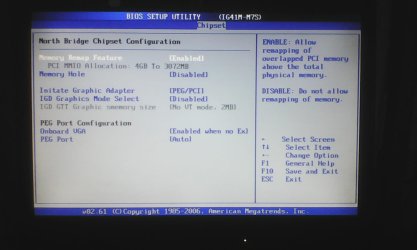
I went to the BIOS and this is what I could find. I have classes in the afternoon and I am currently on my way back when I posted this.
 

Attachments

  • Flare Lite_20160711_104808.jpg
    Flare Lite_20160711_104808.jpg
    210.6 KB · Views: 1

My Computer

Computer type
PC/Desktop
Computer Manufacturer/Model Number
ASUS X550ZE
OS
Windows 7 Home Premium 64-BIT
CPU
AMD A8 7200P
Motherboard
N/A
Memory
8GB 1600mhz
Graphics Card(s)
Radeon R5 (APU) + Radeon R5 M230 2GB Dual Graphics
Sound Card
Realtek ALC269 with SonicMaster
Monitor(s) Displays
Laptop Display
Screen Resolution
1920 x 1080 @60hz
Hard Drives
WDC WD50 00LPVX-80V0TT0 (500GB)
PSU
Laptop Charger
Mouse
ARMAGGEDON TEXTRON SCORPION 7
Internet Speed
100 mbps DOWN / 50 mbps UP
Antivirus
Windows Defender
Browser
Mozzila FireFox, Valve Steam in-game internet browser
Hi,
Possibly you should enable memory remapping Oops better memory hole or try optimize defaults ?
Something is off onboard graphic's should be disabled when a real gpu is installed
I have a grand total of 1mb hardware reserved even though the bios shows otherwise :)

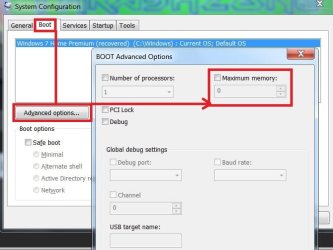
It either that or you have changed something in msconfig boot advanced options
msconfig boot advanced mem.jpg
 

My Computer

Computer type
PC/Desktop
Computer Manufacturer/Model Number
Custom assembled by me :}
OS
Win-7-Pro64bit 7-H-Prem-64bit
CPU
i7-5930K 2nd i9-9940x both water blocked VRM's too
Motherboard
ASUS SABERTOOTH X99 2nd ASUS x299 Apex
Memory
Trident-z 3200C14 2nd Trident-z 3600C16
Graphics Card(s)
EVGA 1080ti ftw3 2nd Titan Xp both water blocked
Sound Card
Built-in Realtek
Monitor(s) Displays
1-AOC G2460PG 24"G-Sync 144Hz/ 2nd 1-ASUS VG248QE 24" 144Hz
Screen Resolution
1920 x 1080 144Hz
Hard Drives
2-Samsung M.2 Evo & Evo Plus
2-Samsung 850 EVO 500GB SSD's/ 3-2.5 W.D. Black 1tb-&3-1tb/3-3.5 WD Black 1tb hdd's
PSU
EVGA SuperNOVA 1000-P2 2nd 1200-P2
Case
2-Corsair Obsidian Series 450D Black ATX Mid Tower
Cooling
Custom water loops
Keyboard
Logitech G710+/ 2nd Logitech G910
Mouse
2-RedDragon M901 Perdition 16400 dpi Gaming mouse = wired
Internet Speed
Comcast Ping 19ms 89.31mbps download speed 6.12mbps upload
Antivirus
Malwarebytes Pro/ Superantispyware Pro
Browser
FireFox & Pale moon
Other Info
2nd ASUS X299 Apex/Intel i9-9940x with Custom water loop/7H-Prem-x64/Corsair 450D case/Ram Trident-z 3600C16 4x8gb / Samsung970Evo plus 500gb SSD/Dual ssd EZ swap evo/PSU EVGA SuperNova 1200w-P2 80+Platinum/GPU Titan Xp /8-ML-140 on push-pull on 2-280GTX rads
Hello again, just lucky to be connected on someone's wireless connection.

I have the maxmimum memory checked off in msconfig, I have yet to set everything in default once I get back home.

Will post the results later.
 

My Computer

Computer type
PC/Desktop
Computer Manufacturer/Model Number
ASUS X550ZE
OS
Windows 7 Home Premium 64-BIT
CPU
AMD A8 7200P
Motherboard
N/A
Memory
8GB 1600mhz
Graphics Card(s)
Radeon R5 (APU) + Radeon R5 M230 2GB Dual Graphics
Sound Card
Realtek ALC269 with SonicMaster
Monitor(s) Displays
Laptop Display
Screen Resolution
1920 x 1080 @60hz
Hard Drives
WDC WD50 00LPVX-80V0TT0 (500GB)
PSU
Laptop Charger
Mouse
ARMAGGEDON TEXTRON SCORPION 7
Internet Speed
100 mbps DOWN / 50 mbps UP
Antivirus
Windows Defender
Browser
Mozzila FireFox, Valve Steam in-game internet browser
Good call Mike.

There has been a few other threads with people changing Advanced Boot Options.
Must be the gravitational pull of the moon or maybe global warming.
 

My Computer

Computer type
PC/Desktop
Computer Manufacturer/Model Number
Home made Desktop
OS
Windows 10 Pro. 64/ version 1709 Windows 7 Pro/64
CPU
Intel i7-6800K @ 4.3
Motherboard
ASUS X-99 Deluxe II
Memory
Corsair Platinum 16 gig @2400
Graphics Card(s)
EVGA GTX 1070 OC
Monitor(s) Displays
Asus 27" LED LCD/VE278Q
Screen Resolution
1920-1080 or 1280-720 HDMI
Hard Drives
INTEL SSD 730-240 Gb Sata 3.0/
PSU
EVGA Platium 1200W
Case
Phanteks Luxe Tempered Glass 8 fans/ one radiator
Cooling
XSPC/ Water Cooled CPU
Keyboard
Das 4 Professional
Mouse
Logitech M705/MX Anywhere 2-S
Internet Speed
100 mbits
Antivirus
Microsoft Security Essentials/ Malwarebytes Premium 3.0/ SAS
Browser
I.E. 11 default/Firefox/ ISP Time Warner Cable/Spectrum
Other Info
LG BluRay Burner/
Sound system-KLipsch-THX/
Icy Dock ssd Hot Swap bays.
Hey guys, just some heads up.

I went into the BIOS and set everything to default, applied it then proceeded to boot my computer to Windows. I checked the system information again but it's still saying the same thing.

I tried another method which is to set everything to default, went to the north bridge option then disabled the graphics memory option. I just can't find an option to completely disable the onboard GPU. I'm using a dedicated graphics card so I am wondering if the onboard GPU is off?
 

My Computer

Computer type
PC/Desktop
Computer Manufacturer/Model Number
ASUS X550ZE
OS
Windows 7 Home Premium 64-BIT
CPU
AMD A8 7200P
Motherboard
N/A
Memory
8GB 1600mhz
Graphics Card(s)
Radeon R5 (APU) + Radeon R5 M230 2GB Dual Graphics
Sound Card
Realtek ALC269 with SonicMaster
Monitor(s) Displays
Laptop Display
Screen Resolution
1920 x 1080 @60hz
Hard Drives
WDC WD50 00LPVX-80V0TT0 (500GB)
PSU
Laptop Charger
Mouse
ARMAGGEDON TEXTRON SCORPION 7
Internet Speed
100 mbps DOWN / 50 mbps UP
Antivirus
Windows Defender
Browser
Mozzila FireFox, Valve Steam in-game internet browser
Hi,
Do you have VMWare installed ?
 

My Computer

Computer type
PC/Desktop
Computer Manufacturer/Model Number
Custom assembled by me :}
OS
Win-7-Pro64bit 7-H-Prem-64bit
CPU
i7-5930K 2nd i9-9940x both water blocked VRM's too
Motherboard
ASUS SABERTOOTH X99 2nd ASUS x299 Apex
Memory
Trident-z 3200C14 2nd Trident-z 3600C16
Graphics Card(s)
EVGA 1080ti ftw3 2nd Titan Xp both water blocked
Sound Card
Built-in Realtek
Monitor(s) Displays
1-AOC G2460PG 24"G-Sync 144Hz/ 2nd 1-ASUS VG248QE 24" 144Hz
Screen Resolution
1920 x 1080 144Hz
Hard Drives
2-Samsung M.2 Evo & Evo Plus
2-Samsung 850 EVO 500GB SSD's/ 3-2.5 W.D. Black 1tb-&3-1tb/3-3.5 WD Black 1tb hdd's
PSU
EVGA SuperNOVA 1000-P2 2nd 1200-P2
Case
2-Corsair Obsidian Series 450D Black ATX Mid Tower
Cooling
Custom water loops
Keyboard
Logitech G710+/ 2nd Logitech G910
Mouse
2-RedDragon M901 Perdition 16400 dpi Gaming mouse = wired
Internet Speed
Comcast Ping 19ms 89.31mbps download speed 6.12mbps upload
Antivirus
Malwarebytes Pro/ Superantispyware Pro
Browser
FireFox & Pale moon
Other Info
2nd ASUS X299 Apex/Intel i9-9940x with Custom water loop/7H-Prem-x64/Corsair 450D case/Ram Trident-z 3600C16 4x8gb / Samsung970Evo plus 500gb SSD/Dual ssd EZ swap evo/PSU EVGA SuperNova 1200w-P2 80+Platinum/GPU Titan Xp /8-ML-140 on push-pull on 2-280GTX rads
Nope, not a single virtual emulation software in my system.
 

My Computer

Computer type
PC/Desktop
Computer Manufacturer/Model Number
ASUS X550ZE
OS
Windows 7 Home Premium 64-BIT
CPU
AMD A8 7200P
Motherboard
N/A
Memory
8GB 1600mhz
Graphics Card(s)
Radeon R5 (APU) + Radeon R5 M230 2GB Dual Graphics
Sound Card
Realtek ALC269 with SonicMaster
Monitor(s) Displays
Laptop Display
Screen Resolution
1920 x 1080 @60hz
Hard Drives
WDC WD50 00LPVX-80V0TT0 (500GB)
PSU
Laptop Charger
Mouse
ARMAGGEDON TEXTRON SCORPION 7
Internet Speed
100 mbps DOWN / 50 mbps UP
Antivirus
Windows Defender
Browser
Mozzila FireFox, Valve Steam in-game internet browser
This is sort of interesting possibly Jack posted this earlier seeing you're on 32 bit might be another possibility
* The Max shared memory size will be available only when 4GB memory or more installed on Motherboard under the 64-bit OS.
BIOSTAR :: Motherboard
 

My Computer

Computer type
PC/Desktop
Computer Manufacturer/Model Number
Custom assembled by me :}
OS
Win-7-Pro64bit 7-H-Prem-64bit
CPU
i7-5930K 2nd i9-9940x both water blocked VRM's too
Motherboard
ASUS SABERTOOTH X99 2nd ASUS x299 Apex
Memory
Trident-z 3200C14 2nd Trident-z 3600C16
Graphics Card(s)
EVGA 1080ti ftw3 2nd Titan Xp both water blocked
Sound Card
Built-in Realtek
Monitor(s) Displays
1-AOC G2460PG 24"G-Sync 144Hz/ 2nd 1-ASUS VG248QE 24" 144Hz
Screen Resolution
1920 x 1080 144Hz
Hard Drives
2-Samsung M.2 Evo & Evo Plus
2-Samsung 850 EVO 500GB SSD's/ 3-2.5 W.D. Black 1tb-&3-1tb/3-3.5 WD Black 1tb hdd's
PSU
EVGA SuperNOVA 1000-P2 2nd 1200-P2
Case
2-Corsair Obsidian Series 450D Black ATX Mid Tower
Cooling
Custom water loops
Keyboard
Logitech G710+/ 2nd Logitech G910
Mouse
2-RedDragon M901 Perdition 16400 dpi Gaming mouse = wired
Internet Speed
Comcast Ping 19ms 89.31mbps download speed 6.12mbps upload
Antivirus
Malwarebytes Pro/ Superantispyware Pro
Browser
FireFox & Pale moon
Other Info
2nd ASUS X299 Apex/Intel i9-9940x with Custom water loop/7H-Prem-x64/Corsair 450D case/Ram Trident-z 3600C16 4x8gb / Samsung970Evo plus 500gb SSD/Dual ssd EZ swap evo/PSU EVGA SuperNova 1200w-P2 80+Platinum/GPU Titan Xp /8-ML-140 on push-pull on 2-280GTX rads
Hmm well personally the fact that the slot does not pick up the stick smacks to me of it (the slot) being bad and has me wondering about them board even.
What I would do is to put sticks in each slot and run the memtest if you get errors up with the second slot having some RAM installed then I would be very surprised if the slot was the problem. In that event then you are only going to get 3-4GB available eh? I am also saying this because your board is a considerable vintage now and just maybe the problem. The BIOS I am assuming it is up to date??

I am also assuming you have checked the speed of the 4GB stick as I seem to remember the RAM speed as being 800?? It could be that the wrong speed stick is causing issues with a lower speed stick or a higher speed not being accessed fully. Am just surmising here and maybe I could be very wrong.

Having said that the board does support 533- 1333 RAM. Just out of morbid curiosity what brand of RAM are you using??
 

My Computer

Computer type
PC/Desktop
Computer Manufacturer/Model Number
Own build (new) Desk1 / Asus ROG Win 7 / Desk2 1st build
OS
Desk1 7 Home Prem / Desk2 10 Pro / Main lap Asus ROG 10 Pro 2 laptop Toshiba 7 Pro Asus P2520 7 & 10
CPU
Desk1 i5 3750K / Laptop i7 GTX 860M / Desk2 i5 2500
Motherboard
Desk1 Asus P877-V / Desk2 Gigabyte H67 UD3H / Laptop ?
Memory
Desk1 8GB (1866) / Desk2 16GB (1333) / Laptop 8Gb DDR3
Graphics Card(s)
Desk 1& 2NVidia GTX 650 & Laptops on board Intel
Sound Card
Desk 1 & 2 -XONAR DG Realtek High Def audio Laptop
Monitor(s) Displays
Desk 1 Benq HD 2450 / Desk2 Philips 24" / Laptop 17.5"
Screen Resolution
1920x1080 D1 & D2 & Laptop 1
Hard Drives
Desk1 Samsung 120GB 830 SSD
Asus ROG 256GB 850 Pro SSD
Desk2 Samsung 840 256 SSD
Toshiba 120GB EVO
PSU
Desk 1 Corsair HX 1050/ Laptop ? / Desk 2 Corsair HX 650
Case
Desk 1 Cooler HAF XM ? Toshiba laptop / Desk2 Coolermaster
Cooling
Fans on all Desk1 -2 Desk2 - all Coolermasters 5 Laptop ?
Keyboard
Desk 1 MS Sidewinder X6 Desk 2 MS Sidewinder X 4
Mouse
Desk 1&2 - Gigabyte MS 900 gamer - laptop - Logitec wireless
Internet Speed
ADSL2+
Other Info
One other Desktop (tester) and spare Toshba laptop both with SSD's
Running Kaspersky 2016 ISS on all machines config'd identically
Logitec audio stereo systems on each machine (x3)
Canon MG5250MFC
Router/modem TP-Link running WPA2SK

My Computer

Computer type
PC/Desktop
Computer Manufacturer/Model Number
Custom assembled by me :}
OS
Win-7-Pro64bit 7-H-Prem-64bit
CPU
i7-5930K 2nd i9-9940x both water blocked VRM's too
Motherboard
ASUS SABERTOOTH X99 2nd ASUS x299 Apex
Memory
Trident-z 3200C14 2nd Trident-z 3600C16
Graphics Card(s)
EVGA 1080ti ftw3 2nd Titan Xp both water blocked
Sound Card
Built-in Realtek
Monitor(s) Displays
1-AOC G2460PG 24"G-Sync 144Hz/ 2nd 1-ASUS VG248QE 24" 144Hz
Screen Resolution
1920 x 1080 144Hz
Hard Drives
2-Samsung M.2 Evo & Evo Plus
2-Samsung 850 EVO 500GB SSD's/ 3-2.5 W.D. Black 1tb-&3-1tb/3-3.5 WD Black 1tb hdd's
PSU
EVGA SuperNOVA 1000-P2 2nd 1200-P2
Case
2-Corsair Obsidian Series 450D Black ATX Mid Tower
Cooling
Custom water loops
Keyboard
Logitech G710+/ 2nd Logitech G910
Mouse
2-RedDragon M901 Perdition 16400 dpi Gaming mouse = wired
Internet Speed
Comcast Ping 19ms 89.31mbps download speed 6.12mbps upload
Antivirus
Malwarebytes Pro/ Superantispyware Pro
Browser
FireFox & Pale moon
Other Info
2nd ASUS X299 Apex/Intel i9-9940x with Custom water loop/7H-Prem-x64/Corsair 450D case/Ram Trident-z 3600C16 4x8gb / Samsung970Evo plus 500gb SSD/Dual ssd EZ swap evo/PSU EVGA SuperNova 1200w-P2 80+Platinum/GPU Titan Xp /8-ML-140 on push-pull on 2-280GTX rads
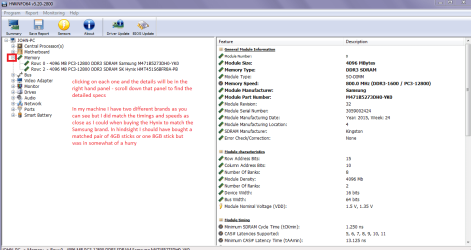
In addition to Mikes suggestion you can run this HWiNFO, HWiNFO32/64 - Download < download the right bit version - when open close the small windows at the start and go to the left hand listings for the components - pick Memory - see my pic and you will see an in depth detail exactly what my RAM is
 

Attachments

  • RAM SPECS.PNG
    RAM SPECS.PNG
    42.6 KB · Views: 2

My Computer

Computer type
PC/Desktop
Computer Manufacturer/Model Number
Own build (new) Desk1 / Asus ROG Win 7 / Desk2 1st build
OS
Desk1 7 Home Prem / Desk2 10 Pro / Main lap Asus ROG 10 Pro 2 laptop Toshiba 7 Pro Asus P2520 7 & 10
CPU
Desk1 i5 3750K / Laptop i7 GTX 860M / Desk2 i5 2500
Motherboard
Desk1 Asus P877-V / Desk2 Gigabyte H67 UD3H / Laptop ?
Memory
Desk1 8GB (1866) / Desk2 16GB (1333) / Laptop 8Gb DDR3
Graphics Card(s)
Desk 1& 2NVidia GTX 650 & Laptops on board Intel
Sound Card
Desk 1 & 2 -XONAR DG Realtek High Def audio Laptop
Monitor(s) Displays
Desk 1 Benq HD 2450 / Desk2 Philips 24" / Laptop 17.5"
Screen Resolution
1920x1080 D1 & D2 & Laptop 1
Hard Drives
Desk1 Samsung 120GB 830 SSD
Asus ROG 256GB 850 Pro SSD
Desk2 Samsung 840 256 SSD
Toshiba 120GB EVO
PSU
Desk 1 Corsair HX 1050/ Laptop ? / Desk 2 Corsair HX 650
Case
Desk 1 Cooler HAF XM ? Toshiba laptop / Desk2 Coolermaster
Cooling
Fans on all Desk1 -2 Desk2 - all Coolermasters 5 Laptop ?
Keyboard
Desk 1 MS Sidewinder X6 Desk 2 MS Sidewinder X 4
Mouse
Desk 1&2 - Gigabyte MS 900 gamer - laptop - Logitec wireless
Internet Speed
ADSL2+
Other Info
One other Desktop (tester) and spare Toshba laptop both with SSD's
Running Kaspersky 2016 ISS on all machines config'd identically
Logitec audio stereo systems on each machine (x3)
Canon MG5250MFC
Router/modem TP-Link running WPA2SK
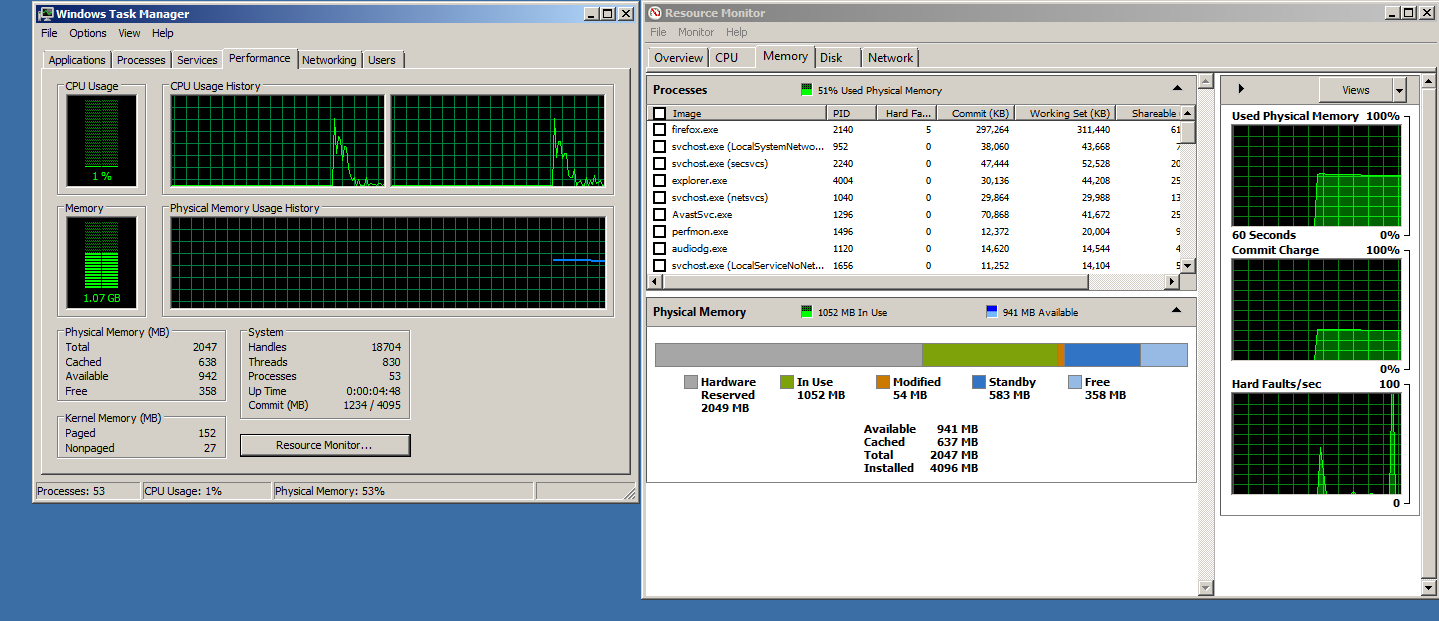
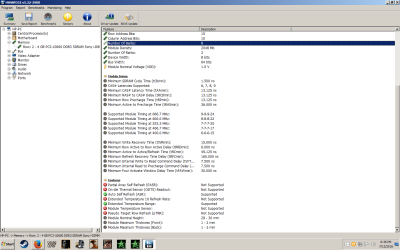
Hello guys, I just came here to upload the HWiNFO screenshots. I couldn't do the memtest because I have a flu :(
 

Attachments

  • Untitled.png
    Untitled.png
    46.5 KB · Views: 5
  • MLG.png
    MLG.png
    47.5 KB · Views: 3

My Computer

Computer type
PC/Desktop
Computer Manufacturer/Model Number
ASUS X550ZE
OS
Windows 7 Home Premium 64-BIT
CPU
AMD A8 7200P
Motherboard
N/A
Memory
8GB 1600mhz
Graphics Card(s)
Radeon R5 (APU) + Radeon R5 M230 2GB Dual Graphics
Sound Card
Realtek ALC269 with SonicMaster
Monitor(s) Displays
Laptop Display
Screen Resolution
1920 x 1080 @60hz
Hard Drives
WDC WD50 00LPVX-80V0TT0 (500GB)
PSU
Laptop Charger
Mouse
ARMAGGEDON TEXTRON SCORPION 7
Internet Speed
100 mbps DOWN / 50 mbps UP
Antivirus
Windows Defender
Browser
Mozzila FireFox, Valve Steam in-game internet browser
Back
Top