
4GB of RAM, only 3,5 GB usable

Jaakow22

New member
Local time
11:22 PM
Messages
51
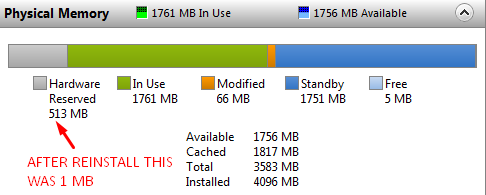
I recently reinstalled Windows because only 3,5 GB of RAM was usable. After the reinstall, 4 GB was installed and usable, but after a few weeks I noticed that it is again only 3,5 GB usable. I did not change any BIOS settings since I reinstalled Windows. Here is a screenshot from resource monitor:
q7XyoUq.png
:mad:
Like WTF? Any ideas?
Move this thread if it is on the wrong location.
Feedback is much appreciated.
 

My Computer My Computer

At a glance

Windows 7 Ultimate x64Intel Celeron E3400 Dual Core 2.6GHz2x2gbGIGABYTE AMD Radeon HD6670 2GB DDR3
Computer type
PC/Desktop
Computer Manufacturer/Model Number
MSGW
OS
Windows 7 Ultimate x64
CPU
Intel Celeron E3400 Dual Core 2.6GHz
Motherboard
ASUS P5G41T-M LX3
Memory
2x2gb
Graphics Card(s)
GIGABYTE AMD Radeon HD6670 2GB DDR3
Monitor(s) Displays
SAMSUNG
Screen Resolution
1920x1080
Hard Drives
HDD 320 GB
PSU
400W
Case
mATX
Cooling
Stock
Internet Speed
5 MBPS download, 0.4 MBPS upload
Antivirus
Microsoft Serciurity Essentials
Browser
Firefox
It's normal for the system to reserve memory for the hardware addresses. PCs have hardware which is built into the memory map of the computer, like video memory, drive vectors and caches. The OS can't use these areas for standard memory, so it blocks them off from your use.

In any case, it's normal, and nothing to worry about. You can't change it.
 

My Computer My Computer

At a glance

Win 7 Pro x64/Win 10 Pro x64 dual bootAMD FX 8350 Vishera @ 420016 GB Mushkin Blackline DDR3-2400 @ 1866 (9-1...XFX Radeon R9 280 Double D Black Edition
Computer type
PC/Desktop
Computer Manufacturer/Model Number
Mellon Labs (custom build)
OS
Win 7 Pro x64/Win 10 Pro x64 dual boot
CPU
AMD FX 8350 Vishera @ 4200
Motherboard
ASUS M5A97 R2.0
Memory
16 GB Mushkin Blackline DDR3-2400 @ 1866 (9-10-10-10-31)
Graphics Card(s)
XFX Radeon R9 280 Double D Black Edition
Sound Card
Realtek HD Audio on MB. Sounds great.
Monitor(s) Displays
Acer 24", Acer 22"
Screen Resolution
3840 x 1080
Hard Drives
1 x Mushkin Chronos 120 GB SSD (Win 10)
1 x Samsung 850 EVO 250 GB SSD (Win 7)
1 x WD 1TB SATA Blue
1 x WD 1TB SATA Green
PSU
Corsair TX-750
Case
CoolerMaster HAF 912+
Cooling
Coolermaster Seidon 240M Liquid AIO. 6 case fans
Keyboard
Logitech G710+
Mouse
Logitech G500s
Internet Speed
Much better since I got fiber, but still way overpriced.
Antivirus
MSE, Malware Bytes for scanning
Browser
Firefox
Other Info
Corsair VOID USB headphones.

A Mellon Labs X-1 - LCD Smartie driven system status display.

Brought to you by the letter E
Are you certain you installed 64 bit Windows 7? What you are seeing is typical of a 32 bit OS.
 

My Computer My Computer

At a glance

Windows 7 Pro 64 bitXeon W35208 GBNvidia Geforce 210
Computer type
PC/Desktop
Computer Manufacturer/Model Number
HP
OS
Windows 7 Pro 64 bit
CPU
Xeon W3520
Memory
8 GB
Graphics Card(s)
Nvidia Geforce 210
For 32 bit it would only be able to use 3 GB, while this example shows 3,5 - 3,6
 

My Computer My Computer

At a glance

Windows 7 Pro 32Intel(R) Core(TM) i5 CPU M 540 @ 2.53GHz4,00 GB (Usable 2,98)NVIDIA NVS 5100M
Computer type
Laptop
Computer Manufacturer/Model Number
HP Elitebook 8540p
OS
Windows 7 Pro 32
CPU
Intel(R) Core(TM) i5 CPU M 540 @ 2.53GHz
Motherboard
Hewlett-Packard 1521
Memory
4,00 GB (Usable 2,98)
Graphics Card(s)
NVIDIA NVS 5100M
Sound Card
NVIDIA High Definition Audio
Screen Resolution
1600x900
Hard Drives
INTEL SSDSA2CW120G3
Antivirus
F-Secure Internet Security
Browser
IE, Firefox, Opera
Other Info
Sandboxie,
SRP (Software Restriction Policy),
EMET (Enhanced Mitigation Experience Toolkit),
WFC (Windows Firewall Control by BiniSoft),
Malwarebytes Premium
Having 3583 MB available to Windows in a 32 bit OS is unusual but very possible. Some systems have more. My 32 bit Windows 7 system has 3543 MB.
 

My Computer My Computer

At a glance

Windows 7 Pro 64 bitXeon W35208 GBNvidia Geforce 210
Computer type
PC/Desktop
Computer Manufacturer/Model Number
HP
OS
Windows 7 Pro 64 bit
CPU
Xeon W3520
Memory
8 GB
Graphics Card(s)
Nvidia Geforce 210
As far as my experience goes, having 32-bit Windows on a computer with 4GB RAM will show only 3.5 to 3.6 available, maybe as low as 3.3GB. Also remember some of the RAM is allocated to the onboard/built-in video by the BIOS before the Operating System loads. Having 4GB on 32-bit doesn't prevent anything, just can't be all used.
Memory Limits for Windows and Windows Server Releases (Windows)
I have a Dell Inspiron 530S on the bench with just that situation with 4GB RAM.
An interesting read, might have to try it on that computer:
http://www.u nawave.de/windows-7-tipps/32-bit-ram-barrier.html?lang=EN
This site is blocking the full URL so take the space out between the u and n.
 

My Computer My Computer

At a glance

Windows 7 Ultimate 64-bit, Windows 8.1 64-bit...
Computer type
PC/Desktop
Computer Manufacturer/Model Number
Customs, Dell, Gateway, HP, Toshiba, Acer, ASUS
OS
Windows 7 Ultimate 64-bit, Windows 8.1 64-bit, Mac OS X 10.10, Linux Mint 17, Windows 10 Pro TP
Keyboard
Microsoft
Mouse
Microsoft
If I check in Control Panel - System, it says: 4,00 GB (2,98 GB usable)

Is that showing more too for those of you that are running 32 bit?
 

My Computer My Computer

At a glance

Windows 7 Pro 32Intel(R) Core(TM) i5 CPU M 540 @ 2.53GHz4,00 GB (Usable 2,98)NVIDIA NVS 5100M
Computer type
Laptop
Computer Manufacturer/Model Number
HP Elitebook 8540p
OS
Windows 7 Pro 32
CPU
Intel(R) Core(TM) i5 CPU M 540 @ 2.53GHz
Motherboard
Hewlett-Packard 1521
Memory
4,00 GB (Usable 2,98)
Graphics Card(s)
NVIDIA NVS 5100M
Sound Card
NVIDIA High Definition Audio
Screen Resolution
1600x900
Hard Drives
INTEL SSDSA2CW120G3
Antivirus
F-Secure Internet Security
Browser
IE, Firefox, Opera
Other Info
Sandboxie,
SRP (Software Restriction Policy),
EMET (Enhanced Mitigation Experience Toolkit),
WFC (Windows Firewall Control by BiniSoft),
Malwarebytes Premium
My 32 bit system with 4 GB RAM shows 3.46 GB usable in control panel. If you have 2.98 usable it is likely that a portion of RAM is being used by the video system. This is very common in laptops. The exact amount of RAM that is usable depends greatly on the hardware. Typically it will be about 3.25 GB but it can significantly more or less.

I am not saying that the OP is using a 32 but OS. I just want to be sure that a simple explanation is not overlooked.
 

My Computer My Computer

At a glance

Windows 7 Pro 64 bitXeon W35208 GBNvidia Geforce 210
Computer type
PC/Desktop
Computer Manufacturer/Model Number
HP
OS
Windows 7 Pro 64 bit
CPU
Xeon W3520
Memory
8 GB
Graphics Card(s)
Nvidia Geforce 210
The problem on a 32bit system is not really RAM but address space. I have seen useable numbers up tp 3.6GB. It depends mainly on what the graphics needs.
 

My Computer My Computer

At a glance

Vista, Windows7, Mint Mate, Zorin, Windows 8from 1.6GHz Duo to i7
Computer Manufacturer/Model Number
HP, Dell, Gateway, Toshiba - 4 laptops and 2 desktops
OS
Vista, Windows7, Mint Mate, Zorin, Windows 8
CPU
from 1.6GHz Duo to i7
Monitor(s) Displays
2x HP w2207
Hard Drives
5x HDD, 7x SSD, 12x Externals
Keyboard
with trackball - no mices
Mouse
Trackball mice
Internet Speed
DSL 6000
Thanks guys, this was news to me.

And apologies to OP for maybe going OT with 32-bit stuff.
 

My Computer My Computer

At a glance

Windows 7 Pro 32Intel(R) Core(TM) i5 CPU M 540 @ 2.53GHz4,00 GB (Usable 2,98)NVIDIA NVS 5100M
Computer type
Laptop
Computer Manufacturer/Model Number
HP Elitebook 8540p
OS
Windows 7 Pro 32
CPU
Intel(R) Core(TM) i5 CPU M 540 @ 2.53GHz
Motherboard
Hewlett-Packard 1521
Memory
4,00 GB (Usable 2,98)
Graphics Card(s)
NVIDIA NVS 5100M
Sound Card
NVIDIA High Definition Audio
Screen Resolution
1600x900
Hard Drives
INTEL SSDSA2CW120G3
Antivirus
F-Secure Internet Security
Browser
IE, Firefox, Opera
Other Info
Sandboxie,
SRP (Software Restriction Policy),
EMET (Enhanced Mitigation Experience Toolkit),
WFC (Windows Firewall Control by BiniSoft),
Malwarebytes Premium
I have 64 bit version of Windows, but I don't understand how it changed from 4 GB usable to 3,5 GB? I disabled on-board graphics because I was not using it. But how can it change by itself. It was 4 GB usable and now it is 3,5 GB. But how!?!? It was 4 GB after a clean install. And it changed by itself. The thing is that I need that half GB when playing heavily modded Minecraft so I have to allocate 3 GB of ram because other stuff in background and OS are using 1 GB. Because if RAM usage goes over 3,5 GB it goes in Swap memory and I get a nice Not Responding without the progress saved. The graphic card should not take that memory because I have 2 GB of graphics. Should I go check BIOS settings. I disabled on-board graphics, it was 32 MB before now it is 1 MB (it can't be less). But what took that 512 MB of RAM?
 

My Computer My Computer

At a glance

Windows 7 Ultimate x64Intel Celeron E3400 Dual Core 2.6GHz2x2gbGIGABYTE AMD Radeon HD6670 2GB DDR3
Computer type
PC/Desktop
Computer Manufacturer/Model Number
MSGW
OS
Windows 7 Ultimate x64
CPU
Intel Celeron E3400 Dual Core 2.6GHz
Motherboard
ASUS P5G41T-M LX3
Memory
2x2gb
Graphics Card(s)
GIGABYTE AMD Radeon HD6670 2GB DDR3
Monitor(s) Displays
SAMSUNG
Screen Resolution
1920x1080
Hard Drives
HDD 320 GB
PSU
400W
Case
mATX
Cooling
Stock
Internet Speed
5 MBPS download, 0.4 MBPS upload
Antivirus
Microsoft Serciurity Essentials
Browser
Firefox
The same factors that limit RAM in a 32 bit OS are also present in a 64 bit OS. The difference being that in a 64 bit OS there is usually a solution. That solution is remapping the inaccessible RAM below 4 GB to an address above 4 GB where it is accessible. This is controlled by a setting in the BIOS. The name of the setting varies from system to system. If the CMOS battery is failing BIOS settings can change for no apparent reason.
 

My Computer My Computer

At a glance

Windows 7 Pro 64 bitXeon W35208 GBNvidia Geforce 210
Computer type
PC/Desktop
Computer Manufacturer/Model Number
HP
OS
Windows 7 Pro 64 bit
CPU
Xeon W3520
Memory
8 GB
Graphics Card(s)
Nvidia Geforce 210
But still, how can it change by itself, after the reinstall it was available 4 GB but now it is 3,5 GB. How!? There must be something wrong, the CMOS battery is fine, because after playing Battlefield 3 after I take off the headphones I can hear the CPU fan screaming, because it is set on Performance mode, by default it was on silent mode and it was not possible to hear the CPU fan because the PSU fan was way louder. But it was available 4 GB after the reinstall and it changed by itself after a few weeks.:mad::cry:
 

My Computer My Computer

At a glance

Windows 7 Ultimate x64Intel Celeron E3400 Dual Core 2.6GHz2x2gbGIGABYTE AMD Radeon HD6670 2GB DDR3
Computer type
PC/Desktop
Computer Manufacturer/Model Number
MSGW
OS
Windows 7 Ultimate x64
CPU
Intel Celeron E3400 Dual Core 2.6GHz
Motherboard
ASUS P5G41T-M LX3
Memory
2x2gb
Graphics Card(s)
GIGABYTE AMD Radeon HD6670 2GB DDR3
Monitor(s) Displays
SAMSUNG
Screen Resolution
1920x1080
Hard Drives
HDD 320 GB
PSU
400W
Case
mATX
Cooling
Stock
Internet Speed
5 MBPS download, 0.4 MBPS upload
Antivirus
Microsoft Serciurity Essentials
Browser
Firefox
I found that it is better to check if a setting has been changed rather than try to explain why it could not have changed.
 

My Computer My Computer

At a glance

Windows 7 Pro 64 bitXeon W35208 GBNvidia Geforce 210
Computer type
PC/Desktop
Computer Manufacturer/Model Number
HP
OS
Windows 7 Pro 64 bit
CPU
Xeon W3520
Memory
8 GB
Graphics Card(s)
Nvidia Geforce 210
No BIOS setting changed.
 

My Computer My Computer

At a glance

Windows 7 Ultimate x64Intel Celeron E3400 Dual Core 2.6GHz2x2gbGIGABYTE AMD Radeon HD6670 2GB DDR3
Computer type
PC/Desktop
Computer Manufacturer/Model Number
MSGW
OS
Windows 7 Ultimate x64
CPU
Intel Celeron E3400 Dual Core 2.6GHz
Motherboard
ASUS P5G41T-M LX3
Memory
2x2gb
Graphics Card(s)
GIGABYTE AMD Radeon HD6670 2GB DDR3
Monitor(s) Displays
SAMSUNG
Screen Resolution
1920x1080
Hard Drives
HDD 320 GB
PSU
400W
Case
mATX
Cooling
Stock
Internet Speed
5 MBPS download, 0.4 MBPS upload
Antivirus
Microsoft Serciurity Essentials
Browser
Firefox
Back
Top