
Mishal2015
New member
- Local time
- 5:47 PM
- Messages
- 2
Problem is WINDOWS 7 does not boot from the 4TB disk alone. There is a 2 line error message "ReBoot and Select Proper Boot Device Or Insert Boot Media in Selected Boot device and press a key". The system boots only when both the hard disks are connected.
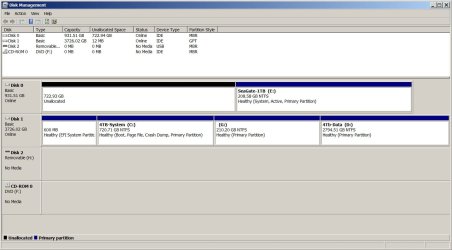
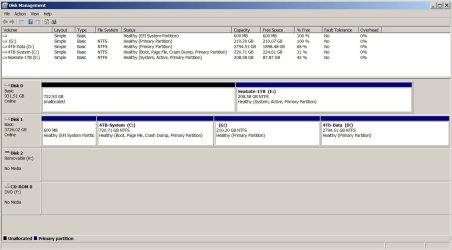
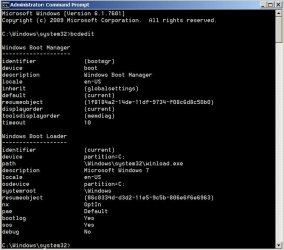
Did any update of BIOS to UEFI from ASUS. Copied the the partition from 1TB to 4TB hard drive via AOMEI Partition Assistant. There is also a hidden folder \WINDOWS\Boot on both the physical disks. Moreover,EasyBCD shows the Bootloader Path to 4TB disk c:\Windows\system32\winload.exe.
Any guidance on how to change the system partition from E: to C:
Did any update of BIOS to UEFI from ASUS. Copied the the partition from 1TB to 4TB hard drive via AOMEI Partition Assistant. There is also a hidden folder \WINDOWS\Boot on both the physical disks. Moreover,EasyBCD shows the Bootloader Path to 4TB disk c:\Windows\system32\winload.exe.
Any guidance on how to change the system partition from E: to C:
My Computer
At a glance
WINDOWS 7 64 bitIntel(R) Core(TM) i7-2600K CPU @ 3.40GHz8GB DIMM DDR3NVIDIA Quadro NVS 450
- Computer type
- PC/Desktop
- Computer Manufacturer/Model Number
- ASUS
- OS
- WINDOWS 7 64 bit
- CPU
- Intel(R) Core(TM) i7-2600K CPU @ 3.40GHz
- Motherboard
- ASUS P8P67 PRO
- Memory
- 8GB DIMM DDR3
- Graphics Card(s)
- NVIDIA Quadro NVS 450
- Hard Drives
- Seagate ST31000525SV (1TB, SATA300, 3.5", 7200rpm)
WDC WD4003FZEX-00Z4SA0 (4TB, SATA600, 3.5", 7200rpm)
- Antivirus
- COMODO
- Browser
- Firefox


