Solved Windows 7 64-bit installation freezes on loading

chris98

New member
Local time
4:47 AM
Messages
10
I've recently bought a copy of Windows 7 64-bit to dual boot on my computer. It's not exactly what I would have liked to do, but it's necessary in order to play several old games on my PC. I can't play this on Windows 8/8.1/10 so this is the only option.


I tried to boot the disc to install it and for some reason, right after the "loading files" screen the animation of the four colours started, but then it just froze. It didn't start again so I had to turn my computer off. This is doing the same thing happening every time I'm trying to boot from the media in that way.


I managed to boot the installation by booting it from the CD drive within Windows itself, and much to my surprise it actually installed. I installed it on my other partition and the installation finally started. Well, right up until the point where it had to restart. And then exactly the same thing happened again- it tried to boot back into the installation after the restart and froze again.


Again much to my surprise, despite not showing me anything it eventually rebooted again and somehow completed the installation by itself. So I then tried to boot it for real...... and exactly the same thing is happening. I can't get into Windows 7 because each time it comes up with the "Starting Windows" screen, it freezes and won't do anything.


I initially put this down to my fairly new hardware or SSD or something (I assumed by graphics as to why it was freezing, but I honestly have no idea). So to test this theory, I tried it on my old PC from 2014. Sadly, I'm getting the same thing- I can't get past the "loading files" screen because it freezes every time. It therefore doesn't seem likely it's the disc, and it doesn't seem like it's my new PC either.


I watched a video on YouTube where the guy changed his BIOS UEFI setting to Legacy and the installation properly booted. So I tried this (on my old PC), and it actually worked, it allowed me to boot into the installation. HOWEVER. Once I'm in there, I can't actually install anything because it says an error about the partition or disk being GPT. I have Windows 8.1 installed on my hard drive as well, and I would like to dual boot both- but it doesn't seem possible at this stage?


I've been reading up about GPT and MBR, trying to see if I can find out what's going wrong here but the honest truth is that I just don't understand what's happening as to why it just won't boot or load and I'm really confused.


One other thing to note as well, on my SSD and newer machine, I can't find any setting in the BIOS for UEFI. I can only find the boot settings actually, nothing else at all. Does this interfere with anything or make it impossible for me to install on my newer machine? I need to keep Windows 8.1 on my new machine, and I'd like to use 7 as well on there if possible.


Any help would be greatly appreciated. Thank you.
 

My Computer My Computer

Computer type
PC/Desktop
OS
Windows 7 64-bit

My Computer My Computer

Computer type
PC/Desktop
Computer Manufacturer/Model Number
medionl/Aspire 6930G/acer x55a
OS
W7 home premium 32bit/W7HP 64bit/w10 tp insider ring
CPU
E5300 dual core
Motherboard
medion MS7366
Memory
3gb
Graphics Card(s)
Nvidia Geforce 7100 Nforce 630i
Monitor(s) Displays
avixc
Internet Speed
n (isp resticted to 72)
Antivirus
mse/pands
Browser
palemoon
Other Info
Belkin Fd7050 n USB using Railink RT2870 drivers, more upto date
Hi,

Thank you very much for your reply. Unfortunately, despite the fact I disabled secure boot through my BIOS, bizarrely the same issue is still occurring even when I try to boot from my USB.

So to recap over what I've since done: I downloaded the official 64-bit ISO from Microsoft's website, used Rufus to put it on my 8 GB USB and make it bootable, I've changed the boot order in my BIOS to run from the USB first, disabled Secure Boot through my BIOS, it starts trying to load the files but then freezes on the four colours again. I think just about the only thing that *can* actually be ruled out is that the original installation media I bought was faulty, because the same issue is happening with both the USB and the disk.

I've tried the USB on five different computers now, after following the steps above, and each of them won't let it run, freezing with the same error & in the same place. I've tried using the USB on all of them with Secure Boot disabled and the boot order has been changed. One of them even has Windows 7 installed already, and that won't even boot the media at all. Three of them contain Windows 8.1 which freeze & the other has Windows 10 which can't seem to find a bootable device.

I genuinely have no idea what to do or even how to proceed at this point, so I'll also leave the hardware specs of two of my machines here in case anything could be incompatible or too new to run Windows 7.

My Ultranote is the one I'd actually like to get this working on, but I think it's probably going to be easier to test if I can get this working on my Acer Aspire first, which is older anyway.

Ultranote

Ultranote Series: 17.3" Matte Full HD IPS 60Hz 72% NTSC LED Widescreen
(1920x1080)
Intel® Core™ i5 Quad Core Processor i5-10210U (1.6GHz, 4.2GHz
Turbo)
16GB Corsair 2133MHz SODIMM DDR4 (1 x 16GB)
INTEL® HD GRAPHICS
(CPU Dependant) - 1.7GB Max DDR4 Video RAM - DirectX® 12
1TB PCS 2.5" SSD,
SATA 6 Gb (520MB/R, 470MB/W)
Ultra Slim 8x SATA DVD±R/RW/Dual Layer (+ 24x
CD-RW)
Integrated 6 in 1 Card Reader (SD /Mini SD/ SDHC / SDXC / MMC /
RSMMC)
1 x 40W AC Adaptor
Ultranote Series 4 Cell Lithium Ion Battery

2 Channel High Definition Audio + MIC/Headphone Jack
GIGABIT LAN &
WIRELESS INTEL® Wi-Fi 6 AX200 (2.4 Gbps) + BT 5.0
1 x USB 3.2 GEN 2 PORT
(Type C) + 1 x USB 3.2 GEN 1 PORT + 2 x USB 2.0 PORTS
10th Generation Intel
Processor Support

Supports DDR4 2666MHz
2 x Modules
Maximum
Supported Memory 32GB

1 x 7mm, 2.5" S-ATA HDD support
M.2 Port 2 x
M.2 Ports (1st for WLAN, 2nd for SSD M.2 2280 Card with SATA / PCIe Gen3 x4
interface)
Wireless LAN 802.11ax/ac/b/g/n (M.2 Interface)
Bluetooth V5.0
module support

6-in-1 Card Reader (MMC / RSMMC / SD / Mini SD / SDHC /
SDXC)
LAN 1 x RJ-45 jack
USB 1 x USB 3.2 Gen 2 Port (Type C), 1 x USB
3.2 Gen 1 Port, 2 x USB 2.0 Ports
Display 1 x HDMI OUT Port, 1 x VGA
Port
4 Cell Lithium-Ion battery (41WH)

Acer Aspire E5-773

Processor:

Intel® Core™ i5-6200U Processor - Dual-core - 2.3 GHz / 2.8 GHz with Turbo Boost - 3 MB cache

( 6th Generation )

Memory (RAM):

8GB DDR3L (16 GB maximum installable RAM)

Storage:

1 TB HDD, 5400 rpm

Screen:

17.3" Full HD Backlit - 1920 x 1080

Graphics:

Intel HD Integrated


Connectivity:

Wireless:802.11 ac

Ethernet:10/100 Gigabyte Ethernet

Bluetooth:Bluetooth 4.0

USB:USB 3.0 x 2, USB 2.0 x 2

Video interface:HDMI x 1

Card Reader: SD Memory Card Reader


Optical disc drive:

DVD/RW with Dual Layer suppoort

Speakers:

Intergrated Stereo Speakers

Camera:

Integrated HD Webcam

Microphone:

Yes

Battery type:

4-cell Lithium-ion

Battery life:

Up to 4.5 hours

Colour:

White

Dimensions:

31.65/27.5 x 423 x 281.9 mm (H x W x D)

Weight:

3kg
 

My Computer My Computer

Computer type
PC/Desktop
OS
Windows 7 64-bit
The Ultranote officially does not support Win 7 and probably has a M.2 MVMe SSD drive. It's a Comet Lake CPU / chipset. Not sure if you can install Win 7 on it as it may not have all drivers for it.

The Aspire E5-773 has a Skylake CPU / chipset that you can install Win 7 on it. As Win 7 doesn't have all the required drivers, you must add those drivers to the installation disk. Update your Win 7 installation media

My suggestion is to make a disk image and save it to an external drive so you can recover if something goes wrong.
A better option is to leave the original HDD as it is and replace it with a small SSD to install Win 7. You can then transfer the Win 8 from the HDD to the SSD and install a caddy to hold the HDD in place of the ODD.
You will have the speed of a SSD and the space of a HDD at low cost.

On BIOS, set secure boot and fast boot to disable. Set OS to other and/or CSM.

To install Win 7 as UEFI - GPT, you MUST boot the win 7 installation drive as UEFI, not Legacy.
 
Last edited:

My Computers My Computers

System One System Two

  • Computer type
    PC/Desktop
    Computer Manufacturer/Model Number
    custom build
    OS
    Windows 7 HP 64
    CPU
    i5 6600K - 800MHz to 4200MHz
    Motherboard
    GA-Z170-HD3P
    Memory
    4+4G GSkill DDR4 3000
    Graphics Card(s)
    IG - Intel 530
    Monitor(s) Displays
    Samsung 226BW
    Screen Resolution
    1680x1050
    Hard Drives
    (1) -1 SM951 – 128GB M.2 AHCI PCIe SSD drive for Windows 7 and Lubuntu
    (2) -1 WD SATA 3 - 1T for Data
    (3) -1 WD SATA 3 - 1T for backup
    PSU
    Thermaltake 450W TR2 gold
    Keyboard
    Old and good Chicony mechanical keyboard
    Mouse
    Logitech mX performance - 9 buttons (had to disable some)
    Internet Speed
    500Mb/s
    Browser
    Firefox 64
    Other Info
    TinyWall firewall
  • Computer type
    Laptop
    System Manufacturer/Model Number
    Asus Q550LF
    OS
    Windows 7 Pro
    CPU
    i7-4500U 800MHz to 3.0GHz
    Motherboard
    Asus Q550LF
    Memory
    (4+4)G DDR3 1600
    Graphics Card(s)
    IG intel 4400 + NVIDIA GeForce GT 745M
    Sound Card
    Realtek
    Monitor(s) Displays
    LG Display LP156WF4-SPH1
    Screen Resolution
    1920 x 1080
    Hard Drives
    BX500 120G SSD for Windows and programs +
    1T HDD for data
    Internet Speed
    500 Mb/s
    Browser
    Firefox
    Other Info
    TinyWall firewall
Thanks for your reply.

I'm somehow not surprised about the Ultranote. I do however think that same problem is occurring on both computers, whatever that is. I would hope that I can at least use it on the Ultranote, even if I don't get full functionality- I certainly didn't expect to get that, for example the wireless internet I assumed I wouldn't get, but I was expecting to be able to get something. I have technically been able to install it on there, through the Windows 8 interface. But when I try to load it up on startup instead of Windows 8 it's crashing, just like with the installation, & in exactly the same way.

The Aspire seems to have the same problem. I've also been able to launch the installer through the Windows 8 interface, but I didn't actually go through with anything on that one. I assume the same thing would happen if I tried, i.e. it would install, but I wouldn't be able to run it.

As you suggested, I updated my installation media. I did it twice, on both computers as I assume only the necessary drivers for that machine are installed when you run the tools (the article was a bit scarce on detail). I was hoping the installation would load the required drivers straight away which would let the installation run for me, but sadly, in both cases, it didn't make the slightest difference.

I also made a disk image of my Acer. To be honest, if I can find a way to get Office and Premier Pro off my Acer and onto my Ultranote, I'd even go to such lengths as to wipe Windows 8 off there entirely, and try Windows 7 to see if 8 is interfering & 7 needs installing first. I'm not sure how to transfer Office & Premier Pro though because I received my copies of them while I was still at Uni. I've since left, and I was never really given any license keys or anything..... they were just installers that I downloaded from the store or something & they gave me the full version. That's another issue, anyway.

I don't really feel that the SSD/HDD route is the right one..... again, if possible I'd like to move entirely to the Ultranote, and with current budget restraints I don't feel it's the best use of resources for me...

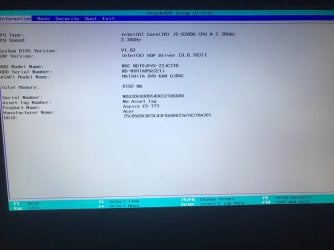
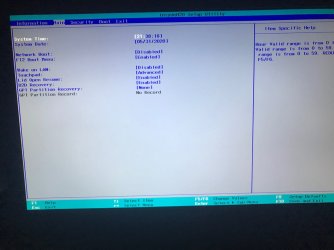
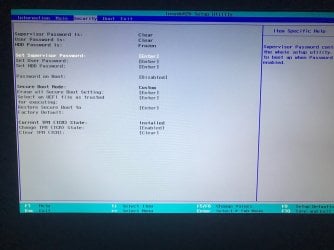
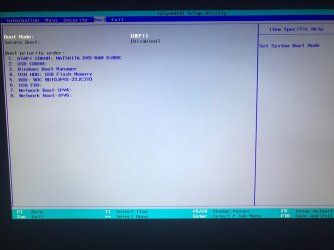
On the BOIS, I've disabled Secure Boot on my Acer. It was already disabled in my Ultranote. I've also disabled Fast Boot on both of them, which I did via the "Power Options" menu in Windows (I couldn't find any settings in the BIOS). I also couldn't find any settings in the BIOS of either machine relating to OS or CSM. If it helps at all, I've attached screenshots of the settings in the BIOS of my Acer machine. These are the only settings which are available on there.


I've also attached a screenshot of the exact moment my machine freezes when trying to load the installer. The only time I've ever managed to get past this "freeze crash" was when I changed the UEFI setting to Legacy in the BIOS of my Acer. I know you said UEFI was the only way, just trying to provide as much info as possible to try and help. I've got to be honest I have no idea what's going on here.


I really appreciate your time. Thank you.
 

Attachments

  • IMG_0729.jpg
    IMG_0729.jpg
    146 KB · Views: 0
  • IMG_0730.jpg
    IMG_0730.jpg
    153.8 KB · Views: 0
  • IMG_0731.jpg
    IMG_0731.jpg
    263.7 KB · Views: 0
  • IMG_0732.jpg
    IMG_0732.jpg
    134.6 KB · Views: 0
  • IMG_0734.jpg
    IMG_0734.jpg
    138.5 KB · Views: 0

My Computer My Computer

Computer type
PC/Desktop
OS
Windows 7 64-bit
On BIOS, boot tab, Boot mode I can see UEFI.
What are the other options?
 

My Computers My Computers

System One System Two

  • Computer type
    PC/Desktop
    Computer Manufacturer/Model Number
    custom build
    OS
    Windows 7 HP 64
    CPU
    i5 6600K - 800MHz to 4200MHz
    Motherboard
    GA-Z170-HD3P
    Memory
    4+4G GSkill DDR4 3000
    Graphics Card(s)
    IG - Intel 530
    Monitor(s) Displays
    Samsung 226BW
    Screen Resolution
    1680x1050
    Hard Drives
    (1) -1 SM951 – 128GB M.2 AHCI PCIe SSD drive for Windows 7 and Lubuntu
    (2) -1 WD SATA 3 - 1T for Data
    (3) -1 WD SATA 3 - 1T for backup
    PSU
    Thermaltake 450W TR2 gold
    Keyboard
    Old and good Chicony mechanical keyboard
    Mouse
    Logitech mX performance - 9 buttons (had to disable some)
    Internet Speed
    500Mb/s
    Browser
    Firefox 64
    Other Info
    TinyWall firewall
  • Computer type
    Laptop
    System Manufacturer/Model Number
    Asus Q550LF
    OS
    Windows 7 Pro
    CPU
    i7-4500U 800MHz to 3.0GHz
    Motherboard
    Asus Q550LF
    Memory
    (4+4)G DDR3 1600
    Graphics Card(s)
    IG intel 4400 + NVIDIA GeForce GT 745M
    Sound Card
    Realtek
    Monitor(s) Displays
    LG Display LP156WF4-SPH1
    Screen Resolution
    1920 x 1080
    Hard Drives
    BX500 120G SSD for Windows and programs +
    1T HDD for data
    Internet Speed
    500 Mb/s
    Browser
    Firefox
    Other Info
    TinyWall firewall
The only other option is Legacy. That's the setting which I changed that allowed me to load the installation, which then got me to the original error of this topic with the partitions. Changing this setting to Legacy has also been the only way I've ever been able to get past this freeze crash, that I've tried anyway.
 

My Computer My Computer

Computer type
PC/Desktop
OS
Windows 7 64-bit
I think you have a Win 8 installed as UEFI-GPT.
If you are trying to install as Legacy-MBR it is not compatible.

Try to leave, on BIOS, boot tab, Boot mode as UEFI and boot the installation disk a UEFI.
Are you using a DVD or USB drive as installation device?
 

My Computers My Computers

System One System Two

  • Computer type
    PC/Desktop
    Computer Manufacturer/Model Number
    custom build
    OS
    Windows 7 HP 64
    CPU
    i5 6600K - 800MHz to 4200MHz
    Motherboard
    GA-Z170-HD3P
    Memory
    4+4G GSkill DDR4 3000
    Graphics Card(s)
    IG - Intel 530
    Monitor(s) Displays
    Samsung 226BW
    Screen Resolution
    1680x1050
    Hard Drives
    (1) -1 SM951 – 128GB M.2 AHCI PCIe SSD drive for Windows 7 and Lubuntu
    (2) -1 WD SATA 3 - 1T for Data
    (3) -1 WD SATA 3 - 1T for backup
    PSU
    Thermaltake 450W TR2 gold
    Keyboard
    Old and good Chicony mechanical keyboard
    Mouse
    Logitech mX performance - 9 buttons (had to disable some)
    Internet Speed
    500Mb/s
    Browser
    Firefox 64
    Other Info
    TinyWall firewall
  • Computer type
    Laptop
    System Manufacturer/Model Number
    Asus Q550LF
    OS
    Windows 7 Pro
    CPU
    i7-4500U 800MHz to 3.0GHz
    Motherboard
    Asus Q550LF
    Memory
    (4+4)G DDR3 1600
    Graphics Card(s)
    IG intel 4400 + NVIDIA GeForce GT 745M
    Sound Card
    Realtek
    Monitor(s) Displays
    LG Display LP156WF4-SPH1
    Screen Resolution
    1920 x 1080
    Hard Drives
    BX500 120G SSD for Windows and programs +
    1T HDD for data
    Internet Speed
    500 Mb/s
    Browser
    Firefox
    Other Info
    TinyWall firewall
I left it as UEFI and tried to install (on my Acer only this time).... to my absolute surprise, the four colours animation got about a second further ahead than before. This time, the Windows logo fully loaded, except that was the part it froze on. So technically while the animation played for slightly longer, it still got stuck on the same part. I also left my PC on for about half an hour to see if it was just incredibly slow..... it was definitely frozen and didn't change. I also tried multiple times, and can now seem to get to this same slightly further point, but the installation itself still won't load.

And I've tried using both a USB and my installation disc. Both result in exactly the same thing.
 

My Computer My Computer

Computer type
PC/Desktop
OS
Windows 7 64-bit
Did you boot the win 7 installation disk as UEFI?
How did you build the USB drive?
Did you add the add the USB 3.x chipset drivers to the installation disk?
 

My Computers My Computers

System One System Two

  • Computer type
    PC/Desktop
    Computer Manufacturer/Model Number
    custom build
    OS
    Windows 7 HP 64
    CPU
    i5 6600K - 800MHz to 4200MHz
    Motherboard
    GA-Z170-HD3P
    Memory
    4+4G GSkill DDR4 3000
    Graphics Card(s)
    IG - Intel 530
    Monitor(s) Displays
    Samsung 226BW
    Screen Resolution
    1680x1050
    Hard Drives
    (1) -1 SM951 – 128GB M.2 AHCI PCIe SSD drive for Windows 7 and Lubuntu
    (2) -1 WD SATA 3 - 1T for Data
    (3) -1 WD SATA 3 - 1T for backup
    PSU
    Thermaltake 450W TR2 gold
    Keyboard
    Old and good Chicony mechanical keyboard
    Mouse
    Logitech mX performance - 9 buttons (had to disable some)
    Internet Speed
    500Mb/s
    Browser
    Firefox 64
    Other Info
    TinyWall firewall
  • Computer type
    Laptop
    System Manufacturer/Model Number
    Asus Q550LF
    OS
    Windows 7 Pro
    CPU
    i7-4500U 800MHz to 3.0GHz
    Motherboard
    Asus Q550LF
    Memory
    (4+4)G DDR3 1600
    Graphics Card(s)
    IG intel 4400 + NVIDIA GeForce GT 745M
    Sound Card
    Realtek
    Monitor(s) Displays
    LG Display LP156WF4-SPH1
    Screen Resolution
    1920 x 1080
    Hard Drives
    BX500 120G SSD for Windows and programs +
    1T HDD for data
    Internet Speed
    500 Mb/s
    Browser
    Firefox
    Other Info
    TinyWall firewall
I changed the boot order in the BIOS to run the USB/disk first, but if there’s any specific way of running either in UEFI mode other then just plugging the USB or inserting the disk into my machine, and waiting for it to load when I turn it on, I’m not sure how to do that. I did try running the USB through Windows 8, ie using the Windows + C, then holding Shift and restart, going into whatever menu is brought up and then running the USB from there. But that also brings up the same result with the freezing.

Other than that I’m unsure what UEFI mode is....

I built the USB using Rufus, I got the latest version directly from their website, it was 3. something I think, but I also downloaded whichever version was used in the tutorial too, which I think was 1. something. They both produced pretty much the same thing.

As far as the driver updates go, I’ll admit I found it a bit hard to follow and a bit confusing so I only ran the updates that were explained in the tutorial rather than downloading anything else, as I’m not really sure what I’m looking for. It definitely downloaded some though, because I took a look in the created “drivers” folder.

In the meantime I’ll try and look for some of the chipset drivers- will they be specific to my machine or just generic for Windows 7?

Thank you
 

My Computer My Computer

Computer type
PC/Desktop
OS
Windows 7 64-bit
Ok, I took a look at everything again and I was thinking that booting it as UEFI was something different (i.e. in addition) to what we'd already tried. The option in the BIOS was indeed UEFI, so yes I booted it as a UEFI.

As far as the USB 3.0 Chipset drivers go, I tried installing some chipset drivers into my installation using this Intel guide: How to Install USB 3.0 Drivers into Windows* 7 and Windows 2008 R2 on...

However after doing this, I noticed that it says "Windows* 7 and Windows 2008 R2 on the Intel® Server Board S1200SP Family"- so I'm not sure whether this is for the right version or not. It hasn't done anything when I started up the installation.

I'm still not really sure what I'm looking for re drivers to be honest.... any help would be greatly appreciated.
 

My Computer My Computer

Computer type
PC/Desktop
OS
Windows 7 64-bit
Window 7 64 bits can be installed as Legacy - MBR or UEFI - GPT.
It works the same way, although UEFI - GPT is the modern way and it has some advantages on dual boot and allows drives bigger than 2.2T
The point is that, as you already has win 8 on the drive, you must install same type. As win 8.x is installed as UEFI - GPT you MUST install win 7 as UEFI - GPT.
To install Win 7 as UEFI - GPT, you MUST boot the installation disk as UEFI - GPT.
Your computer has a boot menu. Insert the USB drive and power on. When power is turned on, during POST (Power-On Self-Test) press F12 to launch the boot menu. The boot able devices will show. You may have two options to boot the USB device: Legacy and UEFI, Choose UEFI.

Booting from the USB will take you to the GUI to install Win 7. At this point you are under Win 7 PE, a GUI OS to guide you to install win 7. At this point you you will need the USB drivers to have mouse and keyboard. If you did not add the USB drivers to the installation files, you wont have mouse and / or keyboard and it will seem that the computer has freezed, but it isn't.
To add the USB drivers to the installation media you should use SIW2 script.
 

My Computers My Computers

System One System Two

  • Computer type
    PC/Desktop
    Computer Manufacturer/Model Number
    custom build
    OS
    Windows 7 HP 64
    CPU
    i5 6600K - 800MHz to 4200MHz
    Motherboard
    GA-Z170-HD3P
    Memory
    4+4G GSkill DDR4 3000
    Graphics Card(s)
    IG - Intel 530
    Monitor(s) Displays
    Samsung 226BW
    Screen Resolution
    1680x1050
    Hard Drives
    (1) -1 SM951 – 128GB M.2 AHCI PCIe SSD drive for Windows 7 and Lubuntu
    (2) -1 WD SATA 3 - 1T for Data
    (3) -1 WD SATA 3 - 1T for backup
    PSU
    Thermaltake 450W TR2 gold
    Keyboard
    Old and good Chicony mechanical keyboard
    Mouse
    Logitech mX performance - 9 buttons (had to disable some)
    Internet Speed
    500Mb/s
    Browser
    Firefox 64
    Other Info
    TinyWall firewall
  • Computer type
    Laptop
    System Manufacturer/Model Number
    Asus Q550LF
    OS
    Windows 7 Pro
    CPU
    i7-4500U 800MHz to 3.0GHz
    Motherboard
    Asus Q550LF
    Memory
    (4+4)G DDR3 1600
    Graphics Card(s)
    IG intel 4400 + NVIDIA GeForce GT 745M
    Sound Card
    Realtek
    Monitor(s) Displays
    LG Display LP156WF4-SPH1
    Screen Resolution
    1920 x 1080
    Hard Drives
    BX500 120G SSD for Windows and programs +
    1T HDD for data
    Internet Speed
    500 Mb/s
    Browser
    Firefox
    Other Info
    TinyWall firewall
Thanks for the explanation, that makes a lot of sense. I think I eventually found a Skylake USB 3 driver at this page: How to Install Windows 7 on Skylake based systems - Overcoming USB issues such as Keyboard not working or Installation Media not found - Stone Computers :: Knowledgebase

Using the same process as described on the Intel page above, I added this driver to both the install.wim and boot.wim files on my USB installation. I used a DISM GUI executable to do it, whatever one is mentioned in the Intel page above. I did search for SIW2 tools on Google but the only page I could find was this one, I couldn't find a download for it anywhere: https://www.sevenforums.com/software/415960-siw2-tools.html

I then went into the F12 boot screen you mentioned, but there was no option for Legacy or UEFI, I only found options to change the boot order of my devices. I've attached a screenshot below of what this page looks like.


I've also uploaded a video here of exactly what is happening when I turn my PC on and try to boot it.... I stop recording at the moment it freezes: IMG_0770.MOV - Google Drive
 

Attachments

  • IMG_0766.jpg
    IMG_0766.jpg
    162.9 KB · Views: 2

My Computer My Computer

Computer type
PC/Desktop
OS
Windows 7 64-bit

My Computers My Computers

System One System Two

  • Computer type
    PC/Desktop
    Computer Manufacturer/Model Number
    custom build
    OS
    Windows 7 HP 64
    CPU
    i5 6600K - 800MHz to 4200MHz
    Motherboard
    GA-Z170-HD3P
    Memory
    4+4G GSkill DDR4 3000
    Graphics Card(s)
    IG - Intel 530
    Monitor(s) Displays
    Samsung 226BW
    Screen Resolution
    1680x1050
    Hard Drives
    (1) -1 SM951 – 128GB M.2 AHCI PCIe SSD drive for Windows 7 and Lubuntu
    (2) -1 WD SATA 3 - 1T for Data
    (3) -1 WD SATA 3 - 1T for backup
    PSU
    Thermaltake 450W TR2 gold
    Keyboard
    Old and good Chicony mechanical keyboard
    Mouse
    Logitech mX performance - 9 buttons (had to disable some)
    Internet Speed
    500Mb/s
    Browser
    Firefox 64
    Other Info
    TinyWall firewall
  • Computer type
    Laptop
    System Manufacturer/Model Number
    Asus Q550LF
    OS
    Windows 7 Pro
    CPU
    i7-4500U 800MHz to 3.0GHz
    Motherboard
    Asus Q550LF
    Memory
    (4+4)G DDR3 1600
    Graphics Card(s)
    IG intel 4400 + NVIDIA GeForce GT 745M
    Sound Card
    Realtek
    Monitor(s) Displays
    LG Display LP156WF4-SPH1
    Screen Resolution
    1920 x 1080
    Hard Drives
    BX500 120G SSD for Windows and programs +
    1T HDD for data
    Internet Speed
    500 Mb/s
    Browser
    Firefox
    Other Info
    TinyWall firewall
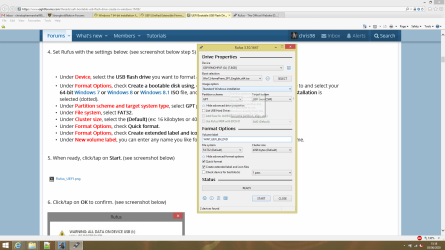
Now that is strange, because that's the tutorial I followed last time to create it. Using the official 64-bit ISO from Microsoft that I downloaded, I followed the tutorial again and re-created my USB from scratch using Rufus 3.10. I've attached a screenshot of the settings I used, and a log file which suggests (at least to me) the USB used UEFI settings when it was created. It certainly told me it was creating something to do with UEFI in the install.

So, I have now:

1) Created a new USB from scratch from the Microsoft ISO
2) Updated the installation media using this link: Update your Win 7 installation media
3) Added the Skylake USB drivers to my installation from this page: How to Install Windows 7 on Skylake based systems - Overcoming USB issues such as Keyboard not working or Installation Media not found - Stone Computers :: Knowledgebase
4) Changed the whole boot order in my bios to allow everything to load before Windows Boot Manager in case it was one of the other two USB boot options that was the right option, or the boot order was somehow changing something or preventing it from being detected.

I've then gone into the boot options menu when loading my PC after doing all of this, and only the same two options are there as before, the USB HDD and Windows Boot Manager. I'm also getting the same problem still with the installation.

Am I just completely fouling all of this up here and doing everything wrong? I really don't understand this because I'm doing everything exactly how it says.
 

Attachments

  • rufus screenshot.png
    rufus screenshot.png
    104.9 KB · Views: 1
  • Rufus Log.txt
    Rufus Log.txt
    64.3 KB · Views: 1

My Computer My Computer

Computer type
PC/Desktop
OS
Windows 7 64-bit
Hi guys, I wanted to let you know that I've managed to get everything working correctly. I also want to thank everyone who has helped me in this thread too, because I wouldn't have gotten this far without you. Ironically my computer now works better on Windows 7 than it ever did on Windows 8 or 8.1.

First of all, I discovered that my computer wouldn't allow me to run both Windows 7 & Windows 8 as a dual boot, probably because of an incompatibility in the bios. So I wiped Windows 8 off completely, and I decided to install just Windows 7 instead.

I went into the BIOS and changed the boot setting from UEFI to legacy, and that allowed me to properly boot the installation media. Once that had been done, I then cleaned my disk which got me past the GPT/MBR errors. This allowed me to install Windows 7 properly, leaving only the drivers.

To solve this problem, including the USB 3.0 drivers which meant no USB drivers worked and the network did not work either, I downloaded Kyki tools and turned it into a bootable USB stick. I downloaded the drivers on another computer, transferred them using the KyKi tools, which I booted, then I transferred them into Windows 7 & installed the drivers. I now have a fully working Windows 7 installation on my PC.

Hopefully this info will help anyone else who may be reading this topic.
 

My Computer My Computer

Computer type
PC/Desktop
OS
Windows 7 64-bit
Back
Top