Solved 4TB hard drive, how can I format it?

netrate

New member
Member
VIP
Local time
6:26 PM
Messages
174
I didn't realise that Win 7 only lets me format/partition 2TB of the hard drive with its simple volume. How can I get around this for my 4TB hard drive?
 

My Computer My Computer

At a glance

Win 7 dual boot with win 1016gigGTX
Computer type
PC/Desktop
OS
Win 7 dual boot with win 10
Motherboard
Gigabyte GA-970A-d3
Memory
16gig
Graphics Card(s)
GTX
Monitor(s) Displays
3
Hard Drives
500 gig ssd Samsung
People also ask

How do I format a 4TB hard drive in Windows 7?

1 Answer

  • Start Disk Management.
  • If the disk contains any partitions or volumes, right-click each and then click Delete Partition or Delete Volume, until the disk is all one unallocated space.
  • Right-click the MBR disk and then click Convert to GPT Disk.
  • Format the disk as one volume of type NTFS.
 

My Computers My Computers

  • At a glance

    Windows 7 Pro 64-bitI7-970032 GB
    Computer type
    PC/Desktop
    Computer Manufacturer/Model Number
    HP Elite 800 G5
    OS
    Windows 7 Pro 64-bit
    CPU
    I7-9700
    Memory
    32 GB
  • At a glance

    Windows 7 Pro 64-bit
    Computer type
    Laptop
    System Manufacturer/Model Number
    ASUS UX305C
    OS
    Windows 7 Pro 64-bit
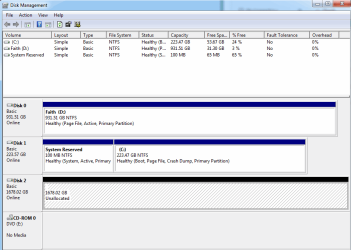
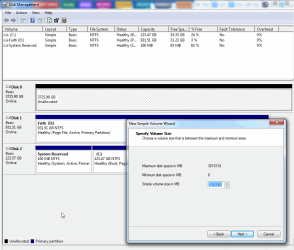
All of the options you refer to are GREYED OUT.
The only option available is "create simple volume"
This is a brand new, never used 4TB drive.
 

My Computer My Computer

At a glance

Win 7 dual boot with win 1016gigGTX
Computer type
PC/Desktop
OS
Win 7 dual boot with win 10
Motherboard
Gigabyte GA-970A-d3
Memory
16gig
Graphics Card(s)
GTX
Monitor(s) Displays
3
Hard Drives
500 gig ssd Samsung
When install Windows 7, your BIOS should setup UFEI mode than CSM mode.

- - - Updated - - -

image.png
 

My Computers My Computers

  • At a glance

    Windows 7 Pro 64-bitI7-970032 GB
    Computer type
    PC/Desktop
    Computer Manufacturer/Model Number
    HP Elite 800 G5
    OS
    Windows 7 Pro 64-bit
    CPU
    I7-9700
    Memory
    32 GB
  • At a glance

    Windows 7 Pro 64-bit
    Computer type
    Laptop
    System Manufacturer/Model Number
    ASUS UX305C
    OS
    Windows 7 Pro 64-bit
Will this affect any of the other hard drives presently in the system? I am wondering if I should just take the OEM drive and make it a portable USB drive. Would that have any effect?
 

My Computer My Computer

At a glance

Win 7 dual boot with win 1016gigGTX
Computer type
PC/Desktop
OS
Win 7 dual boot with win 10
Motherboard
Gigabyte GA-970A-d3
Memory
16gig
Graphics Card(s)
GTX
Monitor(s) Displays
3
Hard Drives
500 gig ssd Samsung

My Computers My Computers

  • At a glance

    Windows 7 Pro 64-bitI7-970032 GB
    Computer type
    PC/Desktop
    Computer Manufacturer/Model Number
    HP Elite 800 G5
    OS
    Windows 7 Pro 64-bit
    CPU
    I7-9700
    Memory
    32 GB
  • At a glance

    Windows 7 Pro 64-bit
    Computer type
    Laptop
    System Manufacturer/Model Number
    ASUS UX305C
    OS
    Windows 7 Pro 64-bit
Ok, I gues I wasn't being clear enough, sorry about that. This is going to be used as a backup drive only. This will not be a boot drive. Just for storage.
 

My Computer My Computer

At a glance

Win 7 dual boot with win 1016gigGTX
Computer type
PC/Desktop
OS
Win 7 dual boot with win 10
Motherboard
Gigabyte GA-970A-d3
Memory
16gig
Graphics Card(s)
GTX
Monitor(s) Displays
3
Hard Drives
500 gig ssd Samsung
The feature is same
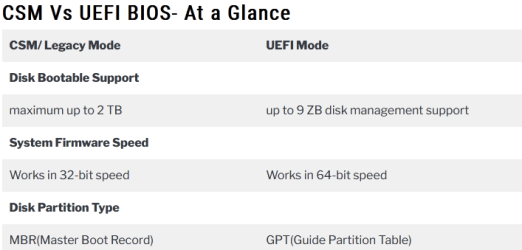
Win 7 in CSM mode can see upto 2TB. hence the 4TB cannot be seen. If you do format, only 2TB on it is visible.
Win 7 in UFEI/GPT mode can see upto 9ZB. hence you can fully take advantage of the 4TB.
 

My Computers My Computers

  • At a glance

    Windows 7 Pro 64-bitI7-970032 GB
    Computer type
    PC/Desktop
    Computer Manufacturer/Model Number
    HP Elite 800 G5
    OS
    Windows 7 Pro 64-bit
    CPU
    I7-9700
    Memory
    32 GB
  • At a glance

    Windows 7 Pro 64-bit
    Computer type
    Laptop
    System Manufacturer/Model Number
    ASUS UX305C
    OS
    Windows 7 Pro 64-bit
Just for storage.

You need to make the 4tb disk gpt partition style.

It has nothing to do with csm.

post a screenshot of disk management window
 

My Computers My Computers

  • At a glance

    7 X64i5 84002x8gb 3200mhz
    Computer type
    PC/Desktop
    OS
    7 X64
    CPU
    i5 8400
    Motherboard
    gigabyte b365m ds3h
    Memory
    2x8gb 3200mhz
    Hard Drives
    various
    PSU
    pure power 11 400w cm
    Case
    Coolermaster
    Cooling
    cryorig m9i
  • At a glance

    7x64g54008gb ddr4 2400
    Computer type
    PC/Desktop
    OS
    7x64
    CPU
    g5400
    Motherboard
    ga b365m ds3h
    Memory
    8gb ddr4 2400
    PSU
    xfx pro 450w
Here is a screen shot - the drive is now being set up as an external USB enclosure. Right clicking only bring up NEW SIMPLE VOLUME. Everything else is greyed out. I can put it back inside of my case to use internally if needed.
disk management1.png
 

My Computer My Computer

At a glance

Win 7 dual boot with win 1016gigGTX
Computer type
PC/Desktop
OS
Win 7 dual boot with win 10
Motherboard
Gigabyte GA-970A-d3
Memory
16gig
Graphics Card(s)
GTX
Monitor(s) Displays
3
Hard Drives
500 gig ssd Samsung
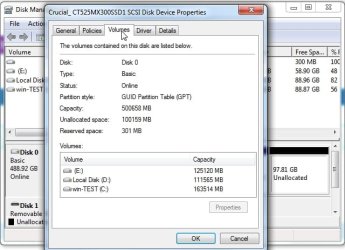
rt click on the words Disk 2

select properties and then click the Volumes tab

that will tell the partition style

diskmgmt-properties.jpg

- - - Updated - - -

If your disk is already GPT you can go ahead and create new volumes and will be able to utilize all 4tb.

If your disk is MBR partition style, you will only be able create new volumes up to to 2tb. Half the disk would be wasted.

Therefore, if it is MBR style the sensible thing is to convert it to GPT
 

My Computers My Computers

  • At a glance

    7 X64i5 84002x8gb 3200mhz
    Computer type
    PC/Desktop
    OS
    7 X64
    CPU
    i5 8400
    Motherboard
    gigabyte b365m ds3h
    Memory
    2x8gb 3200mhz
    Hard Drives
    various
    PSU
    pure power 11 400w cm
    Case
    Coolermaster
    Cooling
    cryorig m9i
  • At a glance

    7x64g54008gb ddr4 2400
    Computer type
    PC/Desktop
    OS
    7x64
    CPU
    g5400
    Motherboard
    ga b365m ds3h
    Memory
    8gb ddr4 2400
    PSU
    xfx pro 450w
Ok it is set to MBR. So what is the process of setting it to GPT that won't affect my entire system?
 

My Computer My Computer

At a glance

Win 7 dual boot with win 1016gigGTX
Computer type
PC/Desktop
OS
Win 7 dual boot with win 10
Motherboard
Gigabyte GA-970A-d3
Memory
16gig
Graphics Card(s)
GTX
Monitor(s) Displays
3
Hard Drives
500 gig ssd Samsung
It wont affect anything else.

open an administrator command prompt and type :

diskpart
(then press enter, it might take a couple of seconds for the next prompt > to appear)
lis dis
(then press enter)
( you will see the number for your 4tb disk , probably disk2 )
( select the number it shows for your 4tb disk)
sel dis 2
(then press enter)
clean
(then press enter)
convert gpt
(then press enter)

(to get out of diskpart type)
exi
(then press enter)
 

My Computers My Computers

  • At a glance

    7 X64i5 84002x8gb 3200mhz
    Computer type
    PC/Desktop
    OS
    7 X64
    CPU
    i5 8400
    Motherboard
    gigabyte b365m ds3h
    Memory
    2x8gb 3200mhz
    Hard Drives
    various
    PSU
    pure power 11 400w cm
    Case
    Coolermaster
    Cooling
    cryorig m9i
  • At a glance

    7x64g54008gb ddr4 2400
    Computer type
    PC/Desktop
    OS
    7x64
    CPU
    g5400
    Motherboard
    ga b365m ds3h
    Memory
    8gb ddr4 2400
    PSU
    xfx pro 450w
I followed the instructions, but it still says there is only 1.7TB but the volume is not GPT
 

My Computer My Computer

At a glance

Win 7 dual boot with win 1016gigGTX
Computer type
PC/Desktop
OS
Win 7 dual boot with win 10
Motherboard
Gigabyte GA-970A-d3
Memory
16gig
Graphics Card(s)
GTX
Monitor(s) Displays
3
Hard Drives
500 gig ssd Samsung

My Computers My Computers

  • At a glance

    7 X64i5 84002x8gb 3200mhz
    Computer type
    PC/Desktop
    OS
    7 X64
    CPU
    i5 8400
    Motherboard
    gigabyte b365m ds3h
    Memory
    2x8gb 3200mhz
    Hard Drives
    various
    PSU
    pure power 11 400w cm
    Case
    Coolermaster
    Cooling
    cryorig m9i
  • At a glance

    7x64g54008gb ddr4 2400
    Computer type
    PC/Desktop
    OS
    7x64
    CPU
    g5400
    Motherboard
    ga b365m ds3h
    Memory
    8gb ddr4 2400
    PSU
    xfx pro 450w
Here is the screen shot :
disk management2.png
 

My Computer My Computer

At a glance

Win 7 dual boot with win 1016gigGTX
Computer type
PC/Desktop
OS
Win 7 dual boot with win 10
Motherboard
Gigabyte GA-970A-d3
Memory
16gig
Graphics Card(s)
GTX
Monitor(s) Displays
3
Hard Drives
500 gig ssd Samsung
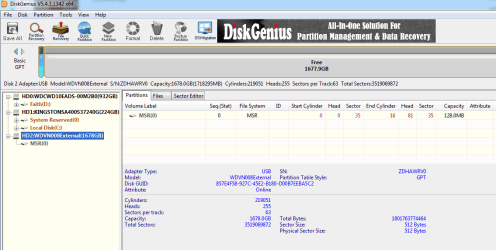
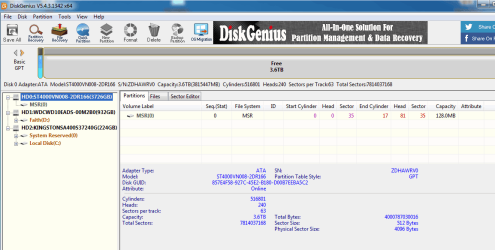
Diskgenius says it is GPT

WDVN008. Does anybody recognize that ?
 

My Computers My Computers

  • At a glance

    7 X64i5 84002x8gb 3200mhz
    Computer type
    PC/Desktop
    OS
    7 X64
    CPU
    i5 8400
    Motherboard
    gigabyte b365m ds3h
    Memory
    2x8gb 3200mhz
    Hard Drives
    various
    PSU
    pure power 11 400w cm
    Case
    Coolermaster
    Cooling
    cryorig m9i
  • At a glance

    7x64g54008gb ddr4 2400
    Computer type
    PC/Desktop
    OS
    7x64
    CPU
    g5400
    Motherboard
    ga b365m ds3h
    Memory
    8gb ddr4 2400
    PSU
    xfx pro 450w
This is a brand new drive, just got it from Staples today. I haven't done anything to it yet except what you have asked me and viewed what Disk Management had to say.
Would it be better to make it internal again?
 

My Computer My Computer

At a glance

Win 7 dual boot with win 1016gigGTX
Computer type
PC/Desktop
OS
Win 7 dual boot with win 10
Motherboard
Gigabyte GA-970A-d3
Memory
16gig
Graphics Card(s)
GTX
Monitor(s) Displays
3
Hard Drives
500 gig ssd Samsung
Would it be better to make it internal again?

Yes.


What enclosure did you put it in?
 

My Computers My Computers

  • At a glance

    7 X64i5 84002x8gb 3200mhz
    Computer type
    PC/Desktop
    OS
    7 X64
    CPU
    i5 8400
    Motherboard
    gigabyte b365m ds3h
    Memory
    2x8gb 3200mhz
    Hard Drives
    various
    PSU
    pure power 11 400w cm
    Case
    Coolermaster
    Cooling
    cryorig m9i
  • At a glance

    7x64g54008gb ddr4 2400
    Computer type
    PC/Desktop
    OS
    7x64
    CPU
    g5400
    Motherboard
    ga b365m ds3h
    Memory
    8gb ddr4 2400
    PSU
    xfx pro 450w
Just a typical enclosure I had for hard drives, nothing unique about it. I will install into the case and try DiskGenius again.

- - - Updated - - -

Here it is , internal install.
.disk management3.png
and here is disk management :
disk management4.png

- - - Updated - - -

SOLVED

It has been formatted and working.
Solved. thank you.
 

My Computer My Computer

At a glance

Win 7 dual boot with win 1016gigGTX
Computer type
PC/Desktop
OS
Win 7 dual boot with win 10
Motherboard
Gigabyte GA-970A-d3
Memory
16gig
Graphics Card(s)
GTX
Monitor(s) Displays
3
Hard Drives
500 gig ssd Samsung
Back
Top