4TB HDD suddenly RAW

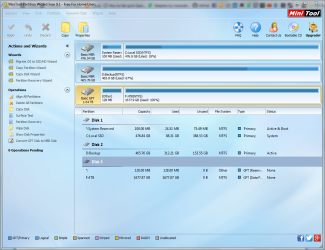
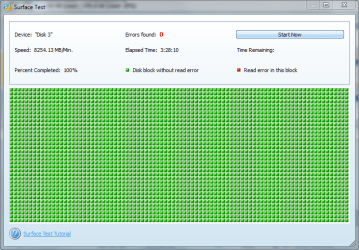
So I ran a surface test using MiniTool while I was at work. Not sure if this gives us a better insight to the file structure or not. But I'm gonna go check out that thread you link and possibly try CHKDSK. I'v got nothing else to lose, I've recovered what I can for now... If I lose anything else off the disk (It's gonna suck) but I can replace most of it.
Untitled9.png
 

My Computer My Computer

At a glance

Win 7 Ultimate 64-bitIntel i716GB Corsair VengenceGigabyte
Computer type
PC/Desktop
Computer Manufacturer/Model Number
Custom
OS
Win 7 Ultimate 64-bit
CPU
Intel i7
Motherboard
MSI MPower
Memory
16GB Corsair Vengence
Graphics Card(s)
Gigabyte
Okay hang on, so I just had to reboot my computer (After leaving it run for 10+ hrs while I was at work, It decided to get hung up on me).

In starting PW I noticed something a little different.
Untitled10.png
My Drive is now showing as NTFS instead of Other and it shows the label that I had on it "4TB"
My windows explorer still shows that it is RAW though.

I haven't done CHKDSK yet, as I figure maybe this new discovery would change your mind on which way we should take this

EDIT: I ran a quick scan and opened the partition explorer...nothing to show. However, the files where still showing in GetDataBack. So I'm now running a full scan in PW to see if we can't get the files to show in partition explorer on PW.
 
Last edited:

My Computer My Computer

At a glance

Win 7 Ultimate 64-bitIntel i716GB Corsair VengenceGigabyte
Computer type
PC/Desktop
Computer Manufacturer/Model Number
Custom
OS
Win 7 Ultimate 64-bit
CPU
Intel i7
Motherboard
MSI MPower
Memory
16GB Corsair Vengence
Graphics Card(s)
Gigabyte
I wish you had made full image backups of your known good partitions onto external media before experimenting. My experience has been...restoring those good partitions sure saved my beef bacon 'cause during the process of restoring one partition sometimes led to the Un-Allocation of another formerly known good partition. I hope you have a much smoother restoration than I did!
 

My Computer My Computer

At a glance

Windows 7 Professional 64-bitDesktop i5; Acers i5 & i7desktop 16GB; 1 Acer 8GB & 1 Acer 16GB
Computer type
PC/Desktop
Computer Manufacturer/Model Number
Antec desktop; Acer Aspire laptops
OS
Windows 7 Professional 64-bit
CPU
Desktop i5; Acers i5 & i7
Memory
desktop 16GB; 1 Acer 8GB & 1 Acer 16GB
Hard Drives
1TB split into 2 equal partitions [OS and data] usable by RJS
Internet Speed
AT&T DSL
Browser
FF, GChrome, msIE
Other Info
Windows 7 Firewall, Emsisoft AM/AV, MSE [scan-only], SpywareBlaster, Ruiware/BillP combine
The thing is, it's all one 4TB partition. I'm not sure why It shows in two 2TB partitions (and some places only one). And I had a drive for backups, but recently gave it to my sister to store all of her pics from a dinosaur of a computer.
 

My Computer My Computer

At a glance

Win 7 Ultimate 64-bitIntel i716GB Corsair VengenceGigabyte
Computer type
PC/Desktop
Computer Manufacturer/Model Number
Custom
OS
Win 7 Ultimate 64-bit
CPU
Intel i7
Motherboard
MSI MPower
Memory
16GB Corsair Vengence
Graphics Card(s)
Gigabyte
I see the change in Partition Wizard. But I don't think a Full Scan is going to bringout anything. Anyway let us see when full scan completes.
 

My Computer My Computer

At a glance

Windows 7 Home Premium 32 bit
OS
Windows 7 Home Premium 32 bit
....I haven't done CHKDSK yet, as I figure maybe this new discovery would change your mind on which way we should take this........

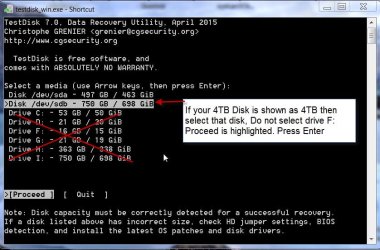
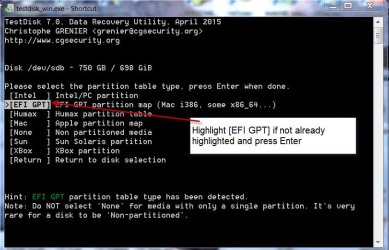
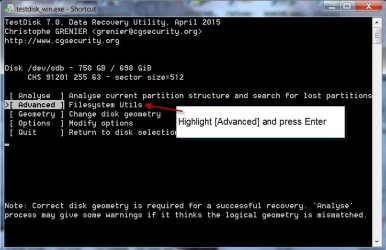
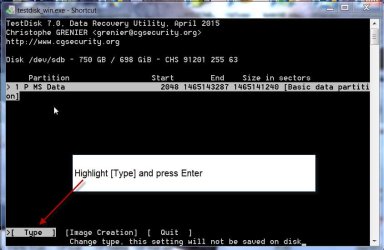
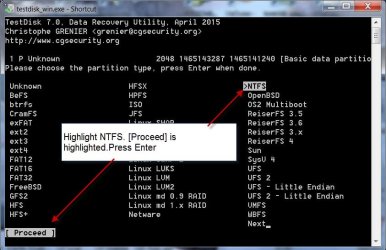
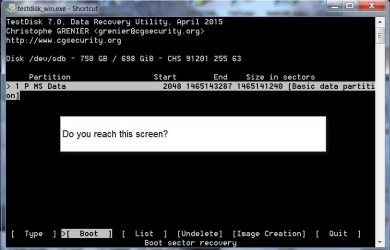
I would still go with TestDisk once again and check whether I could get it list all files ( after the change in the PW screenshot). If I find any files that I haven't copied with Getdataback I would copy those. Then I would run checkdisk.

TestDisk procedure I envisage: ( I am not sure whether you are going to get the same screens . Try and let me know. We are still experimenting :D)

A14-05-2017 17-55-38.jpg

B14-05-2017 18-02-51.jpg

C14-05-2017 18-05-48.jpg

D14-05-2017 18-07-49.jpg

E14-05-2017 18-10-51.jpg

F14-05-2017 18-13-31.jpg

G14-05-2017 18-16-52.jpg

When you reach the last screen move the highlight to List and check for the files.

OK what I have done is on my experimental trial drive. You may get different screens. Aim is to get to the screen where you can List the files. Use your best judgement to reach this screen. I am sure you are more competent now in using TestDisk. ( Take care not to give any write command like Rebuild BS ( Rebuild Boot sector) or write new bootsector )
 
Last edited:

My Computer My Computer

At a glance

Windows 7 Home Premium 32 bit
OS
Windows 7 Home Premium 32 bit
Full scan, as you predicted, did nothing.
Going through TestDisk yielded "No file found, filesystem may be damaged" after I hit
 

My Computer My Computer

At a glance

Win 7 Ultimate 64-bitIntel i716GB Corsair VengenceGigabyte
Computer type
PC/Desktop
Computer Manufacturer/Model Number
Custom
OS
Win 7 Ultimate 64-bit
CPU
Intel i7
Motherboard
MSI MPower
Memory
16GB Corsair Vengence
Graphics Card(s)
Gigabyte
OK, I have nothing else to suggest except take a chance with checkdisk.
 

My Computer My Computer

At a glance

Windows 7 Home Premium 32 bit
OS
Windows 7 Home Premium 32 bit
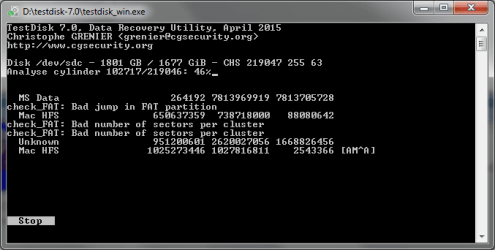
Okay, so I've had a full scan running on /dev/sdc using Testdisk for probably ~13 hours or so now...
Untitled11.png
Please translate this for me.
I still have yet to run CHKDSK, I'm holding out hope that something else will work before having to run the risk of CHKDSK.
 

My Computer My Computer

At a glance

Win 7 Ultimate 64-bitIntel i716GB Corsair VengenceGigabyte
Computer type
PC/Desktop
Computer Manufacturer/Model Number
Custom
OS
Win 7 Ultimate 64-bit
CPU
Intel i7
Motherboard
MSI MPower
Memory
16GB Corsair Vengence
Graphics Card(s)
Gigabyte
No point. Unless your Disk /dev/sdc shows its full capacity of 4TB in the second screen, doing a quick search or deep search is pointless. And that Quick Search and Deep search is done only to find lost partitions ( Partition Table corruption in sector 0) What TestDisk shows taking the volume as 1801GB/1607GiB is all gibberish and has no meaning or status to be acted upon.

Yours is clearly a file system corruption. Partition Wizard Quick Scan and Full Scan has already shown that the volume boot record at sector 2048 where the first partition should start is not there.

You can try whatever you want but the final destination is a)checkdisk and b) disk health check by the manufacturer's utility. It can be b) and then a) also. If b) says your disk is bad then a) gets automatically cancelled..
 

My Computer My Computer

At a glance

Windows 7 Home Premium 32 bit
OS
Windows 7 Home Premium 32 bit
Okay a little update. After the full scan had finished, I rebooted my computer. In doing so, during boot it said that drive F should be checked...I allowed it and let it run over night.

Untitled12.png

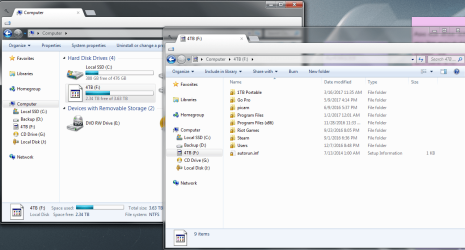
On the left, you can see the 4TB is usable. The icon isn't showing but I can get into it. On the right is the root of the F drive. First thing I notice is the locks on the folders. I can open an manipulate everything in them. (I think it's just because the permissions have been completely stripped from the folders.) The second thing I noticed is my Music folder (Which resides on the root of the drive) is missing. And I'm sure there may be other things missing too that I just haven't noticed yet.

Untitled13.png

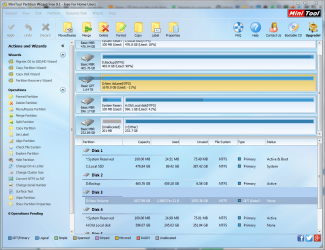
Unfortunately PW still only shows half the drive, as did Test disk for /dev/sdc. Running a deep scan using GetDataBack and will also try Recuva for the music folder.

Will update again with results
 

My Computer My Computer

At a glance

Win 7 Ultimate 64-bitIntel i716GB Corsair VengenceGigabyte
Computer type
PC/Desktop
Computer Manufacturer/Model Number
Custom
OS
Win 7 Ultimate 64-bit
CPU
Intel i7
Motherboard
MSI MPower
Memory
16GB Corsair Vengence
Graphics Card(s)
Gigabyte
Okay, CHKDSK ran but didn't do anything to help. I've formatted the drive and now its only showing 2TB max. how to I get full use of the drive back?
 

My Computer My Computer

At a glance

Win 7 Ultimate 64-bitIntel i716GB Corsair VengenceGigabyte
Computer type
PC/Desktop
Computer Manufacturer/Model Number
Custom
OS
Win 7 Ultimate 64-bit
CPU
Intel i7
Motherboard
MSI MPower
Memory
16GB Corsair Vengence
Graphics Card(s)
Gigabyte
Did you initialise it as GPT before formatting? Please post a screenshot of how your drive looks in Partition izard. Also let me know the manufacturer and model number of the drive.
 

My Computer My Computer

At a glance

Windows 7 Home Premium 32 bit
OS
Windows 7 Home Premium 32 bit
Well, the drive was already GPT before formatting.

However, after taking the drive out of my computer and plugging it into my bare drive bay, it reads at 4TB. I've since partitioned the drive into two partitions. (Do you think that'll help windows deal the fact that it's over 2TB?)
~~~~~~~~~
Okay, I just checked it in PW...and well,, look at this weirdness.
Untitled.png

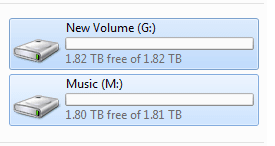
But as you can see in windows explorer, the two partitions.
Untitdled.png

Also the model is WDC_WD40EZRX-00SPEB0. It's a Western Digital Green
 

My Computer My Computer

At a glance

Win 7 Ultimate 64-bitIntel i716GB Corsair VengenceGigabyte
Computer type
PC/Desktop
Computer Manufacturer/Model Number
Custom
OS
Win 7 Ultimate 64-bit
CPU
Intel i7
Motherboard
MSI MPower
Memory
16GB Corsair Vengence
Graphics Card(s)
Gigabyte
You have disclosed some new information hitherto unknown to me. Either you didn't put it across before or I missed it - most unlikely. You have a dock. Confirm.

A dock has some specifications, how many GB/TB HDD each bay can handle, and the total HDD capacity it can handle. This can create a wraparound problem if you put a larger capacity drive into a bay. For example if each bay can handle 2TB and you put a 4TB drive into it after 2TB of data is written any further data will wraparound and start writing from the beginning overwriting the old data. The dock may also muck up your HDD in many ways. ( Sector 0 , other volume boot records, GPT drive partition header, partition table, and the partition data backups))

OK, now please do this. Connect your 4TB drive as an internal drive. Do a full erase using WD Datalifeguard Diagnostic for Windows. http://support.wdc.com/downloads.aspx?lang=en Essentially you are writing zeros to all sectors and a clean wipe to clear all muck. For a 4TB drive it may take hours. So do it overnight.

Once a full erase is completed, when you reboot you will need to initialise the disk as GPT. Create as many volumes as you would like and format.

As far as the dock is concerned, check its specification and comply with it. Older docks can handle only 2TB HDDs /bay.
 

My Computer My Computer

At a glance

Windows 7 Home Premium 32 bit
OS
Windows 7 Home Premium 32 bit
You have disclosed some new information hitherto unknown to me. Either you didn't put it across before or I missed it - most unlikely. You have a dock. Confirm.
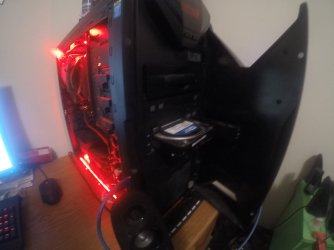
Yes this is new information. But no, its not so much a dock as it is a front loading bay. Basically, I can plug-in HDDs from other computers without having to open computer case every time. I think you have the misconception that I've been using it as a mount point for the HDD...this isn't the case. The HDD has always been an internal HDD ever since I purchased it (yes, it was a desktop drive, but never used as such).

GOPR0568.JPG

...if each bay can handle 2TB and you put a 4TB drive into it after 2TB of data is written any further data will wraparound and start writing from the beginning overwriting the old data.
Again, not the case. I only mounted the 4TB HDD to this bay as it was the easiest way to test another connection (making sure its not my SATA cable or the SATA port on the motherboard that might be causing this problem). As soon as I had it in the bay, it read as 4TB and I turned off the computer and reinstalled it internally...at which point it continued to read as 4TB.

I'll run the zero fill format and see what good it does as far as showing in PW afterward
Looks like that utility doesn't support WD Green.
But I'm pretty sure I can write zeros using PW.
 
Last edited:

My Computer My Computer

At a glance

Win 7 Ultimate 64-bitIntel i716GB Corsair VengenceGigabyte
Computer type
PC/Desktop
Computer Manufacturer/Model Number
Custom
OS
Win 7 Ultimate 64-bit
CPU
Intel i7
Motherboard
MSI MPower
Memory
16GB Corsair Vengence
Graphics Card(s)
Gigabyte
OK, It is a drive bay built into the case.

You must check the drive properly with Datalifeguard Diagnostic for Windows. It should work with/test all WD drives, no exceptions.. See the WD Green support page here http://support.wdc.com/product.aspx?ID=608. You can download Datalifeguard Diagnostic for Windows from this page also. ( It will be the same v1.31) See the User Guide here [url="http://support.wdc.com/knowledgebase/answer.aspx?ID=940"]Testing a drive for problems using Data Lifeguard Diagnostics for Windows | WD Support
[/URL]. When run it should enumerate all the WD drives alongwith their capacity. If your 4 TB drive is not enumerated with full capacity shown , God help you. But next to God, contact WD Tech support and discuss with them on what you should do further.

If your 4TB drive is recognised with full capacity, then run the Quick Test, Extended Test and check the results. You should also be able to Full Erase the drive if the Quick Test and extended test pass..
 

My Computer My Computer

At a glance

Windows 7 Home Premium 32 bit
OS
Windows 7 Home Premium 32 bit
Back
Top