Recover a GPT Partition that became RAW in 3T Internal HDD

RFG

New member
Local time
4:35 AM
Messages
27
Hello everybody


I've been following this forum for many years and already "saved" me a few times in the past, but despite already are a few similar threads where this subject/topic was covered or treated, my case is slightly different from the one's i saw.


I am talking about a couple of topics opened on this forum in the past:

External HDD suddenly requires formatting, read as RAW instead of ntfs

and

4TB Seagate drive in enclosure suddenly became RAW

I have read them carefully and after trying to follow all the steps/options described there, i wasn't able to recover my partition and ofc it led me to open this new thread instead of revive one of the older ones.


My Problem:

One of the partitions of my secondary HDD (Toshiba P300 3T) became RAW. I would like to recover the partition again without or with minimum data loss.


Facts and Figures:

I have a Desktop PC with an ASUS P6X58D-E motherboard.

I have the Win7 X64 running on a Samsung 500G SSD drive and then I have 3 additional internal SATA drives for backup and storage. Of these last three, two drives have 1T of space and another 3T drive which is the target of this problem.

What happened was that about a month ago I bought a new SSD disk to improve the performance of my desktop. To install it, i've unplugged all the other HDDs from the board, connected my new ssd, made a fresh install of the Win7 x64, all the drivers etc... all good. Then after that i plugged all my secondary internal SATA discs again and the system recognized them all without problem with all their partitions looking and working ok in all the drives.

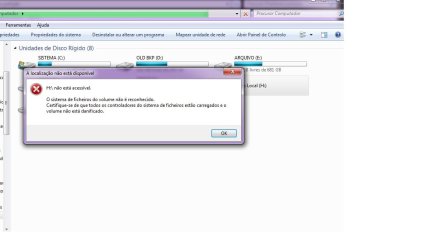
Suddently, about a week ago, the Toshiba P300 3T HDD saw one of its three partitions became RAW. I can't precise exactly what i was doing. Just noticed it randomly, when i've tryed to access a few documents and the message "You need to format H:" appeared. I canceled and since then i've been in a hard task to recover my partition.

My suspect is that somehow the PBR from that HDD got corrupted.

When i try to run checkdsk (without any options /f /r...) it returns this message:

"The type of file system is NTFS.
The first boot sector is unreadable or corrupted
Reading second boot sector instead
Unable to determine the version and volume state. CHKDSK aborted.
"

After this i read the threads mentioned above and tryed to follow Jumanji steps but i got no lucky because there are a few things different and i am afraid to loose all the data if i make a wrong move or decision.

SMART test says all is good. No bad secctors on HDD. HDTune Pro info about the drive says its all physically good.

Strange things:

+ In windows disk manager the HDD show all the drive with it's correct size (3T) and all the 3 partitions of that drive with its correct sizes (each of 1T).

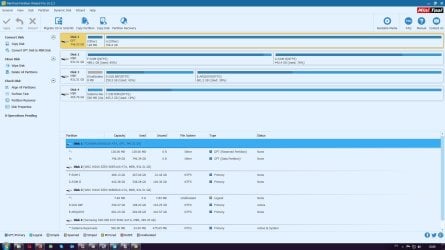
+ Other disc manager tools like Easus Partition Manager, Mini Tools Partition Wizard, AOMEI partition Assistant return wrong sizes of disc/partition.

+ Testdisk 7.1 and Bootice also don't recognize the full capacity of this drive. So i am afraid to use them.

+ WinHex shows the two first sector of the drive filled with 00 and gives a strange warning message.

+ Easeus data recovery can detect the partition and lots of data but everything is a mess and the folder structure is gone. Not all the documents i look for are there too, or have wrong names and/or sizes.


I dunno what to do next and feel exhausted with this situation.


It's important for me to fix this for 2 reasons. First i want my data back as there are very important things that i need to get back. Second, i would like to know what happened to prevent this from happening again.

I am going to attach a few images of some tests i already did. I havent tryed to write or use that partition anymore since the problem occur.


Thanks in advance for any help!


RFG
 

Attachments
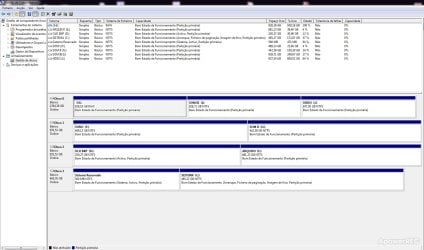
  • dskmng2.jpg
    dskmng2.jpg
    165.7 KB · Views: 1
  • warning message2.jpg
    warning message2.jpg
    42.9 KB · Views: 0
Last edited:

My Computer My Computer

At a glance

Windows 7 Ultimate x64Intel I7 920
Computer type
PC/Desktop
OS
Windows 7 Ultimate x64
CPU
Intel I7 920
Motherboard
Asus P6X58D-E
Hard Drives
1xSamsung 860 EVO 500G
2xWD Blue 1T
1xToshiba P300 3T
I'll add a few extra printscreens with a few extra infos...


Thanks in advance for any help!
 

Attachments

  • test disk.jpg
    test disk.jpg
    41.9 KB · Views: 4
  • bootice.jpg
    bootice.jpg
    29.8 KB · Views: 1
  • mini tool.jpg
    mini tool.jpg
    151.7 KB · Views: 5
Last edited:

My Computer My Computer

At a glance

Windows 7 Ultimate x64Intel I7 920
Computer type
PC/Desktop
OS
Windows 7 Ultimate x64
CPU
Intel I7 920
Motherboard
Asus P6X58D-E
Hard Drives
1xSamsung 860 EVO 500G
2xWD Blue 1T
1xToshiba P300 3T

I'll add a few extra printscreens with a few extra infos...


Thanks in advance for any help!
 

My Computer My Computer

At a glance

Windows 7 Ultimate x64Intel I7 920
Computer type
PC/Desktop
OS
Windows 7 Ultimate x64
CPU
Intel I7 920
Motherboard
Asus P6X58D-E
Hard Drives
1xSamsung 860 EVO 500G
2xWD Blue 1T
1xToshiba P300 3T
Hi RFG,

Welcome to Seven Forums. I have just given one reading of your post. Let me grasp it fully before I continue.I shall be back in another half an hour or so after dinner.
 

My Computer My Computer

At a glance

Windows 7 Home Premium 32 bit
OS
Windows 7 Home Premium 32 bit
Hi RFG,

Welcome to Seven Forums. I have just given one reading of your post. Let me grasp it fully before I continue.I shall be back in another half an hour or so after dinner.


Hello Jumanji


Thank you very much for reading.

I saw that you already dealt and helped people with similar problems in the past. I've tryed to do everything i can before post this here, but my ability to deal with this alone is not enough.


Take your time, i'll be around!


Thanks again for your help!


R
 

My Computer My Computer

At a glance

Windows 7 Ultimate x64Intel I7 920
Computer type
PC/Desktop
OS
Windows 7 Ultimate x64
CPU
Intel I7 920
Motherboard
Asus P6X58D-E
Hard Drives
1xSamsung 860 EVO 500G
2xWD Blue 1T
1xToshiba P300 3T
Too many confusing screenshots, which I would like to forget and start afresh. I amn't going to get biased with those.

First your country? Is the local time shown in your posts correct?

Please post a fresh screenshot of Windows Disk Management. ( Do not upload the previous screenshot )
 

My Computer My Computer

At a glance

Windows 7 Home Premium 32 bit
OS
Windows 7 Home Premium 32 bit
You have Partition Wizard Pro. Have you tried its "partition recovery" function? That might work.
 

My Computer My Computer

At a glance

Windows 7 Pro x64 (1), Win7 Pro X64 (2)i5-3350p 3.1Ghz/6MB-cache (1); E8400 3.0Ghz/6...8GB PC3-12800 DDR3 (1); 4GB PC3-10600 DDR3 (2)ATI HD7750 (1), (see TV cards); ATI R7 250 (2)
Computer type
PC/Desktop
Computer Manufacturer/Model Number
Home-built, two systems (1) and (2)
OS
Windows 7 Pro x64 (1), Win7 Pro X64 (2)
CPU
i5-3350p 3.1Ghz/6MB-cache (1); E8400 3.0Ghz/6MB-cache (2)
Motherboard
ASUS P8Z77-V Pro (1); ASUS P5Q3 (2)
Memory
8GB PC3-12800 DDR3 (1); 4GB PC3-10600 DDR3 (2)
Graphics Card(s)
ATI HD7750 (1), (see TV cards); ATI R7 250 (2)
Sound Card
Realtek ALC892 HD Audio (1); Realtek ALC1200 HD Audio (2)
Monitor(s) Displays
Eizo HD2441W LCD, Eizo S2433W (1); Eizo 24" S2433W (2)
Screen Resolution
1920x1200, 1920x1200 (1); 1920x1200 (2)
Hard Drives
(1) 1TB SATA-II (7200RPM), 2x2TB SATA-III (7200RPM), 250GB SATA-III (10000RPM) for OS; 2x2TB external USB 3.0

(2) 320GB SATA-II (7200RPM), 750GB SATA-II (7200RPM), 150GB SATA-II (10000RPM) for OS; 2TB external USB 3.0
PSU
Nesteq ECS-6001 600W (1); Nesteq ECS-5001 500W (2)
Case
Acousti-Case 360 (1) and (2)
Cooling
Noctua NH-U12P SE2 for CPU, 2x120mm case fans (1) and (2)
Keyboard
IBM PS/2 (1) and (2)
Mouse
Logitech MX Revolution wireless (1); Microsoft wired (2)
Internet Speed
100mbps down / 10mbps up
Antivirus
Microsoft Security Essentials; Malwarebyte Anti-Malware Pro
Browser
Firefox
Other Info
Ceton InfiniTV 4-tuner cablecard-enabled TV card as well as Hauppauge HVR-2250 OTA/ATSC 2-tuner TV card in (1), running under Win7 WMC
Too many confusing screenshots, which I would like to forget and start afresh. I amn't going to get biased with those.

First your country? Is the local time shown in your posts correct?

Please post a fresh screenshot of Windows Disk Management. ( Do not upload the previous screenshot )


GMT time here ;)
I know we're in different time zones with 5.30hrs of difference, but i will try to reply to your requests always asap...

Here is the print screen that you're asking for:
 

Attachments

  • windskmng.jpg
    windskmng.jpg
    213.1 KB · Views: 5
Last edited:

My Computer My Computer

At a glance

Windows 7 Ultimate x64Intel I7 920
Computer type
PC/Desktop
OS
Windows 7 Ultimate x64
CPU
Intel I7 920
Motherboard
Asus P6X58D-E
Hard Drives
1xSamsung 860 EVO 500G
2xWD Blue 1T
1xToshiba P300 3T

My Computer My Computer

At a glance

Windows 7 Ultimate x64Intel I7 920
Computer type
PC/Desktop
OS
Windows 7 Ultimate x64
CPU
Intel I7 920
Motherboard
Asus P6X58D-E
Hard Drives
1xSamsung 860 EVO 500G
2xWD Blue 1T
1xToshiba P300 3T
OK. Fine and there is no change from the previous screenshot. That is good.

There is no need for you to buy Partition Wizard Pro as suggested by dsperber. We shall try our best to recover the data or restore the disk to the previous state with freeware. In data recovery nothing is definite until it becomes definite one way or the other. So which way the wind will blow we don't know.

Now do this and post a screenshot which I will see only tom morning that is some 10 hours from now.So you have enough time to do it slowly.

Download and install Partition Wizard Free version 9.1 from MiniTool Partition Wizard Free 11 Download for Windows / Old Versions / FileHorse.com ( Uninstall the later version you have now before installing this older version. In later versions Partition Recovery which we are going to try is not free )

Run version 9.1, and launch it. Say no if it asks you to update to a later version, and post a screenshot of how your drives look like in it - the very first screen after you launch it.

After posting the screenshot close Partition Wizard. Wait for my instructions tomorrow on how to proceed further. No need to be in a hurry. We shall do it slowly step by step.

If PW fails to find the partitions, I shall go to examining your drive with bootice. You already have it.
 

My Computer My Computer

At a glance

Windows 7 Home Premium 32 bit
OS
Windows 7 Home Premium 32 bit
OK. Fine and there is no change from the previous screenshot. That is good.

There is no need for you to buy Partition Wizard Pro as suggested by dsperber. We shall try our best to recover the data or restore the disk to the previous state with freeware. In data recovery nothing is definite until it becomes definite one way or the other. So which way the wind will blow we don't know.

Now do this and post a screenshot which I will see only tom morning that is some 10 hours from now.So you have enough time to do it slowly.

Download and install Partition Wizard Free version 9.1 from MiniTool Partition Wizard Free 11 Download for Windows / Old Versions / FileHorse.com ( Uninstall the later version you have now before installing this older version. In later versions Partition Recovery which we are going to try is not free )

Run version 9.1, and launch it. Say no if it asks you to update to a later version, and post a screenshot of how your drives look like in it - the very first screen after you launch it.

After posting the screenshot close Partition Wizard. Wait for my instructions tomorrow on how to proceed further. No need to be in a hurry. We shall do it slowly step by step.

If PW fails to find the partitions, I shall go to examining your drive with bootice. You already have it.


OK Jumanji, i will follow exactly your instructions. I'll post the screenshot of PW 9.1 after i remove my version and install the free one of the link you provide.


After that i'll wait for your reply.


Thanks again for your help
 

My Computer My Computer

At a glance

Windows 7 Ultimate x64Intel I7 920
Computer type
PC/Desktop
OS
Windows 7 Ultimate x64
CPU
Intel I7 920
Motherboard
Asus P6X58D-E
Hard Drives
1xSamsung 860 EVO 500G
2xWD Blue 1T
1xToshiba P300 3T
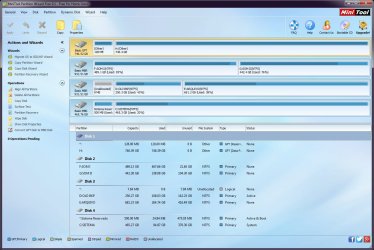
Here it is the screenshot of PW 9.1 as asked.

Looks similar to the one that i've posted before.
 

Attachments

  • PW9.1.jpg
    PW9.1.jpg
    139.5 KB · Views: 4

My Computer My Computer

At a glance

Windows 7 Ultimate x64Intel I7 920
Computer type
PC/Desktop
OS
Windows 7 Ultimate x64
CPU
Intel I7 920
Motherboard
Asus P6X58D-E
Hard Drives
1xSamsung 860 EVO 500G
2xWD Blue 1T
1xToshiba P300 3T
There is no need for you to buy Partition Wizard Pro as suggested by dsperber.

Download and install Partition Wizard Free version 9.1 from MiniTool Partition Wizard Free 11 Download for Windows / Old Versions / FileHorse.com ( Uninstall the later version you have now before installing this older version. In later versions Partition Recovery which we are going to try is not free )
His original PW screenshot was from Partition Wizard PRO 10.2.2. He did not have a "free" version.

I wasn't asking him to buy it... he already had it! So you've asked him to uninstall the Pro 10.2.2 version he already had, to install a free 9.1.
 

My Computer My Computer

At a glance

Windows 7 Pro x64 (1), Win7 Pro X64 (2)i5-3350p 3.1Ghz/6MB-cache (1); E8400 3.0Ghz/6...8GB PC3-12800 DDR3 (1); 4GB PC3-10600 DDR3 (2)ATI HD7750 (1), (see TV cards); ATI R7 250 (2)
Computer type
PC/Desktop
Computer Manufacturer/Model Number
Home-built, two systems (1) and (2)
OS
Windows 7 Pro x64 (1), Win7 Pro X64 (2)
CPU
i5-3350p 3.1Ghz/6MB-cache (1); E8400 3.0Ghz/6MB-cache (2)
Motherboard
ASUS P8Z77-V Pro (1); ASUS P5Q3 (2)
Memory
8GB PC3-12800 DDR3 (1); 4GB PC3-10600 DDR3 (2)
Graphics Card(s)
ATI HD7750 (1), (see TV cards); ATI R7 250 (2)
Sound Card
Realtek ALC892 HD Audio (1); Realtek ALC1200 HD Audio (2)
Monitor(s) Displays
Eizo HD2441W LCD, Eizo S2433W (1); Eizo 24" S2433W (2)
Screen Resolution
1920x1200, 1920x1200 (1); 1920x1200 (2)
Hard Drives
(1) 1TB SATA-II (7200RPM), 2x2TB SATA-III (7200RPM), 250GB SATA-III (10000RPM) for OS; 2x2TB external USB 3.0

(2) 320GB SATA-II (7200RPM), 750GB SATA-II (7200RPM), 150GB SATA-II (10000RPM) for OS; 2TB external USB 3.0
PSU
Nesteq ECS-6001 600W (1); Nesteq ECS-5001 500W (2)
Case
Acousti-Case 360 (1) and (2)
Cooling
Noctua NH-U12P SE2 for CPU, 2x120mm case fans (1) and (2)
Keyboard
IBM PS/2 (1) and (2)
Mouse
Logitech MX Revolution wireless (1); Microsoft wired (2)
Internet Speed
100mbps down / 10mbps up
Antivirus
Microsoft Security Essentials; Malwarebyte Anti-Malware Pro
Browser
Firefox
Other Info
Ceton InfiniTV 4-tuner cablecard-enabled TV card as well as Hauppauge HVR-2250 OTA/ATSC 2-tuner TV card in (1), running under Win7 WMC
^OK, I failed to notice that the screenshot was Pro 10.2.2. However I would think that the OP would have downloaded the demo version and wouldn't have purchased a license. It is also a fact that the so called free versions above 9.1 are really not free when it comes to Partition recovery. If successful Partition Recovery is indicated, the OP would be asked to buy the Pro version to execute the Partition Recovery. It would be the same case with the PRO demo version. But I am in more serious trouble now :-) with Partition Wizard indicating one single partition of 746 GB. Any ideas as to what the OP should do now? Two heads are better than one.


 

My Computer My Computer

At a glance

Windows 7 Home Premium 32 bit
OS
Windows 7 Home Premium 32 bit
jumanji: I've noticed that you might not have looked carefully to my version of PW Pro, but i don't have any problem into install a older version if that's more familiar to you. No worries. I just want to see my problem solved with success, no matter how!


Btw, dsperber - thank you for your suggestion, but i think you now know why i havent run it in first place... As Jumanji says, this odd thing of my disk capacity isn't being fully recognized by external windows apps is worring me a bit. I don't wanna mess around with the partition until its real size have been fully recognized.
I'm opened to suggestions.
Thanks guys
 

My Computer My Computer

At a glance

Windows 7 Ultimate x64Intel I7 920
Computer type
PC/Desktop
OS
Windows 7 Ultimate x64
CPU
Intel I7 920
Motherboard
Asus P6X58D-E
Hard Drives
1xSamsung 860 EVO 500G
2xWD Blue 1T
1xToshiba P300 3T
Why are you awake now? Go to sleep. I will take many more hours researching on it and deciding what next to do.
 

My Computer My Computer

At a glance

Windows 7 Home Premium 32 bit
OS
Windows 7 Home Premium 32 bit
@dsperber - thank you for your suggestion, but i think you now know why i haven't run it in first place... As Jumanji says, this odd thing of my disk capacity isn't being fully recognized by external windows apps is worrying me a bit. I don't wanna mess around with the partition until its real size have been fully recognized.
I'm opened to suggestions.
I agree with all concerns, that it is certainly odd that the PW view of the drive appears to be missing two of the three partitions shown by DISKMGMT. But something is definitely not right with the drive, and we're trying to see if it can be repaired. No guarantees of course, since there clearly is some damage somewhere. But let's see if we can gather some more information and clues, which might be helpful to chart a possible solution... if it's possible at all.

So, by way of example only, I use one of my own drives It's a 4TB GPT-partitioned drive that doesn't have any integrity problem, but does have 130GB of currently "unallocated" space formerly occupied by a partition I once had there which was a copy of my old Windows partition that I was using for reference and convenience (to facilitate easy copying from old to new) when I was reinstalling Windows from scratch into the true genuine Windows space (on another drive).

Once I completed my new Windows reinstall project I deleted this "copy partition" since it was no longer needed so it now shows up as "unallocated space". I could perhaps have simply deleted everything in the partition and left it active and with a Wndows drive letter, but I didn't want to. So it's now just "unallocated", but fully intact inside with everything left there as last it looked just before I DELETE'd it (with Partition Wizard, I might add).

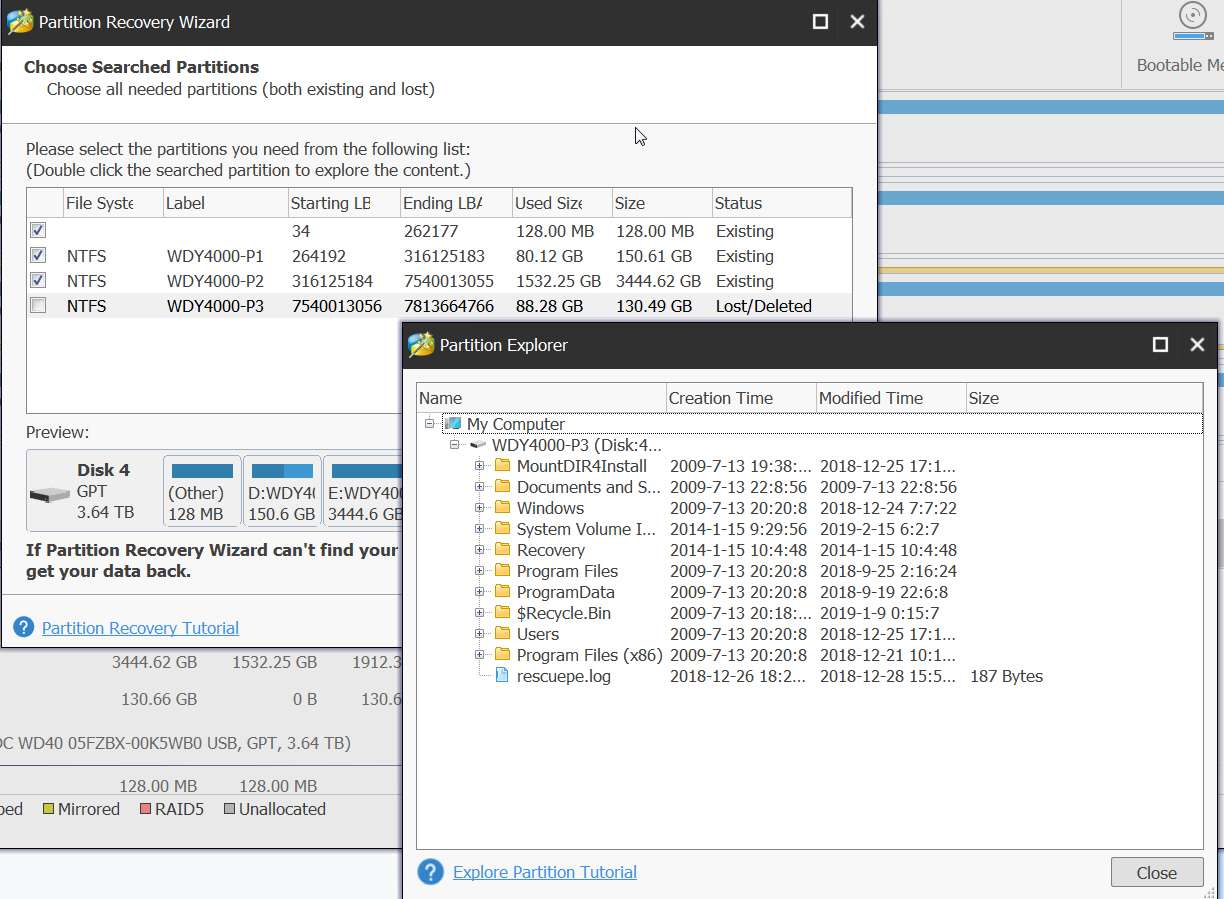
Anyway, since a picture's worth 1000 words, for demonstration here's a sequence of steps showing how I might be able to "recover" that now deleted old partition from the currently "unallocated" space on that drive. I am using my Partition Wizard Pro 11.0.2.

(1) here's the drive in its GUI presentation (note the 130GB unallocated on the right end):

CwljM7.jpg


(2) here's the drive in its details view (note the 130GB unallocated at the end):

Z6VEmj.jpg


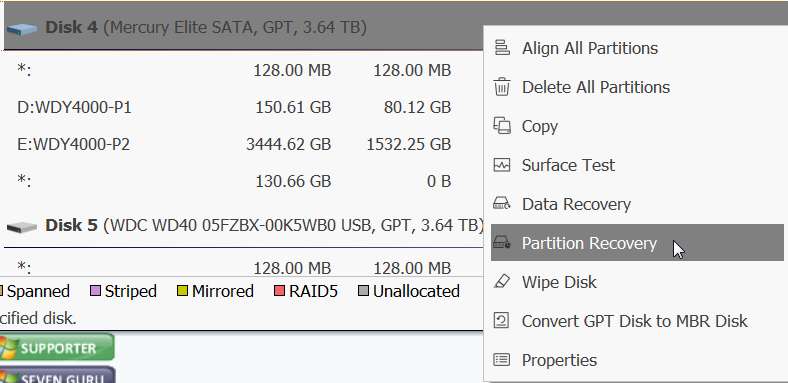
(3) If I select the drive itself (not any one of its partitions or unallocated space), and right-click, I get a menu that includes the "Partition Recovery" wizard:

TX7qrI.jpg


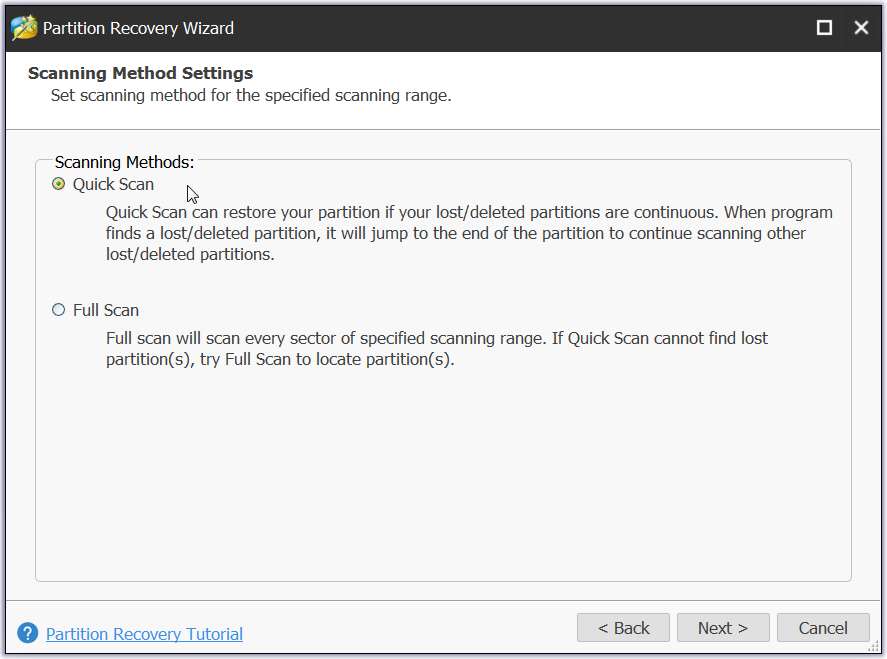
(4) If I click on that "Partition Recovery" item from the menu, PW offers the type of pre-analysis examination of the entire drive I'd like performed, in order to see what can be concluded from its overall current status (quick or full):

QXv86B.jpg


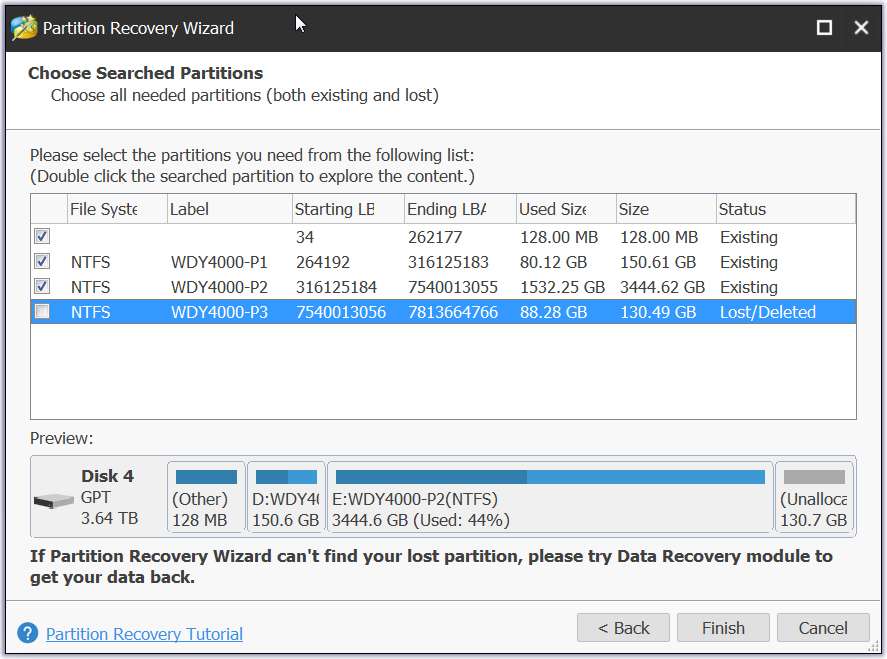
(5) Given the "good integrity" condition of my drive, I picked "quick". If there were significant damage, it might be that "full" would prove fruitful. If there is only minor damage to the partition table describing the drive "quick" might still work acceptably. Anyway, I picked "quick", and PW was able to analyze the obviously intact partition table (with its current integrity), showing the currently allocated partitions as well as that one "unallocated" space which actually could be a lost or deleted partition:

esjjpG.jpg


(6) Before doing anything further, I see that PW has detected that there is an NTFS file system inside this space of interest on the drive. It offers a double-click on that space to pop up an Explorer-view of that space, so that I can at least examine the contents. So I did just that:

Y1Z1GQ.jpg


At this point I didn't proceed further, but I could have. I could have "checked" that last currently un-checked item on the list of partitions shown in (5). All the other partitions are shown as "existing". and my space of concern shows as "lost/deleted". So I would presumably "check" that last item (which I want to recover as a real partition again with a Windows drive letter assigned), and push the FINISH button to have PW complete the partition recovery. Presumably the GPT partition table for the drive would be updated to reflect the original boundaries of that original partition which I once had living there. And a Windows drive letter would have been assigned (or offered to me to choose).

Again, this is obviously all possible for me at the moment because clearly the GPT partition table on the drive shows all 4TB of space, as either partitions or unallocated as appropriate. This is clearly different from how it is showing your own problematic 3TB drive so my above story may not apply at all to your situation.

But I'd at least like to pursue seeing what PW shows about the drive if you do what I did above. If you right-click on the drive (not a partition) and select "Partition Recovery", and take the "quick" option to begin, what shows up? Does PW actually see all 3TB but present some error messages or interesting annotations on the 2/3 of the drive space which currently is unreported?

Also, the earlier PW screenshots you posted show "other" for the file system, which is not encouraging. Had it shown NTFS we would feel much more comfortable. But perhaps this "Partition Recovery" wizard will show us a somewhat different perspective and information detail that might be more enlightening or interesting. Without a usable file system in that "RAW" partition I don't think Explorer View will be possible, but let's at least see what shows up for you in your replication of the first few steps I've demonstrated above for my own drive story.
 

My Computer My Computer

At a glance

Windows 7 Pro x64 (1), Win7 Pro X64 (2)i5-3350p 3.1Ghz/6MB-cache (1); E8400 3.0Ghz/6...8GB PC3-12800 DDR3 (1); 4GB PC3-10600 DDR3 (2)ATI HD7750 (1), (see TV cards); ATI R7 250 (2)
Computer type
PC/Desktop
Computer Manufacturer/Model Number
Home-built, two systems (1) and (2)
OS
Windows 7 Pro x64 (1), Win7 Pro X64 (2)
CPU
i5-3350p 3.1Ghz/6MB-cache (1); E8400 3.0Ghz/6MB-cache (2)
Motherboard
ASUS P8Z77-V Pro (1); ASUS P5Q3 (2)
Memory
8GB PC3-12800 DDR3 (1); 4GB PC3-10600 DDR3 (2)
Graphics Card(s)
ATI HD7750 (1), (see TV cards); ATI R7 250 (2)
Sound Card
Realtek ALC892 HD Audio (1); Realtek ALC1200 HD Audio (2)
Monitor(s) Displays
Eizo HD2441W LCD, Eizo S2433W (1); Eizo 24" S2433W (2)
Screen Resolution
1920x1200, 1920x1200 (1); 1920x1200 (2)
Hard Drives
(1) 1TB SATA-II (7200RPM), 2x2TB SATA-III (7200RPM), 250GB SATA-III (10000RPM) for OS; 2x2TB external USB 3.0

(2) 320GB SATA-II (7200RPM), 750GB SATA-II (7200RPM), 150GB SATA-II (10000RPM) for OS; 2TB external USB 3.0
PSU
Nesteq ECS-6001 600W (1); Nesteq ECS-5001 500W (2)
Case
Acousti-Case 360 (1) and (2)
Cooling
Noctua NH-U12P SE2 for CPU, 2x120mm case fans (1) and (2)
Keyboard
IBM PS/2 (1) and (2)
Mouse
Logitech MX Revolution wireless (1); Microsoft wired (2)
Internet Speed
100mbps down / 10mbps up
Antivirus
Microsoft Security Essentials; Malwarebyte Anti-Malware Pro
Browser
Firefox
Other Info
Ceton InfiniTV 4-tuner cablecard-enabled TV card as well as Hauppauge HVR-2250 OTA/ATSC 2-tuner TV card in (1), running under Win7 WMC
^ dsperber,

Your case is a perfect case for partition recovery. There is nothing extraordinary in that. Quickscan will find a valid bootsector present at the beginning of that partition and list it as lost/deleted since it doesn't find the partition table for it ( Deleting a partition deletes only the partition table of that partition) . Mark all the partitions (existing as well as lost/deleted) and order, it will write the appropriate partition tables for all the partitions in the appropriate sectors. In your case sector 2 (4 tables)

Do you have the paid version of ver 11.0.2? If not, it will ask you to get the license to write the partition tables.

OP's case is quite different. When he ran checkdisk ( without any options) it clearly indicated

"The type of file system is NTFS.
The first boot sector is unreadable or corrupted
Reading second boot sector instead
Unable to determine the version and volume state. CHKDSK aborted."


When the volume boot sector is unreadable ( bad sector - I hope it is not so in Op's disk)) or corrupted (bad luck :D), Windows Disk Management will show it as RAW and Partition Wizard will show it as "other" and whether paid or free is not going to find it.
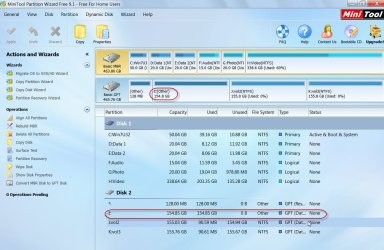
A screenshot of my Trial HDD where I intentionally corrupted the first volume boot sector at 264192:

29-03-2019 11-18-42.jpg

The second and third data volumes are still shown in PW. In Op's case those are missing. The whole disk capacity appears to be that of the first volume only. Why? I have no answer. We have to, in all probabilities, resort to data recovery procedures rather than trying to restore the disk.

Still for academic purposes I will ask the OP run a PW scan to see if it can throw more light. Of interest will be the number of sectors it will scan. Is it going to skip sectors beyond the first volume confirming that it sees only one third of the disk?

Further instructions to the OP after a break.
 
Last edited:

My Computer My Computer

At a glance

Windows 7 Home Premium 32 bit
OS
Windows 7 Home Premium 32 bit
RFG,

A few questions first.

Are you able to see and access the contents on your second and third partitions of the 3TB disk?

What data ( file types like .jpg, .pdf) do you have in the RAW partition?

Now run a Quick scan in Partition Wizard:

Launch Partition Wizard. On the left Pane click on Partition Recovery Wizard > Next > Select your faulty 3TB Drive ( now showing only 746GB) > Next > Full Disk > Next > QuickScan > Next. Allow the quick scan to complete. At the end of the quickscan you will get a window showing all the found partitions - the one like the image 5 in dsperber's post #17 ). Post a screenshot of it ( only that Window. No need of any background). After you have taken the screenshot click on Cancel button on that Window and close PW. You can run it again if need be.

As the quick scan progresses time it and note down upto what sector number it scans.

Note: You are only scanning the disk. It does not write anything to the disk. So the data in it is not affected in anyway.
 

My Computer My Computer

At a glance

Windows 7 Home Premium 32 bit
OS
Windows 7 Home Premium 32 bit
Hello again

@dsperber - Tks for the tutorial, i already knew how to perform the test in PW but my problem is the missing volume boot sector which doesnt allow PW to recognize the other partitions and also the info that it returns about the RAW one is not accurate. I am afraid that making changes with things in its current state just aggravate the drive/partition condition and make data complete unrecoverable.

Btw, this drive was always configured, since i bought it, as a secondary internal HDD used only for storage and backups. Never had any OS installed there. The only difference now is that i have a new SSD with the OS and the rest was kept exactly how it worked before (i had another SATA HDD running the OS - in this case it was the drive with partitions D + E)

@jumanji - Yes, i can see, enter, browse and use all the other partitions of my HDD. I have there mostly music, video and photography.
In the RAW partition i have mostly lots of documents (ms office apps docs, pdfs, email dbs, images and compressed archives like rar, zips, etc, etc). That's why it's the most important partition to me.


I will perform the Scan as suggested and will leave it scanning while i go out for a while. I'll give a feedback when i come back.


Thanks again!
R
 

My Computer My Computer

At a glance

Windows 7 Ultimate x64Intel I7 920
Computer type
PC/Desktop
OS
Windows 7 Ultimate x64
CPU
Intel I7 920
Motherboard
Asus P6X58D-E
Hard Drives
1xSamsung 860 EVO 500G
2xWD Blue 1T
1xToshiba P300 3T
Back
Top