(6.08 unusable) ram?

bluzeboy

New member
Member
Local time
11:47 AM
Messages
81
i have 8.00 gig ram in my computer info i get this message 8.00 ram (6.08 unusable) how can i use all my ram i'm running 64 bit
 

My Computer

Computer type
PC/Desktop
Computer Manufacturer/Model Number
Lenovo IdeaCentre A730
OS
windows 7 64 BIT
CPU
intel(R)core(TM)quad CPU Q8300 2.50 ghZ
Motherboard
GIGABYTE
Memory
8.00 GB
Sound Card
External USB Centrax DacMini
PSU
4700
Keyboard
Logitech
Mouse
Logitech
Internet Speed
15 M
Antivirus
Microsoft Defender
Browser
Google Chrome
i guess you need to push it little harder ...
maybe PC uses the ram when it needed
 

My Computer

Computer Manufacturer/Model Number
Dell Inspiron 1545, HP Compaq DC7800
OS
Windows Ultimate 32-Bit, Windows Enterprise 32-bit
CPU
Intel Core 2 Due 2.0GHZ T6400,Intel Core 2 Due 2.66 E6750
Motherboard
Phonex,Intel
Memory
2 GB DDR2,2GB
Graphics Card(s)
Mobile Intel(R) 4 Series Express Chipset Family,-----
Sound Card
IDT HD audio Card,internal
Monitor(s) Displays
Dell Orginal 15'4 display,TCL TV 39'' fullHD
Screen Resolution
1366 x 768,1280x768
Hard Drives
250 GB,Seagate 250 GB SATA
Internet Speed
4 mb/s

My Computer

Computer type
PC/Desktop
Computer Manufacturer/Model Number
Self assembled
OS
Windows 10 Home 64Bit
CPU
Intel Core i5 10400 @ 2.90GHz
Motherboard
Intel Corporation DG41WV (PROCESSOR)
Memory
8.00GB Single-Channel Unknown @ 1329MHz (16-20-20-38)
Sound Card
Realtek High Definition Audio
Monitor(s) Displays
DELL E170S
Screen Resolution
1280x1024 pixels
Hard Drives
931GB TOSHIBA DT01ACA100 (SATA)
238GB TEAM TM8PS7256G (SATA SSD)
Case
Nothing Fancy
Cooling
Fans
Keyboard
A4 Tech Co LTD
Mouse
A4 Tech Co Ltd/Logitech
Internet Speed
25 Mbps
If you havent opened up your computer yet, make sure you wont void the warranty with the manufacture if you open it up (assuming you bought your computer from DELL/HP/LENOVO etc.)
If you dont negate the warranty, open up your computer and check how many RAM sticks are inside. Take them all out, and clean the RAM slots with compressed air. Then put the sticks back in one at a time (1 stick in, boot up computer to check that the computer recognizes that stick. Then put in another stick, boot up computer and check if computer recognizes it etc etc)

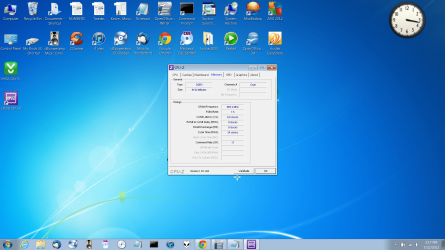
Sidenote: Before you actually do all of this, install CPU-Z and see if it recognizes your sticks of RAM
 

My Computer

Computer Manufacturer/Model Number
Dell - Vostro 430
OS
Windows 7 Professional x64 SP1
CPU
Intel Core i7 860 @2.80GHz
Motherboard
Dell 054KM3
Memory
6144MB DDR3-SDRAM (3 x 2048 DDR3)
Graphics Card(s)
nVidia GeForce 310
Sound Card
Realtek High Definition Audio ALC662
Monitor(s) Displays
Dell Computer DELL E2311H
Screen Resolution
1920 x 1080
Hard Drives
Seagate Barracuda ST3750528AS (750 GB)
PSU
J515T 350W
Case
14.58inH x 6.69inW x 17.43inD
Cooling
Fan from the Box heehee
Keyboard
Rapoo Wireless Keyboard
Mouse
Rapoo Wireless Mouse
Internet Speed
1 byte every 2.6 hours
Other Info
Dreaming of building a new PC :D

Cant wait :)
Would help to know the model number of your Dell.
 

My Computer

Computer type
PC/Desktop
Computer Manufacturer/Model Number
Me
OS
Win 7 Ultimate x64
CPU
FX-8350 @ 4.6 GHz so far
Motherboard
Asus M5A97 EVO
Memory
ADATA XPG V1 Series Black 8GB DDR3 1600
Graphics Card(s)
Sapphire R9 270x Dual-X
Sound Card
Xonar DGX w/ Corsair Vengence 1300
Monitor(s) Displays
Acer S232HL Abid
Screen Resolution
1920x1080
Hard Drives
120 GB OCZ Vertex 3
500 GB Seagate 7200.12
PSU
Antec Earthwatts 650W Green
Case
Antec Three Hundred
Cooling
Cooler Master 212 EVO
Keyboard
Logitech G510
Mouse
Logitech G500s
Internet Speed
35000/3000
i have 8.00 gig ram in my computer info i get this message 8.00 ram (6.08 unusable) how can i use all my ram i'm running 64 bit
Enable Memory Remap if it's listed in your BIOS
 

My Computer

Computer type
PC/Desktop
Computer Manufacturer/Model Number
Custom Build
OS
Windows 10 Pro x64, Arch Linux
CPU
Intel Core 2 Quad Q8200 OC'd 3.08GHz
Motherboard
Asus Rampage formula LGA775
Memory
8GB DDR2 900Mhz
Graphics Card(s)
MSI GT730 2GB GDDR5 (Kepler)
Sound Card
Supreme FX2
Monitor(s) Displays
Samsung LS22F350 LED
Screen Resolution
1080P
Hard Drives
Kingston SSDNow UV400 120GB, 500GB Hitachi, 2TB Samsung, 500GB Seagate FreeAgent, 640GB Samsung, 160GB Toshiba (Arch)
PSU
AeroCool 500W Bronze
Cooling
Cooler Master V6 + 3X fans
Keyboard
Prolink keyboard
Mouse
Logitech M705
Internet Speed
1MiB/s
Browser
Chrome Beta
i'm actually on my laptop -Sony Vaio i tried to enable Memory Remap in bios but could not find.
 

My Computer

Computer type
PC/Desktop
Computer Manufacturer/Model Number
Lenovo IdeaCentre A730
OS
windows 7 64 BIT
CPU
intel(R)core(TM)quad CPU Q8300 2.50 ghZ
Motherboard
GIGABYTE
Memory
8.00 GB
Sound Card
External USB Centrax DacMini
PSU
4700
Keyboard
Logitech
Mouse
Logitech
Internet Speed
15 M
Antivirus
Microsoft Defender
Browser
Google Chrome
Model number of the laptop then.
 

My Computer

Computer type
PC/Desktop
Computer Manufacturer/Model Number
Me
OS
Win 7 Ultimate x64
CPU
FX-8350 @ 4.6 GHz so far
Motherboard
Asus M5A97 EVO
Memory
ADATA XPG V1 Series Black 8GB DDR3 1600
Graphics Card(s)
Sapphire R9 270x Dual-X
Sound Card
Xonar DGX w/ Corsair Vengence 1300
Monitor(s) Displays
Acer S232HL Abid
Screen Resolution
1920x1080
Hard Drives
120 GB OCZ Vertex 3
500 GB Seagate 7200.12
PSU
Antec Earthwatts 650W Green
Case
Antec Three Hundred
Cooling
Cooler Master 212 EVO
Keyboard
Logitech G510
Mouse
Logitech G500s
Internet Speed
35000/3000
Maybe it can happen if you have an onboard graphics card that takes RAM from the main memory. Those 2GB missing may be due to the GPU taking it away. In that case it's perfectly normal and acceptable for the memory to be non-usable.
 

My Computer

Computer type
Laptop
Computer Manufacturer/Model Number
Toshiba Sattelite A665-S6092
OS
Windows 7 Ultimate x64
CPU
Intel Core i7-740QM
Memory
8 GB DDR3
Graphics Card(s)
NVIDIA GeForce 330GT
Screen Resolution
1366x768
Hard Drives
Samsung 840 SSD 500GB
1TB USB3 external HD
Cooling
Coolermaster Notepal U3 notebook cooling pad
Internet Speed
3mbps ASDL
Antivirus
ClamWin 0.98.7
Browser
Opera 12.17 x86 (main), Firefox 38 (sec), IE11 (last resort)
Model Number: US-VPCF2290X-LBOM now it says 8.00 -2.48 usable
 

Attachments

  • Untitled.png
    Untitled.png
    1.7 MB · Views: 16

My Computer

Computer type
PC/Desktop
Computer Manufacturer/Model Number
Lenovo IdeaCentre A730
OS
windows 7 64 BIT
CPU
intel(R)core(TM)quad CPU Q8300 2.50 ghZ
Motherboard
GIGABYTE
Memory
8.00 GB
Sound Card
External USB Centrax DacMini
PSU
4700
Keyboard
Logitech
Mouse
Logitech
Internet Speed
15 M
Antivirus
Microsoft Defender
Browser
Google Chrome
Back
Top