60 gig Hdd.............nearly gone!!

peter4076

New member
Member
VIP
Local time
11:15 PM
Messages
118
I have a Dell laptop loaded with Win7 32 bit with all updates. I haven't got much loaded on it, because only use this lappy every now & then and holidays, also boot it it up every two weeks to download updates for avast, malwarebytes, CCleaner, Firefox & Thunderbird.
I have (according to add & remove) 18 applications, but alas on my 60 gig Hdd (56.70gig really) it is showing 1.7 gig free!!!!, these applications are M$ Office, Snaggit, Revo Uninstaller, WinRAR, as you can see quite small apps. I don't understand how O/S and 18 programmes come to over 54 gig, any ideas?
Your thoughts as always most appreciated.:confused:
 

My Computer My Computer

At a glance

Home Premium 64bit
OS
Home Premium 64bit
My guess would be that the space is being eaten up by System Restore. You can restrict its appetite by the slider in the SR configuration.

You can also regain more space by turning off hibernation if you don't use it.
 

My Computer My Computer

At a glance

Windows 7 Home Premium SP1, 64-bitIntel Skylake i5-6600K, not overclocked8 GB HyperX DDR4-2666 (2 x 4 GB)none; graphics are integrated on CPU
Computer type
PC/Desktop
Computer Manufacturer/Model Number
Ignatz Special; 4 speed manual gearbox; factory air conditioning; one of one
OS
Windows 7 Home Premium SP1, 64-bit
CPU
Intel Skylake i5-6600K, not overclocked
Motherboard
AsRock Z170M Extreme 4, micro ATX
Memory
8 GB HyperX DDR4-2666 (2 x 4 GB)
Graphics Card(s)
none; graphics are integrated on CPU
Sound Card
onboard: Realtek ALC1150; external: USB Behringer UF0-202
Monitor(s) Displays
Dell S2340M 23 inch IPS
Screen Resolution
1600 x 900
Hard Drives
System: Crucial MX100 series SSD, 128 GB;
Data: Samsung Spinpoint 103SJ, 1 TB;
Backup: WD Caviar Green WD30EZRX-00D8PB0, 3 TB
PSU
Rosewill SilentNight 500 watt fanless, semi-modular
Case
Antec Solo II
Cooling
Noctua NH-U12S; Noctua F12 intake, Noctua S12A exhaust
Keyboard
Microsoft 200 6JH-00001 USB
Mouse
Dell or Microsoft optical wired; USB
Antivirus
Microsoft Security Essentials and Malwarebytes Premium
Browser
Pale Moon
Other Info
All fans PWM; speeds at idle: CPU circa 500 rpm; intake circa 600 rpm; exhaust circa 600 rpm; CPU temps 27 idle and 47 C load in a warm room (27 C/81 F) when running Intel Extreme Tuning Utility stress test.
Welcome
Not good to guess donwload windirstat and see exactly what is taking the space.
http://windirstat.info/

System restore takes up a lot of hard drive space.
 

My Computer My Computer

At a glance

Windows 10, Home Clean InstallIntel Core2 processsor Q8200(2.33Ghz 1333FSB)...6 gbATI Radeon 256MB HD3650
Computer type
PC/Desktop
Computer Manufacturer/Model Number
Dell XPS 420
OS
Windows 10, Home Clean Install
CPU
Intel Core2 processsor Q8200(2.33Ghz 1333FSB) Quad Core Tech
Motherboard
Dell
Memory
6 gb
Graphics Card(s)
ATI Radeon 256MB HD3650
Sound Card
Intergrated 7.1 Channel Audio
Monitor(s) Displays
Dell SP2009W 20"
Hard Drives
640 GB Serial ATA Hard drive
Cooling
Fan
Keyboard
Dell USB Keyboard
Mouse
Dell Premium Optical USB
Internet Speed
DSL 2.85
Use something like WinDirStat (as suggested above) or TreeSizeFree to see exactly what folders are taking up space. Sometimes utilities like these put a spotlight on a folder with large log files or something else you might be totally unaware of.
 

My Computer My Computer

At a glance

Windows 7 Ultimate x64Intel Q9550 2.83Ghz OC'd to 3.40Ghz8GB G.Skill PI DDR2-800, 4-4-4-12 timingsEVGA 1280MB Nvidia GeForce GTX570
Computer Manufacturer/Model Number
Self-Built in July 2009
OS
Windows 7 Ultimate x64
CPU
Intel Q9550 2.83Ghz OC'd to 3.40Ghz
Motherboard
Gigabyte GA-EP45-UD3R rev. 1.1, F12 BIOS
Memory
8GB G.Skill PI DDR2-800, 4-4-4-12 timings
Graphics Card(s)
EVGA 1280MB Nvidia GeForce GTX570
Sound Card
Realtek ALC899A 8 channel onboard audio
Monitor(s) Displays
23" Acer x233H
Screen Resolution
1920x1080
Hard Drives
Intel X25-M 80GB Gen 2 SSD
Western Digital 1TB Caviar Black, 32MB cache. WD1001FALS
PSU
Corsair 620HX modular
Case
Antec P182
Cooling
stock
Keyboard
ABS M1 Mechanical
Mouse
Logitech G9 Laser Mouse
Internet Speed
15/2 cable modem
Other Info
Windows and Linux enthusiast. Logitech G35 Headset.
Thanks for the swift response. Also failed to mention the laptop is Dell Inspiron 1300 (quite old in this day & age) it is also loaded with Ubuntu 10.10 (643 Mb) also 2 gig memory. will download the above a bit later after dinner (nearly 6pm here) will post later.
 

My Computer My Computer

At a glance

Home Premium 64bit
OS
Home Premium 64bit
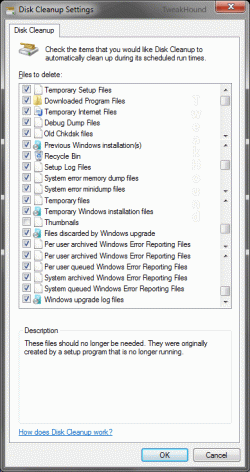
You could also just try using the disk clean utility in windows.

just go to the start bar search box and type disk cleanup and hit enter.
follow the instructions provided.
 

My Computer My Computer

At a glance

Windows 7 x64Intel i7 2600kG.skill Ripjaw 16gigs @ 1866Nvidia gtx580 (evga)
Computer Manufacturer/Model Number
Insane hobo technologies. ;-)
OS
Windows 7 x64
CPU
Intel i7 2600k
Motherboard
Asrock z68 extreme 4 gen 3
Memory
G.skill Ripjaw 16gigs @ 1866
Graphics Card(s)
Nvidia gtx580 (evga)
Sound Card
Integrated HD audio + hdmi
Monitor(s) Displays
24" ASUS widescreen + 42" insignia
Screen Resolution
1080p (1920x1080)
Hard Drives
128 Samsung 830
256 Samsung 840
3 x 1tb storage drive (various)
1 western digital 1tb (eSATA)
1 Seagate 1tb (eSATA)
PSU
1 kilowatt SLI/Crossfire rated Silverstone modular
Case
NZXT Phantom + additional 220 fan
Cooling
Zalmann
Keyboard
Microsoft wireless 3000 (v2)
Mouse
MS - wireless 5000 (bluetrack)
Internet Speed
depends on if you ask me or my provider.
Other Info
The above information is provided as is, and the author assumes no responsibility for issues it may cause with your sanity or fanboyism.
Disk clean only found 13.3 Mb.
I have installed Windirstat, and has come up with my biggest drain on the Hdd 19.6 gig (38.5%) it is (windows.old) what is that, three months ago I done a clean install over WinXP with Win 7 (32 bit only) because I could. Is this safe to delete?
 

My Computer My Computer

At a glance

Home Premium 64bit
OS
Home Premium 64bit
Yes, it's safe to delete. It's the backup of all of your old files when it did the upgrade. As long as you aren't missing anything that you might need on your upgraded system, feel free to delete and get that space back.
 

My Computer My Computer

At a glance

Windows 7 Ultimate x64Intel Q9550 2.83Ghz OC'd to 3.40Ghz8GB G.Skill PI DDR2-800, 4-4-4-12 timingsEVGA 1280MB Nvidia GeForce GTX570
Computer Manufacturer/Model Number
Self-Built in July 2009
OS
Windows 7 Ultimate x64
CPU
Intel Q9550 2.83Ghz OC'd to 3.40Ghz
Motherboard
Gigabyte GA-EP45-UD3R rev. 1.1, F12 BIOS
Memory
8GB G.Skill PI DDR2-800, 4-4-4-12 timings
Graphics Card(s)
EVGA 1280MB Nvidia GeForce GTX570
Sound Card
Realtek ALC899A 8 channel onboard audio
Monitor(s) Displays
23" Acer x233H
Screen Resolution
1920x1080
Hard Drives
Intel X25-M 80GB Gen 2 SSD
Western Digital 1TB Caviar Black, 32MB cache. WD1001FALS
PSU
Corsair 620HX modular
Case
Antec P182
Cooling
stock
Keyboard
ABS M1 Mechanical
Mouse
Logitech G9 Laser Mouse
Internet Speed
15/2 cable modem
Other Info
Windows and Linux enthusiast. Logitech G35 Headset.
Disk clean only found 13.3 Mb.
I have installed Windirstat, and has come up with my biggest drain on the Hdd 19.6 gig (38.5%) it is (windows.old) what is that, three months ago I done a clean install over WinXP with Win 7 (32 bit only) because I could. Is this safe to delete?

Even though you said you did a clean install, becuase you have this file makes me think that you actually did an upgrade. Check out the folder and save anything important and then delete!
 

My Computer My Computer

At a glance

Windows 7 Ultimate 32bitIntel Core 2 Duo 1.8 Centrino2GBnVidia 8400GS 256MB
Computer Manufacturer/Model Number
HP DV6753ca
OS
Windows 7 Ultimate 32bit
CPU
Intel Core 2 Duo 1.8 Centrino
Memory
2GB
Graphics Card(s)
nVidia 8400GS 256MB
Sound Card
Realtek HD Audio Card
Monitor(s) Displays
Laptop Screen
Screen Resolution
1280x800
Hard Drives
250GB Laptop Drive
2TB Western Digital USB External
Keyboard
HP Laptop
Mouse
Touchpad
Internet Speed
25MB Bell
I couldn't do an upgrade over WinXP, I had to go the whole hog. I'm doing a 19 gig delete as I type on this desktop computer, will be great to see some space.
 

My Computer My Computer

At a glance

Home Premium 64bit
OS
Home Premium 64bit
don't Hibernate & pagefile Take up a nice bit of space to. :(

not sure, but when you said you done a clean.. did you do a advanced or normal?

Advanced Disk Cleanup
-Press the Windows + R keys, type cleanmgr /sageset:1
-Tick the options you desire. Click OK and close out the window.
-Press the Windows + R keys, type cleanmgr /sagerun:1
(note - there is a space between the r and the /)
This will then clean all the boxes you ticked.
 

Attachments

  • advdiskclnopt.gif
    advdiskclnopt.gif
    37.8 KB · Views: 10

My Computer My Computer

At a glance

Windows 7 64bit Ultimate SP1, VMware Windows ...Intel Core i7 920 @ 3.8 or 4.2 when i need itCorsair XMS3 12GB DDR3 1600 1.5vMSI GeForce GTX 560Ti OC Twin FrozR II
Computer Manufacturer/Model Number
Goonie Build 8 2010
OS
Windows 7 64bit Ultimate SP1, VMware Windows 7 64bit Ultimate SP1
CPU
Intel Core i7 920 @ 3.8 or 4.2 when i need it
Motherboard
Gigabyte GA-X58-UD5
Memory
Corsair XMS3 12GB DDR3 1600 1.5v
Graphics Card(s)
MSI GeForce GTX 560Ti OC Twin FrozR II
Sound Card
7.1 HD
Monitor(s) Displays
2x BenQ 24 LED 1080p + LG 50PK590 1080p
Screen Resolution
3840 x 1080p
Hard Drives
Intel X25-M 80GB OS/
Intel X25-M 160GB
Data Robotics Drobo V2 8TB
PSU
Corsair AX 750W ATX Modular
Case
Antec Fusion Remote Max
Cooling
Noctua NH D14
Keyboard
Logitech
Mouse
Logitech
Internet Speed
15Mbs Down 1.3Mbs Up
Other Info
Hauppauge HD PVR/
Pioneer 1017-k - 7.1 THX/
Xbox 360 250 Slim
SkyHD/LG 50PK590 TV
Have deleted Windows.old, and claimed back 19.6 gig, so pleased with that..........Cheers.
DaGoon: I done a normal clean diskup, not the advanced, will do that next time, will also look at Hibernate & Pagefile, if I can find them!
Thanks for all your help, been great.
 

My Computer My Computer

At a glance

Home Premium 64bit
OS
Home Premium 64bit
If you have a desktop and don't hibernate, run this to remote the hibernate file.
powercfg -h off in a command line as admin.

Hibernate files will equal your RAM. So, if you have 2GB of RAM, you would have a 2GB file, and 4GB RAM would be a 4GB file, etc.
 

My Computer My Computer

At a glance

Windows 7 Ultimate x64Intel Q9550 2.83Ghz OC'd to 3.40Ghz8GB G.Skill PI DDR2-800, 4-4-4-12 timingsEVGA 1280MB Nvidia GeForce GTX570
Computer Manufacturer/Model Number
Self-Built in July 2009
OS
Windows 7 Ultimate x64
CPU
Intel Q9550 2.83Ghz OC'd to 3.40Ghz
Motherboard
Gigabyte GA-EP45-UD3R rev. 1.1, F12 BIOS
Memory
8GB G.Skill PI DDR2-800, 4-4-4-12 timings
Graphics Card(s)
EVGA 1280MB Nvidia GeForce GTX570
Sound Card
Realtek ALC899A 8 channel onboard audio
Monitor(s) Displays
23" Acer x233H
Screen Resolution
1920x1080
Hard Drives
Intel X25-M 80GB Gen 2 SSD
Western Digital 1TB Caviar Black, 32MB cache. WD1001FALS
PSU
Corsair 620HX modular
Case
Antec P182
Cooling
stock
Keyboard
ABS M1 Mechanical
Mouse
Logitech G9 Laser Mouse
Internet Speed
15/2 cable modem
Other Info
Windows and Linux enthusiast. Logitech G35 Headset.
pparks1. All done, Much obliged to you all.
 

My Computer My Computer

At a glance

Home Premium 64bit
OS
Home Premium 64bit
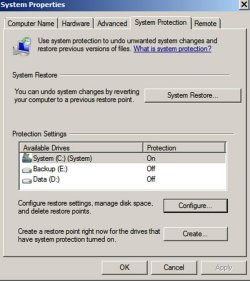
You can control system restore’s allotted space from control panel/system/system protection.

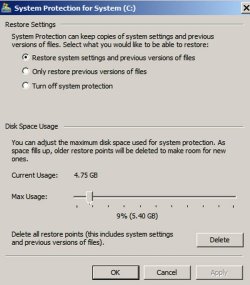
If you go to that location, you will see the first screen below, with the configuration button. If you poke the configuration button, you will see the second screen below.

You can move the slider in the second screen to control the space system restore can use. Note that mine is set to 5.4 gigs and I am currently using 4.76 of that—which covers about 7 restore points dating back a couple of weeks. How much you should allow is personal preference, subject to the overall size of your hard drive—small in your case.
 

Attachments

  • configure.jpg
    configure.jpg
    73.2 KB · Views: 0
  • slider.jpg
    slider.jpg
    67.6 KB · Views: 0

My Computer My Computer

At a glance

Windows 7 Home Premium SP1, 64-bitIntel Skylake i5-6600K, not overclocked8 GB HyperX DDR4-2666 (2 x 4 GB)none; graphics are integrated on CPU
Computer type
PC/Desktop
Computer Manufacturer/Model Number
Ignatz Special; 4 speed manual gearbox; factory air conditioning; one of one
OS
Windows 7 Home Premium SP1, 64-bit
CPU
Intel Skylake i5-6600K, not overclocked
Motherboard
AsRock Z170M Extreme 4, micro ATX
Memory
8 GB HyperX DDR4-2666 (2 x 4 GB)
Graphics Card(s)
none; graphics are integrated on CPU
Sound Card
onboard: Realtek ALC1150; external: USB Behringer UF0-202
Monitor(s) Displays
Dell S2340M 23 inch IPS
Screen Resolution
1600 x 900
Hard Drives
System: Crucial MX100 series SSD, 128 GB;
Data: Samsung Spinpoint 103SJ, 1 TB;
Backup: WD Caviar Green WD30EZRX-00D8PB0, 3 TB
PSU
Rosewill SilentNight 500 watt fanless, semi-modular
Case
Antec Solo II
Cooling
Noctua NH-U12S; Noctua F12 intake, Noctua S12A exhaust
Keyboard
Microsoft 200 6JH-00001 USB
Mouse
Dell or Microsoft optical wired; USB
Antivirus
Microsoft Security Essentials and Malwarebytes Premium
Browser
Pale Moon
Other Info
All fans PWM; speeds at idle: CPU circa 500 rpm; intake circa 600 rpm; exhaust circa 600 rpm; CPU temps 27 idle and 47 C load in a warm room (27 C/81 F) when running Intel Extreme Tuning Utility stress test.
ignatzatsonic: Have just done that as well, I now have more space that I can fill, still it's been great, a really good forum.:D
 

My Computer My Computer

At a glance

Home Premium 64bit
OS
Home Premium 64bit

My Computer My Computer

At a glance

W 7 64-bit UltimateIntel Q9550 Yorkfield8GB Dominator 8500C5DATI : XFX 5870
Computer Manufacturer/Model Number
* BFK Customs *
OS
W 7 64-bit Ultimate
CPU
Intel Q9550 Yorkfield
Motherboard
ASUS P5Q Pro
Memory
8GB Dominator 8500C5D
Graphics Card(s)
ATI : XFX 5870
Sound Card
Realtek HD Audio 7-1
Monitor(s) Displays
1x 47" LCD HDMI & 3x 26" LCD HDMI
Screen Resolution
1920x1080P & 1920x1200
Hard Drives
1x 80GB Intel X25-M G2 SSD : 1x 500GB & 1x 640GB WD Caviar Black(s)
PSU
Corsair 620HX
Case
Cooler Master RC-690
Cooling
Tuniq Tower 120, 2x 140mm and 3x 120mm case fans
Keyboard
Microsoft 500
Mouse
Razer Diamondback 3G
Internet Speed
14 Mb/s
Other Info
1x Koutech 3Gb/s SATA HDD Hot Swap Rack
Just going out to the city in a couple of minutes, will check the links when I get back.:geek:
 

My Computer My Computer

At a glance

Home Premium 64bit
OS
Home Premium 64bit
Back
Top