Solved 64-bit Capable?!

Yatchiie

New member
Member
Local time
9:41 PM
Messages
46
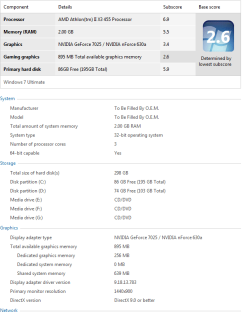
Hello, I was just wondering if my PC can handle 64-bit version of windows. My friend has been forcing me to switch from 32 to 64 but I'm a little bit worried because I have only 2gb of ram. Any suggestions? Should I go for 64-bit without upgrading my ram or stay with 32-bit? Your answers will be highly appreciated, thanks in advance :) By the way, I attached my pc specs for your reference.
 

Attachments

  • wew.png
    wew.png
    16.8 KB · Views: 39

My Computer

OS
Windows 7 Ultimate 32-bit
Unless you plan to install 4GB or more of RAM, moving to 64-bit will not buy you anything. 2GB is the MINIMUM amount of RAM for 64-bit Win 7.

If you look at the screenshot you posted of your system info, at the bottom of the System section, it tells you that the system is 64-bit capable.

If I were to upgrade something on your system, the first thing I would upgrade would be your video card.
 

My Computer

Computer type
PC/Desktop
Computer Manufacturer/Model Number
Home Built desktop, Dell G15 5511 Gaming laptop,MS Surface Pro 7 tablet
OS
W10 Pro desktop, W11 laptop, W11 Pro tablet (all 64-bit)
CPU
3.7Ghz 8700K i7, i7-11800H, i7-1065G7
Motherboard
ASUS TUF Z370-Pro Gaming in desktop
Memory
16G desktop, 16G laptop, 4G tablet
Graphics Card(s)
AMD Radeon RX580, RTX 3060, Intel Iris Plus
Sound Card
High Definition Audio (Built-in to mobo)
Monitor(s) Displays
Samsung U32J59 32" (2x), 15.6", 12"
Screen Resolution
3840x2160, 3840x2160, 1920x1080, 2160x1440
Hard Drives
500G SSD for OS; 2T, 10T & 15T HDDs for Data on Desktop, 1TB SSD laptop, 128G SSD tablet.
PSU
Corsair CX 750M
Case
Antec 100
Cooling
CM 212+
Keyboard
IBM Model M - used continuously since 1986
Mouse
Microsoft Pro IntelliMouse
Internet Speed
400M down 8M up
Antivirus
Windows Defender
Browser
FireFox
Other Info
Built my first computer (8Mhz 8088cpu, 640K RAM, 20MB HDD, 2 360K floppy drives) in 1985 and have been building them for myself, relatives and friends ever since.
You should look for two sticks of dual channel 4GB ram which is pretty cheap now, then go to 64 bit.
 

My Computer

Computer type
Laptop
Computer Manufacturer/Model Number
HP 17-ak0xx, dv7 3173nr
OS
Win7 Home Premium x64 W10Pro&Home
CPU
A12 9720p 4+8 TurionII M520
Motherboard
HP 3839
Memory
6GB 8GB
Graphics Card(s)
R7
Monitor(s) Displays
24" sa550
Screen Resolution
1600x900 1920x1080
Mouse
Logitechx2
Internet Speed
120Mb/s down 12up
Your computer can run 64 bits OS with no problems (all recent and not-so recent CPUs can really), but you're a bit short on memory for Windows x64. 2GB is the bare minimum, and 64 bits is even more memory hungry than x86, so unless you upgrade your RAM first (to 4GB I would say, at least) it's better to stay with 32 bits.
 

My Computer

Computer type
Laptop
Computer Manufacturer/Model Number
Toshiba Sattelite A665-S6092
OS
Windows 7 Ultimate x64
CPU
Intel Core i7-740QM
Memory
8 GB DDR3
Graphics Card(s)
NVIDIA GeForce 330GT
Screen Resolution
1366x768
Hard Drives
Samsung 840 SSD 500GB
1TB USB3 external HD
Cooling
Coolermaster Notepal U3 notebook cooling pad
Internet Speed
3mbps ASDL
Antivirus
ClamWin 0.98.7
Browser
Opera 12.17 x86 (main), Firefox 38 (sec), IE11 (last resort)
By the way, how about my hard disc capacity? Do I need to upgrade it too?
 

My Computer

OS
Windows 7 Ultimate 32-bit
It looks like you have a 300GB drive with 86GB free on your C: partition and 74GB free on your D: partition so you have approximately 1/2 of your drive still free. It wouldn't hurt to upgrade it but it's not necessary unless you have software that you want to install but can't because you lack storage space.

One upgrade you might consider is to install an ssd as your boot drive and then use the existing hdd for data storage.
 

My Computer

Computer type
PC/Desktop
Computer Manufacturer/Model Number
Home Built desktop, Dell G15 5511 Gaming laptop,MS Surface Pro 7 tablet
OS
W10 Pro desktop, W11 laptop, W11 Pro tablet (all 64-bit)
CPU
3.7Ghz 8700K i7, i7-11800H, i7-1065G7
Motherboard
ASUS TUF Z370-Pro Gaming in desktop
Memory
16G desktop, 16G laptop, 4G tablet
Graphics Card(s)
AMD Radeon RX580, RTX 3060, Intel Iris Plus
Sound Card
High Definition Audio (Built-in to mobo)
Monitor(s) Displays
Samsung U32J59 32" (2x), 15.6", 12"
Screen Resolution
3840x2160, 3840x2160, 1920x1080, 2160x1440
Hard Drives
500G SSD for OS; 2T, 10T & 15T HDDs for Data on Desktop, 1TB SSD laptop, 128G SSD tablet.
PSU
Corsair CX 750M
Case
Antec 100
Cooling
CM 212+
Keyboard
IBM Model M - used continuously since 1986
Mouse
Microsoft Pro IntelliMouse
Internet Speed
400M down 8M up
Antivirus
Windows Defender
Browser
FireFox
Other Info
Built my first computer (8Mhz 8088cpu, 640K RAM, 20MB HDD, 2 360K floppy drives) in 1985 and have been building them for myself, relatives and friends ever since.
  • Like
Reactions: whs
It looks like you have a 300GB drive with 86GB free on your C: partition and 74GB free on your D: partition so you have approximately 1/2 of your drive still free. It wouldn't hurt to upgrade it but it's not necessary unless you have software that you want to install but can't because you lack storage space.

One upgrade you might consider is to install an ssd as your boot drive and then use the existing hdd for data storage.
+1 - I would subscribe to that. A small SSD (60 to 128GB) for the OS (and only for the OS and programs) will give you a significant performance boost.
 

My Computer

Computer Manufacturer/Model Number
HP, Dell, Gateway, Toshiba - 4 laptops and 2 desktops
OS
Vista, Windows7, Mint Mate, Zorin, Windows 8
CPU
from 1.6GHz Duo to i7
Monitor(s) Displays
2x HP w2207
Hard Drives
5x HDD, 7x SSD, 12x Externals
Keyboard
with trackball - no mices
Mouse
Trackball mice
Internet Speed
DSL 6000
Thank you! Now I know what I should upgrade in order to install 64-bit of Windows :)
 

My Computer

OS
Windows 7 Ultimate 32-bit
Back
Top