64 Bit or 32 Bit

Many run 64bit editions of Vista will only 2gb installed. It's not actually a requirement for larger amounts just that that option is available when you are running larger memory eaters like CAD, video capturing(often enough here), graphics design, and other things that really hammer ram good.

The sad part there ikilledkenny is being stuck royally with a 32bit only cpu! I now you are going to smiling big time once you finally are able to upgrade out of that situation. According to the specs there you max out with a pair of 2gb 667 so-dimms to start with.
 

My Computers

System One System Two

  • Computer type
    PC/Desktop
    Computer Manufacturer/Model Number
    Custom builds = 2
    OS
    W7 Ultimate x64/W10 Pro x64/W11 Pro Triple Boot - Main PC W7 Remote PC Micro ATX W7 Pro x64/W11 Pro
    CPU
    AMD Phenom II X4 975 Deneb 3.6ghz - 965 2nd remote pc
    Motherboard
    Gigabyte GA-790XTA-UD4-Gigabyte GA-880GM-D2H remote pc
    Memory
    Kingston Hyper X DDR3 1600 1.5v 16gb - Hyper X Fury 8gb 2nd
    Graphics Card(s)
    MSI HD Radeon 5750 1gb - MSI HD Radeon 6450 on mini tower
    Sound Card
    Creative Labs X-Fi Xtreme Audio P - Realtek onooard 2nd case
    Monitor(s) Displays
    ASUS VW199T-P 19" HP 2082a Main-HP 2082a 20" remote pc
    Screen Resolution
    Asus 1440x900 - HP 1600x900
    Hard Drives
    WD Black 1TB HD per OS W7, W10, and pending W11 presently on 500gb OS Drive - Pending Triple 1TB HDs for Spanned Storage/backup volume
    Single 2TB external USB enclosure, single 1TB System 7 Host/Boot drive, Pending 8TB external HD for system image b
    PSU
    Corsair 750TX - primary / Corsair CX600 - second
    Case
    Antec 900-2 - SSD compatible / NZXT Vulcan mini tower
    Cooling
    Zalman CNPS9900A
    Keyboard
    AZIO L70 Backlit Letters Gaming - ONN Cordless/USB
    Mouse
    MSI DS200 Programmable, Logitech Cordless
    Internet Speed
    30mbps upgrade - primary hard wired - mini tower usb WiFi
    Antivirus
    GFI VIPRE Internet Security 2014 on W7 2016 beta on W10,
    Browser
    Cyberfox, WaterFox 64bit FF variants, FireFox x64, Pale Moon
    Other Info
    Accomdata fan cooled usb 2.0 PIDE/Sata II, III external enclosure.
    Sambient usb/eSata PATA/Sata II, III external enclosure.
  • Computer type
    PC/Desktop
    System Manufacturer/Model Number
    CUSTOM ASSEMBLY
    OS
    W7 Pro x64/W11 Pro
    CPU
    AMD Deneb 3.6ghz - 965
    Motherboard
    Gigabyte GA-880GM-D2H remote pc
    Memory
    Kingston Hyper X Fury 8gb
    Graphics Card(s)
    MSI HD Radeon 6450 DVI Output
    Sound Card
    Realtek onooard Creative or Other separate PENDING
    Monitor(s) Displays
    VIZIO 32" LCD TV Separate LCD Pending
    Screen Resolution
    1600x1080
    Hard Drives
    WD 500GB OS Host/Boot WD Green 1TB Storage/Backup
    PSU
    Corsair 600W - THERMALTAKE 600W spare case
    Case
    NZXT Vulcan mini tower
    Cooling
    Twin 120mm Top Fans - 240mm Side Cover
    Keyboard
    ONN Cordless/USB Logitech Cordless
    Mouse
    ONN USB/Cordless - Logitech Cordless
    Internet Speed
    DSL 5G
    Browser
    MS Edge, FireFox, WaterFox x64, FireFox Nightly
    Other Info
    OS Testing-Remote Access to Main TeamViewer
I have 64-bit Windows 7 running on a Pentium 4 with 1GB of ram and the low amount of ram is not causing any issues, in fact it's getting things done faster than with the XP install it used to have.

My advice :
Check if your cpu supports 64-bit, if it does then install a 64-bit Windows (just not xp :p)
Everyone needs to move to 64-bit OS as soon as possible so developers can focus on making everything 64-bit.
 

My Computer

OS
Vista Enterprise x64 SP1
CPU
Athlon64 X2 6000+
Motherboard
M2N-e
Memory
4GB 800MHz DDR2 OC-Z
Graphics Card(s)
Geforce 8800GT OC
Sound Card
X-Fi Extreme Audio
Monitor(s) Displays
17" and 19" widescreen flatscreens
Screen Resolution
1280x1024 & 1440x900
PSU
600W Tagan
Internet Speed
10Mbit down, 512Kbit up
I have 64-bit Windows 7 running on a Pentium 4 with 1GB of ram and the low amount of ram is not causing any issues, in fact it's getting things done faster than with the XP install it used to have.

My advice :
Check if your cpu supports 64-bit, if it does then install a 64-bit Windows (just not xp :p)
Everyone needs to move to 64-bit OS as soon as possible so developers can focus on making everything 64-bit.

The real problem seen too often especially for the 64bit XP was never finding device drivers! In fact some were substituting Window Server 2003 drivers to see things work then. Vista saw an improvement for 64bit there otherwise many wouldn't even be running anything 64bit for the same problem.

The brick wall still has to do with the ISPs providing outdated network adapters, gateways the manufacturers dropped active support for by never seeing 64bit support. For getting online that's still one road block. You have to buy and use your own in order to get newer models that do see that support available.
 

My Computers

System One System Two

  • Computer type
    PC/Desktop
    Computer Manufacturer/Model Number
    Custom builds = 2
    OS
    W7 Ultimate x64/W10 Pro x64/W11 Pro Triple Boot - Main PC W7 Remote PC Micro ATX W7 Pro x64/W11 Pro
    CPU
    AMD Phenom II X4 975 Deneb 3.6ghz - 965 2nd remote pc
    Motherboard
    Gigabyte GA-790XTA-UD4-Gigabyte GA-880GM-D2H remote pc
    Memory
    Kingston Hyper X DDR3 1600 1.5v 16gb - Hyper X Fury 8gb 2nd
    Graphics Card(s)
    MSI HD Radeon 5750 1gb - MSI HD Radeon 6450 on mini tower
    Sound Card
    Creative Labs X-Fi Xtreme Audio P - Realtek onooard 2nd case
    Monitor(s) Displays
    ASUS VW199T-P 19" HP 2082a Main-HP 2082a 20" remote pc
    Screen Resolution
    Asus 1440x900 - HP 1600x900
    Hard Drives
    WD Black 1TB HD per OS W7, W10, and pending W11 presently on 500gb OS Drive - Pending Triple 1TB HDs for Spanned Storage/backup volume
    Single 2TB external USB enclosure, single 1TB System 7 Host/Boot drive, Pending 8TB external HD for system image b
    PSU
    Corsair 750TX - primary / Corsair CX600 - second
    Case
    Antec 900-2 - SSD compatible / NZXT Vulcan mini tower
    Cooling
    Zalman CNPS9900A
    Keyboard
    AZIO L70 Backlit Letters Gaming - ONN Cordless/USB
    Mouse
    MSI DS200 Programmable, Logitech Cordless
    Internet Speed
    30mbps upgrade - primary hard wired - mini tower usb WiFi
    Antivirus
    GFI VIPRE Internet Security 2014 on W7 2016 beta on W10,
    Browser
    Cyberfox, WaterFox 64bit FF variants, FireFox x64, Pale Moon
    Other Info
    Accomdata fan cooled usb 2.0 PIDE/Sata II, III external enclosure.
    Sambient usb/eSata PATA/Sata II, III external enclosure.
  • Computer type
    PC/Desktop
    System Manufacturer/Model Number
    CUSTOM ASSEMBLY
    OS
    W7 Pro x64/W11 Pro
    CPU
    AMD Deneb 3.6ghz - 965
    Motherboard
    Gigabyte GA-880GM-D2H remote pc
    Memory
    Kingston Hyper X Fury 8gb
    Graphics Card(s)
    MSI HD Radeon 6450 DVI Output
    Sound Card
    Realtek onooard Creative or Other separate PENDING
    Monitor(s) Displays
    VIZIO 32" LCD TV Separate LCD Pending
    Screen Resolution
    1600x1080
    Hard Drives
    WD 500GB OS Host/Boot WD Green 1TB Storage/Backup
    PSU
    Corsair 600W - THERMALTAKE 600W spare case
    Case
    NZXT Vulcan mini tower
    Cooling
    Twin 120mm Top Fans - 240mm Side Cover
    Keyboard
    ONN Cordless/USB Logitech Cordless
    Mouse
    ONN USB/Cordless - Logitech Cordless
    Internet Speed
    DSL 5G
    Browser
    MS Edge, FireFox, WaterFox x64, FireFox Nightly
    Other Info
    OS Testing-Remote Access to Main TeamViewer
Driver support has been much improved during the win7 beta cycle than that of vistas.
 

My Computer

Computer Manufacturer/Model Number
self built
OS
Windows 7 Professional 64-bit
CPU
Intel E8400 3GHz
Motherboard
Intel DX48BT2
Memory
Kingston PC3-10700H 4Gb
Graphics Card(s)
XFX Radeon HD 5850 BlackEd.
Sound Card
Asus Xonar DG
Monitor(s) Displays
2x Samsung SM-T220HD 22"
Screen Resolution
1680x1050 on two monitors
Hard Drives
OCZ Vertex 2 120gb 3.5" (OS)
Seagate Momentus XT 500gb
Samsung F3 1Tb (games)
2x Samsung F1 1Tb
PSU
Thermaltake ToughPower 850w
Case
Thermaltake Armor
Cooling
Scythe Mugen II
Keyboard
Microsoft Comfort Curve USB
Mouse
Razer Diamondback 3G
Internet Speed
8128/443
It is time to switch to 64bit OS's


I have said it numerous times on Vista forums, that we are going through another transition here... Windows 95 was a 16bit OS... Windows 98 was what Windows Vista 64bit Ultimate is to us today... Windows 98 was the first "Hybrid" 16/32bit OS...

More and More companys are releasing 64bit drivers everyday... I have not had any issues whatsoever with any hardware that I have installed on my computer, I am running Windows Vista Ultimate 64bit... and it has been PERFECT. VERY stable, smooth, literally no crashes..only BSOD was from me, overclocking my video card a bit too high trying to find the sweet spot. Thats it....


If you have a 64bit processor, upgrade your computer, to take advantage of this new transition happening... upgrade to 64bit... it's time for 32bit to go back from wence it came :-)


More and more programs are released everyday to take advantage of 64bit as well....

Read this article, it will help you with questions to understand that 64bit OS's are MORE then just having more RAM....

bit-tech.net | 64-bit: More than just the RAM

64-bit: More than just the RAM
Author:
Brett Thomas
Published: 16th Oct 2007


Introduction
If you're a member of this or any other technology-based forum, odds are that you've noticed the several versions of Microsoft's latest offering, Windows Vista. If you haven't, well... please come out from under that rock and get with the programming!

One of the biggest changes has been the clear offering and even a gentle push towards the 64-bit version of the OS. Indubitably, this extra option becomes fodder for forum discussion, usually along the line of:

Forumite 1: "Hi, I am building a new system and I wanted to know what your thoughts were on whether I should use 64-bit or 32-bit Vista? I've heard varying things around the net regarding compatibility, and was hoping someone could help."
Forumite 2: "Hi! I just read your post. You should definitely go with the 32-bit version. There's tons of compatibility problems with 64b (Just look at XP-64), and it's going to die a long, drawn-out death. Besides, the only actual difference between them is that 64-bit can make proper use of 4GB of RAM."
Forumite 1: "Oh, ok! Thanks!"

Now, what's wrong with this picture? The answer is a lot. Time and time again, self-proclaimed gurus determine that the only real difference between 32-bit computing and 64-bit computing is the memory limit. Are they right that RAM is a reason? Definitely - but that's missing about 99 percent of the true differences. By that logic, the only major difference between your old 8-bit Nintendo console and your Xbox 360 is processor speed. I think we can all agree, that's just wrong.
 

My Computer

Computer Manufacturer/Model Number
Home Built
OS
Windows 7 Ultimate 64bit
CPU
Intel Core i7 920
Motherboard
ASUS P6T Deluxe
Memory
6gb Mushkin 1866 DDR3
Graphics Card(s)
2x EVGA GTX 285
Sound Card
Onboard
Monitor(s) Displays
ASUS 24inch LCD 2ms delay
Screen Resolution
1920x1080
Hard Drives
4x OCZ-Vertex 60gb in RAID0 & one 300GB Velociraptor HDD, 1TB Western Digital Caviar Black
PSU
Corsair 1000W
Case
Coolermaster HAF 932
Cooling
Water Cooling
Keyboard
Saitek Cyborg
Mouse
MS Generic w/wheel
Internet Speed
Cable - 15mbps
Other Info
None
It is time to switch to 64bit OS's


I have said it numerous times on Vista forums, that we are going through another transition here... Windows 95 was a 16bit OS... Windows 98 was what Windows Vista 64bit Ultimate is to us today... Windows 98 was the first "Hybrid" 16/32bit OS...

More and More companys are releasing 64bit drivers everyday... I have not had any issues whatsoever with any hardware that I have installed on my computer, I am running Windows Vista Ultimate 64bit... and it has been PERFECT. VERY stable, smooth, literally no crashes..only BSOD was from me, overclocking my video card a bit too high trying to find the sweet spot. Thats it....


If you have a 64bit processor, upgrade your computer, to take advantage of this new transition happening... upgrade to 64bit... it's time for 32bit to go back from wence it came :-)


More and more programs are released everyday to take advantage of 64bit as well....

Read this article, it will help you with questions to understand that 64bit OS's are MORE then just having more RAM....

bit-tech.net | 64-bit: More than just the RAM

64-bit: More than just the RAM
Author: Brett Thomas
Published: 16th Oct 2007


Introduction
If you're a member of this or any other technology-based forum, odds are that you've noticed the several versions of Microsoft's latest offering, Windows Vista. If you haven't, well... please come out from under that rock and get with the programming!

One of the biggest changes has been the clear offering and even a gentle push towards the 64-bit version of the OS. Indubitably, this extra option becomes fodder for forum discussion, usually along the line of:

Forumite 1: "Hi, I am building a new system and I wanted to know what your thoughts were on whether I should use 64-bit or 32-bit Vista? I've heard varying things around the net regarding compatibility, and was hoping someone could help."
Forumite 2: "Hi! I just read your post. You should definitely go with the 32-bit version. There's tons of compatibility problems with 64b (Just look at XP-64), and it's going to die a long, drawn-out death. Besides, the only actual difference between them is that 64-bit can make proper use of 4GB of RAM."
Forumite 1: "Oh, ok! Thanks!"

Now, what's wrong with this picture? The answer is a lot. Time and time again, self-proclaimed gurus determine that the only real difference between 32-bit computing and 64-bit computing is the memory limit. Are they right that RAM is a reason? Definitely - but that's missing about 99 percent of the true differences. By that logic, the only major difference between your old 8-bit Nintendo console and your Xbox 360 is processor speed. I think we can all agree, that's just wrong.
Well put.
 

My Computer

Computer Manufacturer/Model Number
Self Build 64bit
OS
Vista Ult64, Win7600
CPU
Intel Core 2 Quad Q6600 @ 2400 MHz 64bit OS
Motherboard
Asus P5E3 Deluxe WiFi @p 64 bit OS
Memory
4096 MB DDR3-SDRAM
Graphics Card(s)
ATI Radeon HD 3870 Series x2 Crossfired
Sound Card
Realtek on board
Monitor(s) Displays
Samsung SyncMaster - 23 inches
Screen Resolution
1680x1050 pixels at 60 Hz in True Colors
Hard Drives
Hitachi (250 GB)/Samsung 750 GB. /Barracuda 160 GB.
My Book 1 TB external..
PSU
Cooler Master 1000w
Case
Cooler Master Cosmos 1000.
Cooling
Fans and fresh air,
Keyboard
Wireless
Mouse
Wireless
Internet Speed
Never fast enough
Other Info
I use a Magnum.
For me, the time to try 64-bit was when the Windows7 beta came out because I could do it for free. I downloaded both 32-bit and 64-bit. I ran 32-bit for two months or so and then did a clean install with 64-bit. It killed my motherboard. Apparently, there was something--I'm no engineer--in using 64-bit that exposed a flaw in either my processor or my motherboard. Intel replaced both and 64-bit loaded without a glitch.

I had two programs that wouldn't run. Neither were critical but I just ordered another program to replace one that wouldn't run and I'm keeping my fingers crossed.

I had less trouble finding all the drivers I needed with Windows7 beta 64-bit than I did with Vista 32-bit when it was first released as a retail product.

So, if you're curious about 64-bit, this is a great time to play with it. I would like to see Microsoft deliver Windows7 as both 32-bit and 64-bit to encourage people to try 64-bit and perhaps reduce the time it will take for software companies to start producing 64-bit programs. Right now, I have two: Lightroom and IE 8.
 

My Computer

Computer Manufacturer/Model Number
Home Built
OS
Windows7 beta 7000
CPU
Intel E6550
Motherboard
Intel DP35DP
Memory
8Gb
Graphics Card(s)
Nvidia 8500 GT
Sound Card
Intel onboard sound
Monitor(s) Displays
Two Gateway 22" LCD monitors
Screen Resolution
1680x1050
Hard Drives
Two 500Gb 7200rpm SATA
Hi all

Warning - slightly length post but hopefully should clear up some misconceptions.

To answer this question properly you need to understand CPU architecture and how a modern OS is designed.

I'm limiting the post to 64 Bit CPU's (irrespective of the amount of RAM in the system). A 32 Bit CPU running a 32 bit OS will work differently in any case.

To stop the post from being too long or complex I'll try and simplifiy it -- so what I'm saying here will be "Conceptually" correct but not necessarilliy 100% scientifically accurate. Unless you are privy to Windows Internals you won't be able to get the info anyway but these addressing schemes our common to all modern OS'es.

We have 2 flavours of OS here on a 64 Bit CPU

Now on a 64 Bit capable CPU you have a Linear address space (sequential series of numbers from 0 => a few TB).

A typical application only uses in any one time a very small amount of REAL memory irrespective of the size of the application so most of the application will be stored in the system's PAGE file which in a 64 bit system consists of a Linear address (the 0 => xTB) and the value of the data.

When an application is not being used it will be "Paged out" allowing you to do something else -- for example switching over from a Spreadsheet to an email document. The address on Disk will represent what it would do in main memory ( a 1:1 mapping I know there are some other tables such as Page fault segments etc etc but conceptually it's a 1:1 mapping).

If the data doesn't exist in memory when it's needed the OS generates what's known as a PAGE FAULT. When this happens the data your program needs is "Paged in " to real RAM and data that isn't being used is moved out to the page area.

If the memory is TOO small then you'll see the disk with the light 100% on -- this is known as "Thrashing" but even with only 1GB RAM most computers running a 64 bit OS will be OK provided you aren't trying to run too much concurrently or too large applications.

Even if you have a HUGE amount of RAM the system will still page some stuff -- and if you "Switch off" paging altogether -- not recommended BTW the system will STILL create a pager file but it will be in main RAM perveresly making your performance WORSE - what will happen here is that paging will still occur but in main RAM. What you will notice in this case since DISK I/O is not being done is that the CPU load dramatically increases without you actually being able to do anything.

A certain amount of paging is OK as DISK I/O is usually "Overlapped" with other processing -- SCSI disks for example can do a lot of processing AWAY from the main CPU allowing the computer to do other work -- same with high qualitty graphic cards.

Now in a 64 Bit CPU data and instructions are excuted also in 64 bit chunks.

Consider now a 64 Bit CPU operating a 32 Bit OS.

First problem -- we have to translate the Native Linear 64 bit address space into another adressing scheme that the 32 bit OS understands. In a 32 bit OS the max address space is around 4GB.

What the system does here is to create an address with a prefix (for example like a telephone number with a prefix say 213-, 768- etc etc.
The part AFTER the prefix can be non-unique -- in any case it needs to be as the full 32 bits aren't available for the system address -- one of the bits is used to indicate the CPU is operating in 32 bit mode.

So an extra piece of work needs to be done in converting our "Pseudo 32 bit address" into the real 64 bit address the system needs and vice versa.

"2nd problem -- Data and instructions are moved 32 bits a time rather than 64 bits -- so you do up to 8X less work per data instruction cycle (32 bit instruction, 32 bit data ) X 2 = X8.

When it come to moving large chunks of data to screen and I/O devices you should notice a significant performance in using a 64 Bit OS -- assuming decent components.

There's all sorts of Cache's, instruction pre-fetch areas etc etc but even with a relatively small amount of RAM if your CPU is 64 bit capable use it.

Unless you absolutely have to install the X-86 version regard 32 bit OS'es these days as HISTORY.

Cheers
jimbo
 

My Computer

Computer type
PC/Desktop
Computer Manufacturer/Model Number
Custom built, several laptops HP/ASUS
OS
Linux CENTOS 7 / various Windows OS'es and servers
CPU
Intel i7 Intel i5
Memory
8GB, 16GB
Graphics Card(s)
On Motherboard
Sound Card
Realtek HD audio
Monitor(s) Displays
Apple Cinema display, Samsung LCD
Screen Resolution
1920 X 1080
Hard Drives
4 X 1TB SATA
Mouse
Toshiba wireless laser
Internet Speed
> 20MB up
Good now find the 64bit drivers for the cable modem here so I can get a 64bit 7 online. Well what's wrong? Even after changing ISPs they still provide equipment the manufacturer hasn't even made Vista 64 drivers for! :mad: "outdated foobar hardwares!"

Granted 7 will see more 64bit drivers available for various standard hardwares since Vista readily saw video, sound, mother board, and other items seeing support there. Two separate routers here see 64bit support right off while the ISPs can't? :rolleyes:

You can be sure that MS already knows there's a serious lack of 3rd party driver support for the 64bit editions they have out and will see with 7. They provide the OS while 3rd party sources simply sit on their duffs at times. It's called the bottom dollar still enmeshed in 32bit softwares! If all was that easy to make the complete transition 7 wouldn't still be seeing 32bit editions to start with.
 

My Computers

System One System Two

  • Computer type
    PC/Desktop
    Computer Manufacturer/Model Number
    Custom builds = 2
    OS
    W7 Ultimate x64/W10 Pro x64/W11 Pro Triple Boot - Main PC W7 Remote PC Micro ATX W7 Pro x64/W11 Pro
    CPU
    AMD Phenom II X4 975 Deneb 3.6ghz - 965 2nd remote pc
    Motherboard
    Gigabyte GA-790XTA-UD4-Gigabyte GA-880GM-D2H remote pc
    Memory
    Kingston Hyper X DDR3 1600 1.5v 16gb - Hyper X Fury 8gb 2nd
    Graphics Card(s)
    MSI HD Radeon 5750 1gb - MSI HD Radeon 6450 on mini tower
    Sound Card
    Creative Labs X-Fi Xtreme Audio P - Realtek onooard 2nd case
    Monitor(s) Displays
    ASUS VW199T-P 19" HP 2082a Main-HP 2082a 20" remote pc
    Screen Resolution
    Asus 1440x900 - HP 1600x900
    Hard Drives
    WD Black 1TB HD per OS W7, W10, and pending W11 presently on 500gb OS Drive - Pending Triple 1TB HDs for Spanned Storage/backup volume
    Single 2TB external USB enclosure, single 1TB System 7 Host/Boot drive, Pending 8TB external HD for system image b
    PSU
    Corsair 750TX - primary / Corsair CX600 - second
    Case
    Antec 900-2 - SSD compatible / NZXT Vulcan mini tower
    Cooling
    Zalman CNPS9900A
    Keyboard
    AZIO L70 Backlit Letters Gaming - ONN Cordless/USB
    Mouse
    MSI DS200 Programmable, Logitech Cordless
    Internet Speed
    30mbps upgrade - primary hard wired - mini tower usb WiFi
    Antivirus
    GFI VIPRE Internet Security 2014 on W7 2016 beta on W10,
    Browser
    Cyberfox, WaterFox 64bit FF variants, FireFox x64, Pale Moon
    Other Info
    Accomdata fan cooled usb 2.0 PIDE/Sata II, III external enclosure.
    Sambient usb/eSata PATA/Sata II, III external enclosure.
  • Computer type
    PC/Desktop
    System Manufacturer/Model Number
    CUSTOM ASSEMBLY
    OS
    W7 Pro x64/W11 Pro
    CPU
    AMD Deneb 3.6ghz - 965
    Motherboard
    Gigabyte GA-880GM-D2H remote pc
    Memory
    Kingston Hyper X Fury 8gb
    Graphics Card(s)
    MSI HD Radeon 6450 DVI Output
    Sound Card
    Realtek onooard Creative or Other separate PENDING
    Monitor(s) Displays
    VIZIO 32" LCD TV Separate LCD Pending
    Screen Resolution
    1600x1080
    Hard Drives
    WD 500GB OS Host/Boot WD Green 1TB Storage/Backup
    PSU
    Corsair 600W - THERMALTAKE 600W spare case
    Case
    NZXT Vulcan mini tower
    Cooling
    Twin 120mm Top Fans - 240mm Side Cover
    Keyboard
    ONN Cordless/USB Logitech Cordless
    Mouse
    ONN USB/Cordless - Logitech Cordless
    Internet Speed
    DSL 5G
    Browser
    MS Edge, FireFox, WaterFox x64, FireFox Nightly
    Other Info
    OS Testing-Remote Access to Main TeamViewer
This is the first I've heard of a cable modem as a PCI or PCIe card that needs a driver. I thought all cable modems were like the RCA branded unit Time Warner gave me - a small brick with lights that lays on the floor with a wall wart for power and the cable going in one side and the network cable coming out the other.

Bye. :cool:

Good now find the 64bit drivers for the cable modem here so I can get a 64bit 7 online. Well what's wrong? Even after changing ISPs they still provide equipment the manufacturer hasn't even made Vista 64 drivers for! :mad: "outdated foobar hardwares!"

[....]
 

My Computer

Computer Manufacturer/Model Number
Home Brew
OS
Windows 7 Ultimate x64
CPU
i7 970
Motherboard
ASUS Rampage III GENE
Memory
9 GB
Graphics Card(s)
9600GT
Monitor(s) Displays
dual 24" Samsung
Screen Resolution
1920x1200
Hard Drives
VelociRaptor and 4TB of Hitachi RAID 0
PSU
Thermaltake toughpower W0104RU 650W
Case
Thermaltake LANBOX Lite
Internet Speed
30 Mbps Download 1 Mbps Upload (Speedtest.com)
This is the first I've heard of a cable modem as a PCI or PCIe card that needs a driver. I thought all cable modems were like the RCA branded unit Time Warner gave me - a small brick with lights that lays on the floor with a wall wart for power and the cable going in one side and the network cable coming out the other.

Bye. :cool:

Like any other modem you have to set that up as a network adapter. For many Windows will already see drivers included for different makes. But the number can also be limited there as well.
 

My Computers

System One System Two

  • Computer type
    PC/Desktop
    Computer Manufacturer/Model Number
    Custom builds = 2
    OS
    W7 Ultimate x64/W10 Pro x64/W11 Pro Triple Boot - Main PC W7 Remote PC Micro ATX W7 Pro x64/W11 Pro
    CPU
    AMD Phenom II X4 975 Deneb 3.6ghz - 965 2nd remote pc
    Motherboard
    Gigabyte GA-790XTA-UD4-Gigabyte GA-880GM-D2H remote pc
    Memory
    Kingston Hyper X DDR3 1600 1.5v 16gb - Hyper X Fury 8gb 2nd
    Graphics Card(s)
    MSI HD Radeon 5750 1gb - MSI HD Radeon 6450 on mini tower
    Sound Card
    Creative Labs X-Fi Xtreme Audio P - Realtek onooard 2nd case
    Monitor(s) Displays
    ASUS VW199T-P 19" HP 2082a Main-HP 2082a 20" remote pc
    Screen Resolution
    Asus 1440x900 - HP 1600x900
    Hard Drives
    WD Black 1TB HD per OS W7, W10, and pending W11 presently on 500gb OS Drive - Pending Triple 1TB HDs for Spanned Storage/backup volume
    Single 2TB external USB enclosure, single 1TB System 7 Host/Boot drive, Pending 8TB external HD for system image b
    PSU
    Corsair 750TX - primary / Corsair CX600 - second
    Case
    Antec 900-2 - SSD compatible / NZXT Vulcan mini tower
    Cooling
    Zalman CNPS9900A
    Keyboard
    AZIO L70 Backlit Letters Gaming - ONN Cordless/USB
    Mouse
    MSI DS200 Programmable, Logitech Cordless
    Internet Speed
    30mbps upgrade - primary hard wired - mini tower usb WiFi
    Antivirus
    GFI VIPRE Internet Security 2014 on W7 2016 beta on W10,
    Browser
    Cyberfox, WaterFox 64bit FF variants, FireFox x64, Pale Moon
    Other Info
    Accomdata fan cooled usb 2.0 PIDE/Sata II, III external enclosure.
    Sambient usb/eSata PATA/Sata II, III external enclosure.
  • Computer type
    PC/Desktop
    System Manufacturer/Model Number
    CUSTOM ASSEMBLY
    OS
    W7 Pro x64/W11 Pro
    CPU
    AMD Deneb 3.6ghz - 965
    Motherboard
    Gigabyte GA-880GM-D2H remote pc
    Memory
    Kingston Hyper X Fury 8gb
    Graphics Card(s)
    MSI HD Radeon 6450 DVI Output
    Sound Card
    Realtek onooard Creative or Other separate PENDING
    Monitor(s) Displays
    VIZIO 32" LCD TV Separate LCD Pending
    Screen Resolution
    1600x1080
    Hard Drives
    WD 500GB OS Host/Boot WD Green 1TB Storage/Backup
    PSU
    Corsair 600W - THERMALTAKE 600W spare case
    Case
    NZXT Vulcan mini tower
    Cooling
    Twin 120mm Top Fans - 240mm Side Cover
    Keyboard
    ONN Cordless/USB Logitech Cordless
    Mouse
    ONN USB/Cordless - Logitech Cordless
    Internet Speed
    DSL 5G
    Browser
    MS Edge, FireFox, WaterFox x64, FireFox Nightly
    Other Info
    OS Testing-Remote Access to Main TeamViewer
I thought Broadband was pretty standard -- Routers don't normally have any problem.

The main problem that can appear is that the Network Card doesn't work properly in 64 bit mode even though windows says the driver is OK -- not a Router problem.

Using a USB==>LAN adapter or wireless will get round that problem -- and my wireless is the newer 108 mbs so it's perfectly fast enough if Wired LAN doesn't work.

Not sure what your set up is but our Broadband comes as a 2nd slot on the telephone socket which is then connected to a Router which has Wireless and 4 LAN slots on it. These type of routers are pretty common these days and aren't generally the cause of connection problems.

I'm sure CABLE modems must have some type of Router connectivity -- most people want to have some type of Wireless network at home and even with wired LAN connections you probably need a few slots - more than 1 computer, multi-media streaming devices for Audio / TV streaming around your house.

Cheers
jimbo
 

My Computer

Computer type
PC/Desktop
Computer Manufacturer/Model Number
Custom built, several laptops HP/ASUS
OS
Linux CENTOS 7 / various Windows OS'es and servers
CPU
Intel i7 Intel i5
Memory
8GB, 16GB
Graphics Card(s)
On Motherboard
Sound Card
Realtek HD audio
Monitor(s) Displays
Apple Cinema display, Samsung LCD
Screen Resolution
1920 X 1080
Hard Drives
4 X 1TB SATA
Mouse
Toshiba wireless laser
Internet Speed
> 20MB up
When I first got a cable modem some years ago, I do remember there was an option to connect directly to a PC with a USB cable. This was good for some people at that time because not all PCs or laptops had the standard RJ-45 network connector and adapter that is common now, but did have a USB 1.0 port available. Is that the kind of cable modem you have? That might require a driver.

Bye. :cool:

Like any other modem you have to set that up as a network adapter. For many Windows will already see drivers included for different makes. But the number can also be limited there as well.
 

My Computer

Computer Manufacturer/Model Number
Home Brew
OS
Windows 7 Ultimate x64
CPU
i7 970
Motherboard
ASUS Rampage III GENE
Memory
9 GB
Graphics Card(s)
9600GT
Monitor(s) Displays
dual 24" Samsung
Screen Resolution
1920x1200
Hard Drives
VelociRaptor and 4TB of Hitachi RAID 0
PSU
Thermaltake toughpower W0104RU 650W
Case
Thermaltake LANBOX Lite
Internet Speed
30 Mbps Download 1 Mbps Upload (Speedtest.com)
The cable modem not router here connects to the host pc by usb while the ethernet port goes out to a router. Two of those were tried since they offer 64bit there but the modem itself was primarily 2000/XP supported seeing a 2008 32bit Vista update. :( Like that really helps on any 64bit edition? :rolleyes:


My Computers

System One System Two

  • Computer type
    PC/Desktop
    Computer Manufacturer/Model Number
    Custom builds = 2
    OS
    W7 Ultimate x64/W10 Pro x64/W11 Pro Triple Boot - Main PC W7 Remote PC Micro ATX W7 Pro x64/W11 Pro
    CPU
    AMD Phenom II X4 975 Deneb 3.6ghz - 965 2nd remote pc
    Motherboard
    Gigabyte GA-790XTA-UD4-Gigabyte GA-880GM-D2H remote pc
    Memory
    Kingston Hyper X DDR3 1600 1.5v 16gb - Hyper X Fury 8gb 2nd
    Graphics Card(s)
    MSI HD Radeon 5750 1gb - MSI HD Radeon 6450 on mini tower
    Sound Card
    Creative Labs X-Fi Xtreme Audio P - Realtek onooard 2nd case
    Monitor(s) Displays
    ASUS VW199T-P 19" HP 2082a Main-HP 2082a 20" remote pc
    Screen Resolution
    Asus 1440x900 - HP 1600x900
    Hard Drives
    WD Black 1TB HD per OS W7, W10, and pending W11 presently on 500gb OS Drive - Pending Triple 1TB HDs for Spanned Storage/backup volume
    Single 2TB external USB enclosure, single 1TB System 7 Host/Boot drive, Pending 8TB external HD for system image b
    PSU
    Corsair 750TX - primary / Corsair CX600 - second
    Case
    Antec 900-2 - SSD compatible / NZXT Vulcan mini tower
    Cooling
    Zalman CNPS9900A
    Keyboard
    AZIO L70 Backlit Letters Gaming - ONN Cordless/USB
    Mouse
    MSI DS200 Programmable, Logitech Cordless
    Internet Speed
    30mbps upgrade - primary hard wired - mini tower usb WiFi
    Antivirus
    GFI VIPRE Internet Security 2014 on W7 2016 beta on W10,
    Browser
    Cyberfox, WaterFox 64bit FF variants, FireFox x64, Pale Moon
    Other Info
    Accomdata fan cooled usb 2.0 PIDE/Sata II, III external enclosure.
    Sambient usb/eSata PATA/Sata II, III external enclosure.
  • Computer type
    PC/Desktop
    System Manufacturer/Model Number
    CUSTOM ASSEMBLY
    OS
    W7 Pro x64/W11 Pro
    CPU
    AMD Deneb 3.6ghz - 965
    Motherboard
    Gigabyte GA-880GM-D2H remote pc
    Memory
    Kingston Hyper X Fury 8gb
    Graphics Card(s)
    MSI HD Radeon 6450 DVI Output
    Sound Card
    Realtek onooard Creative or Other separate PENDING
    Monitor(s) Displays
    VIZIO 32" LCD TV Separate LCD Pending
    Screen Resolution
    1600x1080
    Hard Drives
    WD 500GB OS Host/Boot WD Green 1TB Storage/Backup
    PSU
    Corsair 600W - THERMALTAKE 600W spare case
    Case
    NZXT Vulcan mini tower
    Cooling
    Twin 120mm Top Fans - 240mm Side Cover
    Keyboard
    ONN Cordless/USB Logitech Cordless
    Mouse
    ONN USB/Cordless - Logitech Cordless
    Internet Speed
    DSL 5G
    Browser
    MS Edge, FireFox, WaterFox x64, FireFox Nightly
    Other Info
    OS Testing-Remote Access to Main TeamViewer
I just threw that exact model out a month ago when I switched to AT&T Highspeed! Small world!
 

My Computer

Computer Manufacturer/Model Number
Acer Aspire 5610
OS
Windows 7 Professional, Windows Longhorn 4074
CPU
Intel Centrino Duo T2350 @ 1.87 GHz
Motherboard
Acer Grapevine
Memory
1GB (2x 512MB DDR2 400Mz)
Graphics Card(s)
Intel Integrated 945GM Chipset
Sound Card
On-Board RealTek HD Audio
Monitor(s) Displays
Generic PnP Monitor
Screen Resolution
1280x800
Hard Drives
160GB SATA HD
PSU
Generic PSU
Case
Acer Aspire 5610 Standard Case (U.S. Version)
Cooling
Air
Keyboard
Built-In / Random Logitech wireless keyboard
Mouse
Synaptics Touchpad / Logitech Click! optical mouse.
Internet Speed
2.57 Mbps Download / 0.29 Mbps Upload / 57ms Ping
Other Info
I call it the craptop.
Well apparently while it won't be tossed but returned to the ISP once the new replacement is in! Newegg.com - MOTOROLA SURFboard SB5101 38Mbps Downstream, 30Mbps Upstream USB and Ethernet 10/100Base-T Cable Modem - Modems

When going back over the supported modems and back to the page there plus tracking down the driver updates... Surprize! 64bit support with mention of recommendation for ethernet over usb! That's preferred here anyways! :D

(gee? now I have to find something new for the sig all over again! :D)
 

My Computers

System One System Two

  • Computer type
    PC/Desktop
    Computer Manufacturer/Model Number
    Custom builds = 2
    OS
    W7 Ultimate x64/W10 Pro x64/W11 Pro Triple Boot - Main PC W7 Remote PC Micro ATX W7 Pro x64/W11 Pro
    CPU
    AMD Phenom II X4 975 Deneb 3.6ghz - 965 2nd remote pc
    Motherboard
    Gigabyte GA-790XTA-UD4-Gigabyte GA-880GM-D2H remote pc
    Memory
    Kingston Hyper X DDR3 1600 1.5v 16gb - Hyper X Fury 8gb 2nd
    Graphics Card(s)
    MSI HD Radeon 5750 1gb - MSI HD Radeon 6450 on mini tower
    Sound Card
    Creative Labs X-Fi Xtreme Audio P - Realtek onooard 2nd case
    Monitor(s) Displays
    ASUS VW199T-P 19" HP 2082a Main-HP 2082a 20" remote pc
    Screen Resolution
    Asus 1440x900 - HP 1600x900
    Hard Drives
    WD Black 1TB HD per OS W7, W10, and pending W11 presently on 500gb OS Drive - Pending Triple 1TB HDs for Spanned Storage/backup volume
    Single 2TB external USB enclosure, single 1TB System 7 Host/Boot drive, Pending 8TB external HD for system image b
    PSU
    Corsair 750TX - primary / Corsair CX600 - second
    Case
    Antec 900-2 - SSD compatible / NZXT Vulcan mini tower
    Cooling
    Zalman CNPS9900A
    Keyboard
    AZIO L70 Backlit Letters Gaming - ONN Cordless/USB
    Mouse
    MSI DS200 Programmable, Logitech Cordless
    Internet Speed
    30mbps upgrade - primary hard wired - mini tower usb WiFi
    Antivirus
    GFI VIPRE Internet Security 2014 on W7 2016 beta on W10,
    Browser
    Cyberfox, WaterFox 64bit FF variants, FireFox x64, Pale Moon
    Other Info
    Accomdata fan cooled usb 2.0 PIDE/Sata II, III external enclosure.
    Sambient usb/eSata PATA/Sata II, III external enclosure.
  • Computer type
    PC/Desktop
    System Manufacturer/Model Number
    CUSTOM ASSEMBLY
    OS
    W7 Pro x64/W11 Pro
    CPU
    AMD Deneb 3.6ghz - 965
    Motherboard
    Gigabyte GA-880GM-D2H remote pc
    Memory
    Kingston Hyper X Fury 8gb
    Graphics Card(s)
    MSI HD Radeon 6450 DVI Output
    Sound Card
    Realtek onooard Creative or Other separate PENDING
    Monitor(s) Displays
    VIZIO 32" LCD TV Separate LCD Pending
    Screen Resolution
    1600x1080
    Hard Drives
    WD 500GB OS Host/Boot WD Green 1TB Storage/Backup
    PSU
    Corsair 600W - THERMALTAKE 600W spare case
    Case
    NZXT Vulcan mini tower
    Cooling
    Twin 120mm Top Fans - 240mm Side Cover
    Keyboard
    ONN Cordless/USB Logitech Cordless
    Mouse
    ONN USB/Cordless - Logitech Cordless
    Internet Speed
    DSL 5G
    Browser
    MS Edge, FireFox, WaterFox x64, FireFox Nightly
    Other Info
    OS Testing-Remote Access to Main TeamViewer
The cable modem not router here connects to the host pc by usb while the ethernet port goes out to a router. Two of those were tried since they offer 64bit there but the modem itself was primarily 2000/XP supported seeing a 2008 32bit Vista update. :( Like that really helps on any 64bit edition? :rolleyes:


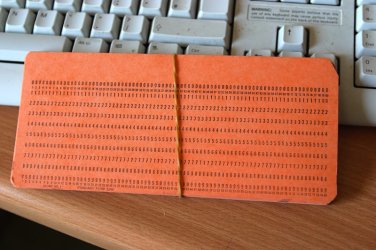
That stuff would even be tossed out of a "Computer" or "Science" Museum.
I can't believe this type of hardware was still being delivered to you guys.
Not even a "Wireless" transmitter in it.

I suppose the accounting system at the back office still uses these for data input. :D

Cheers
jimbo
 

Attachments

  • hollerith.jpg
    hollerith.jpg
    87.6 KB · Views: 10

My Computer

Computer type
PC/Desktop
Computer Manufacturer/Model Number
Custom built, several laptops HP/ASUS
OS
Linux CENTOS 7 / various Windows OS'es and servers
CPU
Intel i7 Intel i5
Memory
8GB, 16GB
Graphics Card(s)
On Motherboard
Sound Card
Realtek HD audio
Monitor(s) Displays
Apple Cinema display, Samsung LCD
Screen Resolution
1920 X 1080
Hard Drives
4 X 1TB SATA
Mouse
Toshiba wireless laser
Internet Speed
> 20MB up
You got that one right! You should have seen the old dsl setup! You would have been in histerics looking at the old 98 usb 1.1 adapter! :roflmao:

Once it comes in I won't have to worry about the latest update either since I already paid a visit to the support site in advance. Believe it or not they actually charge a monthly rental fee on the other one!

Think this will make a nice wallpaper on the 64bit 7? :D


My Computers

System One System Two

  • Computer type
    PC/Desktop
    Computer Manufacturer/Model Number
    Custom builds = 2
    OS
    W7 Ultimate x64/W10 Pro x64/W11 Pro Triple Boot - Main PC W7 Remote PC Micro ATX W7 Pro x64/W11 Pro
    CPU
    AMD Phenom II X4 975 Deneb 3.6ghz - 965 2nd remote pc
    Motherboard
    Gigabyte GA-790XTA-UD4-Gigabyte GA-880GM-D2H remote pc
    Memory
    Kingston Hyper X DDR3 1600 1.5v 16gb - Hyper X Fury 8gb 2nd
    Graphics Card(s)
    MSI HD Radeon 5750 1gb - MSI HD Radeon 6450 on mini tower
    Sound Card
    Creative Labs X-Fi Xtreme Audio P - Realtek onooard 2nd case
    Monitor(s) Displays
    ASUS VW199T-P 19" HP 2082a Main-HP 2082a 20" remote pc
    Screen Resolution
    Asus 1440x900 - HP 1600x900
    Hard Drives
    WD Black 1TB HD per OS W7, W10, and pending W11 presently on 500gb OS Drive - Pending Triple 1TB HDs for Spanned Storage/backup volume
    Single 2TB external USB enclosure, single 1TB System 7 Host/Boot drive, Pending 8TB external HD for system image b
    PSU
    Corsair 750TX - primary / Corsair CX600 - second
    Case
    Antec 900-2 - SSD compatible / NZXT Vulcan mini tower
    Cooling
    Zalman CNPS9900A
    Keyboard
    AZIO L70 Backlit Letters Gaming - ONN Cordless/USB
    Mouse
    MSI DS200 Programmable, Logitech Cordless
    Internet Speed
    30mbps upgrade - primary hard wired - mini tower usb WiFi
    Antivirus
    GFI VIPRE Internet Security 2014 on W7 2016 beta on W10,
    Browser
    Cyberfox, WaterFox 64bit FF variants, FireFox x64, Pale Moon
    Other Info
    Accomdata fan cooled usb 2.0 PIDE/Sata II, III external enclosure.
    Sambient usb/eSata PATA/Sata II, III external enclosure.
  • Computer type
    PC/Desktop
    System Manufacturer/Model Number
    CUSTOM ASSEMBLY
    OS
    W7 Pro x64/W11 Pro
    CPU
    AMD Deneb 3.6ghz - 965
    Motherboard
    Gigabyte GA-880GM-D2H remote pc
    Memory
    Kingston Hyper X Fury 8gb
    Graphics Card(s)
    MSI HD Radeon 6450 DVI Output
    Sound Card
    Realtek onooard Creative or Other separate PENDING
    Monitor(s) Displays
    VIZIO 32" LCD TV Separate LCD Pending
    Screen Resolution
    1600x1080
    Hard Drives
    WD 500GB OS Host/Boot WD Green 1TB Storage/Backup
    PSU
    Corsair 600W - THERMALTAKE 600W spare case
    Case
    NZXT Vulcan mini tower
    Cooling
    Twin 120mm Top Fans - 240mm Side Cover
    Keyboard
    ONN Cordless/USB Logitech Cordless
    Mouse
    ONN USB/Cordless - Logitech Cordless
    Internet Speed
    DSL 5G
    Browser
    MS Edge, FireFox, WaterFox x64, FireFox Nightly
    Other Info
    OS Testing-Remote Access to Main TeamViewer
Hi there
That MUST be worth something on EBAY. :D

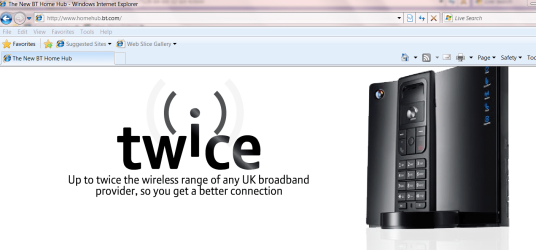
Even in the UK (I'm currently on a contract assignment in the UK -- ZERO work to do but it pays for the moment ) BT (known "affectionally" as Bull --IT telecomms) provides a decent Wireless setup without needing extra boxes etc.

The main problem is when setting up you get through (eventually) to some totally incomprehensible off shore call centre -- who haven't a CLUE about setting this thing to get the MAX wireless speed these days 108 MB/s.

However I do like the idea of minimising the number of "Black boxes" lying around.

enc image
 

Attachments

  • bt.png
    bt.png
    91.2 KB · Views: 11

My Computer

Computer type
PC/Desktop
Computer Manufacturer/Model Number
Custom built, several laptops HP/ASUS
OS
Linux CENTOS 7 / various Windows OS'es and servers
CPU
Intel i7 Intel i5
Memory
8GB, 16GB
Graphics Card(s)
On Motherboard
Sound Card
Realtek HD audio
Monitor(s) Displays
Apple Cinema display, Samsung LCD
Screen Resolution
1920 X 1080
Hard Drives
4 X 1TB SATA
Mouse
Toshiba wireless laser
Internet Speed
> 20MB up
Think this will make a nice wallpaper on the 64bit 7? :D


Zoom in to see the awesomeness
 

My Computer

Computer Manufacturer/Model Number
Acer Aspire 5610
OS
Windows 7 Professional, Windows Longhorn 4074
CPU
Intel Centrino Duo T2350 @ 1.87 GHz
Motherboard
Acer Grapevine
Memory
1GB (2x 512MB DDR2 400Mz)
Graphics Card(s)
Intel Integrated 945GM Chipset
Sound Card
On-Board RealTek HD Audio
Monitor(s) Displays
Generic PnP Monitor
Screen Resolution
1280x800
Hard Drives
160GB SATA HD
PSU
Generic PSU
Case
Acer Aspire 5610 Standard Case (U.S. Version)
Cooling
Air
Keyboard
Built-In / Random Logitech wireless keyboard
Mouse
Synaptics Touchpad / Logitech Click! optical mouse.
Internet Speed
2.57 Mbps Download / 0.29 Mbps Upload / 57ms Ping
Other Info
I call it the craptop.
Back
Top