
64 Bit Os shows only 3,25 GB ram of 4

devilangel

New member
Local time
2:51 PM
Messages
3
Location
LV
Hello
I got an problem, i installed 2x Patriot 2GB stick on my board.


But system only shows 3,25 GB of 4GB ram.
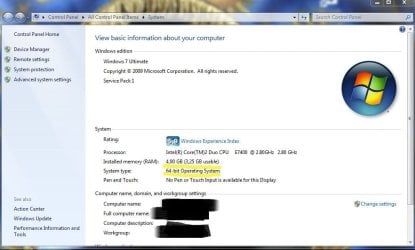
system.JPG


I not found any memmory remaping option in BIOS

I got GA-945GCM-S2C board
Video GF 9800 GT sparkle 1GB 256 Bit (video card doestn support booster)
When i putted on board 1 bu one stick its show up valid 2 GB ram but when they are together its shows only3,25 GB ram. :(
 

My Computer My Computer

At a glance

Windows 7 Ultimate x64Intel Core 2 Duo2x Patriot 2GB 6400Geforce 9800 GT Sparkle 1GB 256 Bit
Computer Manufacturer/Model Number
Gigabyte
OS
Windows 7 Ultimate x64
CPU
Intel Core 2 Duo
Motherboard
GA-945GCM-S2C
Memory
2x Patriot 2GB 6400
Graphics Card(s)
Geforce 9800 GT Sparkle 1GB 256 Bit
Sound Card
Integrated Realtek HD
Monitor(s) Displays
AOL 22`
Hard Drives
2x 500 GB
PSU
ATX-300PNR
Case
PROTEC
Cooling
Intel
devilangel, welcome to the Seven Forums.

This would be why you are only seeing 3.25 GB of 4 GB (says for Vista by the exact same applies to Windows 7),

The system memory that is reported in the System Information dialog box in Windows Vista is less than you expect if 4 GB of RAM is installed

For Windows Vista to use all 4 GB of memory on a computer that has 4 GB of memory installed, the computer must meet the following requirements:
  • The chipset must support at least 8 GB of address space. Chipsets that have this capability include the following:
    • Intel 975X
    • Intel P965
    • Intel 955X on Socket 775
    • Chipsets that support AMD processors that use socket F, socket 940, socket 939, or socket AM2. These chipsets include any AMD socket and CPU combination in which the memory controller resides in the CPU.
  • The CPU must support the x64 instruction set. The AMD64 CPU and the Intel EM64T CPU support this instruction set.
  • The BIOS must support the memory remapping feature. The memory remapping feature allows for the segment of system memory that was previously overwritten by the Peripheral Component Interconnect (PCI) configuration space to be remapped above the 4 GB address line. This feature must be enabled in the BIOS configuration utility on the computer. View your computer product documentation for instructions that explain how to enable this feature. Many consumer-oriented computers may not support the memory remapping feature. No standard terminology is used in documentation or in BIOS configuration utilities for this feature. Therefore, you may have to read the descriptions of the various BIOS configuration settings that are available to determine whether any of the settings enable the memory remapping feature.
  • An x64 (64-bit) version of Windows Vista must be used.

You have everything but the correct chipset, the 945G only supports up to 4 GB,

Intel® 945G Express Chipset - Overview

Basically boils down to regardless of whether you run 32 bit or 64 bit, you're going to run into the same memory limitations.
 

My Computer My Computer

At a glance

Win 7 Ultimate x64FX-8350 @ 4.6 GHz so farADATA XPG V1 Series Black 8GB DDR3 1600Sapphire R9 270x Dual-X
Computer type
PC/Desktop
Computer Manufacturer/Model Number
Me
OS
Win 7 Ultimate x64
CPU
FX-8350 @ 4.6 GHz so far
Motherboard
Asus M5A97 EVO
Memory
ADATA XPG V1 Series Black 8GB DDR3 1600
Graphics Card(s)
Sapphire R9 270x Dual-X
Sound Card
Xonar DGX w/ Corsair Vengence 1300
Monitor(s) Displays
Acer S232HL Abid
Screen Resolution
1920x1080
Hard Drives
120 GB OCZ Vertex 3
500 GB Seagate 7200.12
PSU
Antec Earthwatts 650W Green
Case
Antec Three Hundred
Cooling
Cooler Master 212 EVO
Keyboard
Logitech G510
Mouse
Logitech G500s
Internet Speed
35000/3000
Thankyou for welcoming :)


Ohh i see, then you sugges buy a better motherboard?


And now what i shall use , x64 or x86 better? whit 3,25 GB ram.
 
Last edited:

My Computer My Computer

At a glance

Windows 7 Ultimate x64Intel Core 2 Duo2x Patriot 2GB 6400Geforce 9800 GT Sparkle 1GB 256 Bit
Computer Manufacturer/Model Number
Gigabyte
OS
Windows 7 Ultimate x64
CPU
Intel Core 2 Duo
Motherboard
GA-945GCM-S2C
Memory
2x Patriot 2GB 6400
Graphics Card(s)
Geforce 9800 GT Sparkle 1GB 256 Bit
Sound Card
Integrated Realtek HD
Monitor(s) Displays
AOL 22`
Hard Drives
2x 500 GB
PSU
ATX-300PNR
Case
PROTEC
Cooling
Intel
You could look at a motherboard that supports more than 4 GB, but this is one of those where it might be better to wait until you can do a full system upgrade. If you do decide to go for a board don't look for one with anything less than the G33 chipset on it,

Intel® G33 Express Chipset - Overview

as any under it are like your current board and only support up to 4 GB. As for what board to look for, as cheap as you can find as socket 775 is basically discontinued. Just check the board manufacturer's website if you chose one and make sure that it supports your CPU.

As for whether to run 32 bit or 64 bit with your current setup, seeing as the memory available won't change regardless of which you use I would just leave the 64 bit on it.
 

My Computer My Computer

At a glance

Win 7 Ultimate x64FX-8350 @ 4.6 GHz so farADATA XPG V1 Series Black 8GB DDR3 1600Sapphire R9 270x Dual-X
Computer type
PC/Desktop
Computer Manufacturer/Model Number
Me
OS
Win 7 Ultimate x64
CPU
FX-8350 @ 4.6 GHz so far
Motherboard
Asus M5A97 EVO
Memory
ADATA XPG V1 Series Black 8GB DDR3 1600
Graphics Card(s)
Sapphire R9 270x Dual-X
Sound Card
Xonar DGX w/ Corsair Vengence 1300
Monitor(s) Displays
Acer S232HL Abid
Screen Resolution
1920x1080
Hard Drives
120 GB OCZ Vertex 3
500 GB Seagate 7200.12
PSU
Antec Earthwatts 650W Green
Case
Antec Three Hundred
Cooling
Cooler Master 212 EVO
Keyboard
Logitech G510
Mouse
Logitech G500s
Internet Speed
35000/3000
Unless you have a retail version of Windows7, you will also have to buy a new Windows7 when you change the board. If the OS came with the PC (OEM version), you cannot transfer it to a new board.
 

My Computer My Computer

At a glance

Vista, Windows7, Mint Mate, Zorin, Windows 8from 1.6GHz Duo to i7
Computer Manufacturer/Model Number
HP, Dell, Gateway, Toshiba - 4 laptops and 2 desktops
OS
Vista, Windows7, Mint Mate, Zorin, Windows 8
CPU
from 1.6GHz Duo to i7
Monitor(s) Displays
2x HP w2207
Hard Drives
5x HDD, 7x SSD, 12x Externals
Keyboard
with trackball - no mices
Mouse
Trackball mice
Internet Speed
DSL 6000
Alright so i will then wait for more incomes and then change whole system then and im loking on AMD then as far i know they working better then INTEL.

Tnx for advices :)
 

My Computer My Computer

At a glance

Windows 7 Ultimate x64Intel Core 2 Duo2x Patriot 2GB 6400Geforce 9800 GT Sparkle 1GB 256 Bit
Computer Manufacturer/Model Number
Gigabyte
OS
Windows 7 Ultimate x64
CPU
Intel Core 2 Duo
Motherboard
GA-945GCM-S2C
Memory
2x Patriot 2GB 6400
Graphics Card(s)
Geforce 9800 GT Sparkle 1GB 256 Bit
Sound Card
Integrated Realtek HD
Monitor(s) Displays
AOL 22`
Hard Drives
2x 500 GB
PSU
ATX-300PNR
Case
PROTEC
Cooling
Intel
If I were you, I would not worry too much about the problem. The OS will work just as well with 3.25GB as with 4GB. You probably would hardly notice the difference.

If you look into Resource Monitor > Memory tab, you will see on the color bar that most of the times there is plenty of "available RAM" (the light blue and dark blue sections). Especially if there is still light blue left, there would be just more of it (unused) with 4GBs.
 

My Computer My Computer

At a glance

Vista, Windows7, Mint Mate, Zorin, Windows 8from 1.6GHz Duo to i7
Computer Manufacturer/Model Number
HP, Dell, Gateway, Toshiba - 4 laptops and 2 desktops
OS
Vista, Windows7, Mint Mate, Zorin, Windows 8
CPU
from 1.6GHz Duo to i7
Monitor(s) Displays
2x HP w2207
Hard Drives
5x HDD, 7x SSD, 12x Externals
Keyboard
with trackball - no mices
Mouse
Trackball mice
Internet Speed
DSL 6000
Back
Top