
64bit versus 32 bit

jweigel

New member
Local time
5:42 PM
Messages
21
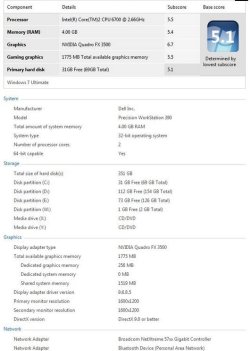
See attached WEI for my work PC. I am sure the hardware will work fine with 64bit. But in a work environment running apps such as Office 2007, Crystal Reports, ArcMap and connected to an Exchange server...would I gain anything by running Win7 64 versus Win7 32????

With RAM very cheap, if I increase RAM to 8GB would the above mentioned run as fast or faster in 64bit?

Thanks for any advice.

jjw
ND
 

Attachments
  • Capture.JPG
    Capture.JPG
    47.9 KB · Views: 389

My Computer

Computer Manufacturer/Model Number
Dell Precision Workstation T3500
OS
Windows 7 x64
CPU
Intel Xeon 5520
Motherboard
Dell
Memory
6 GB
Graphics Card(s)
NVidia FX1800
Monitor(s) Displays
Dual Dell 2007FP
Hard Drives
80GB Intel SSD G2 Boot;
300 GB 10K SATA Data
Keyboard
Logitech Wave Pro
Internet Speed
Fiber
I don't believe you will see a noticeable speed increase with business apps. They'll likely be 32bit apps anyway and even if there were 64 bit versions of those apps, I doubt you'll be dealing with 4GB data in memory for one app. The only thing you will be able to gain with 64 bit Windows (right now anyway) is the ability for the computer to address more that 4GB of RAM which will allow you to have more apps running in physical memory concurrently without Windows swapping them out to the hard drive (much). I think Vista and Windows 7 will still swap somethings out of physical memory even if you have the physical memory to spare. Your Mileage My Vary
 

My Computer

Computer Manufacturer/Model Number
Home Grown
OS
Windows 7 Beta 1
CPU
2.33 Ghz Intel Core 2 Duo
Motherboard
Intel G33 Micro ATX Intel
Memory
A-DATA 2GB (2 x 1GB) 240-Pin DDR2 SDRAM DDR2 800 (PC2 6400)
Graphics Card(s)
ATI X600
Sound Card
Realtek ALC888 (Onboard)
Monitor(s) Displays
Dell 20" LCD
Screen Resolution
1600 x 1200
Hard Drives
WD 320GB
Even though the Apps might be 32 bit, wouldn't the overall OS run smoother at 64bit?

When I installed Vista, I didn't even think about it, I loaded the 64 bit version. 64bit will get you to see the full 8GB, but I don't think it will use the extra ram at all. I would say load the 64 bit version. And may I ask where you are getting Win7 64? :D
 

My Computer

Computer Manufacturer/Model Number
Custom Desktop & HP G60-120US
OS
Windows 7 Pro x64 & Win7 Pre x64 / Ubuntu 9.10 Beta
CPU
Q6600 Quad Core 2 - 2.4Ghz
Motherboard
EVGA - 680i SLI
Memory
4GB Kingston DDR2 800
Graphics Card(s)
XFX 8800GT Alpha Dog Ed. X 2 SLI
Sound Card
On Board
Monitor(s) Displays
24"Dell Wide Screen and Gateway 17" Widescreen & HP 15.4"
Screen Resolution
1920 x1200 (Dell) 1440 x 900(Gateway) & 1366x768 (HP Laptop)
Hard Drives
WD 500GB, Seagate 1.5 TB
PSU
Rosewell RX750
Case
Antec 900
Cooling
Zalman 8700
Keyboard
Saitek Cyborg & Logitech wireless
Mouse
Logitech G5 & Logitech wireless
Internet Speed
Cable - 20Mbs/sec DOWN 5Mbs/s UP
Hello Iknewitwin7, welcome to Se7en Forums!

First, direct links to illegal downloads aren't permitted here at the forums; so they can't answer your question.

There are at least two 64-bit Windows 7 versions floating around; 6801 has both 32-bit and 64- bit and 6936 in available in 64-bit only.

Google


Later ;) Ted
 

My Computer

Computer Manufacturer/Model Number
* BFK Customs *
OS
W 7 64-bit Ultimate
CPU
Intel Q9550 Yorkfield
Motherboard
ASUS P5Q Pro
Memory
8GB Dominator 8500C5D
Graphics Card(s)
ATI : XFX 5870
Sound Card
Realtek HD Audio 7-1
Monitor(s) Displays
1x 47" LCD HDMI & 3x 26" LCD HDMI
Screen Resolution
1920x1080P & 1920x1200
Hard Drives
1x 80GB Intel X25-M G2 SSD : 1x 500GB & 1x 640GB WD Caviar Black(s)
PSU
Corsair 620HX
Case
Cooler Master RC-690
Cooling
Tuniq Tower 120, 2x 140mm and 3x 120mm case fans
Keyboard
Microsoft 500
Mouse
Razer Diamondback 3G
Internet Speed
14 Mb/s
Other Info
1x Koutech 3Gb/s SATA HDD Hot Swap Rack
Well you won't really need 8GB, so I dunno, as with 32bit you can only use 3.6GB of RAM. Installing 32bit OS on any system with more RAM than that is wasting it.
 
Back
Top