6GB ram installed 5.5 usable ?

lamboss

New member
Local time
9:03 PM
Messages
39
Hi everyone

I installed 6 GB of ram today and at first it only showed 2 GB usable memory then I tweaked around with the settings and got it up to 5.5 GB

How can I get it to its full capacity 6GB ?

my motherboard I think does not support memory mapping and I re-installed the OS Win 7 64bit but still shows 5.5 GB

thx for the help in advance :)
 

My Computer

OS
Windows 7 64 bit Ultimate
CPU
Amd Athlon 64 X2 Dual Core Processor 2.8Ghz
Motherboard
ASUS M2N-SLI Deluxe
Memory
6GB
Graphics Card(s)
Nvidia Geforce 9600GT GDDR3 512mb
Sound Card
HD Itergrated
Monitor(s) Displays
19'' Acer
Hard Drives
320 GB Sata II
100 GB IDE
I went to > msconfig > boot tab > advanced options > and unchecked maximum memory and it became 5.5 Gb

i have a 512mb geforce 9600gt .. so im not really sure ?

in msinfo32 shows

Installed Physical Memory (RAM) 6.00 GB
Total Physical Memory 5.50 GB
Available Physical Memory 4.21 GB
Total Virtual Memory 11.0 GB
Available Virtual Memory 9.67 GB
Page File Space 5.50 GB
Page File C:\pagefile.sys
 

My Computer

OS
Windows 7 64 bit Ultimate
CPU
Amd Athlon 64 X2 Dual Core Processor 2.8Ghz
Motherboard
ASUS M2N-SLI Deluxe
Memory
6GB
Graphics Card(s)
Nvidia Geforce 9600GT GDDR3 512mb
Sound Card
HD Itergrated
Monitor(s) Displays
19'' Acer
Hard Drives
320 GB Sata II
100 GB IDE
Hi everyone

I installed 6 GB of ram today and at first it only showed 2 GB usable memory then I tweaked around with the settings and got it up to 5.5 GB

How can I get it to its full capacity 6GB ?

my motherboard I think does not support memory mapping and I re-installed the OS Win 7 64bit but still shows 5.5 GB

thx for the help in advance :)
Welcome to Windows 7 support forum.
Lamboss, your stats are correct.
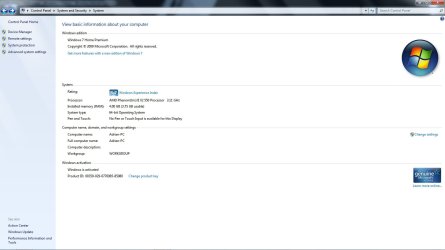
Your operating system and services and startup programs consume a small amount of resident ram. For further info go to search, type "sysinfo" and all your basic stats will be displayed.
For further info consult the posted image.

Regards, and happy holidays.
Adrian
 

Attachments

  • sysinfo.jpg
    sysinfo.jpg
    67.7 KB · Views: 1,069

My Computer

Computer Manufacturer/Model Number
Custom Build
OS
Windows 7 7600 1 X64
CPU
AMD PHENOM II X 550 PROCESSOR 3.1 ghz
Motherboard
ASUS M4A78-TE
Memory
Corsair 4 gig ddr 3
Graphics Card(s)
ati radeon 3300
Sound Card
ati hd
Monitor(s) Displays
syncmaster 2033sw
Screen Resolution
1600X900 60 hz refresh
Hard Drives
twin_seagates SATA's 1 TB & 500 Gig, hitachi_slimline 160 gig
PSU
antec_550 watt
Case
cooler master GLite
Cooling
stock_heat sink
Internet Speed
20mbs up/ 1.5mbs down
Other Info
favorite child "stewie"
favorite dog "brian"
alri thank you :)
 

My Computer

OS
Windows 7 64 bit Ultimate
CPU
Amd Athlon 64 X2 Dual Core Processor 2.8Ghz
Motherboard
ASUS M2N-SLI Deluxe
Memory
6GB
Graphics Card(s)
Nvidia Geforce 9600GT GDDR3 512mb
Sound Card
HD Itergrated
Monitor(s) Displays
19'' Acer
Hard Drives
320 GB Sata II
100 GB IDE
Correct or not ... that is a matter of definition. If you don't have gfx with shared memory or such, you have 0.5 GB of RAM sitting there doing nothing. It is of no use to you.

What motherboard do you have, and what does BIOS display?
 

My Computer

OS
Windows
M2N-SLI Deluxe ... about the missing memory remap feature, have you checked for a more recent bios version?
 

My Computer

OS
Windows
yes I checked and there is a new bios available so should I update it ?
 

My Computer

OS
Windows 7 64 bit Ultimate
CPU
Amd Athlon 64 X2 Dual Core Processor 2.8Ghz
Motherboard
ASUS M2N-SLI Deluxe
Memory
6GB
Graphics Card(s)
Nvidia Geforce 9600GT GDDR3 512mb
Sound Card
HD Itergrated
Monitor(s) Displays
19'' Acer
Hard Drives
320 GB Sata II
100 GB IDE
I updated the Bios to a much newer version and its detecting and using all 6GB installed now :)
I am not very happy happy with the bios tough because it freezes sometimes

Thanks for the help :)

Wishing you and everyone a Happy Christmas :)
 

My Computer

OS
Windows 7 64 bit Ultimate
CPU
Amd Athlon 64 X2 Dual Core Processor 2.8Ghz
Motherboard
ASUS M2N-SLI Deluxe
Memory
6GB
Graphics Card(s)
Nvidia Geforce 9600GT GDDR3 512mb
Sound Card
HD Itergrated
Monitor(s) Displays
19'' Acer
Hard Drives
320 GB Sata II
100 GB IDE
I updated the Bios to a much newer version and its detecting and using all 6GB installed now :)
I am not very happy happy with the bios tough because it freezes sometimes

Thanks for the help :)

Wishing you and everyone a Happy Christmas :)
Merry Christmas LAmboss, what is freezing?
This comes after the reflash?
 

My Computer

Computer Manufacturer/Model Number
Custom Build
OS
Windows 7 7600 1 X64
CPU
AMD PHENOM II X 550 PROCESSOR 3.1 ghz
Motherboard
ASUS M4A78-TE
Memory
Corsair 4 gig ddr 3
Graphics Card(s)
ati radeon 3300
Sound Card
ati hd
Monitor(s) Displays
syncmaster 2033sw
Screen Resolution
1600X900 60 hz refresh
Hard Drives
twin_seagates SATA's 1 TB & 500 Gig, hitachi_slimline 160 gig
PSU
antec_550 watt
Case
cooler master GLite
Cooling
stock_heat sink
Internet Speed
20mbs up/ 1.5mbs down
Other Info
favorite child "stewie"
favorite dog "brian"
I updated the Bios to a much newer version and its detecting and using all 6GB installed now :)
I am not very happy happy with the bios tough because it freezes sometimes

Thanks for the help :)

Wishing you and everyone a Happy Christmas :)
Did you backup and save your previous bios version.
 

My Computer

Computer Manufacturer/Model Number
Custom Build
OS
Windows 7 7600 1 X64
CPU
AMD PHENOM II X 550 PROCESSOR 3.1 ghz
Motherboard
ASUS M4A78-TE
Memory
Corsair 4 gig ddr 3
Graphics Card(s)
ati radeon 3300
Sound Card
ati hd
Monitor(s) Displays
syncmaster 2033sw
Screen Resolution
1600X900 60 hz refresh
Hard Drives
twin_seagates SATA's 1 TB & 500 Gig, hitachi_slimline 160 gig
PSU
antec_550 watt
Case
cooler master GLite
Cooling
stock_heat sink
Internet Speed
20mbs up/ 1.5mbs down
Other Info
favorite child "stewie"
favorite dog "brian"
nope i didn back it up lol

yes its kinda lagging and it froze up but i reloaded the setup defaults and its working for now . Havent really checked it troughly after I reloaded the setup defaults
 

My Computer

OS
Windows 7 64 bit Ultimate
CPU
Amd Athlon 64 X2 Dual Core Processor 2.8Ghz
Motherboard
ASUS M2N-SLI Deluxe
Memory
6GB
Graphics Card(s)
Nvidia Geforce 9600GT GDDR3 512mb
Sound Card
HD Itergrated
Monitor(s) Displays
19'' Acer
Hard Drives
320 GB Sata II
100 GB IDE
open task manager, performance tab, then click resource monitor. you can see exactly how all of your ram is used and allocated.

and see this: http://www.sevenforums.com/general-discussion/48304-only-2-5-gigs-ram-64-bit.html

on the above link, the person who had their memory problem also had an nvidia card installed. see if you have memory reserved for hardware in the resource monitor.

those of us who jumped into the 64-bit windows arena like to have our systems with 4, 6, 8, 12, or 16 gigs of memory, but even though the architecture allows the addressing advantage over the 32-bit systems, you can only still use or have available a certain amount at any given time. meaning, part of your memory is always going to be in use by something--that's how it is. i have 8 installed in my system--at this time writing this, i have system info open, task manager open, resource monitor open, outlook 2007, and firefox with 8 tabs open--all of this along with the programs and services that start automatically and i only have available 5.97 gigs. it's not a problem--i know i have 8 gigs installed and for whatever task i need to perform, 5 to 6 gigs of my available memory is more than enough to get my task done in an efficient time. as adrian stated above, you're stats look good and everything seems in order.

that .5gigs "just sitting there doing nothing for you" are more than likely reserved by the os for hardware.

i'd be more concerned if you had 6 installed and only had 2 available--5.5, you're good
 

My Computer

Computer Manufacturer/Model Number
Rig 1
OS
Windows 7 Ultimate x64
CPU
AMD Phenom II X4 940 Black Edition @ 3.4GHz (AM2+)
Motherboard
Gigabyte GA-MA790X-UD4P (AM2+)
Memory
Corsair CM2X4096-8500C5 (4 X 2GB)
Graphics Card(s)
XFX Radeon HD 5770 / Diamond Radeon HD 5770 CrossFireX
Sound Card
Asus Xonar DS (PCI)
Monitor(s) Displays
Samsung SyncMaster 932bw+ (3)
Screen Resolution
4320x900
Hard Drives
OCZ Vertex 2 80 GB - Windows 7 System --
WD Caviar Black 1TB - Music, Movies, Vids, Pics --
WD Caviar Black 640GB - User Profiles & Games --
WD My Book 320GB external
PSU
Corsair CMPSU-750TX
Case
Cooler Master HAF 932
Cooling
Corsair Hydro Series H50
Keyboard
Logitech Desktop Wave
Mouse
Logitech LX8 Laser
Internet Speed
20 down / 2 up
Other Info
LG GGC-H20L Blu-Ray / HDDVD combo --
Hauppauge HVR-1250 --
Silverstone MFP-51 --
Logitech Webcam C600
thx for the help mpcrsc562 but I managed to get the full 6gb back as usable when I updated the bios :D
 

My Computer

OS
Windows 7 64 bit Ultimate
CPU
Amd Athlon 64 X2 Dual Core Processor 2.8Ghz
Motherboard
ASUS M2N-SLI Deluxe
Memory
6GB
Graphics Card(s)
Nvidia Geforce 9600GT GDDR3 512mb
Sound Card
HD Itergrated
Monitor(s) Displays
19'' Acer
Hard Drives
320 GB Sata II
100 GB IDE
cool. :thumbsup:
 

My Computer

Computer Manufacturer/Model Number
Rig 1
OS
Windows 7 Ultimate x64
CPU
AMD Phenom II X4 940 Black Edition @ 3.4GHz (AM2+)
Motherboard
Gigabyte GA-MA790X-UD4P (AM2+)
Memory
Corsair CM2X4096-8500C5 (4 X 2GB)
Graphics Card(s)
XFX Radeon HD 5770 / Diamond Radeon HD 5770 CrossFireX
Sound Card
Asus Xonar DS (PCI)
Monitor(s) Displays
Samsung SyncMaster 932bw+ (3)
Screen Resolution
4320x900
Hard Drives
OCZ Vertex 2 80 GB - Windows 7 System --
WD Caviar Black 1TB - Music, Movies, Vids, Pics --
WD Caviar Black 640GB - User Profiles & Games --
WD My Book 320GB external
PSU
Corsair CMPSU-750TX
Case
Cooler Master HAF 932
Cooling
Corsair Hydro Series H50
Keyboard
Logitech Desktop Wave
Mouse
Logitech LX8 Laser
Internet Speed
20 down / 2 up
Other Info
LG GGC-H20L Blu-Ray / HDDVD combo --
Hauppauge HVR-1250 --
Silverstone MFP-51 --
Logitech Webcam C600
that .5gigs "just sitting there doing nothing for you" are more than likely reserved by the os for hardware.

Unless you have hardware that uses shared memory, there should be about zero reserved for the hardware if there is enough address space for all of it.
 

My Computer

OS
Windows
Back
Top