7 saving multiple copies at random...???

ladyluck487

New member
Local time
2:02 PM
Messages
17
Need some help, please! Got Win 7 Pro on new Dell....have regretted it 4 the 3 months I've had this machine! Half of my (some) expensive software that claimed to be compatible is NOT! Big problem now is 7 is actually randomly saving multiple copies of files I save, so I now have "My Websites" and a 'copy' within that folder named "My Website"....so this is the problems this is creating:

1) I save a file to "My Websites" (I do websites for dog breeders)

2) I go back to find that same file.....but it's not under "My Websites"...it's now under sub-folder "My Websites"....which is not where I saved it!

3) Also at random, clicking on "My Websites" does not open the folder (depending on which copy of "My Websites" actually opens ..(the main folder or the sub-folder).

4) at that point, more often than not, the computer freezes....sometimes, after several seconds, it will finally open the folder....most times, it stays 'frozen'...have to reboot!

To make matters worse, this cliche does not 'synchronize' both "My Websites" folders...so files between the 2 folders are not showing the same files...some have been updated but others have not.

Others things, files/folders, have also 'self-duplicated' themselves ....weirdest thing I've ever come across. :cry:

Open to any suggestions.....including a little guidance to setup either dual boot (making XP Pro my first boot) or a VPC. I have to go with the OS that supports all my software needed to make my money....and that's XP! I'm losing money because I can't get my sites completed at this rate....got several people mad at me now....gotta figure out a solution.
Hope you guys can steer me in the right direction! Appreciate your time!
 

My Computer

Computer Manufacturer/Model Number
Dell Studio XPS 8100
OS
Win 7 Pro 64-bit
CPU
Intel(R) Core(TM) i7 860 @ 2.80 GHz
Memory
8 gigs
Graphics Card(s)
NVIDIA GeForce GT 220
Sound Card
NVIDIA High Definition Audio Realtek High Definition Audio
Monitor(s) Displays
DELL SX2210 @ 1920x1080
Hard Drives
1 terabyte HDD
Hi Ladyluck
Need a bit more information here. What program are you using when you save the files to My Websites? what is the program that you were led to believe is compatible with Win 7 only to find it is not? have you tried to run it it "compatibilty mode"?
 

My Computer

Computer type
PC/Desktop
OS
Microsoft Windows 7 Home Premium 64-bit 7601 Multiprocessor Free Service Pack 1
CPU
Intel(R) Core(TM) i7-3770 CPU @ 3.40GHz
Motherboard
ASUSTeK COMPUTER INC. P8H77-M
Memory
8.00 GB
Graphics Card(s)
Intel(R) HD Graphics 4000
Sound Card
On Board
Monitor(s) Displays
Dell 24"
Screen Resolution
1920 x 1080
Hard Drives
(1) INTEL SSDSC2CT180A3 ATA Device (2) ST500DM002-1BD142 ATA Device (3) WDC WD3200AAKS-75L9A0 ATA Device (4) Generic- Compact Flash USB Device (5) Generic- MS/MS-Pro USB Device (6) Generic- SD/MMC USB Device (7) Generic- SM/xD-Picture USB
PSU
500w Corsair
Case
Cooler Master
Cooling
3 Fans
Keyboard
Logitech MK300
Mouse
Logitech WOM
Internet Speed
75Mb
Antivirus
Norton 360
Browser
Firefox, Opera, IE
This may be the same question as above, but what software are you thinking is not compatible with Windows 7?
 

My Computer

OS
Windows 7 Ultimate x64 SP1
CPU
Intel Core i7-2600
Motherboard
Gigabyte GA-P67A-UD3P-B3
Memory
12 GB Patriot Extreme DDR3-1333
Graphics Card(s)
Nvidia GTX 470
Monitor(s) Displays
Dell UltraSharp 2209WA
Hard Drives
OCZ Agility3 240 GB, WD5001AALS, WD7501AALS
PSU
OCZ ModStream 700W
Case
CoolerMaster HAF 912 Advanced
Cooling
CoolerMaster Hyper 212 Plus
to answer both you guys, software said to be compatible with Win 7 is Paint Shop Pro 2 & 3, all of the Xara programs I use for graphics, my FTP program only cooperates half the time....that's the main ones, all were 'said' to be compatible, but only run half-ass if they run at all.
I have also tried compatibility mode on most of these as well. I'm just basically dead in the water where my work is concerned at this point. :cry:
 

My Computer

Computer Manufacturer/Model Number
Dell Studio XPS 8100
OS
Win 7 Pro 64-bit
CPU
Intel(R) Core(TM) i7 860 @ 2.80 GHz
Memory
8 gigs
Graphics Card(s)
NVIDIA GeForce GT 220
Sound Card
NVIDIA High Definition Audio Realtek High Definition Audio
Monitor(s) Displays
DELL SX2210 @ 1920x1080
Hard Drives
1 terabyte HDD
Hi LadyLuck,

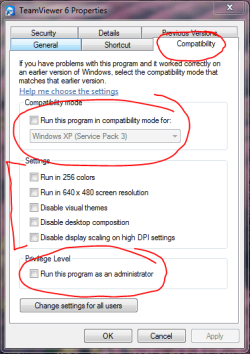
Have you tried to run your programs in Compatibility mode? Right-click the desktop icon for that program and then select Properties. See the image - make the appropriate changes to the areas circled in red.
 

Attachments

  • Capture2.PNG
    Capture2.PNG
    24.4 KB · Views: 2

My Computer

Computer type
PC/Desktop
Computer Manufacturer/Model Number
Golden Mk. I.4
OS
Windows 10 Pro x64 ; Xubuntu x64
CPU
Intel i7 860 @ 2.80 GHz O/C'ed to 4.0GHz
Motherboard
Gigabyte P55A-UD3R Rev.1. Award BIOS F13
Memory
16GB Corsair Vengance DDR3 @ 661 MHz Dual Channel (9-9-9-24)
Graphics Card(s)
EVGA NVidia GTX 560 1024MB
Sound Card
Realtek Integrated
Monitor(s) Displays
Dual Samsung SyncMaster 2494HS
Screen Resolution
1920*1080 and 1920*1080
Hard Drives
1*Samsung 840 EVO 120GB SSD;
1*OCZ Vertex 2 60GB SSD;
2*Samsung F3 SpinPoint 1TB in RAID0;
1*Samsung F1 SpinPoint 1TB;
2*Western Digital 1TB External USB 3.0
1*Western Digital 500GB External USB 3.0
1*Seagate 500GB External USB 2.0
PSU
Thermaltake ToughPower QFan 750W
Case
Thermaltake Element S VK60001W2Z
Cooling
Corsair H60 Water Cooling, 2*230mm and 2*80mm case fans
Keyboard
Logitech G110
Mouse
Logitech MX518
Paint.Net is a free graphics program that is compatible and mimics Photoshop. Filezilla is a free FTP program that puts all others to shame, and works perfectly fine under 7.

At one time, PaintShop Pro 7 was given away for free. I don't want to sound mean, but those versions you are using are beyond old, into the realm of ancient.
 

My Computer

OS
Windows 7 Ultimate x64 SP1
CPU
Intel Core i7-2600
Motherboard
Gigabyte GA-P67A-UD3P-B3
Memory
12 GB Patriot Extreme DDR3-1333
Graphics Card(s)
Nvidia GTX 470
Monitor(s) Displays
Dell UltraSharp 2209WA
Hard Drives
OCZ Agility3 240 GB, WD5001AALS, WD7501AALS
PSU
OCZ ModStream 700W
Case
CoolerMaster HAF 912 Advanced
Cooling
CoolerMaster Hyper 212 Plus
Got a client coming in for hopefully a new site. Will check back in a couple of hours. Thanks!
 

My Computer

Computer Manufacturer/Model Number
Dell Studio XPS 8100
OS
Win 7 Pro 64-bit
CPU
Intel(R) Core(TM) i7 860 @ 2.80 GHz
Memory
8 gigs
Graphics Card(s)
NVIDIA GeForce GT 220
Sound Card
NVIDIA High Definition Audio Realtek High Definition Audio
Monitor(s) Displays
DELL SX2210 @ 1920x1080
Hard Drives
1 terabyte HDD
Corel Paint Shop Pro Photo v.12 & v.13......sorry...had a 'senior moment' there. :confused:
 

My Computer

Computer Manufacturer/Model Number
Dell Studio XPS 8100
OS
Win 7 Pro 64-bit
CPU
Intel(R) Core(TM) i7 860 @ 2.80 GHz
Memory
8 gigs
Graphics Card(s)
NVIDIA GeForce GT 220
Sound Card
NVIDIA High Definition Audio Realtek High Definition Audio
Monitor(s) Displays
DELL SX2210 @ 1920x1080
Hard Drives
1 terabyte HDD
Those programs should be completely compatible. In fact, I know 12 is...my wife uses that on her laptop.
 

My Computer

OS
Windows 7 Ultimate x64 SP1
CPU
Intel Core i7-2600
Motherboard
Gigabyte GA-P67A-UD3P-B3
Memory
12 GB Patriot Extreme DDR3-1333
Graphics Card(s)
Nvidia GTX 470
Monitor(s) Displays
Dell UltraSharp 2209WA
Hard Drives
OCZ Agility3 240 GB, WD5001AALS, WD7501AALS
PSU
OCZ ModStream 700W
Case
CoolerMaster HAF 912 Advanced
Cooling
CoolerMaster Hyper 212 Plus
Corel Paint Shop Pro Photo v.12 & v.13 both work fine on windows 7. What is the expensive software that you are having problems with?
 

My Computer

Computer type
PC/Desktop
OS
Microsoft Windows 7 Home Premium 64-bit 7601 Multiprocessor Free Service Pack 1
CPU
Intel(R) Core(TM) i7-3770 CPU @ 3.40GHz
Motherboard
ASUSTeK COMPUTER INC. P8H77-M
Memory
8.00 GB
Graphics Card(s)
Intel(R) HD Graphics 4000
Sound Card
On Board
Monitor(s) Displays
Dell 24"
Screen Resolution
1920 x 1080
Hard Drives
(1) INTEL SSDSC2CT180A3 ATA Device (2) ST500DM002-1BD142 ATA Device (3) WDC WD3200AAKS-75L9A0 ATA Device (4) Generic- Compact Flash USB Device (5) Generic- MS/MS-Pro USB Device (6) Generic- SD/MMC USB Device (7) Generic- SM/xD-Picture USB
PSU
500w Corsair
Case
Cooler Master
Cooling
3 Fans
Keyboard
Logitech MK300
Mouse
Logitech WOM
Internet Speed
75Mb
Antivirus
Norton 360
Browser
Firefox, Opera, IE
Well, maybe we're getting somewhere after all.....because neither works "fine" my machine....neither program will allow me to even view things like the material palette or any palette for that matter....believe me, I've used these programs for a long time on my XP Pro machine. I'm not a newbie at this software.

So, if you're both sure Corel PSP Pro v12 & v13 both work fine on Win 7 Pro, then any suggestions as to why neither will work correctly on my machine? I've spent alot of money here so, maybe I have hardware trouble instead of software/OS trouble?
 

My Computer

Computer Manufacturer/Model Number
Dell Studio XPS 8100
OS
Win 7 Pro 64-bit
CPU
Intel(R) Core(TM) i7 860 @ 2.80 GHz
Memory
8 gigs
Graphics Card(s)
NVIDIA GeForce GT 220
Sound Card
NVIDIA High Definition Audio Realtek High Definition Audio
Monitor(s) Displays
DELL SX2210 @ 1920x1080
Hard Drives
1 terabyte HDD
Golden,
thanks for joining in....Yes, I have tried compatibility mode....same results. I can use part of PSP 12 and parts of PSP 13, but neither will allow "toolbars" or "Palettes" to be 'docked' on screen....I can click and see the names of the options I need, but clicking, double-clicking, etc. nothing will make the palettes show up on the right side of the screen as they always did....end result is they are unusable. I can resize, crop, adjust color, etc.....but cannot add text to photos because I can't choose the font or the color, can't add borders to a pic because I can't change the color of the borders, can't create an original background image because I don't have access to any function of any palette. I've tried everything.

I checked the mgf websites for compatibility before I paid nearly $1600 for this new machine...MS website claims compatibility to every program I have that now will NOT work on Win 7 Pro. So, if I sound a tad miffed, it's because I am.
I was just hoping someone might have an easier solution than cleaning house and starting over! I was willing to learn Win 7, but I will lose my website clients if I have to take the necessary time to learn both Win 7 and several other 'second choice' software programs that I've never heard of before and especially cannot pay for even if the cost is low. I did buy an extra year of warranty on the machine...so I have about 18 months of warranty left on it. I'm thinking now that it may be the machine rather than the OS or a compatibility issue.
Appreciate the time, you guys....I'm open to any suggestions. :(
 

My Computer

Computer Manufacturer/Model Number
Dell Studio XPS 8100
OS
Win 7 Pro 64-bit
CPU
Intel(R) Core(TM) i7 860 @ 2.80 GHz
Memory
8 gigs
Graphics Card(s)
NVIDIA GeForce GT 220
Sound Card
NVIDIA High Definition Audio Realtek High Definition Audio
Monitor(s) Displays
DELL SX2210 @ 1920x1080
Hard Drives
1 terabyte HDD
Hi,

Well, from your PC specs, I can see its a very good one and more than capable of running Windows 7.

Just to check : this isn't a dual boot XP and 7 right? Its only Windows 7?

Regards,
Golden

EDIT : are the two graphics cards (the one in your XP PC that runs the software fine, and the other in your Win7 PC) different? Can you give us some information about them please?
 

My Computer

Computer type
PC/Desktop
Computer Manufacturer/Model Number
Golden Mk. I.4
OS
Windows 10 Pro x64 ; Xubuntu x64
CPU
Intel i7 860 @ 2.80 GHz O/C'ed to 4.0GHz
Motherboard
Gigabyte P55A-UD3R Rev.1. Award BIOS F13
Memory
16GB Corsair Vengance DDR3 @ 661 MHz Dual Channel (9-9-9-24)
Graphics Card(s)
EVGA NVidia GTX 560 1024MB
Sound Card
Realtek Integrated
Monitor(s) Displays
Dual Samsung SyncMaster 2494HS
Screen Resolution
1920*1080 and 1920*1080
Hard Drives
1*Samsung 840 EVO 120GB SSD;
1*OCZ Vertex 2 60GB SSD;
2*Samsung F3 SpinPoint 1TB in RAID0;
1*Samsung F1 SpinPoint 1TB;
2*Western Digital 1TB External USB 3.0
1*Western Digital 500GB External USB 3.0
1*Seagate 500GB External USB 2.0
PSU
Thermaltake ToughPower QFan 750W
Case
Thermaltake Element S VK60001W2Z
Cooling
Corsair H60 Water Cooling, 2*230mm and 2*80mm case fans
Keyboard
Logitech G110
Mouse
Logitech MX518
Hi,

Well, from your PC specs, I can see its a very good one and more than capable of running Windows 7.

Just to check : this isn't a dual boot XP and 7 right? Its only Windows 7?

Regards,
Golden

No it isn't a dual boot....not yet anyway. Just Win 7 Pro as ordered. TDual boot has been suggested as has Win XP Mode...but I havent' tried either because I have (as my origina post title alludes to) other problems with 7 saving files in whatever folder it chooses and creates copies of folder with the same name...etc.

So, I'm at a loss really as to what to try next. :(
 

My Computer

Computer Manufacturer/Model Number
Dell Studio XPS 8100
OS
Win 7 Pro 64-bit
CPU
Intel(R) Core(TM) i7 860 @ 2.80 GHz
Memory
8 gigs
Graphics Card(s)
NVIDIA GeForce GT 220
Sound Card
NVIDIA High Definition Audio Realtek High Definition Audio
Monitor(s) Displays
DELL SX2210 @ 1920x1080
Hard Drives
1 terabyte HDD
Sorry, hit the send button too quick! :( I actually don't have the XP Pro machine here ...I sent it to my daughter when the new one got here. don't know how to look up the graphic card specs on this one....tell me what to look for and I will find it, please?
 

My Computer

Computer Manufacturer/Model Number
Dell Studio XPS 8100
OS
Win 7 Pro 64-bit
CPU
Intel(R) Core(TM) i7 860 @ 2.80 GHz
Memory
8 gigs
Graphics Card(s)
NVIDIA GeForce GT 220
Sound Card
NVIDIA High Definition Audio Realtek High Definition Audio
Monitor(s) Displays
DELL SX2210 @ 1920x1080
Hard Drives
1 terabyte HDD
OK. Can you post the information from the graphics card please? In the mean-time, I'll see if I can get some high-level help here for you. I wouldn't ditch Windows 7 yet.
 

My Computer

Computer type
PC/Desktop
Computer Manufacturer/Model Number
Golden Mk. I.4
OS
Windows 10 Pro x64 ; Xubuntu x64
CPU
Intel i7 860 @ 2.80 GHz O/C'ed to 4.0GHz
Motherboard
Gigabyte P55A-UD3R Rev.1. Award BIOS F13
Memory
16GB Corsair Vengance DDR3 @ 661 MHz Dual Channel (9-9-9-24)
Graphics Card(s)
EVGA NVidia GTX 560 1024MB
Sound Card
Realtek Integrated
Monitor(s) Displays
Dual Samsung SyncMaster 2494HS
Screen Resolution
1920*1080 and 1920*1080
Hard Drives
1*Samsung 840 EVO 120GB SSD;
1*OCZ Vertex 2 60GB SSD;
2*Samsung F3 SpinPoint 1TB in RAID0;
1*Samsung F1 SpinPoint 1TB;
2*Western Digital 1TB External USB 3.0
1*Western Digital 500GB External USB 3.0
1*Seagate 500GB External USB 2.0
PSU
Thermaltake ToughPower QFan 750W
Case
Thermaltake Element S VK60001W2Z
Cooling
Corsair H60 Water Cooling, 2*230mm and 2*80mm case fans
Keyboard
Logitech G110
Mouse
Logitech MX518
Sorry, hit the send button too quick! :( I actually don't have the XP Pro machine here ...I sent it to my daughter when the new one got here. don't know how to look up the graphic card specs on this one....tell me what to look for and I will find it, please?

OK. Please download Speccy here. Speccy - System Information - Free Download

Run it. It provides lots of details about your hardware, so we can analyse the problem better. Save the results as TXT and upload it here.
 

My Computer

Computer type
PC/Desktop
Computer Manufacturer/Model Number
Golden Mk. I.4
OS
Windows 10 Pro x64 ; Xubuntu x64
CPU
Intel i7 860 @ 2.80 GHz O/C'ed to 4.0GHz
Motherboard
Gigabyte P55A-UD3R Rev.1. Award BIOS F13
Memory
16GB Corsair Vengance DDR3 @ 661 MHz Dual Channel (9-9-9-24)
Graphics Card(s)
EVGA NVidia GTX 560 1024MB
Sound Card
Realtek Integrated
Monitor(s) Displays
Dual Samsung SyncMaster 2494HS
Screen Resolution
1920*1080 and 1920*1080
Hard Drives
1*Samsung 840 EVO 120GB SSD;
1*OCZ Vertex 2 60GB SSD;
2*Samsung F3 SpinPoint 1TB in RAID0;
1*Samsung F1 SpinPoint 1TB;
2*Western Digital 1TB External USB 3.0
1*Western Digital 500GB External USB 3.0
1*Seagate 500GB External USB 2.0
PSU
Thermaltake ToughPower QFan 750W
Case
Thermaltake Element S VK60001W2Z
Cooling
Corsair H60 Water Cooling, 2*230mm and 2*80mm case fans
Keyboard
Logitech G110
Mouse
Logitech MX518
From the sound of things it seems like there is more of an underlying problem.
Is the OS installed the same as it came from the manufacture (Dell, HP, Acer, etc)?
When I get a pre-made computer the first thing I do is wipe the OS and reinstall.
The manufactures tend to add a lot of crap.

But I do know there is no duplication. It only would appear that way, if you are not used to Libraries. Or if you messed with permissions in any way (DON"T DO IT) it might appear to happen.
 

My Computer

Computer type
PC/Desktop
Computer Manufacturer/Model Number
Alienware Aurora ALX R4
OS
Windows 10 Pro (x64)
CPU
Intel Core i7-3930K (3.2GHz - 4.5GHz)
Motherboard
Alienware Aurora-R4 x79
Memory
4x Samsung 4GB PC3-12800 DDR3 (16GB 1600MHz)
Graphics Card(s)
Nvidia Geforce GTX 690
Sound Card
SteelSeries Siberia Elite
Monitor(s) Displays
Dell UltraSharp U3011
Screen Resolution
2560x1600
Hard Drives
Samsung 850 Pro 256 GB, Seagate 1TB Desktop Hybrid HDD, 2x Western Digital 4TB Green HDD
PSU
875W Some Dell PSU <.<
Case
Alienware Aurora ALX
Cooling
Custom Liquid Cooling (EK CPU & GPU blocks) dual EK 480RAD
Keyboard
Logitech G710+ Mechanical
Mouse
Logitech G700s
Internet Speed
Verizon Fios (50 mbps average)
Other Info
Server: Intel NUC D54250WYK: i5-4250U, 16GB, 256 GB mSATA, Windows Server 2012 R2
Well, as to the 'duplication'.....I can tell you that between the 2 copies of "My Websites", the files are NOT all the same if you look in 1 copy of My Websites and then the other copy. and I haven't messed with anything....the computer is as it was when I recevieved with the exception of the software I installed myself.

As as far as doing a clean install intitially on a new machine, I'm a part-time web designer....not qualified to take on that big of job on my own...although it does sound like an excellent idea. I do believe the 'earmarks' abound in any new system. :)
Golden, hope I'm attaching this correctly. :)
 

Attachments

Last edited:

My Computer

Computer Manufacturer/Model Number
Dell Studio XPS 8100
OS
Win 7 Pro 64-bit
CPU
Intel(R) Core(TM) i7 860 @ 2.80 GHz
Memory
8 gigs
Graphics Card(s)
NVIDIA GeForce GT 220
Sound Card
NVIDIA High Definition Audio Realtek High Definition Audio
Monitor(s) Displays
DELL SX2210 @ 1920x1080
Hard Drives
1 terabyte HDD
Hi Lady luck - thanks I'll have a look at that file now.

I've been thinking about your problems with 7 a bit more, and I think there are two separate unrelated issues:

The "multiple copy" problem

I think this is related to something called Libraries (as logicearth suggests) which is a new feature you wouldn't have seen in XP. Can you give me a bit more detail about how you are saving your work? Is it to one location only? Can you take a screencapture image (use Start > and type Snipping in the search box) of where you see these multiple copies in Explorer, and upload them here?

Photo Shop Palette Problem

I'm wondering whether this is Aero related. Aero is a Windows 7 feature that enriches the graphical experience. Can you please perform the following steps, and then see if Photo Shop behaves any better for you?

Steps
1. Right-click on the desktop, and then choose Personalize.
2. Scroll down and select "Windows Classic".

Regards,
Golden
 

My Computer

Computer type
PC/Desktop
Computer Manufacturer/Model Number
Golden Mk. I.4
OS
Windows 10 Pro x64 ; Xubuntu x64
CPU
Intel i7 860 @ 2.80 GHz O/C'ed to 4.0GHz
Motherboard
Gigabyte P55A-UD3R Rev.1. Award BIOS F13
Memory
16GB Corsair Vengance DDR3 @ 661 MHz Dual Channel (9-9-9-24)
Graphics Card(s)
EVGA NVidia GTX 560 1024MB
Sound Card
Realtek Integrated
Monitor(s) Displays
Dual Samsung SyncMaster 2494HS
Screen Resolution
1920*1080 and 1920*1080
Hard Drives
1*Samsung 840 EVO 120GB SSD;
1*OCZ Vertex 2 60GB SSD;
2*Samsung F3 SpinPoint 1TB in RAID0;
1*Samsung F1 SpinPoint 1TB;
2*Western Digital 1TB External USB 3.0
1*Western Digital 500GB External USB 3.0
1*Seagate 500GB External USB 2.0
PSU
Thermaltake ToughPower QFan 750W
Case
Thermaltake Element S VK60001W2Z
Cooling
Corsair H60 Water Cooling, 2*230mm and 2*80mm case fans
Keyboard
Logitech G110
Mouse
Logitech MX518
Back
Top