7 saving multiple copies at random...???

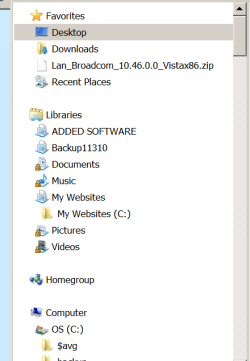
Well, as to the 'duplication'.....I can tell you that between the 2 copies of "My Websites", the files are NOT all the same if you look in 1 copy of My Websites and then the other copy. and I haven't messed with anything....the computer is as it was when I recevieved with the exception of the software I installed myself.

Where is this ?My Websites" folder? The full path.

As as far as doing a clean install intitially on a new machine, I'm a part-time web designer....not qualified to take on that big of job on my own...although it does sound like an excellent idea. I do believe the 'earmarks' abound in any new system. :)

If we were talking about (re)installing Windows XP then yeah might want help. But Windows 7 is easier then toast. Turn on the computer, boot up to Windows, put in the DVD follow the instructions. In less then 30 minutes you'll have a fresh installation. Don't have to format the disk or anything like that, just pick the correct one.
 

My Computer

Computer type
PC/Desktop
Computer Manufacturer/Model Number
Alienware Aurora ALX R4
OS
Windows 10 Pro (x64)
CPU
Intel Core i7-3930K (3.2GHz - 4.5GHz)
Motherboard
Alienware Aurora-R4 x79
Memory
4x Samsung 4GB PC3-12800 DDR3 (16GB 1600MHz)
Graphics Card(s)
Nvidia Geforce GTX 690
Sound Card
SteelSeries Siberia Elite
Monitor(s) Displays
Dell UltraSharp U3011
Screen Resolution
2560x1600
Hard Drives
Samsung 850 Pro 256 GB, Seagate 1TB Desktop Hybrid HDD, 2x Western Digital 4TB Green HDD
PSU
875W Some Dell PSU <.<
Case
Alienware Aurora ALX
Cooling
Custom Liquid Cooling (EK CPU & GPU blocks) dual EK 480RAD
Keyboard
Logitech G710+ Mechanical
Mouse
Logitech G700s
Internet Speed
Verizon Fios (50 mbps average)
Other Info
Server: Intel NUC D54250WYK: i5-4250U, 16GB, 256 GB mSATA, Windows Server 2012 R2
OMG! PSP Pro 12 (after resetting all preferences) opened up with all palettes, etc. showing on the right side of the screen as normal!! I cannot believe it!! I've reset PSP Pro 13 and will view it after I reset all preferences on that version. This is a miracle!!
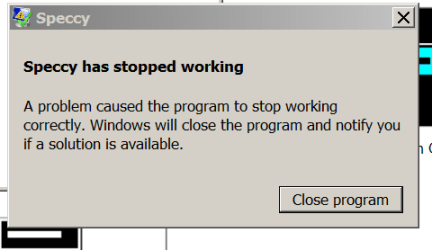
I did, however, have this pop up...(2nd attachment)

Also, must have hit wrong button on the 1st attachment you sent me...it just disappeared. :o Could you resend it?

I will do a screenshot of the My Websites folders and send shortly
Thank you so much....if nothing else gets fixed, the problem with PSP Pro 12 at least seems to be back in working order....hoorah!!! :cool:
 

Attachments

  • Speccyerror.png
    Speccyerror.png
    6.4 KB · Views: 1

My Computer

Computer Manufacturer/Model Number
Dell Studio XPS 8100
OS
Win 7 Pro 64-bit
CPU
Intel(R) Core(TM) i7 860 @ 2.80 GHz
Memory
8 gigs
Graphics Card(s)
NVIDIA GeForce GT 220
Sound Card
NVIDIA High Definition Audio Realtek High Definition Audio
Monitor(s) Displays
DELL SX2210 @ 1920x1080
Hard Drives
1 terabyte HDD
Hi,

Nice one Ladyluck! So was that after the enabled "Windows Classic", or did you do something different?

Don't worry about Speccy - it probably fell over when you changed to "Windows Classic".

Regards,
Golden
 

My Computer

Computer type
PC/Desktop
Computer Manufacturer/Model Number
Golden Mk. I.4
OS
Windows 10 Pro x64 ; Xubuntu x64
CPU
Intel i7 860 @ 2.80 GHz O/C'ed to 4.0GHz
Motherboard
Gigabyte P55A-UD3R Rev.1. Award BIOS F13
Memory
16GB Corsair Vengance DDR3 @ 661 MHz Dual Channel (9-9-9-24)
Graphics Card(s)
EVGA NVidia GTX 560 1024MB
Sound Card
Realtek Integrated
Monitor(s) Displays
Dual Samsung SyncMaster 2494HS
Screen Resolution
1920*1080 and 1920*1080
Hard Drives
1*Samsung 840 EVO 120GB SSD;
1*OCZ Vertex 2 60GB SSD;
2*Samsung F3 SpinPoint 1TB in RAID0;
1*Samsung F1 SpinPoint 1TB;
2*Western Digital 1TB External USB 3.0
1*Western Digital 500GB External USB 3.0
1*Seagate 500GB External USB 2.0
PSU
Thermaltake ToughPower QFan 750W
Case
Thermaltake Element S VK60001W2Z
Cooling
Corsair H60 Water Cooling, 2*230mm and 2*80mm case fans
Keyboard
Logitech G110
Mouse
Logitech MX518
Nope, did exactly as you instructed.....and wa la!!! It worked!!! Like I said, if nothing else gets fixed .....the PSP graphic/photo software is what actually keeps my little home business running!! Gotta have it working right! :) I can't express how much I appreciate you guys....now I may not lose those 3 clients that have been soooo mad at me because I wasn't able to update their little puppy pics on their web sites instantly. :)
 

My Computer

Computer Manufacturer/Model Number
Dell Studio XPS 8100
OS
Win 7 Pro 64-bit
CPU
Intel(R) Core(TM) i7 860 @ 2.80 GHz
Memory
8 gigs
Graphics Card(s)
NVIDIA GeForce GT 220
Sound Card
NVIDIA High Definition Audio Realtek High Definition Audio
Monitor(s) Displays
DELL SX2210 @ 1920x1080
Hard Drives
1 terabyte HDD
logicearth
I typed a reply with an attachment to you...but I can't see it....got so excited, maybe I didn't hit the post button. At any rate, here's the attachment ....may not be doing this right.
But, if I stick with the Windows Classic view....will this change the 'view' that Win 7 Pro shows now?
 

Attachments

  • MyWebsites2.png
    MyWebsites2.png
    12.3 KB · Views: 2

My Computer

Computer Manufacturer/Model Number
Dell Studio XPS 8100
OS
Win 7 Pro 64-bit
CPU
Intel(R) Core(TM) i7 860 @ 2.80 GHz
Memory
8 gigs
Graphics Card(s)
NVIDIA GeForce GT 220
Sound Card
NVIDIA High Definition Audio Realtek High Definition Audio
Monitor(s) Displays
DELL SX2210 @ 1920x1080
Hard Drives
1 terabyte HDD
No worries - its a pleasure.

Now, as you become more aacustomed to Windows 7 I suspect you are going to be wanting to use Aero. At the moment, its preventing PSP working properly. There could be two reasons:

1. PSP not 100% Windows 7 compatible, or
2. Your graphics card needs an updated driver

Lets check No2. Please go this site, and ensure the details are correct for your graphics card http://www.nvidia.com/Download/index.aspx?lang=en-us. You have a 64 bit operating system, so select the 64 bit driver. Your grahpics card is a Nvidia GeForce GT220.

Downlaod the file, and install the driver/s. You might have to reboot the PC. After that, go back to Personalisation, and select one of the Aero themes. Now run PSP to see if it misbehaves again. If it does, go back to "Windows Classic".

Lets make sure the PSP problem is corrected first, then we'll tackle the multiple files problem, as per your latest post and screenshot. And, no, "Windows Classic" will not change the way you see things in Windows Explorer.


Regards,
Golden
 
Last edited:

My Computer

Computer type
PC/Desktop
Computer Manufacturer/Model Number
Golden Mk. I.4
OS
Windows 10 Pro x64 ; Xubuntu x64
CPU
Intel i7 860 @ 2.80 GHz O/C'ed to 4.0GHz
Motherboard
Gigabyte P55A-UD3R Rev.1. Award BIOS F13
Memory
16GB Corsair Vengance DDR3 @ 661 MHz Dual Channel (9-9-9-24)
Graphics Card(s)
EVGA NVidia GTX 560 1024MB
Sound Card
Realtek Integrated
Monitor(s) Displays
Dual Samsung SyncMaster 2494HS
Screen Resolution
1920*1080 and 1920*1080
Hard Drives
1*Samsung 840 EVO 120GB SSD;
1*OCZ Vertex 2 60GB SSD;
2*Samsung F3 SpinPoint 1TB in RAID0;
1*Samsung F1 SpinPoint 1TB;
2*Western Digital 1TB External USB 3.0
1*Western Digital 500GB External USB 3.0
1*Seagate 500GB External USB 2.0
PSU
Thermaltake ToughPower QFan 750W
Case
Thermaltake Element S VK60001W2Z
Cooling
Corsair H60 Water Cooling, 2*230mm and 2*80mm case fans
Keyboard
Logitech G110
Mouse
Logitech MX518
Hi Ladyluck,

I won't be around for a few hours, so just to summarise:

1. If PSP misbehaves with Aero turned on after installing the latest graphics card drivers, simply go back to Personalisation and turn on "Windows Classic". This means that PSP is probably not 100% compatible with the Aero features of Windows 7.

2. I noticed from the Speccy attachment that you don't have an anti-virus turned on. I'm unsure if you have done that on purpose, but if not, I recommend turning it back on. If you don't have an anti-virus program, then you can download and install Microsoft's free anti-virus from this link http://www.microsoft.com/security_essentials/

Keep posting here if you need more help, and I'm sure someone will be able to sort you out. I'm convinced the "dulpicates" are a function of Libraries, or the way you work with them, so replacing hardware or operating system is definately not required.

Regards,
Golden
 

My Computer

Computer type
PC/Desktop
Computer Manufacturer/Model Number
Golden Mk. I.4
OS
Windows 10 Pro x64 ; Xubuntu x64
CPU
Intel i7 860 @ 2.80 GHz O/C'ed to 4.0GHz
Motherboard
Gigabyte P55A-UD3R Rev.1. Award BIOS F13
Memory
16GB Corsair Vengance DDR3 @ 661 MHz Dual Channel (9-9-9-24)
Graphics Card(s)
EVGA NVidia GTX 560 1024MB
Sound Card
Realtek Integrated
Monitor(s) Displays
Dual Samsung SyncMaster 2494HS
Screen Resolution
1920*1080 and 1920*1080
Hard Drives
1*Samsung 840 EVO 120GB SSD;
1*OCZ Vertex 2 60GB SSD;
2*Samsung F3 SpinPoint 1TB in RAID0;
1*Samsung F1 SpinPoint 1TB;
2*Western Digital 1TB External USB 3.0
1*Western Digital 500GB External USB 3.0
1*Seagate 500GB External USB 2.0
PSU
Thermaltake ToughPower QFan 750W
Case
Thermaltake Element S VK60001W2Z
Cooling
Corsair H60 Water Cooling, 2*230mm and 2*80mm case fans
Keyboard
Logitech G110
Mouse
Logitech MX518
OMG! Download screen says 4 hours 31 minutes for 128 mb file??? with 8 gigs of ram? does that sound right?
 

My Computer

Computer Manufacturer/Model Number
Dell Studio XPS 8100
OS
Win 7 Pro 64-bit
CPU
Intel(R) Core(TM) i7 860 @ 2.80 GHz
Memory
8 gigs
Graphics Card(s)
NVIDIA GeForce GT 220
Sound Card
NVIDIA High Definition Audio Realtek High Definition Audio
Monitor(s) Displays
DELL SX2210 @ 1920x1080
Hard Drives
1 terabyte HDD
The amount of RAM you have doesn't dictate the speed of your internet connection.
 

My Computer

Computer type
PC/Desktop
Computer Manufacturer/Model Number
Alienware Aurora ALX R4
OS
Windows 10 Pro (x64)
CPU
Intel Core i7-3930K (3.2GHz - 4.5GHz)
Motherboard
Alienware Aurora-R4 x79
Memory
4x Samsung 4GB PC3-12800 DDR3 (16GB 1600MHz)
Graphics Card(s)
Nvidia Geforce GTX 690
Sound Card
SteelSeries Siberia Elite
Monitor(s) Displays
Dell UltraSharp U3011
Screen Resolution
2560x1600
Hard Drives
Samsung 850 Pro 256 GB, Seagate 1TB Desktop Hybrid HDD, 2x Western Digital 4TB Green HDD
PSU
875W Some Dell PSU <.<
Case
Alienware Aurora ALX
Cooling
Custom Liquid Cooling (EK CPU & GPU blocks) dual EK 480RAD
Keyboard
Logitech G710+ Mechanical
Mouse
Logitech G700s
Internet Speed
Verizon Fios (50 mbps average)
Other Info
Server: Intel NUC D54250WYK: i5-4250U, 16GB, 256 GB mSATA, Windows Server 2012 R2
I aborted the download of the graphics driver update....it started from 4 hrs. 31 minutes and went steadily downhill from there. just no it was still saying 4 hrs XX mins....but the speed had dropped to 8 kb per.....the speed of this machine is also another concern....it should be blazing away right now...i have no other programs running except this download and this forum....
I shut it down for the night....will try again tomorrow.
live in MS.....another hour will be my bedtime....LOL. Will try again tomorrow.'
Thanks again to Golden, logicearth for all the progress I've made tonight. You guys rock!
 

My Computer

Computer Manufacturer/Model Number
Dell Studio XPS 8100
OS
Win 7 Pro 64-bit
CPU
Intel(R) Core(TM) i7 860 @ 2.80 GHz
Memory
8 gigs
Graphics Card(s)
NVIDIA GeForce GT 220
Sound Card
NVIDIA High Definition Audio Realtek High Definition Audio
Monitor(s) Displays
DELL SX2210 @ 1920x1080
Hard Drives
1 terabyte HDD
Hi Ladyluck and Good Morning!
Don't worry too much about the long estimated download time. This often happens and is often caused by a number of people all trying to download a driver at he same time. Just give it another go and it will probably be fine!
I'm inclined to agrre with Golden that your "duplicate" file issue is a Libraries misunderstanding. It is confusing when you set up a new library and then get invited to "Add a folder" That's when you get what shows in your screenshot. Remember that what you see in the Library is not a duplicate copy of the file but a link to the Folder where you saved the file to. So when it looks like a duplicate file it isn't. It is a duplicate link to the same file. Libraries are explained much better than I can here:
Understanding the Libraries Feature in Windows 7 - How-To Geek
Well worth a read when you have time!!
Once you get used to the Libraries their value becomes apparent. IMHO it is one of the best innovations of Win 7.
 

My Computer

Computer type
PC/Desktop
OS
Microsoft Windows 7 Home Premium 64-bit 7601 Multiprocessor Free Service Pack 1
CPU
Intel(R) Core(TM) i7-3770 CPU @ 3.40GHz
Motherboard
ASUSTeK COMPUTER INC. P8H77-M
Memory
8.00 GB
Graphics Card(s)
Intel(R) HD Graphics 4000
Sound Card
On Board
Monitor(s) Displays
Dell 24"
Screen Resolution
1920 x 1080
Hard Drives
(1) INTEL SSDSC2CT180A3 ATA Device (2) ST500DM002-1BD142 ATA Device (3) WDC WD3200AAKS-75L9A0 ATA Device (4) Generic- Compact Flash USB Device (5) Generic- MS/MS-Pro USB Device (6) Generic- SD/MMC USB Device (7) Generic- SM/xD-Picture USB
PSU
500w Corsair
Case
Cooler Master
Cooling
3 Fans
Keyboard
Logitech MK300
Mouse
Logitech WOM
Internet Speed
75Mb
Antivirus
Norton 360
Browser
Firefox, Opera, IE
Back
Top