7068 - Free arangement of files

TheVinesKid

New member
Power User
Local time
9:23 PM
Messages
203
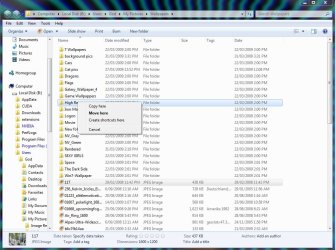
So, I'm noticing that I can't arrange my files/folders how I want; like in Vista when you drag a file/folder the black indicator shows up so you can freely arrange the files any way you want.

Is that not aloud on 7068? or is it off by default?
It's rather annoying... any help?
 

My Computer My Computer

At a glance

Windows 7 Ultimate x64 7600 RTMIntel Core 2 Quad Q66008GB DDR2 PC6400ATI Radeon X2400
Computer Manufacturer/Model Number
Dell XPS 420
OS
Windows 7 Ultimate x64 7600 RTM
CPU
Intel Core 2 Quad Q6600
Memory
8GB DDR2 PC6400
Graphics Card(s)
ATI Radeon X2400
Sound Card
On Board 5.1
Monitor(s) Displays
Dual NEC MultiSync 70GX2
Screen Resolution
1280x1024
Hard Drives
WD 500GB / SeaGate 1TB
Case
Dell XPS 420
Cooling
Fan
Keyboard
Logitech G19
Mouse
Logitech MX Revolution
Internet Speed
1.5Mb Down... soon to be 12Mb Down
anyone got any info? please?
 

My Computer My Computer

At a glance

Windows 7 Ultimate x64 7600 RTMIntel Core 2 Quad Q66008GB DDR2 PC6400ATI Radeon X2400
Computer Manufacturer/Model Number
Dell XPS 420
OS
Windows 7 Ultimate x64 7600 RTM
CPU
Intel Core 2 Quad Q6600
Memory
8GB DDR2 PC6400
Graphics Card(s)
ATI Radeon X2400
Sound Card
On Board 5.1
Monitor(s) Displays
Dual NEC MultiSync 70GX2
Screen Resolution
1280x1024
Hard Drives
WD 500GB / SeaGate 1TB
Case
Dell XPS 420
Cooling
Fan
Keyboard
Logitech G19
Mouse
Logitech MX Revolution
Internet Speed
1.5Mb Down... soon to be 12Mb Down
Its working for me. Did you do an upgrade install?
 

My Computer My Computer

At a glance

Windows 7 Professional 64-bitIntel E8400 3GHzKingston PC3-10700H 4GbXFX Radeon HD 5850 BlackEd.
Computer Manufacturer/Model Number
self built
OS
Windows 7 Professional 64-bit
CPU
Intel E8400 3GHz
Motherboard
Intel DX48BT2
Memory
Kingston PC3-10700H 4Gb
Graphics Card(s)
XFX Radeon HD 5850 BlackEd.
Sound Card
Asus Xonar DG
Monitor(s) Displays
2x Samsung SM-T220HD 22"
Screen Resolution
1680x1050 on two monitors
Hard Drives
OCZ Vertex 2 120gb 3.5" (OS)
Seagate Momentus XT 500gb
Samsung F3 1Tb (games)
2x Samsung F1 1Tb
PSU
Thermaltake ToughPower 850w
Case
Thermaltake Armor
Cooling
Scythe Mugen II
Keyboard
Microsoft Comfort Curve USB
Mouse
Razer Diamondback 3G
Internet Speed
8128/443
Works for me also!
 

My Computer My Computer

At a glance

Windows 7 Ultimate x64.i5 760 @ 4.2Ghz. 1.18v4g Corsair xms3 ddr3, 1600Mhz.Gigabyte GTX-560Ti soc edition
Computer Manufacturer/Model Number
Custom Build.
OS
Windows 7 Ultimate x64.
CPU
i5 760 @ 4.2Ghz. 1.18v
Motherboard
Gigabyte - H55M-USB3
Memory
4g Corsair xms3 ddr3, 1600Mhz.
Graphics Card(s)
Gigabyte GTX-560Ti soc edition
Sound Card
Asus Xonar Dx - Logitech Z5500.
Monitor(s) Displays
Acer 22" LCD Wide screen 1680-1050 -Samsung 42" Plasma....
Screen Resolution
1680/1050 -----1920/1080p.
Hard Drives
2x 2TB Seagate Go Flex,
1x 1TB Seagate,
1x 640WD Black,
x16 Gig sandisc flash drive,
1x8Gig sandisc flash drive.
PSU
XigmaTek 80plus NRP-PC702 - 700w dual 30a.
Case
Venus Gamers Midi Tower Case with LED Display
Cooling
Arctic Freezer 7 Pro Rev 2... x2 Arctic F8 case fans........
Keyboard
Logitech G15-v2 Gaming.
Mouse
Microsoft Sidewinder X8.
Internet Speed
Virgin Media - 50mb down- 8mb up.
Other Info
x2 Xbox 360 wireless controllers...

Dual layer optical disc drive...

Chrome 79million

A.V = MSE

My Computer My Computer

At a glance

Windows 7 Ultimate x64 7600 RTMIntel Core 2 Quad Q66008GB DDR2 PC6400ATI Radeon X2400
Computer Manufacturer/Model Number
Dell XPS 420
OS
Windows 7 Ultimate x64 7600 RTM
CPU
Intel Core 2 Quad Q6600
Memory
8GB DDR2 PC6400
Graphics Card(s)
ATI Radeon X2400
Sound Card
On Board 5.1
Monitor(s) Displays
Dual NEC MultiSync 70GX2
Screen Resolution
1280x1024
Hard Drives
WD 500GB / SeaGate 1TB
Case
Dell XPS 420
Cooling
Fan
Keyboard
Logitech G19
Mouse
Logitech MX Revolution
Internet Speed
1.5Mb Down... soon to be 12Mb Down
Actually, I can't do this either. It just never really bothered me because I always organize my files by name, size, type or date modified anyways. I haven't been able to do this in any build of seven as far as I can recall. Is this your first install of Windows 7, Vines?
 

My Computer My Computer

At a glance

Windows 7 Build 7077 x64AMD Athlon Dual Core QL-60 - 1.9Ghz2GBNVIDIA GeForce 8200 M G
Computer Manufacturer/Model Number
Compaq CQ50-107NR
OS
Windows 7 Build 7077 x64
CPU
AMD Athlon Dual Core QL-60 - 1.9Ghz
Memory
2GB
Graphics Card(s)
NVIDIA GeForce 8200 M G
Screen Resolution
1280 x 800
Hard Drives
120GB, Not sure of RPM but prolly 5400 or lower.
Actually, I can't do this either. It just never really bothered me because I always organize my files by name, size, type or date modified anyways. I haven't been able to do this in any build of seven as far as I can recall. Is this your first install of Windows 7, Vines?

No, I've used many builds of 7 since the first leak. I've maybe only not used 1 of them and it was an old old one.
Anyways, this is the first time I've actually installed it to be my main OS, rather than something to just mess around with and see the new features and whatnot. So I've never had files to mess with before.

I just tried reinstalling 7068 4 times, it still never worked. I even burned a new disc. This is very bothersome to me. I arranged stuff like this all the time...I need it.
 

My Computer My Computer

At a glance

Windows 7 Ultimate x64 7600 RTMIntel Core 2 Quad Q66008GB DDR2 PC6400ATI Radeon X2400
Computer Manufacturer/Model Number
Dell XPS 420
OS
Windows 7 Ultimate x64 7600 RTM
CPU
Intel Core 2 Quad Q6600
Memory
8GB DDR2 PC6400
Graphics Card(s)
ATI Radeon X2400
Sound Card
On Board 5.1
Monitor(s) Displays
Dual NEC MultiSync 70GX2
Screen Resolution
1280x1024
Hard Drives
WD 500GB / SeaGate 1TB
Case
Dell XPS 420
Cooling
Fan
Keyboard
Logitech G19
Mouse
Logitech MX Revolution
Internet Speed
1.5Mb Down... soon to be 12Mb Down
-hoping for help before he turns in for the night-
hehe, sorry for bumping my own thread, if I'm not supposed to.
 

My Computer My Computer

At a glance

Windows 7 Ultimate x64 7600 RTMIntel Core 2 Quad Q66008GB DDR2 PC6400ATI Radeon X2400
Computer Manufacturer/Model Number
Dell XPS 420
OS
Windows 7 Ultimate x64 7600 RTM
CPU
Intel Core 2 Quad Q6600
Memory
8GB DDR2 PC6400
Graphics Card(s)
ATI Radeon X2400
Sound Card
On Board 5.1
Monitor(s) Displays
Dual NEC MultiSync 70GX2
Screen Resolution
1280x1024
Hard Drives
WD 500GB / SeaGate 1TB
Case
Dell XPS 420
Cooling
Fan
Keyboard
Logitech G19
Mouse
Logitech MX Revolution
Internet Speed
1.5Mb Down... soon to be 12Mb Down
I've been looking around at the folder options, and searching the registry for some possilbe key that could be turned off.
There has to be some option somewhere, it doesn't make sense that it would work for some and not for others.

Anyone have any info on this at all? I'm getting desperate. e___e
 

My Computer My Computer

At a glance

Windows 7 Ultimate x64 7600 RTMIntel Core 2 Quad Q66008GB DDR2 PC6400ATI Radeon X2400
Computer Manufacturer/Model Number
Dell XPS 420
OS
Windows 7 Ultimate x64 7600 RTM
CPU
Intel Core 2 Quad Q6600
Memory
8GB DDR2 PC6400
Graphics Card(s)
ATI Radeon X2400
Sound Card
On Board 5.1
Monitor(s) Displays
Dual NEC MultiSync 70GX2
Screen Resolution
1280x1024
Hard Drives
WD 500GB / SeaGate 1TB
Case
Dell XPS 420
Cooling
Fan
Keyboard
Logitech G19
Mouse
Logitech MX Revolution
Internet Speed
1.5Mb Down... soon to be 12Mb Down
Come on, is this happeneing to anyone else at least?
Someone want to help me search the options/registry for an answer?
 

My Computer My Computer

At a glance

Windows 7 Ultimate x64 7600 RTMIntel Core 2 Quad Q66008GB DDR2 PC6400ATI Radeon X2400
Computer Manufacturer/Model Number
Dell XPS 420
OS
Windows 7 Ultimate x64 7600 RTM
CPU
Intel Core 2 Quad Q6600
Memory
8GB DDR2 PC6400
Graphics Card(s)
ATI Radeon X2400
Sound Card
On Board 5.1
Monitor(s) Displays
Dual NEC MultiSync 70GX2
Screen Resolution
1280x1024
Hard Drives
WD 500GB / SeaGate 1TB
Case
Dell XPS 420
Cooling
Fan
Keyboard
Logitech G19
Mouse
Logitech MX Revolution
Internet Speed
1.5Mb Down... soon to be 12Mb Down
If your talking about auto arrange and snap to grid, you can only toggle those options on the desktop and not in folders, unlike Vista which did allow for those options, another thing that is not available is for folders to have individual window sizes and instead if you resize one it will do the same for all the others, again unlike Vista which allowed you to have different size windows for all folders.
 

My Computer My Computer

At a glance

Windows 7 Ultimate Vista Ultimate x64Core 2 Duo E8500 3.16Ghz @ 3.8Ghz2x2Gigs Patriot PC2-6400 LLInno3D GeForce GTX260 216 SP
Computer Manufacturer/Model Number
Home Brew
OS
Windows 7 Ultimate Vista Ultimate x64
CPU
Core 2 Duo E8500 3.16Ghz @ 3.8Ghz
Motherboard
eVGA 750i FTW
Memory
2x2Gigs Patriot PC2-6400 LL
Graphics Card(s)
Inno3D GeForce GTX260 216 SP
Monitor(s) Displays
ASUS VW222U 22" 2ms Response time
Screen Resolution
1680x1050
Hard Drives
SATA 150GB
SATA II 250GB
USB IDE 750GB Ext.
PSU
HYTEC 600W & Thermaltake 650W Toughpower Power Exp
Case
Thermaltake Armor LCS (Liquid Cooling System)
Cooling
Liquid Cooling System
Keyboard
Logitech G15 Gaming Keyboard
Mouse
Logitech G9 Gaming Mouse
If your talking about auto arrange and snap to grid, you can only toggle those options on the desktop and not in folders, unlike Vista which did allow for those options, another thing that is not available is for folders to have individual window sizes and instead if you resize one it will do the same for all the others, again unlike Vista which allowed you to have different size windows for all folders.

Nah, that's not what I mean. I'll try to better explain it.
Alright, I see you use Vista too, so do this: Open up a window, any window, like program files or your pictures folder. Click down on any item and drag it around in that window. See the black indicator line that appears when it's inbetween two items, so you know that you'll be dropping it inbetween them and not in one of the folders?

That's what's missing. Not only that, but the abbility to move the files around in the same folder.
I also noticed today that if you right-click and drag (within th same window) and try to drop it, the "Move Here" option isn't there, like it is on vista.
 

My Computer My Computer

At a glance

Windows 7 Ultimate x64 7600 RTMIntel Core 2 Quad Q66008GB DDR2 PC6400ATI Radeon X2400
Computer Manufacturer/Model Number
Dell XPS 420
OS
Windows 7 Ultimate x64 7600 RTM
CPU
Intel Core 2 Quad Q6600
Memory
8GB DDR2 PC6400
Graphics Card(s)
ATI Radeon X2400
Sound Card
On Board 5.1
Monitor(s) Displays
Dual NEC MultiSync 70GX2
Screen Resolution
1280x1024
Hard Drives
WD 500GB / SeaGate 1TB
Case
Dell XPS 420
Cooling
Fan
Keyboard
Logitech G19
Mouse
Logitech MX Revolution
Internet Speed
1.5Mb Down... soon to be 12Mb Down
OK I see what you mean, no mine doesn't give you the line either, although I do have the move here option in the context menu but I think that was from a registry tweak that someone posted on the forum, have a look through these to see what might help you but its a good idea to make a backup of the registry before you make any changes.

2009-04-01_141707.jpg
 

Attachments

My Computer My Computer

At a glance

Windows 7 Ultimate Vista Ultimate x64Core 2 Duo E8500 3.16Ghz @ 3.8Ghz2x2Gigs Patriot PC2-6400 LLInno3D GeForce GTX260 216 SP
Computer Manufacturer/Model Number
Home Brew
OS
Windows 7 Ultimate Vista Ultimate x64
CPU
Core 2 Duo E8500 3.16Ghz @ 3.8Ghz
Motherboard
eVGA 750i FTW
Memory
2x2Gigs Patriot PC2-6400 LL
Graphics Card(s)
Inno3D GeForce GTX260 216 SP
Monitor(s) Displays
ASUS VW222U 22" 2ms Response time
Screen Resolution
1680x1050
Hard Drives
SATA 150GB
SATA II 250GB
USB IDE 750GB Ext.
PSU
HYTEC 600W & Thermaltake 650W Toughpower Power Exp
Case
Thermaltake Armor LCS (Liquid Cooling System)
Cooling
Liquid Cooling System
Keyboard
Logitech G15 Gaming Keyboard
Mouse
Logitech G9 Gaming Mouse
I found that reg tweak earlier, but never installed it b/c it says that it's the "Move To" so I didn't figure it would work.
Give me a sec to turn on my 7 machine and test it too see if it'll do what I need...
 

My Computer My Computer

At a glance

Windows 7 Ultimate x64 7600 RTMIntel Core 2 Quad Q66008GB DDR2 PC6400ATI Radeon X2400
Computer Manufacturer/Model Number
Dell XPS 420
OS
Windows 7 Ultimate x64 7600 RTM
CPU
Intel Core 2 Quad Q6600
Memory
8GB DDR2 PC6400
Graphics Card(s)
ATI Radeon X2400
Sound Card
On Board 5.1
Monitor(s) Displays
Dual NEC MultiSync 70GX2
Screen Resolution
1280x1024
Hard Drives
WD 500GB / SeaGate 1TB
Case
Dell XPS 420
Cooling
Fan
Keyboard
Logitech G19
Mouse
Logitech MX Revolution
Internet Speed
1.5Mb Down... soon to be 12Mb Down
nope =\ that's not it. I didn't think so.
But, I did notice that (before I installed the reg tweak) in the list and details mode I have the "move here" option, but it doesn't work. It does nothing.

From your screen shot it looked like you were moving it into that folder.
Just so nothing is misconstrued, I want to say move the "SEXY GIRLS" folder (lol) to the bottom of that list, say under your "b6c7fb14aa" file.
That's what I mean by "free arrangement" =]
 

My Computer My Computer

At a glance

Windows 7 Ultimate x64 7600 RTMIntel Core 2 Quad Q66008GB DDR2 PC6400ATI Radeon X2400
Computer Manufacturer/Model Number
Dell XPS 420
OS
Windows 7 Ultimate x64 7600 RTM
CPU
Intel Core 2 Quad Q6600
Memory
8GB DDR2 PC6400
Graphics Card(s)
ATI Radeon X2400
Sound Card
On Board 5.1
Monitor(s) Displays
Dual NEC MultiSync 70GX2
Screen Resolution
1280x1024
Hard Drives
WD 500GB / SeaGate 1TB
Case
Dell XPS 420
Cooling
Fan
Keyboard
Logitech G19
Mouse
Logitech MX Revolution
Internet Speed
1.5Mb Down... soon to be 12Mb Down
I just tried on build 7000 that I have installed on a different drive, and it still doesn't work...
I'll be trying build 68somethin later today, I'm going to bed now, but I'll report back the the actual build number (too tired to remember atm) and the results
 

My Computer My Computer

At a glance

Windows 7 Ultimate x64 7600 RTMIntel Core 2 Quad Q66008GB DDR2 PC6400ATI Radeon X2400
Computer Manufacturer/Model Number
Dell XPS 420
OS
Windows 7 Ultimate x64 7600 RTM
CPU
Intel Core 2 Quad Q6600
Memory
8GB DDR2 PC6400
Graphics Card(s)
ATI Radeon X2400
Sound Card
On Board 5.1
Monitor(s) Displays
Dual NEC MultiSync 70GX2
Screen Resolution
1280x1024
Hard Drives
WD 500GB / SeaGate 1TB
Case
Dell XPS 420
Cooling
Fan
Keyboard
Logitech G19
Mouse
Logitech MX Revolution
Internet Speed
1.5Mb Down... soon to be 12Mb Down
I was trying this on build 7068 and you can't do it on this build either, I think you may be out of luck unless Microsoft decide to include it in latter builds, I think they need to because I'm sure there are allot of people that want to do the same thing, if you still have the send feedback enabled on that build I would make the most of it because they have removed that in the builds since 7048.
 

My Computer My Computer

At a glance

Windows 7 Ultimate Vista Ultimate x64Core 2 Duo E8500 3.16Ghz @ 3.8Ghz2x2Gigs Patriot PC2-6400 LLInno3D GeForce GTX260 216 SP
Computer Manufacturer/Model Number
Home Brew
OS
Windows 7 Ultimate Vista Ultimate x64
CPU
Core 2 Duo E8500 3.16Ghz @ 3.8Ghz
Motherboard
eVGA 750i FTW
Memory
2x2Gigs Patriot PC2-6400 LL
Graphics Card(s)
Inno3D GeForce GTX260 216 SP
Monitor(s) Displays
ASUS VW222U 22" 2ms Response time
Screen Resolution
1680x1050
Hard Drives
SATA 150GB
SATA II 250GB
USB IDE 750GB Ext.
PSU
HYTEC 600W & Thermaltake 650W Toughpower Power Exp
Case
Thermaltake Armor LCS (Liquid Cooling System)
Cooling
Liquid Cooling System
Keyboard
Logitech G15 Gaming Keyboard
Mouse
Logitech G9 Gaming Mouse
I was trying this on build 7068 and you can't do it on this build either, I think you may be out of luck unless Microsoft decide to include it in latter builds, I think they need to because I'm sure there are allot of people that want to do the same thing, if you still have the send feedback enabled on that build I would make the most of it because they have removed that in the builds since 7048.
I'd love to send them the feedback for that, I'm just not quite sure how to phrase it.
Any suggustions?
 

My Computer My Computer

At a glance

Windows 7 Ultimate x64 7600 RTMIntel Core 2 Quad Q66008GB DDR2 PC6400ATI Radeon X2400
Computer Manufacturer/Model Number
Dell XPS 420
OS
Windows 7 Ultimate x64 7600 RTM
CPU
Intel Core 2 Quad Q6600
Memory
8GB DDR2 PC6400
Graphics Card(s)
ATI Radeon X2400
Sound Card
On Board 5.1
Monitor(s) Displays
Dual NEC MultiSync 70GX2
Screen Resolution
1280x1024
Hard Drives
WD 500GB / SeaGate 1TB
Case
Dell XPS 420
Cooling
Fan
Keyboard
Logitech G19
Mouse
Logitech MX Revolution
Internet Speed
1.5Mb Down... soon to be 12Mb Down
Well it's basically Auto arrange that's enabled by default that is stopping you from moving things where you want so you would have mention that in some way, really what you want is for it to behave the same way it would if it were arranged on the desktop.
 

My Computer My Computer

At a glance

Windows 7 Ultimate Vista Ultimate x64Core 2 Duo E8500 3.16Ghz @ 3.8Ghz2x2Gigs Patriot PC2-6400 LLInno3D GeForce GTX260 216 SP
Computer Manufacturer/Model Number
Home Brew
OS
Windows 7 Ultimate Vista Ultimate x64
CPU
Core 2 Duo E8500 3.16Ghz @ 3.8Ghz
Motherboard
eVGA 750i FTW
Memory
2x2Gigs Patriot PC2-6400 LL
Graphics Card(s)
Inno3D GeForce GTX260 216 SP
Monitor(s) Displays
ASUS VW222U 22" 2ms Response time
Screen Resolution
1680x1050
Hard Drives
SATA 150GB
SATA II 250GB
USB IDE 750GB Ext.
PSU
HYTEC 600W & Thermaltake 650W Toughpower Power Exp
Case
Thermaltake Armor LCS (Liquid Cooling System)
Cooling
Liquid Cooling System
Keyboard
Logitech G15 Gaming Keyboard
Mouse
Logitech G9 Gaming Mouse
I've been reading this thread, and would like to provide my own views on the subject of the "I-bar", and wish to ask a question:

When in Windows Explorer, are you using the one of the Libraries views, or one of the "Computer" views?
 

My Computer My Computer

At a glance

Windows 7 Professional 32-bit SP1AMD A4/A63.00GB EDOVMware SVGA 3D
Computer type
PC/Desktop
Computer Manufacturer/Model Number
Virtual Machine
OS
Windows 7 Professional 32-bit SP1
CPU
AMD A4/A6
Motherboard
Intel Corporation 440BX Desktop Reference Platform
Memory
3.00GB EDO
Graphics Card(s)
VMware SVGA 3D
Sound Card
High Definition Audio Device
Monitor(s) Displays
Generic Non-PnP Monitor on VMware SVGA 3D
Screen Resolution
1440x900
Hard Drives
1 x 60GB VMware Virtual SATA Hard Drive ATA Device
Antivirus
Kaspersky Total Security
Back
Top