75% of Memory is Hardware Reserved?

jsmith10168

New member
Local time
11:23 AM
Messages
12
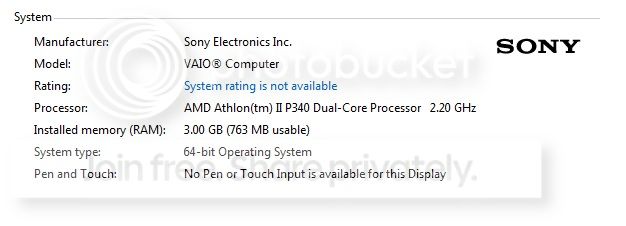
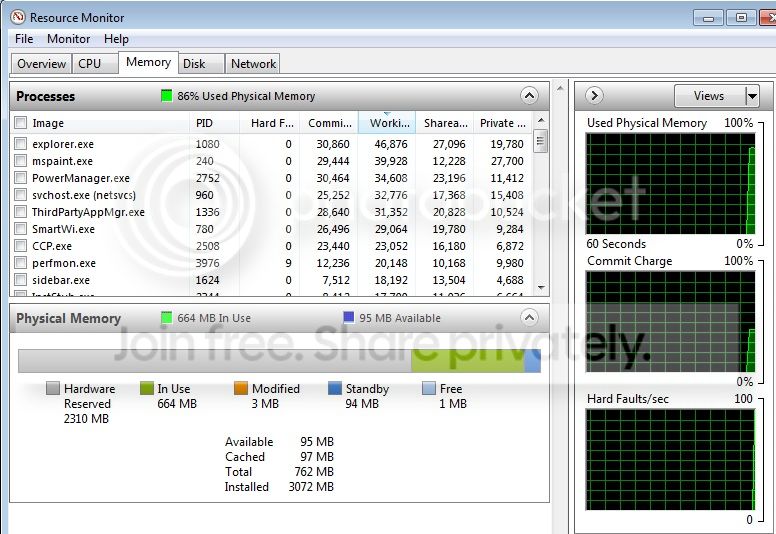
Ive got a Sony Vaio 64bit laptop dual processor 2.20 GHz. Its been very slow - the computer usage will stay about 70% and memory usage is alwasy >90%?? I looked at resource monitor and:

2300MB hardware reserved
664MB in use
3MB modified
94MB standbye
1MB Free

Currently there is 3GB of RAM installed with only about 700mb free; Im assuming this should be upwards to about 2.3GB free?

What is going on here? Why is the hardware reserved memory sooo high? Im assuming thats why it is slow - there is no free memory. Any ideas?
 
Last edited:

My Computer My Computer

OS
Win 7
Could it be a problem with one of the RAM sticks? Im assuming there is a 2Gb + 1GB stick installed now. If one of these were not working properly, would my system profile still show 3GB or would it show less?
 

My Computer My Computer

OS
Win 7
with a laptop the graphics card will use about 512mb(half a gb) but never that much, also the sound card uses some but not much. Try starting up cpu id and looking into the memory section to see if you speed matches and if there is any stick that windows doesnt recognise fully, try looking into bios also, try device manager and see if there are any conflicts.if you search for "msconfig" in the startup(no quote marks) and go to boot, then advanced then see if maximum memory is checked, if it is then uncheck and save and reboot
 

My Computer My Computer

Computer Manufacturer/Model Number
Packard Bell iMedia 2218 -- Has Been Running For Almost 7 Years!
OS
Windows 7 Ultimate x86
CPU
Intel Pentium D 925 @ 3.00GHz
Motherboard
Socket 775 MCP73VT-PM
Memory
1GB DDR2 667MHz
Graphics Card(s)
Overclocked Asus ATI Radeon X1600 Pro 512MB
Sound Card
Sound Blaster Audigy 570
Monitor(s) Displays
19" LCD Monitor; MW19E-AAA
Screen Resolution
1440 x 900
Hard Drives
500gb 7200rpm (Windows 7) ---
160gb 7200rpm (Backup) ---
1TB Iomega External Drive (7200rpm)
PSU
250w Packard Bell Standard
Case
Packard Bell standard
Cooling
Intel Socket 775 Air Cooler
Keyboard
Wired PS/2 Keyboard
Mouse
Dell Wireless USB Mouse
Internet Speed
Wireles --- Download - 6.63 Mbps Upload - 0.38 Mbps
Other Info
Currently Planning To Build New Computer --- Also Got A Samsung Galaxy Ace II (Plays All Games You Throw At It)
Ive got a Sony Vaio 64bit laptop dual processor 2.20 GHz. Its been very slow - the computer usage will stay about 70% and memory usage is alwasy >90%?? I looked at resource monitor and:

2300MB hardware reserved
664MB in use
3MB modified
94MB standbye
1MB Free

Currently there is 3GB of RAM installed with only about 700mb free; Im assuming this should be upwards to about 2.3GB free?

What is going on here? Why is the hardware reserved memory sooo high? Im assuming thats why it is slow - there is no free memory. Any ideas?
Hi
I think that you have the wrong idea about memory usage. On modern PC's (Vista, 7 and 8 and Linux) operating systems know RAM is plentiful so they will use it all up to cache files commonly used (DLL, Programs etc). Hardware reserved could be for on board video and other system processes. Most likely your system is slow because it is full of bloatware loaded by Sony. Press Control Alt Delete to call up task manager and post a screenshot of what is running. I'll bet you have a ton of stuff running. The experts on here can tell you what to get rid of. Personally I prefer a clean install with needed drivers rather than a bunch of stuff the OEM thinks you need. You could run PC decrapifier Download | The PC Decrapifier which will help remove junk. Other than that I suspect your lappy is using memory like it should. :geek:
 

My Computer My Computer

Computer type
PC/Desktop
Computer Manufacturer/Model Number
Bluethunder II
OS
Windows 7 x64 Ultimate and numerous virtual machines
CPU
AMD FX-8350 Vishera 32nm Technology @ 4.2 GHz default
Motherboard
ASUSTeK COMPUTER INC. SABERTOOTH 990FX R2.0 (Socket 942)
Memory
G Skill 32.0GB Dual-Channel DDR3 @ 1204MHz (11-13-13-31)
Graphics Card(s)
EVGA GeForce GTX 960 4GB Super SC ACX 2.0+ with Back Plate
Sound Card
Creative X-Fi Titanium HD Audiophile PCIe
Monitor(s) Displays
LG L227WTG x 3
Screen Resolution
1680 x 1050 16:10
Hard Drives
238GB Samsung850 PRO SATA Disk Device (SSD)
1863GB Seagate ST2000DM 001-1CH164 (SATA)
1397GB Seagate ST1500DL 003-9VT16L(SATA)
466GB Western Digital WDC WD50 03AZEX-00K1GA0 (SATA) x 2
932GB Seagate ST310005 28AS SATA Disk Device (SATA)
PSU
Enermax Revolution87+ 1000 Watts Gold Certified Power Supply
Case
Rocketfish Full Tower
Cooling
Cooler Master Hyper 212 EVO Push Pull 120mm Fans
Keyboard
Logitech K740
Mouse
Logitech G100S Laser LED + Logitech Gamepad F310
Internet Speed
500 mbs down and 30mbs up
Antivirus
Malwarebytes Pro & Avast and MSE on certain Virtual Machines
Browser
Firefox (Main) Chrome, Internet Explorer (Back Up)
Other Info
Logitech X 230 2.1 Stereo System and 5.1 Yamaha RX V2090
B&W DM6 Monitor Speakers + Center and Surround Speakers
Using Mouse Without Borders (Google it)
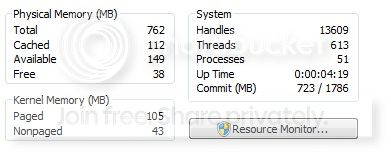
Seriously I bet nobodys resource monitor looks like this; I reinstalled Win7 because I thought maybe a virus or something was the problem and I just couldnt detect it. But it was exactly the same Look @ the RAM. 3GB but only 763mb usable? For example, my work computer has 4GB with 3.86GB usable..
system_zpse9f1cb1a.jpg


physmem_zps8bcdc65e.jpg


Edit: I've went through the processes and theres nothing major that sticks out? my cpu usage isnt the problem; its the physical memory that is maxed out basically.
 

My Computer My Computer

OS
Win 7
So you must have 3GB of ram and a 32 bit Windows 7 installed. Can you adjust the amount of Video Card allocated RAM in the bios, has this got set to some really high amount (like 1GB or more) ? I have 3 machines to hand and one is 32 bit with 3072 ram installed and the system reserved is 1 mb, it does have a dedicated 512mb video card.

Look here at this thread http://www.sevenforums.com/performance-maintenance/201202-hardware-reserved-memory.html
 

My Computer My Computer

Computer type
PC/Desktop
Computer Manufacturer/Model Number
Bluethunder II
OS
Windows 7 x64 Ultimate and numerous virtual machines
CPU
AMD FX-8350 Vishera 32nm Technology @ 4.2 GHz default
Motherboard
ASUSTeK COMPUTER INC. SABERTOOTH 990FX R2.0 (Socket 942)
Memory
G Skill 32.0GB Dual-Channel DDR3 @ 1204MHz (11-13-13-31)
Graphics Card(s)
EVGA GeForce GTX 960 4GB Super SC ACX 2.0+ with Back Plate
Sound Card
Creative X-Fi Titanium HD Audiophile PCIe
Monitor(s) Displays
LG L227WTG x 3
Screen Resolution
1680 x 1050 16:10
Hard Drives
238GB Samsung850 PRO SATA Disk Device (SSD)
1863GB Seagate ST2000DM 001-1CH164 (SATA)
1397GB Seagate ST1500DL 003-9VT16L(SATA)
466GB Western Digital WDC WD50 03AZEX-00K1GA0 (SATA) x 2
932GB Seagate ST310005 28AS SATA Disk Device (SATA)
PSU
Enermax Revolution87+ 1000 Watts Gold Certified Power Supply
Case
Rocketfish Full Tower
Cooling
Cooler Master Hyper 212 EVO Push Pull 120mm Fans
Keyboard
Logitech K740
Mouse
Logitech G100S Laser LED + Logitech Gamepad F310
Internet Speed
500 mbs down and 30mbs up
Antivirus
Malwarebytes Pro & Avast and MSE on certain Virtual Machines
Browser
Firefox (Main) Chrome, Internet Explorer (Back Up)
Other Info
Logitech X 230 2.1 Stereo System and 5.1 Yamaha RX V2090
B&W DM6 Monitor Speakers + Center and Surround Speakers
Using Mouse Without Borders (Google it)

My Computer My Computer

Computer type
PC/Desktop
Computer Manufacturer/Model Number
Home made Desktop
OS
Windows 10 Pro. 64/ version 1709 Windows 7 Pro/64
CPU
Intel i7-6800K @ 4.3
Motherboard
ASUS X-99 Deluxe II
Memory
Corsair Platinum 16 gig @2400
Graphics Card(s)
EVGA GTX 1070 OC
Monitor(s) Displays
Asus 27" LED LCD/VE278Q
Screen Resolution
1920-1080 or 1280-720 HDMI
Hard Drives
INTEL SSD 730-240 Gb Sata 3.0/
PSU
EVGA Platium 1200W
Case
Phanteks Luxe Tempered Glass 8 fans/ one radiator
Cooling
XSPC/ Water Cooled CPU
Keyboard
Das 4 Professional
Mouse
Logitech M705/MX Anywhere 2-S
Internet Speed
100 mbits
Antivirus
Microsoft Security Essentials/ Malwarebytes Premium 3.0/ SAS
Browser
I.E. 11 default/Firefox/ ISP Time Warner Cable/Spectrum
Other Info
LG BluRay Burner/
Sound system-KLipsch-THX/
Icy Dock ssd Hot Swap bays.
  • Like
Reactions: Arc
If I may add a little. All the times I have seen hardware memory that high it was caused by bad or mismatched memory or installed incorrectly.
Have you change or moved the memory?
-----------------
This will help us help you. Filling in your specs.
http://www.sevenforums.com/tutorials/180324-system-info-see-your-system-specs.html
or this
Speccy - System Information - Free Download

I have not messed with any of the memory. I've heard that the RAM can become damaged or dislodged. But if it shows 3GB of RAM total, does that mean both sticks are seated correctly? Say a 2GB stick was loose or damaged, would my computer only show 1GB of total RAM?
 

My Computer My Computer

OS
Win 7
So you must have 3GB of ram and a 32 bit Windows 7 installed. Can you adjust the amount of Video Card allocated RAM in the bios, has this got set to some really high amount (like 1GB or more) ? I have 3 machines to hand and one is 32 bit with 3072 ram installed and the system reserved is 1 mb, it does have a dedicated 512mb video card.

Look here at this thread http://www.sevenforums.com/performance-maintenance/201202-hardware-reserved-memory.html

My laptop is a 64bit Win 7. Could you explain how to view the allocated RAM in bios?
 

My Computer My Computer

OS
Win 7
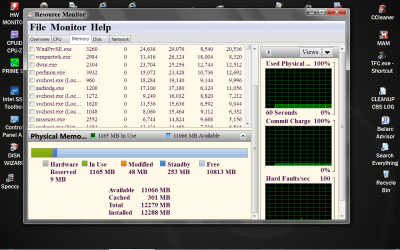
And ram on any computer that has become not seated properly can cause all kinds of problems. Take a look a Resource Monitor with nothing plugged into the laptop. Have you banged or dropped the laptop? To give you a example.
Resource Monitor RAM.PNG

Notice the hardware.
 

My Computer My Computer

Computer type
PC/Desktop
Computer Manufacturer/Model Number
Home made Desktop
OS
Windows 10 Pro. 64/ version 1709 Windows 7 Pro/64
CPU
Intel i7-6800K @ 4.3
Motherboard
ASUS X-99 Deluxe II
Memory
Corsair Platinum 16 gig @2400
Graphics Card(s)
EVGA GTX 1070 OC
Monitor(s) Displays
Asus 27" LED LCD/VE278Q
Screen Resolution
1920-1080 or 1280-720 HDMI
Hard Drives
INTEL SSD 730-240 Gb Sata 3.0/
PSU
EVGA Platium 1200W
Case
Phanteks Luxe Tempered Glass 8 fans/ one radiator
Cooling
XSPC/ Water Cooled CPU
Keyboard
Das 4 Professional
Mouse
Logitech M705/MX Anywhere 2-S
Internet Speed
100 mbits
Antivirus
Microsoft Security Essentials/ Malwarebytes Premium 3.0/ SAS
Browser
I.E. 11 default/Firefox/ ISP Time Warner Cable/Spectrum
Other Info
LG BluRay Burner/
Sound system-KLipsch-THX/
Icy Dock ssd Hot Swap bays.
I can't show you anything about your bios without your specs filled out as requested.
When they are filled out someone here will be able to help with just about any bios to a degree. If you use Speccy you will see the information you need.
 

My Computer My Computer

Computer type
PC/Desktop
Computer Manufacturer/Model Number
Home made Desktop
OS
Windows 10 Pro. 64/ version 1709 Windows 7 Pro/64
CPU
Intel i7-6800K @ 4.3
Motherboard
ASUS X-99 Deluxe II
Memory
Corsair Platinum 16 gig @2400
Graphics Card(s)
EVGA GTX 1070 OC
Monitor(s) Displays
Asus 27" LED LCD/VE278Q
Screen Resolution
1920-1080 or 1280-720 HDMI
Hard Drives
INTEL SSD 730-240 Gb Sata 3.0/
PSU
EVGA Platium 1200W
Case
Phanteks Luxe Tempered Glass 8 fans/ one radiator
Cooling
XSPC/ Water Cooled CPU
Keyboard
Das 4 Professional
Mouse
Logitech M705/MX Anywhere 2-S
Internet Speed
100 mbits
Antivirus
Microsoft Security Essentials/ Malwarebytes Premium 3.0/ SAS
Browser
I.E. 11 default/Firefox/ ISP Time Warner Cable/Spectrum
Other Info
LG BluRay Burner/
Sound system-KLipsch-THX/
Icy Dock ssd Hot Swap bays.
Back
Top