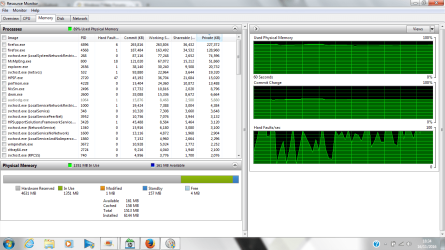
hardware reserved memory increased

kwaku

New member
Local time
3:21 PM
Messages
3
hardware reserved memory on my laptop increased to 4.6gb for no apparent reason.


details: Hp pavillion G6 notebook Processor AMD A8-3500M APU with Radeon(tm) HD Graphics, 1500 Mhz, 4 Core(s) bios:BIOS Version Insyde F.6A

installed physicall memory 6gb total physical memory(usable) 1.48gb which was formerly 5.5gb.


As far as i can tell ive updated all drivers and bios,checked that the max memory box in msconfig is unchecked. cant access the locked/hidden options in bios and the regedit page file value change didnt work either. done a system recovery, still no change and i have not opened the laptop physically,because i have not made any physical changes to it since purchase


any new help will be appreciated
 

My Computer

Computer type
Laptop
Computer Manufacturer/Model Number
HP
OS
WINDOWS 7 HOME PREMIUM 64BIT
CPU
AMD A8-3500M APU with Radeon(tm) HD Graphics, 1500
Memory
6gb
Graphics Card(s)
APU with Radeon(tm) HD Graphics, 1500
Hard Drives
1tb hdd

My Computer

Computer type
PC/Desktop
Computer Manufacturer/Model Number
Custom Build
OS
Windows 7 Professional SP1 - x64 [Non-UEFI Boot]
CPU
Ivy Bridge Core i5 3570K (Delidded)
Motherboard
Asus P8Z77-V LE PLUS
Memory
G.Skill "Ares" DDR3 PC3-12800 - 1600MHz (16Gb)
Graphics Card(s)
Asus Dual-RX480-O4G
Sound Card
Creative Sound Blaster Z w/5.1 sound system
Monitor(s) Displays
Asus IPS 23"
Screen Resolution
16/9
Hard Drives
Internal:
500Go Sata 6Gb/s (x2)
500Go Sata 3Gb/s (x2)
SSD 60Go Sata 6Gb/s
PSU
In Win C 900W Series 80+ Platinum
Case
Thermaltake Chaser A71
Cooling
Custom Water Cooling Loop
Keyboard
Cooler Master QuickFire XTi
Mouse
Razer Imperator 2012 (4G)
Antivirus
MSE
Browser
IE 11.0.xxx Rtm
Other Info
"Raid0" with Intel Smart Response Technology (HDD/SSD)
heres the screenshot, will try the paging file change now
 

Attachments

  • resource monitor.png
    resource monitor.png
    149.8 KB · Views: 3

My Computer

Computer type
Laptop
Computer Manufacturer/Model Number
HP
OS
WINDOWS 7 HOME PREMIUM 64BIT
CPU
AMD A8-3500M APU with Radeon(tm) HD Graphics, 1500
Memory
6gb
Graphics Card(s)
APU with Radeon(tm) HD Graphics, 1500
Hard Drives
1tb hdd

My Computer

Computer type
Laptop
Computer Manufacturer/Model Number
HP
OS
WINDOWS 7 HOME PREMIUM 64BIT
CPU
AMD A8-3500M APU with Radeon(tm) HD Graphics, 1500
Memory
6gb
Graphics Card(s)
APU with Radeon(tm) HD Graphics, 1500
Hard Drives
1tb hdd
Welcome to sevenforums,

You should put a screenshot here of your Resources Monitor (memory tab) for some being able to help solving your problem.

See if it helps: Virtual Memory Paging File - Change

no joy witht he paging file change

Maybe try this tutorial: How to Run the Memory Diagnostics Tool in Windows 7

If you plan to open your laptop for checking the memory sticks and diagnostics tool didn't help, then, try to swap the sticks from their slot.
 

My Computer

Computer type
PC/Desktop
Computer Manufacturer/Model Number
Custom Build
OS
Windows 7 Professional SP1 - x64 [Non-UEFI Boot]
CPU
Ivy Bridge Core i5 3570K (Delidded)
Motherboard
Asus P8Z77-V LE PLUS
Memory
G.Skill "Ares" DDR3 PC3-12800 - 1600MHz (16Gb)
Graphics Card(s)
Asus Dual-RX480-O4G
Sound Card
Creative Sound Blaster Z w/5.1 sound system
Monitor(s) Displays
Asus IPS 23"
Screen Resolution
16/9
Hard Drives
Internal:
500Go Sata 6Gb/s (x2)
500Go Sata 3Gb/s (x2)
SSD 60Go Sata 6Gb/s
PSU
In Win C 900W Series 80+ Platinum
Case
Thermaltake Chaser A71
Cooling
Custom Water Cooling Loop
Keyboard
Cooler Master QuickFire XTi
Mouse
Razer Imperator 2012 (4G)
Antivirus
MSE
Browser
IE 11.0.xxx Rtm
Other Info
"Raid0" with Intel Smart Response Technology (HDD/SSD)
Back
Top