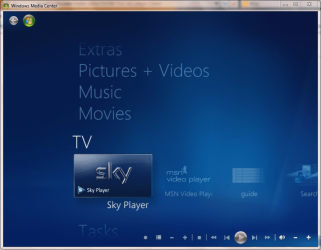
7MC and Sky Player

Paul1360

New member
Power User
Local time
8:22 PM
Messages
191
Location
Brynna-Wales
Morning All,
Ok I know that I'm missing something but for the life of me I can't remember what it is. So any help will be great.
A few days ago I had to do a clean install of my PC & Laptop, I then ran MC setup and got it working np at all, but alas the sky player option is now missing from both.
I've looked online and found many help pages to sort this out but non work for me:-
I turned MC on and off and rebooted, I checked that GB was in the reg entry for Country, I used the download button in MC, I removed all files from ehome folder, I rebooted after each of the above. But alas still a big NO NO.
Carried out what was on THE Greenbutton site and sky player site :mad:
So please what am I missing.
Iechyd Da
 

My Computer

Computer type
PC/Desktop
Computer Manufacturer/Model Number
Advent & Acer
OS
Win 8.1 Ultimate and Home Premium x64 bit
Hi Paul i have had the same problem as you, i have been googling this problem for well over a week and been getting nowhere, been checking registry, regional settings, followed the green button post for people having similar problems but with netflix and using a new dns, deleting ehome folders, running mcupdate as administrator - all got me nowhere

But last night i managed to solve it after trying everything
http://thegreenbutton.com/forums/t/97576.aspx?PageIndex=3
Read Holidayboy's post in the link (5th post down on page 3) also read acr2011 post in the next reply - they have been trying to help, finally read my post (sorethumbs) about how it worked for me near the end.

Do you have MSN video and Sky Player thumbnails within the guide but clicking on them does nothing??

Hope you get it working please let me know i'd be really interested to see how you get on

ps who is your broadband provider?
 

My Computer

OS
Windows 7 Professional 64 bit
CPU
Atom 330
Motherboard
Asus AT3N7A
Memory
2gb Corsair DDR2 800mhz
Graphics Card(s)
Nvidia ION
Hard Drives
1TB Samsung F1
hi ST,
Yeah i've got sky + msn in the guide and they do nothing:mad:. I'm with o2 but am waiting to change to FTTC.
Going to have a look at the link.
Diolch yn fawr for your help
Iechyd Da
UPDATE.
Just changed my DNS servers and sky player and msn are back and am now watching live ODI'
Once again Diolch yn fawr and
Iechyd Da
 
Last edited:

My Computer

Computer type
PC/Desktop
Computer Manufacturer/Model Number
Advent & Acer
OS
Win 8.1 Ultimate and Home Premium x64 bit
Exactly same prob as me, yet to find someone with same symptoms trawling through google.

And guess what....

I'm on O2 as well
 

My Computer

OS
Windows 7 Professional 64 bit
CPU
Atom 330
Motherboard
Asus AT3N7A
Memory
2gb Corsair DDR2 800mhz
Graphics Card(s)
Nvidia ION
Hard Drives
1TB Samsung F1
Well Well that is very very odd. I was wiv Sky BB when I upgraded from Vista to Win7 and I never had the problem then. I wonder what will happen now if we change back the dns:huh:.
I think I will try that this afternoon just for the hell of it, will post back the results
Iechyd Da
PS
I'll have to get my laptop back and check on there cos I did a clean install on there also to get rid of W7 SP1 RC and I also noticed that we are using different version's of Win7
 

My Computer

Computer type
PC/Desktop
Computer Manufacturer/Model Number
Advent & Acer
OS
Win 8.1 Ultimate and Home Premium x64 bit
Paul what steps exactly did you take to get it back and working?
do you have a tv tuner (satellite/freeview) installed?
Yeah be interested to see what happens once you put automatic DNS back on (i think thats what you meant you were going to do) i'm guessing as its now installed (Sky Player/MSN) you should be ok, but try sky player with auto DNS see if it errors in any way. I'm at work at moment so can't do any testing with you!
 

My Computer

OS
Windows 7 Professional 64 bit
CPU
Atom 330
Motherboard
Asus AT3N7A
Memory
2gb Corsair DDR2 800mhz
Graphics Card(s)
Nvidia ION
Hard Drives
1TB Samsung F1
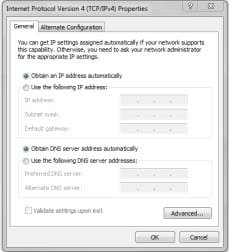
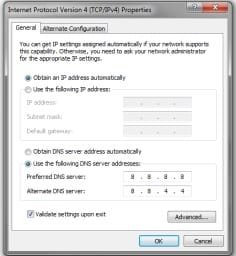
Ok, I'm using an USB Avermedia A850 TV Tuner. All I do was remove the Obtain DNS Addy Auto (Fig1) and put these in instead (Fig2), Nothing else.
I just changed my dns back to auto and Sky Player & MSN was no show again, so changed it back to Fig2 and I'm up and running again. This is very very odd as before my clean re-install all was working ok.
Will have to look into this a bit more. I'll go on the O2 forum soon and ask.

Iechyd Da
 

Attachments

  • Fig1.jpg
    Fig1.jpg
    9.4 KB · Views: 333
  • fig2.jpg
    fig2.jpg
    10.3 KB · Views: 333

My Computer

Computer type
PC/Desktop
Computer Manufacturer/Model Number
Advent & Acer
OS
Win 8.1 Ultimate and Home Premium x64 bit
I'll have a look when i get home again tonight.
So you didn't need to re-run the setup in media center?? interesting because i had to.
Last night was bit pushed for time but what i did was to make an Acronis image backup with sky player working. I then reloaded my previous image where i had all my channels order edited but no sky player to see if i could get the player working without having to run the setup wizard again and lose my channels. I'll see if it worked tonight but it seems to definitely be the dns setting as we've concluded.
 

My Computer

OS
Windows 7 Professional 64 bit
CPU
Atom 330
Motherboard
Asus AT3N7A
Memory
2gb Corsair DDR2 800mhz
Graphics Card(s)
Nvidia ION
Hard Drives
1TB Samsung F1
No I never I changed the DNS settings and ticked the validate settings on exit, it then told me unable to detect / Fix a fault as non was present, Then I started 7MC and the the sky and MSN icon's where present, Clicked on sky and it came back as checking for updates, all ok clicked next and signed in and went to Sports1 live and on the Top screen told me that my PC has been registerd as my main PC and away I went. Still can't find any infor as to why it only seems to be O2 DNS causing problems on the web.
Good luck tonite.
Iechyd Da
 

My Computer

Computer type
PC/Desktop
Computer Manufacturer/Model Number
Advent & Acer
OS
Win 8.1 Ultimate and Home Premium x64 bit
Ha! Just seen the O2 reply - not stalking! You'd still be scratching your head were it not for me!
I'll let you know how i get on matey, really want to get the player working AND keep my old channel lineup but if needs must

At least we've got out sport channels back eh!

ps i've also popped a thread on the O2 forum over at thinkbroadband
http://forums.thinkbroadband.com/o2/t/3962307-o2-and-windows-7-media-center.html?view=collapsed

Couple replies but as you might see one chap keeps it on auto dns and he had no problems at all - annoying thing is he doesn't even use sky player - grrrrr

reinstalled a previous acronis image (one without sky working but had all my channels saved) changed dns and ran update and sky/msn showed up. So all my channels are safe there was no need to delete the ehome folder after all.
 
Last edited:

My Computer

OS
Windows 7 Professional 64 bit
CPU
Atom 330
Motherboard
Asus AT3N7A
Memory
2gb Corsair DDR2 800mhz
Graphics Card(s)
Nvidia ION
Hard Drives
1TB Samsung F1
That's true Mike, lol just read tbb post's, the thing about this is that when Sky Player came to 7mc i had the same problem and got it fixed fast but for the life of me can't remember what I did, but I do know I never done anything to my DNS settings, when i went from skybb to o2bb I never had a problem,so I think it's not a dns issues but a windows7 issues (ok I got my working by changing dns settings).
Glad your back up and running, I'm still going to look to try and sort this out tho.
Iechyd Da
 

My Computer

Computer type
PC/Desktop
Computer Manufacturer/Model Number
Advent & Acer
OS
Win 8.1 Ultimate and Home Premium x64 bit
Somebody else has encountered our problem too and he's on Be broadband (which is pretty much O2 i think) so plot thickens.
I have a PC in the loft room that don't use much but i know it had Sky Player working on it a while back, after got i this problem with usual pc downstairs i went up and booted it up and that was missing sky player too so it must be a recent thing. I didn't start using player straight away when it came out so whatever problem you had at first i may have just missed.
I've been with O2 much longer than sky player has been around so i'm tending to think opposite to you that its something O2 have changed which affects it but we'll see.

btw who is mike?

Phil
 

My Computer

OS
Windows 7 Professional 64 bit
CPU
Atom 330
Motherboard
Asus AT3N7A
Memory
2gb Corsair DDR2 800mhz
Graphics Card(s)
Nvidia ION
Hard Drives
1TB Samsung F1
O2 is on the BE network, but I'm on BE and my sky player is fine :confused:
 

My Computer

Computer type
PC/Desktop
OS
Windows 11
Automatic DNS?
 

My Computer

OS
Windows 7 Professional 64 bit
CPU
Atom 330
Motherboard
Asus AT3N7A
Memory
2gb Corsair DDR2 800mhz
Graphics Card(s)
Nvidia ION
Hard Drives
1TB Samsung F1
See if Sky/Msn disappear from main media center menu if you change it to Automatic
 

My Computer

OS
Windows 7 Professional 64 bit
CPU
Atom 330
Motherboard
Asus AT3N7A
Memory
2gb Corsair DDR2 800mhz
Graphics Card(s)
Nvidia ION
Hard Drives
1TB Samsung F1
I cant I have the DNS set on the router and other machines working on the network that would be disrupted :(
 

My Computer

Computer type
PC/Desktop
OS
Windows 11
No worries - after all if it ain't broke, don't try and break it
 

My Computer

OS
Windows 7 Professional 64 bit
CPU
Atom 330
Motherboard
Asus AT3N7A
Memory
2gb Corsair DDR2 800mhz
Graphics Card(s)
Nvidia ION
Hard Drives
1TB Samsung F1
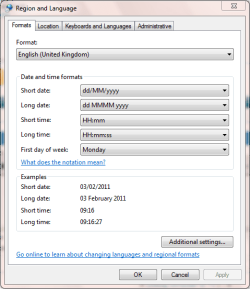
I had a similar issue when I last re-installed my OS. Follow these steps & it should have you up & running in no time...

Open Regional and Language settings from the 'Clock, Language and Region' option in Control Panel or just type 'regional' into the Start Menu.

Now make sure that all your settings are correct for the following options

1 Formats
1 Region & Language - Formats.PNG

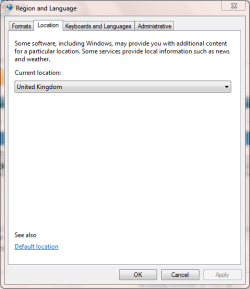
2 Location
2 Region & Language - Location.PNG

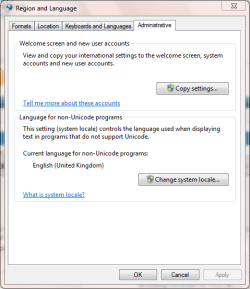
and 3 Administrative
3 Region & Language - Administrative.PNG

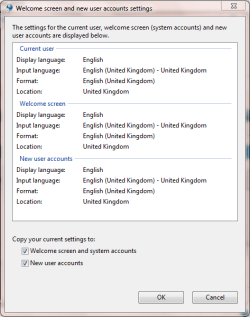
under the Administrative tab select 'Copy settings' and check all details under 'Current User' & 'Welcome Screen' are set to your prefered settings.

3a Region & Language - Administrative - Copy Settings.PNG

Next, check the 'Welcome screen and system accounts' and 'New user accounts' and click OK
   Note
Be sure to confirm and UAC notifications


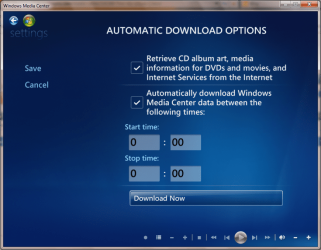
Now, open 7MC and scroll to 'Task' and select 'Settings' -> 'General' -> 'Automatic Download Options'. Check both boxes then click 'Download Now'.

7MC Download Settings.PNG

   Note
You may be directed to the Internet Connection test but this is fine, just go thru with it and select 'Download Now' again. The download can take a bit of time so close 7MC untill the notification icon disappears then re-open 7MC and you'll nice that the Sky Player (and some others) have appeared in the menu


7MC With Sky Player.PNG
 

My Computer

Computer Manufacturer/Model Number
Compaq Desktop
OS
Windows 7 Ultimate x64
CPU
AMD Sempron Dual Core
Memory
3GB
Graphics Card(s)
NVIDIA GeForce 6150SE nForce 430
Screen Resolution
1024x768
Hard Drives
150GB Sata
Oh believe me, been through all that, also into registry to check GB location is set in there.
I've done reinstalls of windows, run media center setup, ran mcupdates as administrator, disabled media center from within programs and re-enabled it, re-run setup lots of times - all with no result.

We've now established (well its worked for 2 of us) simply changing dns from automatic to google (8.8.8.8 / 8.8.4.4) has resulted in sky/msn appearing in media center

ps i can now move on to next mini project after overcoming this one and thats to follow your guide for movie library setup, thanks
phil
 

My Computer

OS
Windows 7 Professional 64 bit
CPU
Atom 330
Motherboard
Asus AT3N7A
Memory
2gb Corsair DDR2 800mhz
Graphics Card(s)
Nvidia ION
Hard Drives
1TB Samsung F1
Back
Top