8.00GB and only 3.99GB usable

blueyedsamurai

New member
Member
Local time
7:30 AM
Messages
84
I had my i5 OC'd but it was unstable so just went back to defaults.

I recently took out my CPU to reapply some thermal paste and then reinstalled it.

My PC now posts then reboots and then starts normally but its only using 4GB of ram.

I checked msconfig and maximum memory isn't checked.

I tried resetting the cmos on the MB and I also changed the cmos battery but that did nothing.

Every stick works when I try them individually but they only seem to work in slot 3 otherwise the computer wont post if its in another slot.


When I reinstalled the CPU I dont think I installed it correctly and may have bent some pins on the motherboards CPU slot?
 

My Computer My Computer

At a glance

Windows 7 Ultimate x64Intel i7 4790k16GB DDR3Nvidia Geforce GTX 970
Computer type
PC/Desktop
OS
Windows 7 Ultimate x64
CPU
Intel i7 4790k
Motherboard
MSI Z87-G45
Memory
16GB DDR3
Graphics Card(s)
Nvidia Geforce GTX 970
Monitor(s) Displays
LG 24 inch
Case
Corsair Obsidian 450D
I had my i5 OC'd but it was unstable so just went back to defaults.

I recently took out my CPU to reapply some thermal paste and then reinstalled it.

My PC now posts then reboots and then starts normally but its only using 4GB of ram.

I checked msconfig and maximum memory isn't checked.

I tried resetting the cmos on the MB and I also changed the cmos battery but that did nothing.

Every stick works when I try them individually but they only seem to work in slot 3 otherwise the computer wont post if its in another slot.


When I reinstalled the CPU I dont think I installed it correctly and may have bent some pins on the motherboards CPU slot?
You might have knocked a memory stick loose. Reinstall both memory chips. If you still have this problem, take out one memory stick and leave the other in. Does the computer work normally? If so, take that chip out and insert the other one into the same slot that the good chip was in. This is either a RAM or RAM slot problem. Also, run Memtest 86 on your memory: http://download.cnet.com/Memtest86/3000-2086_4-10524193.html

Note: This CNET download link is a direct download, not their bad installer.
 

My Computer My Computer

At a glance

Windows 7 Professional x64 Service Pack 1AMD Athlon X4 6456GB DDR3 1066Sapphire Radeon HD 5670 512MB GDDR5
Computer type
PC/Desktop
Computer Manufacturer/Model Number
HP Pavilion P7-1010
OS
Windows 7 Professional x64 Service Pack 1
CPU
AMD Athlon X4 645
Motherboard
Foxxcon N-Alvorix RS880
Memory
6GB DDR3 1066
Graphics Card(s)
Sapphire Radeon HD 5670 512MB GDDR5
Sound Card
Realtek Integrated Audio
Monitor(s) Displays
HP 2011x
Screen Resolution
1600x900
Hard Drives
1. Crucial M4 128GB SSD
2. 1TB Seagate Barracuda 7200.12 RPM
3. 1TB Western Digital Caviar Green 5400RPM
PSU
Seasonic S12 II Bronze 380 Watt
Case
HP OEM
Cooling
Coolermaster Heatsink, AVC Case Fan
Keyboard
HP OEM- Made by Chicony
Mouse
HP OEM- Made by Logitech
Internet Speed
20MBit Down/4 Up
Antivirus
Microsoft Security Essentials
Browser
Internet Explorer 10
HEre's the tutorial for memtest.

RAM (memory) test:


This will require memtest on a bootable CD or USB stick.


RAM - Test with Memtest86+

You may have reinstalled the CPU cocked or not perfectly square in the socket. It's not necessary to take the CPU out of the socket to re-apply paste, it can be cleaned in-socket.​
 

My Computer My Computer

At a glance

Windows 7 Ultimate X64 SP1Intel i5-2550K, Differing ~4.4-4.8GHz No buil...16GB G.Skill Sniper 1866MHz @ 2133MHz 2x8GBASUS GTX650TIB-DC2OC-2GD5, (650TI Boost)
Computer type
PC/Desktop
Computer Manufacturer/Model Number
Home Built Desktop By DataTech
OS
Windows 7 Ultimate X64 SP1
CPU
Intel i5-2550K, Differing ~4.4-4.8GHz No built in GPU
Motherboard
ASUS P8Z68-V PRO/GEN3
Memory
16GB G.Skill Sniper 1866MHz @ 2133MHz 2x8GB
Graphics Card(s)
ASUS GTX650TIB-DC2OC-2GD5, (650TI Boost)
Sound Card
Onboard Realtek 5-1
Monitor(s) Displays
Samsung P2570HD
Screen Resolution
1920x1080
Hard Drives
Samsung 840 Pro 256GB SSD for OS, 500GB Seagate Constellation (Enterprise drive) for Data
PSU
Corsair HX650W
Case
Inwin Dragon Rider
Cooling
Hyper 212 EVO w/two Noctua fans, push-pull, @1300 RPM
Keyboard
E-Z Eyes, bright yellow keys with large characters
Mouse
steelseries SENSEI Laser Pro Gaming
Internet Speed
48-51Mbs Mbs down, 11 Mbs up Xfinity Cable
Antivirus
Norton Internet Security 2013
Browser
IE 10, Opera, Pale Moon if needed
Other Info
4 case fans, LG BluRay-RE, ASUS DVD-RW, Mr. Fusion power supply, 1.21 gigawatts.
I'm not sure why one would remove the cpu to apply new compound. If you just removed the cooler then their shouldn't be a problem with bent pins.
Most likely you have jarred the ram modules.

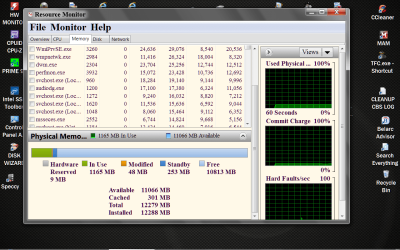
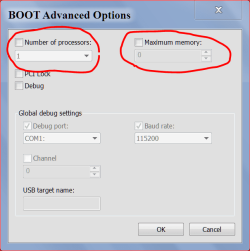
After following the instructions that windude99 and Britton30 have posted could you post one of these. The reason is because your system specs is this.
Memory 4GB DDR3
Resource Monitor RAM.PNG

and this

ADVANCE OPTIONS 8 9 2013.PNG
 

My Computer My Computer

At a glance

Windows 10 Pro. 64/ version 1709 Windows 7 Pr...Intel i7-6800K @ 4.3Corsair Platinum 16 gig @2400EVGA GTX 1070 OC
Computer type
PC/Desktop
Computer Manufacturer/Model Number
Home made Desktop
OS
Windows 10 Pro. 64/ version 1709 Windows 7 Pro/64
CPU
Intel i7-6800K @ 4.3
Motherboard
ASUS X-99 Deluxe II
Memory
Corsair Platinum 16 gig @2400
Graphics Card(s)
EVGA GTX 1070 OC
Monitor(s) Displays
Asus 27" LED LCD/VE278Q
Screen Resolution
1920-1080 or 1280-720 HDMI
Hard Drives
INTEL SSD 730-240 Gb Sata 3.0/
PSU
EVGA Platium 1200W
Case
Phanteks Luxe Tempered Glass 8 fans/ one radiator
Cooling
XSPC/ Water Cooled CPU
Keyboard
Das 4 Professional
Mouse
Logitech M705/MX Anywhere 2-S
Internet Speed
100 mbits
Antivirus
Microsoft Security Essentials/ Malwarebytes Premium 3.0/ SAS
Browser
I.E. 11 default/Firefox/ ISP Time Warner Cable/Spectrum
Other Info
LG BluRay Burner/
Sound system-KLipsch-THX/
Icy Dock ssd Hot Swap bays.
I could have left the CPU in the slot but its easier to wipe off and apply when taken out.

I managed to fix it after I moved some pins, When I reinstalled the CPU cooler it wasn't installed correctly
and pushed down way to hard as it wasn't in its groove.

I swapped out the memory sticks as well, although I did do that several times and it didn't fix the issue.

Will probably upgrade my ram soon anyway as I have 4 sticks of 2GB, would be cleaner with 1 or 2 8GB sticks.
 

My Computer My Computer

At a glance

Windows 7 Ultimate x64Intel i7 4790k16GB DDR3Nvidia Geforce GTX 970
Computer type
PC/Desktop
OS
Windows 7 Ultimate x64
CPU
Intel i7 4790k
Motherboard
MSI Z87-G45
Memory
16GB DDR3
Graphics Card(s)
Nvidia Geforce GTX 970
Monitor(s) Displays
LG 24 inch
Case
Corsair Obsidian 450D

My Computer My Computer

At a glance

Windows 7 Ultimate x64Intel i7 4790k16GB DDR3Nvidia Geforce GTX 970
Computer type
PC/Desktop
OS
Windows 7 Ultimate x64
CPU
Intel i7 4790k
Motherboard
MSI Z87-G45
Memory
16GB DDR3
Graphics Card(s)
Nvidia Geforce GTX 970
Monitor(s) Displays
LG 24 inch
Case
Corsair Obsidian 450D
Already tried that its mentioned in my post, managed to fix it so all good.

I know you mentioned that you checked there before but I wanted to make sure they were like the picture I posted.
I'm not sure what you mean by

managed to fix it so all good

Could you post the pictures I requested.
Here is the best way to do it on this forum.

http://www.sevenforums.com/tutorials/9733-screenshots-files-upload-post-seven-forums.html
 

My Computer My Computer

At a glance

Windows 10 Pro. 64/ version 1709 Windows 7 Pr...Intel i7-6800K @ 4.3Corsair Platinum 16 gig @2400EVGA GTX 1070 OC
Computer type
PC/Desktop
Computer Manufacturer/Model Number
Home made Desktop
OS
Windows 10 Pro. 64/ version 1709 Windows 7 Pro/64
CPU
Intel i7-6800K @ 4.3
Motherboard
ASUS X-99 Deluxe II
Memory
Corsair Platinum 16 gig @2400
Graphics Card(s)
EVGA GTX 1070 OC
Monitor(s) Displays
Asus 27" LED LCD/VE278Q
Screen Resolution
1920-1080 or 1280-720 HDMI
Hard Drives
INTEL SSD 730-240 Gb Sata 3.0/
PSU
EVGA Platium 1200W
Case
Phanteks Luxe Tempered Glass 8 fans/ one radiator
Cooling
XSPC/ Water Cooled CPU
Keyboard
Das 4 Professional
Mouse
Logitech M705/MX Anywhere 2-S
Internet Speed
100 mbits
Antivirus
Microsoft Security Essentials/ Malwarebytes Premium 3.0/ SAS
Browser
I.E. 11 default/Firefox/ ISP Time Warner Cable/Spectrum
Other Info
LG BluRay Burner/
Sound system-KLipsch-THX/
Icy Dock ssd Hot Swap bays.
Back
Top