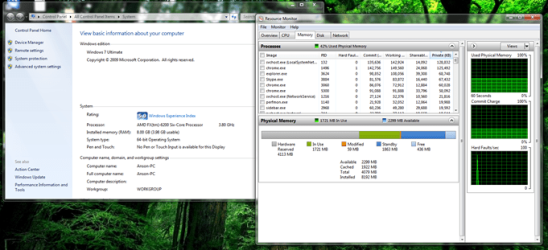
i trying doing the enable my remaping still same, and try to resit my ram and still same
why ??the picture i take~
My pc spec~AMD FX-6200
8gb (3.98gb usable)
Cross-Fire Sapphire Graphic Card HD 6850 1DDR5 256bit x2
ASUS Mainboard M5A88-EVO
Attachments
Untitled_??.png
61.1 KB
· Views: 64
My Computer
At a glance
Windows 7 Ultimate x64AMD FX-62008GB (3.98usable)CrossFire Sapphire HD 6850 x2
If the bios shows 8gb then skip to the next step,if not then it could be a issue with the motherboard not reading it or one of the sticks has gone bad and can not be read.
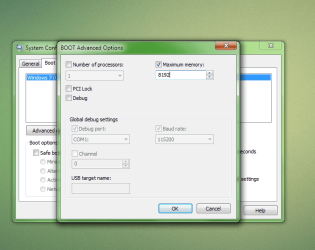
Anyways have you tried checking in msconfig? Hold the windows key then press R and type msconfig and press enter or click ok. If uac shows up then press yes and enter. Go to the boot tab then click on advanced options. At advanced options check to see if you have a check next to maximum memory and if so how much does it say. If it does have a check next to memory with a lower number then 8192 then uncheck it and reboot because it is set to show less memory to the operating system.
Check to see if it shows 8gbs now, if it does not try checking next to maximum memory and clicking the up arrow next to the amount until it reaches the maximum that you can put it up being 8192 for a 8gb ram system. Should look like in my screen shot and once done click ok and reboot and check if windows sees your memory now.
If you still have issues or this resolved the issue please let us know.
-Miguel
Attachments
examplems.png
81.9 KB
· Views: 6
My Computer
At a glance
Windows 10 64bitAMD Phenom II X4 925 (Deneb)(2.8GHz) OC 3.4GHzCorsair Vengeance DDR3 4GBX2 (8192MB)XFX HD 6870 1GB (OC)- 940MHz core, mem 1150MHz
Computer type
PC/Desktop
Computer Manufacturer/Model Number
custom build
OS
Windows 10 64bit
CPU
AMD Phenom II X4 925 (Deneb)(2.8GHz) OC 3.4GHz
Motherboard
M5A78L-MLX Plus
Memory
Corsair Vengeance DDR3 4GBX2 (8192MB)
Graphics Card(s)
XFX HD 6870 1GB (OC)- 940MHz core, mem 1150MHz
Monitor(s) Displays
Vizio 26' 1920x1080 / Acer 1336x768
Screen Resolution
1920x1080 60Hz /1336x768
Hard Drives
Kingston Digital 60GB SSDNow V300/500gb HDD Western Digital 7200rpm (/WD 160GB HDD 7200rpm
The problem may also arise , If you install Windows without secureboot over a UEFI BIOS.
(I have experienced such a crisis while i turned off secureboot to install Windows 7, and System Properties showed 1996MB Memory. But I had 6GB Ram). Please check that too. Use Hardware diagnostic tool supplied by Manufacturer to check the RAM.
My Computer
At a glance
Windows 7 Home Premium 64bitIntel Core i7 2670QMSamsung 8GB 1333MhznVidia Geforce 540M GT 2GB