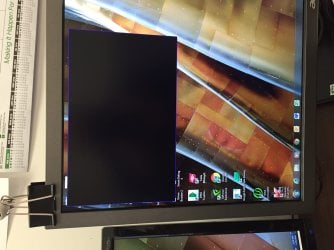
Anyone,
I came in to work today and started my computer as normal. I hooked up some new speakers to my computer and noticed a black box on my screen and now I can not get rid of it. There is nothing written in it. I can not selected it, nor can I end it via task manager. I have restarted my computer and preformed a system restore but to no prevail. Any ideas would be great.
I plugged in a different monitor and it works just fine. That is not helping me with the current one. The monitor works just fine I can see half of the screen just not where this box is.
I plugged in a different monitor and it works just fine. That is not helping me with the current one. The monitor works just fine I can see half of the screen just not where this box is.
Gyration wireless, Logitech wireless, Dell USB wired
Mouse
Gyration wireless, Logitech wireless, V7 USB wired
Internet Speed
Spectrum - 100Mbps D / 10Mbps U
Antivirus
Avast, MBAM3, EMET, WinPatrol
Browser
Pale Moon, Firefox, IE
Other Info
2 multi-boot PC's
Mainly HTPC/Office/Gen purpose (no gaming).
Trendnet USB KVM.
LG DVD burner/Blue Ray Player.
Tray system for removable SATA backup drives.
Not currently OCd, under-volted.
I use Hybrid sleep, rarely re-boot or shutdown.
Hauppauge HD-PVR, Avermedia PCIe TV Tuner, Hauppauge PCI TV Tuner.
All,
The computer will boot in safe mode and the box is not there but when I restart it, there it is. The only new changes to the computer that I have made would be plugging in the new set of speakers.
Win-7-Pro64bit 7-H-Prem-64biti7-5930K 2nd i9-9940x both water blocked VRM'...Trident-z 3200C14 2nd Trident-z 3600C16EVGA 1080ti ftw3 2nd Titan Xp both water blocked
Computer type
PC/Desktop
Computer Manufacturer/Model Number
Custom assembled by me :}
OS
Win-7-Pro64bit 7-H-Prem-64bit
CPU
i7-5930K 2nd i9-9940x both water blocked VRM's too
2nd ASUS X299 Apex/Intel i9-9940x with Custom water loop/7H-Prem-x64/Corsair 450D case/Ram Trident-z 3600C16 4x8gb / Samsung970Evo plus 500gb SSD/Dual ssd EZ swap evo/PSU EVGA SuperNova 1200w-P2 80+Platinum/GPU Titan Xp /8-ML-140 on push-pull on 2-280GTX rads
Not yet,
I will later today when I get the time. Remember that I am running a duel monitor and when I hook a different monitor up the box is not there. So the question is why is this box restricted to one monitor and not all if it was a settings or a program wouldn't it reciprocate the same outcome regardless of what monitor is hooked up?
In my #4 post with the picture it shows the second monitor but I should have stated it, my apologies. I had to order more VGA adapter connectors I will test as soon as they come in.
Win-7-Pro64bit 7-H-Prem-64biti7-5930K 2nd i9-9940x both water blocked VRM'...Trident-z 3200C14 2nd Trident-z 3600C16EVGA 1080ti ftw3 2nd Titan Xp both water blocked
Computer type
PC/Desktop
Computer Manufacturer/Model Number
Custom assembled by me :}
OS
Win-7-Pro64bit 7-H-Prem-64bit
CPU
i7-5930K 2nd i9-9940x both water blocked VRM's too
2nd ASUS X299 Apex/Intel i9-9940x with Custom water loop/7H-Prem-x64/Corsair 450D case/Ram Trident-z 3600C16 4x8gb / Samsung970Evo plus 500gb SSD/Dual ssd EZ swap evo/PSU EVGA SuperNova 1200w-P2 80+Platinum/GPU Titan Xp /8-ML-140 on push-pull on 2-280GTX rads
It was the free edition and has been on the computer for a long time. I just removed all traces of Iobit except for the powerful uninstaller. I use Kaspersky now.