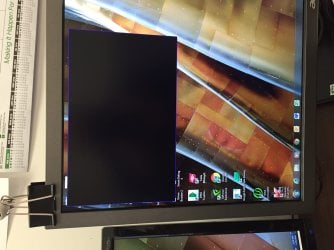
A black box has appeared on my screen and will not go away.

lsinagra

New member
Local time
7:49 PM
Messages
7
Anyone,
I came in to work today and started my computer as normal. I hooked up some new speakers to my computer and noticed a black box on my screen and now I can not get rid of it. There is nothing written in it. I can not selected it, nor can I end it via task manager. I have restarted my computer and preformed a system restore but to no prevail. Any ideas would be great.
 

My Computer My Computer

At a glance

Windows 7 Professional 64-bitNvidia
Computer type
PC/Desktop
Computer Manufacturer/Model Number
Cooler Master
OS
Windows 7 Professional 64-bit
Graphics Card(s)
Nvidia
Antivirus
Kaspersky
Browser
Google Chrome
Try plugging in a different monitor.
 

My Computer My Computer

At a glance

Windows 10 ProIntel i7-5820k 3.30ghz4x 4gb Crucial 2133mhz DDR4Gtx 780
Computer type
PC/Desktop
Computer Manufacturer/Model Number
self built
OS
Windows 10 Pro
CPU
Intel i7-5820k 3.30ghz
Motherboard
Asus Rampage Extreme V ROG
Memory
4x 4gb Crucial 2133mhz DDR4
Graphics Card(s)
Gtx 780
Sound Card
-
Monitor(s) Displays
Acer XB270H (144hz, G-Sync, 27")
Screen Resolution
1920x1080
Hard Drives
3x SSDs 256gb Samsung 850 Pro
PSU
Corsair AX850 Gold 80+ 850w
Case
NZXT Phantom full tower
Cooling
Noctua NH-U14S + 7 case fans
Keyboard
Logitech Illuminated Keyboard
Mouse
Razer Deathadder 3500
Internet Speed
60mbit down, 15mbit up
Antivirus
Microsoft Security Essentials
Browser
Chrome
I plugged in a different monitor and it works just fine. That is not helping me with the current one. The monitor works just fine I can see half of the screen just not where this box is.
 

My Computer My Computer

At a glance

Windows 7 Professional 64-bitNvidia
Computer type
PC/Desktop
Computer Manufacturer/Model Number
Cooler Master
OS
Windows 7 Professional 64-bit
Graphics Card(s)
Nvidia
Antivirus
Kaspersky
Browser
Google Chrome
picture of the box
 

Attachments

  • IMG_0200.JPG
    IMG_0200.JPG
    160.6 KB · Views: 6

My Computer My Computer

At a glance

Windows 7 Professional 64-bitNvidia
Computer type
PC/Desktop
Computer Manufacturer/Model Number
Cooler Master
OS
Windows 7 Professional 64-bit
Graphics Card(s)
Nvidia
Antivirus
Kaspersky
Browser
Google Chrome
picture of the box

Did you make any new changes to your computer lately?

I would like you to try and boot into Safe Mode.

Restart the machine, tap F8 once the "Shutting down..." dissapears, select "Safe Mode" and press Enter.

Report back if the blackbox is still prevalent.
 

My Computer My Computer

At a glance

Windows 7 Professional x64Intel Core i7 3612QM @ 2.10GHz12.0GB Dual-Channel DDR3 @ 798MHz1023MB NVIDIA GeForce GT 630M (HP)
Computer type
Laptop
Computer Manufacturer/Model Number
HP Pavilion dv6t-7000
OS
Windows 7 Professional x64
CPU
Intel Core i7 3612QM @ 2.10GHz
Motherboard
Hewlett-Packard 181B (U3E1)
Memory
12.0GB Dual-Channel DDR3 @ 798MHz
Graphics Card(s)
1023MB NVIDIA GeForce GT 630M (HP)
Sound Card
Casual Sound Card
Monitor(s) Displays
Casual Monitor
Screen Resolution
1366x768
Hard Drives
447GB SanDisk SDSSDHII480G (SSD)
PSU
Typical Power Supply
Case
No Case
Cooling
HAVIT HV-F2056 17" Laptop Cooling Pad, Ultra Slim (3 Blades)
Keyboard
Some keyboard with backlight
Mouse
Some lenovo mouse
Internet Speed
60 vice-versa
Antivirus
Kaspersky Internet Security 2016
Browser
Mozilla Firefox
Other Info
This information hardly matters. Ego much?
I plugged in a different monitor and it works just fine. That is not helping me with the current one. The monitor works just fine I can see half of the screen just not where this box is.

I meant to replace the current one.

But now you have uploaded a picture, it looks like a program, try what the other guy said, boot in safe mode, see if it is still there.
 

My Computer My Computer

At a glance

Windows 10 ProIntel i7-5820k 3.30ghz4x 4gb Crucial 2133mhz DDR4Gtx 780
Computer type
PC/Desktop
Computer Manufacturer/Model Number
self built
OS
Windows 10 Pro
CPU
Intel i7-5820k 3.30ghz
Motherboard
Asus Rampage Extreme V ROG
Memory
4x 4gb Crucial 2133mhz DDR4
Graphics Card(s)
Gtx 780
Sound Card
-
Monitor(s) Displays
Acer XB270H (144hz, G-Sync, 27")
Screen Resolution
1920x1080
Hard Drives
3x SSDs 256gb Samsung 850 Pro
PSU
Corsair AX850 Gold 80+ 850w
Case
NZXT Phantom full tower
Cooling
Noctua NH-U14S + 7 case fans
Keyboard
Logitech Illuminated Keyboard
Mouse
Razer Deathadder 3500
Internet Speed
60mbit down, 15mbit up
Antivirus
Microsoft Security Essentials
Browser
Chrome

My Computer My Computer

At a glance

Multi-Boot W7_Pro_x64 W8.1_Pro_x64 W10_Pro_x6...AMD Athlon II x4 6206GB GSkill DDR2 800AMD 4670 GPU + AMD 4200 IGP
Computer type
PC/Desktop
Computer Manufacturer/Model Number
home built
OS
Multi-Boot W7_Pro_x64 W8.1_Pro_x64 W10_Pro_x64 +Linux_VMs +Chromium_VM
CPU
AMD Athlon II x4 620
Motherboard
Gigabyte GA-MA785G-UD3H
Memory
6GB GSkill DDR2 800
Graphics Card(s)
AMD 4670 GPU + AMD 4200 IGP
Sound Card
on board Realtek ALC889A
Monitor(s) Displays
RCA 40" LCD TV, Insignia 32" LCD TV, HP 15" LCD monitor
Screen Resolution
1680 x 1050
Hard Drives
OCZ Vertex 3 120GB,
Samsung F3 1TB (3),
Several others - WD, Seagate, Hitachi, ...
PSU
Corsair 500 W
Case
Rosewill mid tower
Cooling
CM 90mm rifle
Keyboard
Gyration wireless, Logitech wireless, Dell USB wired
Mouse
Gyration wireless, Logitech wireless, V7 USB wired
Internet Speed
Spectrum - 100Mbps D / 10Mbps U
Antivirus
Avast, MBAM3, EMET, WinPatrol
Browser
Pale Moon, Firefox, IE
Other Info
2 multi-boot PC's
Mainly HTPC/Office/Gen purpose (no gaming).
Trendnet USB KVM.
LG DVD burner/Blue Ray Player.
Tray system for removable SATA backup drives.

Not currently OCd, under-volted.
I use Hybrid sleep, rarely re-boot or shutdown.

Hauppauge HD-PVR, Avermedia PCIe TV Tuner, Hauppauge PCI TV Tuner.
All,
The computer will boot in safe mode and the box is not there but when I restart it, there it is. The only new changes to the computer that I have made would be plugging in the new set of speakers.
 

My Computer My Computer

At a glance

Windows 7 Professional 64-bitNvidia
Computer type
PC/Desktop
Computer Manufacturer/Model Number
Cooler Master
OS
Windows 7 Professional 64-bit
Graphics Card(s)
Nvidia
Antivirus
Kaspersky
Browser
Google Chrome
That tells you it's a program, something is running in the background.

Did you try DavidE's suggestion ?
 

My Computer My Computer

At a glance

Windows 10 ProIntel i7-5820k 3.30ghz4x 4gb Crucial 2133mhz DDR4Gtx 780
Computer type
PC/Desktop
Computer Manufacturer/Model Number
self built
OS
Windows 10 Pro
CPU
Intel i7-5820k 3.30ghz
Motherboard
Asus Rampage Extreme V ROG
Memory
4x 4gb Crucial 2133mhz DDR4
Graphics Card(s)
Gtx 780
Sound Card
-
Monitor(s) Displays
Acer XB270H (144hz, G-Sync, 27")
Screen Resolution
1920x1080
Hard Drives
3x SSDs 256gb Samsung 850 Pro
PSU
Corsair AX850 Gold 80+ 850w
Case
NZXT Phantom full tower
Cooling
Noctua NH-U14S + 7 case fans
Keyboard
Logitech Illuminated Keyboard
Mouse
Razer Deathadder 3500
Internet Speed
60mbit down, 15mbit up
Antivirus
Microsoft Security Essentials
Browser
Chrome
Hi,
How long have you had IOBit ?
 

My Computer My Computer

At a glance

Win-7-Pro64bit 7-H-Prem-64biti7-5930K 2nd i9-9940x both water blocked VRM'...Trident-z 3200C14 2nd Trident-z 3600C16EVGA 1080ti ftw3 2nd Titan Xp both water blocked
Computer type
PC/Desktop
Computer Manufacturer/Model Number
Custom assembled by me :}
OS
Win-7-Pro64bit 7-H-Prem-64bit
CPU
i7-5930K 2nd i9-9940x both water blocked VRM's too
Motherboard
ASUS SABERTOOTH X99 2nd ASUS x299 Apex
Memory
Trident-z 3200C14 2nd Trident-z 3600C16
Graphics Card(s)
EVGA 1080ti ftw3 2nd Titan Xp both water blocked
Sound Card
Built-in Realtek
Monitor(s) Displays
1-AOC G2460PG 24"G-Sync 144Hz/ 2nd 1-ASUS VG248QE 24" 144Hz
Screen Resolution
1920 x 1080 144Hz
Hard Drives
2-Samsung M.2 Evo & Evo Plus
2-Samsung 850 EVO 500GB SSD's/ 3-2.5 W.D. Black 1tb-&3-1tb/3-3.5 WD Black 1tb hdd's
PSU
EVGA SuperNOVA 1000-P2 2nd 1200-P2
Case
2-Corsair Obsidian Series 450D Black ATX Mid Tower
Cooling
Custom water loops
Keyboard
Logitech G710+/ 2nd Logitech G910
Mouse
2-RedDragon M901 Perdition 16400 dpi Gaming mouse = wired
Internet Speed
Comcast Ping 19ms 89.31mbps download speed 6.12mbps upload
Antivirus
Malwarebytes Pro/ Superantispyware Pro
Browser
FireFox & Pale moon
Other Info
2nd ASUS X299 Apex/Intel i9-9940x with Custom water loop/7H-Prem-x64/Corsair 450D case/Ram Trident-z 3600C16 4x8gb / Samsung970Evo plus 500gb SSD/Dual ssd EZ swap evo/PSU EVGA SuperNova 1200w-P2 80+Platinum/GPU Titan Xp /8-ML-140 on push-pull on 2-280GTX rads
Not yet,
I will later today when I get the time. Remember that I am running a duel monitor and when I hook a different monitor up the box is not there. So the question is why is this box restricted to one monitor and not all if it was a settings or a program wouldn't it reciprocate the same outcome regardless of what monitor is hooked up?
 

My Computer My Computer

At a glance

Windows 7 Professional 64-bitNvidia
Computer type
PC/Desktop
Computer Manufacturer/Model Number
Cooler Master
OS
Windows 7 Professional 64-bit
Graphics Card(s)
Nvidia
Antivirus
Kaspersky
Browser
Google Chrome
How would we remember that you are using dual monitors?
Until your post #11 we didn't know.

Shut down your computer and then remove you speakers you added.
Restart your computer and let us know if the box is still there.
 

My Computer My Computer

At a glance

Windows 10 Pro. 64/ version 1709 Windows 7 Pr...Intel i7-6800K @ 4.3Corsair Platinum 16 gig @2400EVGA GTX 1070 OC
Computer type
PC/Desktop
Computer Manufacturer/Model Number
Home made Desktop
OS
Windows 10 Pro. 64/ version 1709 Windows 7 Pro/64
CPU
Intel i7-6800K @ 4.3
Motherboard
ASUS X-99 Deluxe II
Memory
Corsair Platinum 16 gig @2400
Graphics Card(s)
EVGA GTX 1070 OC
Monitor(s) Displays
Asus 27" LED LCD/VE278Q
Screen Resolution
1920-1080 or 1280-720 HDMI
Hard Drives
INTEL SSD 730-240 Gb Sata 3.0/
PSU
EVGA Platium 1200W
Case
Phanteks Luxe Tempered Glass 8 fans/ one radiator
Cooling
XSPC/ Water Cooled CPU
Keyboard
Das 4 Professional
Mouse
Logitech M705/MX Anywhere 2-S
Internet Speed
100 mbits
Antivirus
Microsoft Security Essentials/ Malwarebytes Premium 3.0/ SAS
Browser
I.E. 11 default/Firefox/ ISP Time Warner Cable/Spectrum
Other Info
LG BluRay Burner/
Sound system-KLipsch-THX/
Icy Dock ssd Hot Swap bays.
In my #4 post with the picture it shows the second monitor but I should have stated it, my apologies. I had to order more VGA adapter connectors I will test as soon as they come in.
 

My Computer My Computer

At a glance

Windows 7 Professional 64-bitNvidia
Computer type
PC/Desktop
Computer Manufacturer/Model Number
Cooler Master
OS
Windows 7 Professional 64-bit
Graphics Card(s)
Nvidia
Antivirus
Kaspersky
Browser
Google Chrome

My Computer My Computer

At a glance

Win-7-Pro64bit 7-H-Prem-64biti7-5930K 2nd i9-9940x both water blocked VRM'...Trident-z 3200C14 2nd Trident-z 3600C16EVGA 1080ti ftw3 2nd Titan Xp both water blocked
Computer type
PC/Desktop
Computer Manufacturer/Model Number
Custom assembled by me :}
OS
Win-7-Pro64bit 7-H-Prem-64bit
CPU
i7-5930K 2nd i9-9940x both water blocked VRM's too
Motherboard
ASUS SABERTOOTH X99 2nd ASUS x299 Apex
Memory
Trident-z 3200C14 2nd Trident-z 3600C16
Graphics Card(s)
EVGA 1080ti ftw3 2nd Titan Xp both water blocked
Sound Card
Built-in Realtek
Monitor(s) Displays
1-AOC G2460PG 24"G-Sync 144Hz/ 2nd 1-ASUS VG248QE 24" 144Hz
Screen Resolution
1920 x 1080 144Hz
Hard Drives
2-Samsung M.2 Evo & Evo Plus
2-Samsung 850 EVO 500GB SSD's/ 3-2.5 W.D. Black 1tb-&3-1tb/3-3.5 WD Black 1tb hdd's
PSU
EVGA SuperNOVA 1000-P2 2nd 1200-P2
Case
2-Corsair Obsidian Series 450D Black ATX Mid Tower
Cooling
Custom water loops
Keyboard
Logitech G710+/ 2nd Logitech G910
Mouse
2-RedDragon M901 Perdition 16400 dpi Gaming mouse = wired
Internet Speed
Comcast Ping 19ms 89.31mbps download speed 6.12mbps upload
Antivirus
Malwarebytes Pro/ Superantispyware Pro
Browser
FireFox & Pale moon
Other Info
2nd ASUS X299 Apex/Intel i9-9940x with Custom water loop/7H-Prem-x64/Corsair 450D case/Ram Trident-z 3600C16 4x8gb / Samsung970Evo plus 500gb SSD/Dual ssd EZ swap evo/PSU EVGA SuperNova 1200w-P2 80+Platinum/GPU Titan Xp /8-ML-140 on push-pull on 2-280GTX rads
It was the free edition and has been on the computer for a long time. I just removed all traces of Iobit except for the powerful uninstaller. I use Kaspersky now.

 

My Computer My Computer

At a glance

Windows 7 Professional 64-bitNvidia
Computer type
PC/Desktop
Computer Manufacturer/Model Number
Cooler Master
OS
Windows 7 Professional 64-bit
Graphics Card(s)
Nvidia
Antivirus
Kaspersky
Browser
Google Chrome
Have you tried the suggestion by Layback Bear in post #12?

Shut down your computer and then remove you speakers you added.
Restart your computer and let us know if the box is still there.


Just curious.
 

My Computer My Computer

At a glance

1. Windows 7 Home Premium sp1 - 64bit 2. Wind...1. AMD Phenom II x2 511 3.4GHz 2. Intel i7-47...1. 5 GB - DDR3 2. 8GB DDR3-1600MHzIntegrated 1. ATI Radeon 4200 2. Intel HD Gra...
Computer type
PC/Desktop
Computer Manufacturer/Model Number
1. HP p6733w Desktop 2. HP Envy 700-515xt Desktop
OS
1. Windows 7 Home Premium sp1 - 64bit 2. Windows 7 Pro sp1 - 64bit
CPU
1. AMD Phenom II x2 511 3.4GHz 2. Intel i7-4790 Quad 4.0GHz
Motherboard
1. N-Alvorix-RS880-uATX 2. Kaili2
Memory
1. 5 GB - DDR3 2. 8GB DDR3-1600MHz
Graphics Card(s)
Integrated 1. ATI Radeon 4200 2. Intel HD Graphics 4600
Sound Card
1. Realtek High Definition Audio 2. Realtek (Neutered Beats)
Monitor(s) Displays
1. Acer V193L 2. HP 2311 Series Wide LCD
Screen Resolution
1. 1280 x 1024 2. 1920 x 1080
Hard Drives
1. 750 GB - 7200 RPM SATA 2. 1TB 7200 RPM SATA
PSU
1. 250w 2. 300w
Cooling
Stock
Keyboard
Logitech USB keyboard
Mouse
Logitech USB optical mouse
Internet Speed
1.0 - 2.0 mbps
Antivirus
Eset Smart Security v9.0.349.0
Browser
Pale Moon
Back
Top