
A few questions for setting up my new SSD

Hmm. I don't know what I want to do. I want it to be perfect. Can't believe it got messed up on the install. GRRR

I would run diskpart first inside of windows to format it & then restart with the win7 disc in the tray and do it all over again?

Is it bad to keep re-installing on an SSD like this one after another?

You're only guessing anything is messed up.

Diskpart is run from the installation disc. You start the install over and hit shift F10 at the first screen when you are asked to pick a language. That gives you a command prompt, where you run Diskpart.

No, it's not bad to keep reinstalling. Get over the phobia about writing to an SSD.
 

My Computer My Computer

At a glance

Windows 7 Home Premium SP1, 64-bitIntel Skylake i5-6600K, not overclocked8 GB HyperX DDR4-2666 (2 x 4 GB)none; graphics are integrated on CPU
Computer type
PC/Desktop
Computer Manufacturer/Model Number
Ignatz Special; 4 speed manual gearbox; factory air conditioning; one of one
OS
Windows 7 Home Premium SP1, 64-bit
CPU
Intel Skylake i5-6600K, not overclocked
Motherboard
AsRock Z170M Extreme 4, micro ATX
Memory
8 GB HyperX DDR4-2666 (2 x 4 GB)
Graphics Card(s)
none; graphics are integrated on CPU
Sound Card
onboard: Realtek ALC1150; external: USB Behringer UF0-202
Monitor(s) Displays
Dell S2340M 23 inch IPS
Screen Resolution
1600 x 900
Hard Drives
System: Crucial MX100 series SSD, 128 GB;
Data: Samsung Spinpoint 103SJ, 1 TB;
Backup: WD Caviar Green WD30EZRX-00D8PB0, 3 TB
PSU
Rosewill SilentNight 500 watt fanless, semi-modular
Case
Antec Solo II
Cooling
Noctua NH-U12S; Noctua F12 intake, Noctua S12A exhaust
Keyboard
Microsoft 200 6JH-00001 USB
Mouse
Dell or Microsoft optical wired; USB
Antivirus
Microsoft Security Essentials and Malwarebytes Premium
Browser
Pale Moon
Other Info
All fans PWM; speeds at idle: CPU circa 500 rpm; intake circa 600 rpm; exhaust circa 600 rpm; CPU temps 27 idle and 47 C load in a warm room (27 C/81 F) when running Intel Extreme Tuning Utility stress test.
Ok nice I'm going to do it. so just type in diskpart in the command prompt and it's a pretty easy walk-thru?
 

My Computer My Computer

At a glance

Windows 7 64 & Ubuntu 64Intel Quad Core Q6600 2.40GHz8gNvidia 9600 GT & 9800 GT
Computer Manufacturer/Model Number
Built it myself
OS
Windows 7 64 & Ubuntu 64
CPU
Intel Quad Core Q6600 2.40GHz
Motherboard
Asus
Memory
8g
Graphics Card(s)
Nvidia 9600 GT & 9800 GT
Sound Card
Turtle Beach 5.1
Monitor(s) Displays
Three 19" Dell's & one 46" Samsung 750
Make sure all drives except the SSD are disconnected, then boot from the installation disc and hit shift F10 when asked to pick a language. Then at the command prompt:

Type in the following commands one by one, followed by the Enter key to create a partition (text in parentheses are comments only):

list disk (to show the ID number of the hard disk to partition, normally Disk 0)

select disk 0 (change 0 to another number if applicable)

clean (this wipes the drive of anything on it; not needed on a brand new drive)

create partition primary (this will create one primary partition covering the entire drive; if you instead want to create a primary partition of 80 GB, add “size=80000” after the word “primary”)

select partition 1 (this selects the partition you just made)

active (this marks that partition active)

format fs=ntfs quick (this formats that partition)

exit (this quits the diskpart program)

exit (this closes the command prompt window)

Continue Windows 7 installation as usual. Remember to highlight and select the partition just created when you come to the partition screen asking you "where do you want to install Windows?”.
 

My Computer My Computer

At a glance

Windows 7 Home Premium SP1, 64-bitIntel Skylake i5-6600K, not overclocked8 GB HyperX DDR4-2666 (2 x 4 GB)none; graphics are integrated on CPU
Computer type
PC/Desktop
Computer Manufacturer/Model Number
Ignatz Special; 4 speed manual gearbox; factory air conditioning; one of one
OS
Windows 7 Home Premium SP1, 64-bit
CPU
Intel Skylake i5-6600K, not overclocked
Motherboard
AsRock Z170M Extreme 4, micro ATX
Memory
8 GB HyperX DDR4-2666 (2 x 4 GB)
Graphics Card(s)
none; graphics are integrated on CPU
Sound Card
onboard: Realtek ALC1150; external: USB Behringer UF0-202
Monitor(s) Displays
Dell S2340M 23 inch IPS
Screen Resolution
1600 x 900
Hard Drives
System: Crucial MX100 series SSD, 128 GB;
Data: Samsung Spinpoint 103SJ, 1 TB;
Backup: WD Caviar Green WD30EZRX-00D8PB0, 3 TB
PSU
Rosewill SilentNight 500 watt fanless, semi-modular
Case
Antec Solo II
Cooling
Noctua NH-U12S; Noctua F12 intake, Noctua S12A exhaust
Keyboard
Microsoft 200 6JH-00001 USB
Mouse
Dell or Microsoft optical wired; USB
Antivirus
Microsoft Security Essentials and Malwarebytes Premium
Browser
Pale Moon
Other Info
All fans PWM; speeds at idle: CPU circa 500 rpm; intake circa 600 rpm; exhaust circa 600 rpm; CPU temps 27 idle and 47 C load in a warm room (27 C/81 F) when running Intel Extreme Tuning Utility stress test.
Thanks for the walk thru. I'm going to call it a night for now & go at it tomorrow and get it all taken care of.

Thanks for the help everyone.
 

My Computer My Computer

At a glance

Windows 7 64 & Ubuntu 64Intel Quad Core Q6600 2.40GHz8gNvidia 9600 GT & 9800 GT
Computer Manufacturer/Model Number
Built it myself
OS
Windows 7 64 & Ubuntu 64
CPU
Intel Quad Core Q6600 2.40GHz
Motherboard
Asus
Memory
8g
Graphics Card(s)
Nvidia 9600 GT & 9800 GT
Sound Card
Turtle Beach 5.1
Monitor(s) Displays
Three 19" Dell's & one 46" Samsung 750
Well apparently I can't do shift F10 with my Microsoft wireless keyboard during setup.

If I hook up the SSD while keeping my HDD as first boot, I should be able to format it properly in disk format right?
 

My Computer My Computer

At a glance

Windows 7 64 & Ubuntu 64Intel Quad Core Q6600 2.40GHz8gNvidia 9600 GT & 9800 GT
Computer Manufacturer/Model Number
Built it myself
OS
Windows 7 64 & Ubuntu 64
CPU
Intel Quad Core Q6600 2.40GHz
Motherboard
Asus
Memory
8g
Graphics Card(s)
Nvidia 9600 GT & 9800 GT
Sound Card
Turtle Beach 5.1
Monitor(s) Displays
Three 19" Dell's & one 46" Samsung 750
You can ignore diskpart and just do another standard install like you did before. The drive you choose to put Windows on will be formatted automatically. It was formatted automatically before, the first time you did it. The only reason you were directed to Diskpart was because you wanted everything to be "perfect" and you were worried about something being on the SSD.

I don't have the slightest clue about wireless keyboards or why they might accept some keystrokes and not others, such as the shift key and the F10 key.

I'm not sure what you mean by "in disk format".

And I'm not sure why you would be "keeping my HDD as first boot" when installing to an SSD. You don't want your HDD to be involved in the process at all.
 

My Computer My Computer

At a glance

Windows 7 Home Premium SP1, 64-bitIntel Skylake i5-6600K, not overclocked8 GB HyperX DDR4-2666 (2 x 4 GB)none; graphics are integrated on CPU
Computer type
PC/Desktop
Computer Manufacturer/Model Number
Ignatz Special; 4 speed manual gearbox; factory air conditioning; one of one
OS
Windows 7 Home Premium SP1, 64-bit
CPU
Intel Skylake i5-6600K, not overclocked
Motherboard
AsRock Z170M Extreme 4, micro ATX
Memory
8 GB HyperX DDR4-2666 (2 x 4 GB)
Graphics Card(s)
none; graphics are integrated on CPU
Sound Card
onboard: Realtek ALC1150; external: USB Behringer UF0-202
Monitor(s) Displays
Dell S2340M 23 inch IPS
Screen Resolution
1600 x 900
Hard Drives
System: Crucial MX100 series SSD, 128 GB;
Data: Samsung Spinpoint 103SJ, 1 TB;
Backup: WD Caviar Green WD30EZRX-00D8PB0, 3 TB
PSU
Rosewill SilentNight 500 watt fanless, semi-modular
Case
Antec Solo II
Cooling
Noctua NH-U12S; Noctua F12 intake, Noctua S12A exhaust
Keyboard
Microsoft 200 6JH-00001 USB
Mouse
Dell or Microsoft optical wired; USB
Antivirus
Microsoft Security Essentials and Malwarebytes Premium
Browser
Pale Moon
Other Info
All fans PWM; speeds at idle: CPU circa 500 rpm; intake circa 600 rpm; exhaust circa 600 rpm; CPU temps 27 idle and 47 C load in a warm room (27 C/81 F) when running Intel Extreme Tuning Utility stress test.
Just follow the steps the above users have given ya and you should be good to go. Just post back if there are any issues that come up.
 

My Computer My Computer

At a glance

Windows 7 ultimate 64-bitIntel I7 2600K 3.4ghzCorsair 16gb ddr3 1600mhzNvidia Geforce gt 430
Computer type
PC/Desktop
Computer Manufacturer/Model Number
custom built
OS
Windows 7 ultimate 64-bit
CPU
Intel I7 2600K 3.4ghz
Motherboard
Asus Evo P8P67
Memory
Corsair 16gb ddr3 1600mhz
Graphics Card(s)
Nvidia Geforce gt 430
Sound Card
Sound Blaster Titanium x-fi pci express
Monitor(s) Displays
Dell E198WFP
Hard Drives
1 western digital 2TB drive.
PSU
Antec 1200 watt
Case
Inwin Dragon Rider
Cooling
6 case supplied cooling fans
Keyboard
logitech mk700
Mouse
logitech m705
Internet Speed
25-50mbps download; 10mbps upload(i think)
Antivirus
avg free 2014
Browser
mozilla firefox
Other Info
Also have a pretty bad speaker setup which is a klipsch promedia 5.1 surround speaker setup with huge subwoofer and lg blu ray player/writer. Also a hp officejet pro 8600 plus wireless all in one and a logitech s7500 webcam.
You can ignore diskpart and just do another standard install like you did before. The drive you choose to put Windows on will be formatted automatically. It was formatted automatically before, the first time you did it. The only reason you were directed to Diskpart was because you wanted everything to be "perfect" and you were worried about something being on the SSD.

I don't have the slightest clue about wireless keyboards or why they might accept some keystrokes and not others, such as the shift key and the F10 key.

I'm not sure what you mean by "in disk format".

And I'm not sure why you would be "keeping my HDD as first boot" when installing to an SSD. You don't want your HDD to be involved in the process at all.

Hmm ok. I just brought that up because my original Magician Write space said .01 & after I re-installed windows it said 0.4 so i was assuming there was something left on there & I wanted to do a clean wipe.

So I can't have my HDD as the main boot device & slave the SSD so I can run Disk Part in "Create & Format Disk Partitions" to get it completely erased?
 

My Computer My Computer

At a glance

Windows 7 64 & Ubuntu 64Intel Quad Core Q6600 2.40GHz8gNvidia 9600 GT & 9800 GT
Computer Manufacturer/Model Number
Built it myself
OS
Windows 7 64 & Ubuntu 64
CPU
Intel Quad Core Q6600 2.40GHz
Motherboard
Asus
Memory
8g
Graphics Card(s)
Nvidia 9600 GT & 9800 GT
Sound Card
Turtle Beach 5.1
Monitor(s) Displays
Three 19" Dell's & one 46" Samsung 750
So I can't have my HDD as the main boot device & slave the SSD so I can run Disk Part in "Create & Format Disk Partitions" to get it completely erased?

There are no "slaves" in SATA land.

The problem with your idea is that you now have 2 drives with a Windows installation. As far as I know, each of them is bootable and working OK.

Do you know for a fact that the HDD will boot your PC if it is the only drive connected? You need to confirm that.

If you boot from one hard drive and try to use Diskpart on the other (from a command prompt, not from the install disk), you'd have to use the list disk and select disk commands in Diskpart to ensure that you were operating on the right disk (the SSD)--before you use the clean or format commands.

After the SSD was formatted, you'd exit diskpart, shut down, disconnect the HDD, connect the SSD to the motherboard ports formerly used by the HDD, reboot from your install disk and install to the SSD.

I think that would work.

You could also use other programs such as Gparted to wipe the disk, but they are Linux-based.

Or you could just forget about reformatting the SSD.

Maybe someone else has a better idea.
 

My Computer My Computer

At a glance

Windows 7 Home Premium SP1, 64-bitIntel Skylake i5-6600K, not overclocked8 GB HyperX DDR4-2666 (2 x 4 GB)none; graphics are integrated on CPU
Computer type
PC/Desktop
Computer Manufacturer/Model Number
Ignatz Special; 4 speed manual gearbox; factory air conditioning; one of one
OS
Windows 7 Home Premium SP1, 64-bit
CPU
Intel Skylake i5-6600K, not overclocked
Motherboard
AsRock Z170M Extreme 4, micro ATX
Memory
8 GB HyperX DDR4-2666 (2 x 4 GB)
Graphics Card(s)
none; graphics are integrated on CPU
Sound Card
onboard: Realtek ALC1150; external: USB Behringer UF0-202
Monitor(s) Displays
Dell S2340M 23 inch IPS
Screen Resolution
1600 x 900
Hard Drives
System: Crucial MX100 series SSD, 128 GB;
Data: Samsung Spinpoint 103SJ, 1 TB;
Backup: WD Caviar Green WD30EZRX-00D8PB0, 3 TB
PSU
Rosewill SilentNight 500 watt fanless, semi-modular
Case
Antec Solo II
Cooling
Noctua NH-U12S; Noctua F12 intake, Noctua S12A exhaust
Keyboard
Microsoft 200 6JH-00001 USB
Mouse
Dell or Microsoft optical wired; USB
Antivirus
Microsoft Security Essentials and Malwarebytes Premium
Browser
Pale Moon
Other Info
All fans PWM; speeds at idle: CPU circa 500 rpm; intake circa 600 rpm; exhaust circa 600 rpm; CPU temps 27 idle and 47 C load in a warm room (27 C/81 F) when running Intel Extreme Tuning Utility stress test.
Johnny.

As far as I know you had reinstalled from your original Win 7 Pro disc & all seemed OK. If that install is still unchanged just use it as it is. I don't think reinstalling is going to give you a better result.

Don't be concerned about what Magician tells you about writes etc. as it keeps a total of writes to the SSD & it does not mean there is stuff still left on the SSD.
 

My Computer My Computer

At a glance

Windows 7 Home Premium 64 bit sp1Intel i5 3570 3.4Ghz Ivy Bridge SKT 1155 quad...G-Skill Rip Jaws 16Gb (8x2) DDR3 -1600 PC3 12...Gigabyte NVIDIA GT610 1Gb DDR3 810/1200 PCI-E...
Computer type
PC/Desktop
Computer Manufacturer/Model Number
Self built using existing case
OS
Windows 7 Home Premium 64 bit sp1
CPU
Intel i5 3570 3.4Ghz Ivy Bridge SKT 1155 quad core
Motherboard
Gigabyte Z77-HD3 SKT 1155 2xSata 3, 4x USB 3.0
Memory
G-Skill Rip Jaws 16Gb (8x2) DDR3 -1600 PC3 12800 CL 10 red
Graphics Card(s)
Gigabyte NVIDIA GT610 1Gb DDR3 810/1200 PCI-E 2.0 Silent
Sound Card
NVIDIA High Definition & Realtech High Definition Audio
Monitor(s) Displays
2 x Philips 226V4L 16:9 aspect ratio
Screen Resolution
1920 x 1080 HD
Hard Drives
Samsung 840 Pro 256gb SSD, SATA 3.
Hitachi Touro Portable 1tb, USB 3.0 HDD used for image b/ups.
PSU
Corsair VS450
Case
Codeng
Cooling
PSU fan & CPU fan
Keyboard
Logitech
Mouse
Logitech Wireless trackball M570
Internet Speed
Wireless 3G. 3mg down & 550kb up.
Antivirus
Bitdefender Internet Security 2020
Browser
Opera (Current Version) & Firefox
Other Info
MS Office 2013 Pro. Davis weather station software. MGE Nova 600 avr UPS.
So I can't have my HDD as the main boot device & slave the SSD so I can run Disk Part in "Create & Format Disk Partitions" to get it completely erased?

There are no "slaves" in SATA land.

The problem with your idea is that you now have 2 drives with a Windows installation. As far as I know, each of them is bootable and working OK.

Do you know for a fact that the HDD will boot your PC if it is the only drive connected? You need to confirm that.

If you boot from one hard drive and try to use Diskpart on the other (from a command prompt, not from the install disk), you'd have to use the list disk and select disk commands in Diskpart to ensure that you were operating on the right disk (the SSD)--before you use the clean or format commands.

After the SSD was formatted, you'd exit diskpart, shut down, disconnect the HDD, connect the SSD to the motherboard ports formerly used by the HDD, reboot from your install disk and install to the SSD.

I think that would work.

You could also use other programs such as Gparted to wipe the disk, but they are Linux-based.

Or you could just forget about reformatting the SSD.

Maybe someone else has a better idea.

Well my HDD is 500g & the Samsung SSD is 250g, so it will be easy to tell exactly what drive is what.

But if I set BIOS to boot from the HDD first, then it should slave the SSD & allow a full & proper format?

Ranger - I guess you're right. I had to "delete" 2 partitions when reinstalling windows the 2nd time - so did this do the full format do you think? I still don't know what Magician is now showing 0.04 vs 0.01 the first time around?
 

My Computer My Computer

At a glance

Windows 7 64 & Ubuntu 64Intel Quad Core Q6600 2.40GHz8gNvidia 9600 GT & 9800 GT
Computer Manufacturer/Model Number
Built it myself
OS
Windows 7 64 & Ubuntu 64
CPU
Intel Quad Core Q6600 2.40GHz
Motherboard
Asus
Memory
8g
Graphics Card(s)
Nvidia 9600 GT & 9800 GT
Sound Card
Turtle Beach 5.1
Monitor(s) Displays
Three 19" Dell's & one 46" Samsung 750
Yeah, you should be able to boot from the HDD if it is bootable. And then use "clean" on the SSD and format it if you can properly identify it.

Yes, you did a full format on your first attempt. But you have the mysterious .04 versus .01 issue. That bothers you.

So use the clean command on the SSD on your next attempt. And hope you don't still have the .04 versus .01 issue.

If you do, and it still bothers you, you could try the "clean all" command. If that doesn't get rid of the issue, you could buy another SSD.
 

My Computer My Computer

At a glance

Windows 7 Home Premium SP1, 64-bitIntel Skylake i5-6600K, not overclocked8 GB HyperX DDR4-2666 (2 x 4 GB)none; graphics are integrated on CPU
Computer type
PC/Desktop
Computer Manufacturer/Model Number
Ignatz Special; 4 speed manual gearbox; factory air conditioning; one of one
OS
Windows 7 Home Premium SP1, 64-bit
CPU
Intel Skylake i5-6600K, not overclocked
Motherboard
AsRock Z170M Extreme 4, micro ATX
Memory
8 GB HyperX DDR4-2666 (2 x 4 GB)
Graphics Card(s)
none; graphics are integrated on CPU
Sound Card
onboard: Realtek ALC1150; external: USB Behringer UF0-202
Monitor(s) Displays
Dell S2340M 23 inch IPS
Screen Resolution
1600 x 900
Hard Drives
System: Crucial MX100 series SSD, 128 GB;
Data: Samsung Spinpoint 103SJ, 1 TB;
Backup: WD Caviar Green WD30EZRX-00D8PB0, 3 TB
PSU
Rosewill SilentNight 500 watt fanless, semi-modular
Case
Antec Solo II
Cooling
Noctua NH-U12S; Noctua F12 intake, Noctua S12A exhaust
Keyboard
Microsoft 200 6JH-00001 USB
Mouse
Dell or Microsoft optical wired; USB
Antivirus
Microsoft Security Essentials and Malwarebytes Premium
Browser
Pale Moon
Other Info
All fans PWM; speeds at idle: CPU circa 500 rpm; intake circa 600 rpm; exhaust circa 600 rpm; CPU temps 27 idle and 47 C load in a warm room (27 C/81 F) when running Intel Extreme Tuning Utility stress test.
Johnny. If you deleted 2 partitions on the second install should have deleted all that was on the SSD. Magician keeps track of the total writes to the SSD. So the .04 was probably covering the first install of Windows, & the .01 was probably the second one. If you format the SSD then the writes will probably start from zero again as all the information has been deleted.

As I mentioned before don't take any notice of what Magician tells you at this stage.

Just get Windows installed & up & running & then get all the updates done. After that we can help you with any other problems.
 

My Computer My Computer

At a glance

Windows 7 Home Premium 64 bit sp1Intel i5 3570 3.4Ghz Ivy Bridge SKT 1155 quad...G-Skill Rip Jaws 16Gb (8x2) DDR3 -1600 PC3 12...Gigabyte NVIDIA GT610 1Gb DDR3 810/1200 PCI-E...
Computer type
PC/Desktop
Computer Manufacturer/Model Number
Self built using existing case
OS
Windows 7 Home Premium 64 bit sp1
CPU
Intel i5 3570 3.4Ghz Ivy Bridge SKT 1155 quad core
Motherboard
Gigabyte Z77-HD3 SKT 1155 2xSata 3, 4x USB 3.0
Memory
G-Skill Rip Jaws 16Gb (8x2) DDR3 -1600 PC3 12800 CL 10 red
Graphics Card(s)
Gigabyte NVIDIA GT610 1Gb DDR3 810/1200 PCI-E 2.0 Silent
Sound Card
NVIDIA High Definition & Realtech High Definition Audio
Monitor(s) Displays
2 x Philips 226V4L 16:9 aspect ratio
Screen Resolution
1920 x 1080 HD
Hard Drives
Samsung 840 Pro 256gb SSD, SATA 3.
Hitachi Touro Portable 1tb, USB 3.0 HDD used for image b/ups.
PSU
Corsair VS450
Case
Codeng
Cooling
PSU fan & CPU fan
Keyboard
Logitech
Mouse
Logitech Wireless trackball M570
Internet Speed
Wireless 3G. 3mg down & 550kb up.
Antivirus
Bitdefender Internet Security 2020
Browser
Opera (Current Version) & Firefox
Other Info
MS Office 2013 Pro. Davis weather station software. MGE Nova 600 avr UPS.
Johnny. If you deleted 2 partitions on the second install should have deleted all that was on the SSD. Magician keeps track of the total writes to the SSD. So the .04 was probably covering the first install of Windows, & the .01 was probably the second one. If you format the SSD then the writes will probably start from zero again as all the information has been deleted.

Aren't you guys talking about "Total Bytes Written"? If so, that's a SMART attribute, "Magician" has nothing to do with it, and formatting the SSD and even secure-erasing it won't overwrite that field, which is relevant to estimating the life of the drive.

That said, per my earlier posts in the thread, "Magician" shouldn't be left running anyway. The OP has already reported problems with sleep due to ignoring that advice in which I specifically mentioned Samsung intentionally interferes with sleep. For day to day assessment of drive condition, something like CrystalDiskInfo is loads better.
 

My Computer My Computer

At a glance

Windows 7 Ultimate x64
Computer type
PC/Desktop
OS
Windows 7 Ultimate x64
Johnny. If you deleted 2 partitions on the second install should have deleted all that was on the SSD. Magician keeps track of the total writes to the SSD. So the .04 was probably covering the first install of Windows, & the .01 was probably the second one. If you format the SSD then the writes will probably start from zero again as all the information has been deleted.

Aren't you guys talking about "Total Bytes Written"? If so, that's a SMART attribute, "Magician" has nothing to do with it, and formatting the SSD and even secure-erasing it won't overwrite that field, which is relevant to estimating the life of the drive.

That said, per my earlier posts in the thread, "Magician" shouldn't be left running anyway. The OP has already reported problems with sleep due to ignoring that advice in which I specifically mentioned Samsung intentionally interferes with sleep. For day to day assessment of drive condition, something like CrystalDiskInfo is loads better.

Ahh ok, yes the issue in question was in fact the "Total Bytes Written" increasing after the 2nd install. Now I understand and since there is no way to change that I am not going to try the install for the 3rd time & will proceed with this install that seems to be working fine as I continue to do updates.

I've only been back on the SSD for a few minutes, but do see that Magician is still running in the background.

So I should shut it down then? Doesn't it help with OS Optimization & such by leaving it running? I know you've reported there are errors but everyone else said that the errors are rare? So I don't know what to do.

Now I have to try the AHCI setup again...
 

My Computer My Computer

At a glance

Windows 7 64 & Ubuntu 64Intel Quad Core Q6600 2.40GHz8gNvidia 9600 GT & 9800 GT
Computer Manufacturer/Model Number
Built it myself
OS
Windows 7 64 & Ubuntu 64
CPU
Intel Quad Core Q6600 2.40GHz
Motherboard
Asus
Memory
8g
Graphics Card(s)
Nvidia 9600 GT & 9800 GT
Sound Card
Turtle Beach 5.1
Monitor(s) Displays
Three 19" Dell's & one 46" Samsung 750
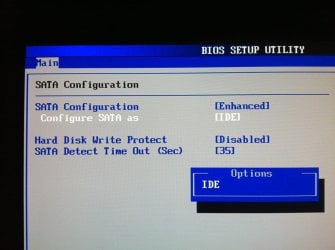
Ok so I changed the two files to 0 & rebooted in BIOS, but I didn't see anything in regards to ACHI? I found the area in BIOS but it only listed IDE?

By switching to ACHI it greatly increases the speed of the SSD doesn't it?

I hope I'm able to switch to it, any idea why it's not showing up & what we can do to make it do so?

Thanks.
 

Attachments

  • photo.JPG
    photo.JPG
    98.2 KB · Views: 0

My Computer My Computer

At a glance

Windows 7 64 & Ubuntu 64Intel Quad Core Q6600 2.40GHz8gNvidia 9600 GT & 9800 GT
Computer Manufacturer/Model Number
Built it myself
OS
Windows 7 64 & Ubuntu 64
CPU
Intel Quad Core Q6600 2.40GHz
Motherboard
Asus
Memory
8g
Graphics Card(s)
Nvidia 9600 GT & 9800 GT
Sound Card
Turtle Beach 5.1
Monitor(s) Displays
Three 19" Dell's & one 46" Samsung 750
What is the exact description of your ASUS motherboard. Once you have posted that info then people here will be able to tell whether you can set it up for AHCI & how to do it. I don't have an ASUS motherboard so I cannot help you.

It is not necessary to have Magician running in the background. I only run Magician when I want to check my Samsung SSD & I do not have it running in the background.
 

My Computer My Computer

At a glance

Windows 7 Home Premium 64 bit sp1Intel i5 3570 3.4Ghz Ivy Bridge SKT 1155 quad...G-Skill Rip Jaws 16Gb (8x2) DDR3 -1600 PC3 12...Gigabyte NVIDIA GT610 1Gb DDR3 810/1200 PCI-E...
Computer type
PC/Desktop
Computer Manufacturer/Model Number
Self built using existing case
OS
Windows 7 Home Premium 64 bit sp1
CPU
Intel i5 3570 3.4Ghz Ivy Bridge SKT 1155 quad core
Motherboard
Gigabyte Z77-HD3 SKT 1155 2xSata 3, 4x USB 3.0
Memory
G-Skill Rip Jaws 16Gb (8x2) DDR3 -1600 PC3 12800 CL 10 red
Graphics Card(s)
Gigabyte NVIDIA GT610 1Gb DDR3 810/1200 PCI-E 2.0 Silent
Sound Card
NVIDIA High Definition & Realtech High Definition Audio
Monitor(s) Displays
2 x Philips 226V4L 16:9 aspect ratio
Screen Resolution
1920 x 1080 HD
Hard Drives
Samsung 840 Pro 256gb SSD, SATA 3.
Hitachi Touro Portable 1tb, USB 3.0 HDD used for image b/ups.
PSU
Corsair VS450
Case
Codeng
Cooling
PSU fan & CPU fan
Keyboard
Logitech
Mouse
Logitech Wireless trackball M570
Internet Speed
Wireless 3G. 3mg down & 550kb up.
Antivirus
Bitdefender Internet Security 2020
Browser
Opera (Current Version) & Firefox
Other Info
MS Office 2013 Pro. Davis weather station software. MGE Nova 600 avr UPS.

My Computer My Computer

At a glance

Windows 7 64 & Ubuntu 64Intel Quad Core Q6600 2.40GHz8gNvidia 9600 GT & 9800 GT
Computer Manufacturer/Model Number
Built it myself
OS
Windows 7 64 & Ubuntu 64
CPU
Intel Quad Core Q6600 2.40GHz
Motherboard
Asus
Memory
8g
Graphics Card(s)
Nvidia 9600 GT & 9800 GT
Sound Card
Turtle Beach 5.1
Monitor(s) Displays
Three 19" Dell's & one 46" Samsung 750
I'm not sure if that motherboard supports AHCI, but you might need the Intel Rapid Storage Technology driver.

No, AHCI doesn't "greatly increase the speed of the SSD".


AHCI mode brings 3 main advantages:

Supports NCQ (Native Command Queuing) allowing SATA drives to accept more than one command at a time and dynamically reorder the commands for maximum efficiency.

Supports hot plugging of devices

Supports staggered spin ups of multiple hard drives at boot time


However, in the real world the performance difference isn't huge.
 
Last edited:

My Computer My Computer

At a glance

Windows 7 Home Premium SP1, 64-bitIntel Skylake i5-6600K, not overclocked8 GB HyperX DDR4-2666 (2 x 4 GB)none; graphics are integrated on CPU
Computer type
PC/Desktop
Computer Manufacturer/Model Number
Ignatz Special; 4 speed manual gearbox; factory air conditioning; one of one
OS
Windows 7 Home Premium SP1, 64-bit
CPU
Intel Skylake i5-6600K, not overclocked
Motherboard
AsRock Z170M Extreme 4, micro ATX
Memory
8 GB HyperX DDR4-2666 (2 x 4 GB)
Graphics Card(s)
none; graphics are integrated on CPU
Sound Card
onboard: Realtek ALC1150; external: USB Behringer UF0-202
Monitor(s) Displays
Dell S2340M 23 inch IPS
Screen Resolution
1600 x 900
Hard Drives
System: Crucial MX100 series SSD, 128 GB;
Data: Samsung Spinpoint 103SJ, 1 TB;
Backup: WD Caviar Green WD30EZRX-00D8PB0, 3 TB
PSU
Rosewill SilentNight 500 watt fanless, semi-modular
Case
Antec Solo II
Cooling
Noctua NH-U12S; Noctua F12 intake, Noctua S12A exhaust
Keyboard
Microsoft 200 6JH-00001 USB
Mouse
Dell or Microsoft optical wired; USB
Antivirus
Microsoft Security Essentials and Malwarebytes Premium
Browser
Pale Moon
Other Info
All fans PWM; speeds at idle: CPU circa 500 rpm; intake circa 600 rpm; exhaust circa 600 rpm; CPU temps 27 idle and 47 C load in a warm room (27 C/81 F) when running Intel Extreme Tuning Utility stress test.
Hmm, so I guess ACHI doesn't sound like it is needed for my use, but if it's possible I may as well do it.

How can I tell if ACHI is possible?

But I keep hearing how old my computer is :eek:

I'm hoping with this latest video card & SSD upgrade I can get another 3-5 years out of it. It runs and works great. Was/is a little slow on the HDD, but that's why the SSD was a nice upgrade.
 

My Computer My Computer

At a glance

Windows 7 64 & Ubuntu 64Intel Quad Core Q6600 2.40GHz8gNvidia 9600 GT & 9800 GT
Computer Manufacturer/Model Number
Built it myself
OS
Windows 7 64 & Ubuntu 64
CPU
Intel Quad Core Q6600 2.40GHz
Motherboard
Asus
Memory
8g
Graphics Card(s)
Nvidia 9600 GT & 9800 GT
Sound Card
Turtle Beach 5.1
Monitor(s) Displays
Three 19" Dell's & one 46" Samsung 750
Back
Top