A little help with Macrium, please

kenC

New member
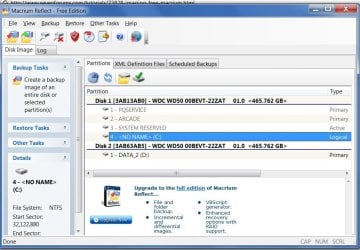
I want to do a system image with Macrium. Could someone help with what I need to image. The 'c' drive or something else with it - the 100mb partion ??
The aim is to get back to a working system in case of failure.
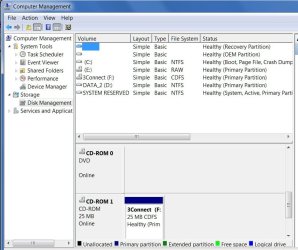
I'm adding Macrium pic and disk management.

Please note: my c drive is Logical - does this make any difference?
 

Attachments

  • 2010-08-13_115628.jpg
    2010-08-13_115628.jpg
    162.2 KB · Views: 22
  • 2010-08-13_124916.jpg
    2010-08-13_124916.jpg
    159.2 KB · Views: 12

My Computer

Computer Manufacturer/Model Number
Acer 7738G
OS
Windows 7 Home Premium X64 SP1
CPU
Intel Core2 duo T6600
Memory
4gb
Graphics Card(s)
Nvidia GeForce GT 1gb
Hard Drives
2 X 500 gb
I use Acronis for backups, and I do full hard drive backups of all partitions, not just the "C" partition. If you have, for example, a recovery partition and a diagnostic partition (as Dell and some other PC's vendors do) those need to be backed up too. If you just backup the "C" drive partition and have a hard drive failure and have to replace the drive with a new hard drive, you can restore the "C" partition to the new hard drive but you have lost any other partition.

I would do the same with this program, backup all partitions with this program to the separate hard drive (D) that I assume you will be using for backups.
 

My Computer

Computer type
PC/Desktop
Computer Manufacturer/Model Number
My Own Build
OS
Windows 10 64 bit
CPU
Intel i7 6700K
Motherboard
ASUS ROG Maximus VIII Hero
Memory
16GB Corsair Dominator
Graphics Card(s)
Intel CPU Graphics
Sound Card
RealTek
Monitor(s) Displays
27" Dell S2719dgf
Screen Resolution
2560X1440
Hard Drives
1 TB Samsung 850 EVO SSD for Win 10 Pro
500GB Samsung 850 EVO SSD for Win 10 Insider
2 TB drive for backup
PSU
EVGA Supernova 750G2
Case
BeQuiet Silent Base 600
Cooling
Deepcool Captain 120EX
Keyboard
Microsoft Wireless 2000
Mouse
Microsoft wireless
Internet Speed
100 MB/sec (Cable)
Antivirus
Microsoft Defender and Malwarebytes
Browser
Edge/Firefox
Other Info
Cakewalk (Sonar) by BandLab and Studio One 4.1 Pro recording studio software. MOTU 896Mk3 Hybrid recording interface, Frontier Tranzport wireless control unit, Behringer X-Touch Control Surface.
Five USB connected optical drives for CD Audio production using Nero BurningROM
I agree do a full HD image if you can
 

My Computer

Computer Manufacturer/Model Number
Proline
OS
Windows 7 Pro 64 bit
CPU
Intel(R) Core(TM) i7 CPU 870 @ 2.93GHz
Motherboard
H55-G43(MS-7638)
Memory
4GB
Graphics Card(s)
NVIDIA GeForce GTX 470
Sound Card
Onboard
Monitor(s) Displays
Proline LCD 19 inch
Screen Resolution
1280 x 1024
Hard Drives
2 x SATA 250 Gig 1 x External 2TB
PSU
RX 730 SS
Case
Proline
Cooling
Standard
Keyboard
PS2
Mouse
PS2
Internet Speed
To embarrassed to tell lol
Hi ken,

It is ok to have your boot drive as a logical drive, only the system partition needs to be a primary.

As you have the 100mb system partition, image it as well.

Make 2 separate images , one of your C partition and the other of your 100mb partition.

Or you can image them both at once - up to you.

You can make a new image of your C partition every week or so to keep it up to date.

No need to keep making new images of the 100 mb partition.

The other 2 are oem partitions put there by the manufacturer essentially to manage and recover your system to factory state.

If you have the time, the space and the inclination you can image those as well if you like. I wouldn't bother because I would have no interest in restoring to factory state. You may feel differently. If you do , then again you only need to image those once - they shouldn't change.

Making your own images with Macrium is much better than using the manufacturer restore program.

Hope it helps.
 

My Computers

System One System Two

  • Computer type
    PC/Desktop
    OS
    7 X64
    CPU
    i5 8400
    Motherboard
    gigabyte b365m ds3h
    Memory
    2x8gb 3200mhz
    Hard Drives
    various
    PSU
    pure power 11 400w cm
    Case
    Coolermaster
    Cooling
    cryorig m9i
  • Computer type
    PC/Desktop
    OS
    7x64
    CPU
    g5400
    Motherboard
    ga b365m ds3h
    Memory
    8gb ddr4 2400
    PSU
    xfx pro 450w
As SIW2 says, it is prudent to image C and the System Reserved partition which contains the MBR. Usually, nothing should happen to the system reserved partition, but one never knows. Pay attention the day you recover. For the recovery of C, you must not restore the MBR nor must you mark that partition as active. That is what you would do for the system reserved partition which you have to recover independently in case it is damaged - but in most cases that will not be neccessary.
You might want to have a look at my Macrium Tutorial ( http://www.sevenforums.com/tutorials/73828-imaging-free-macrium.html?ltr=I ) which explains some of those things in more detail.
 

My Computer

Computer Manufacturer/Model Number
HP, Dell, Gateway, Toshiba - 4 laptops and 2 desktops
OS
Vista, Windows7, Mint Mate, Zorin, Windows 8
CPU
from 1.6GHz Duo to i7
Monitor(s) Displays
2x HP w2207
Hard Drives
5x HDD, 7x SSD, 12x Externals
Keyboard
with trackball - no mices
Mouse
Trackball mice
Internet Speed
DSL 6000
Thanks to everyone for the advice. Much appreciated.

WHS: I've watched your video tutorial twice and it was the warning at the top of that page that prompted this thread.

I'm still a little confused over the restoration of C with regard to the MBR.

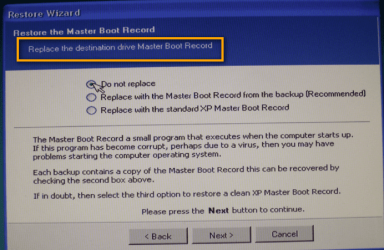
I understand that I should not restore the MBR when restoring C, but would I get the option since it isn't on C ?

Or are you referring to a situation where I would have to restore both?

I realize it would probably become clear if I had to do it - hope I don't have to!
 

My Computer

Computer Manufacturer/Model Number
Acer 7738G
OS
Windows 7 Home Premium X64 SP1
CPU
Intel Core2 duo T6600
Memory
4gb
Graphics Card(s)
Nvidia GeForce GT 1gb
Hard Drives
2 X 500 gb
1, If you watch the part of the video that describes the restoration, you will come to this picture (see below) where it says: "Do not replace". If you chose this option, the MBR will not be replaced. This is a generic Macrium option regardless whether the MBR is or is not in the image.

2. You will only have to restore the active partition (the small partition with the MBR), if you cannot boot after you restored C. Then you get a message like "Bootmgr missing". But that would be the rare case and should only happen if you have a physical damage on your drive.
 

Attachments

  • 2010-03-25_1807.png
    2010-03-25_1807.png
    627 KB · Views: 6

My Computer

Computer Manufacturer/Model Number
HP, Dell, Gateway, Toshiba - 4 laptops and 2 desktops
OS
Vista, Windows7, Mint Mate, Zorin, Windows 8
CPU
from 1.6GHz Duo to i7
Monitor(s) Displays
2x HP w2207
Hard Drives
5x HDD, 7x SSD, 12x Externals
Keyboard
with trackball - no mices
Mouse
Trackball mice
Internet Speed
DSL 6000
There really isn't going to be an issue if you restore the MBR. Most of the time, it would be an unnecessary step. However, for somebody like me, I like to occassionally switch back and forth between Windows and Linux on the box. Therefore, since the MBR is replaced with each OS, it's necessary for me to restore than 100MB active system partition as well as the C drive in order for my box to ever boot again.

But if I were just imaging my C drive and one day after an update Windows would not boot...it would most likely only require me to restore the C drive to get the box working again.

Hope that makes sense.
 

My Computer

Computer Manufacturer/Model Number
Self-Built in July 2009
OS
Windows 7 Ultimate x64
CPU
Intel Q9550 2.83Ghz OC'd to 3.40Ghz
Motherboard
Gigabyte GA-EP45-UD3R rev. 1.1, F12 BIOS
Memory
8GB G.Skill PI DDR2-800, 4-4-4-12 timings
Graphics Card(s)
EVGA 1280MB Nvidia GeForce GTX570
Sound Card
Realtek ALC899A 8 channel onboard audio
Monitor(s) Displays
23" Acer x233H
Screen Resolution
1920x1080
Hard Drives
Intel X25-M 80GB Gen 2 SSD
Western Digital 1TB Caviar Black, 32MB cache. WD1001FALS
PSU
Corsair 620HX modular
Case
Antec P182
Cooling
stock
Keyboard
ABS M1 Mechanical
Mouse
Logitech G9 Laser Mouse
Internet Speed
15/2 cable modem
Other Info
Windows and Linux enthusiast. Logitech G35 Headset.
There really isn't going to be an issue if you restore the MBR. Most of the time, it would be an unnecessary step
Unfortunately that is not my experience. I learned the hard way that the restored system will not boot if you try to restore the MBR from a C image where there is no MBR. In that case you have to restore the small active partition - but this is really not neccessary in practically all cases.
 

My Computer

Computer Manufacturer/Model Number
HP, Dell, Gateway, Toshiba - 4 laptops and 2 desktops
OS
Vista, Windows7, Mint Mate, Zorin, Windows 8
CPU
from 1.6GHz Duo to i7
Monitor(s) Displays
2x HP w2207
Hard Drives
5x HDD, 7x SSD, 12x Externals
Keyboard
with trackball - no mices
Mouse
Trackball mice
Internet Speed
DSL 6000
Unfortunately that is not my experience. I learned the hard way that the restored system will not boot if you try to restore the MBR from a C image where there is no MBR. In that case you have to restore the small active partition - but this is really not neccessary in practically all cases.

I think we are talking about 2 slightly different things. In your case, you tried to restore the MBR from a backup that didn't contain an MBR....and that is simply user error and would never work.

What I am saying is that restoring your MBR is not really an issue if you do it and you don't need to. Obviously, you would be restoring it from a backup which contained it.

edit: on second thought...why not just always back up the 100MB partition. I mean it's tiny and with compression it takes no space.
 
Last edited:

My Computer

Computer Manufacturer/Model Number
Self-Built in July 2009
OS
Windows 7 Ultimate x64
CPU
Intel Q9550 2.83Ghz OC'd to 3.40Ghz
Motherboard
Gigabyte GA-EP45-UD3R rev. 1.1, F12 BIOS
Memory
8GB G.Skill PI DDR2-800, 4-4-4-12 timings
Graphics Card(s)
EVGA 1280MB Nvidia GeForce GTX570
Sound Card
Realtek ALC899A 8 channel onboard audio
Monitor(s) Displays
23" Acer x233H
Screen Resolution
1920x1080
Hard Drives
Intel X25-M 80GB Gen 2 SSD
Western Digital 1TB Caviar Black, 32MB cache. WD1001FALS
PSU
Corsair 620HX modular
Case
Antec P182
Cooling
stock
Keyboard
ABS M1 Mechanical
Mouse
Logitech G9 Laser Mouse
Internet Speed
15/2 cable modem
Other Info
Windows and Linux enthusiast. Logitech G35 Headset.
edit: on second thought...why not just always back up the 100MB partition. I mean it's tiny and with compression it takes no space
That is what I also recommend for a worst case scenario.

PS: sorry if I misunderstood your earlier post. In the context of my previous discussion with the OP it appeared to me as if you meant to restore from an image that has no MBR. As I said, in my early Macrium days I tried that too. You live and learn.
 

My Computer

Computer Manufacturer/Model Number
HP, Dell, Gateway, Toshiba - 4 laptops and 2 desktops
OS
Vista, Windows7, Mint Mate, Zorin, Windows 8
CPU
from 1.6GHz Duo to i7
Monitor(s) Displays
2x HP w2207
Hard Drives
5x HDD, 7x SSD, 12x Externals
Keyboard
with trackball - no mices
Mouse
Trackball mice
Internet Speed
DSL 6000
I thought I had this clear after post 7 but now it's clouded over again ;-)

So, as SIW2 said: I make 2 separate images, one of my C partition and the other of my 100mb partition.

When (if) I have to restore C, I choose 'Do Not Replace' for the MBR

Right?

If so - how do I image the 100mb? It doesn't show up in Macrium.
Do I have to give it a drive letter? If so, will any not in use do and how do I do it?

Sorry for all the q's and thanks for all help.
 

My Computer

Computer Manufacturer/Model Number
Acer 7738G
OS
Windows 7 Home Premium X64 SP1
CPU
Intel Core2 duo T6600
Memory
4gb
Graphics Card(s)
Nvidia GeForce GT 1gb
Hard Drives
2 X 500 gb
Yes, the 100MB partition needs a letter. Either you assign it with Disk Management or Partition Wizard.
 

My Computer

Computer Manufacturer/Model Number
HP, Dell, Gateway, Toshiba - 4 laptops and 2 desktops
OS
Vista, Windows7, Mint Mate, Zorin, Windows 8
CPU
from 1.6GHz Duo to i7
Monitor(s) Displays
2x HP w2207
Hard Drives
5x HDD, 7x SSD, 12x Externals
Keyboard
with trackball - no mices
Mouse
Trackball mice
Internet Speed
DSL 6000
OK - all done! I spent a while moving photos - videos, etc. off C to make it smaller (that stuff is all backed up regularly anyway)
I took an image which seemed to go well (took 18 mins.) and now I've moved the extra stuff back again.

Thanks to everyone.
 

My Computer

Computer Manufacturer/Model Number
Acer 7738G
OS
Windows 7 Home Premium X64 SP1
CPU
Intel Core2 duo T6600
Memory
4gb
Graphics Card(s)
Nvidia GeForce GT 1gb
Hard Drives
2 X 500 gb
moving photos - videos, etc. off C to make it smaller
If you moved that to a data partition, you can image that partition too. I do this all the time since I have a data partition which is shared between my Vista and Win7 systems.
 

My Computer

Computer Manufacturer/Model Number
HP, Dell, Gateway, Toshiba - 4 laptops and 2 desktops
OS
Vista, Windows7, Mint Mate, Zorin, Windows 8
CPU
from 1.6GHz Duo to i7
Monitor(s) Displays
2x HP w2207
Hard Drives
5x HDD, 7x SSD, 12x Externals
Keyboard
with trackball - no mices
Mouse
Trackball mice
Internet Speed
DSL 6000
Wolfgang - I did think of that having seen your other tutorial. I wanted to get the system image done though.

Can I make more partitions? It seems Acer have already made a few - isn't there a limit? 3 or 4?
Please see my first post for disk management.
 

My Computer

Computer Manufacturer/Model Number
Acer 7738G
OS
Windows 7 Home Premium X64 SP1
CPU
Intel Core2 duo T6600
Memory
4gb
Graphics Card(s)
Nvidia GeForce GT 1gb
Hard Drives
2 X 500 gb
Yeah, there is a problem. It looks like thosae Acer people stuffed your system with 4 primaries already - and 4 is the maximum. You have to get rid of one of those first to get to a total of 3 primaries and then add an extended partition to which you can add many additional basic partitions.
Do in no case try to add a partition as it is now. That will automatically convert all your paetitions into dynamic partitions and that is a mess which is not all that easy to correct.
 

My Computer

Computer Manufacturer/Model Number
HP, Dell, Gateway, Toshiba - 4 laptops and 2 desktops
OS
Vista, Windows7, Mint Mate, Zorin, Windows 8
CPU
from 1.6GHz Duo to i7
Monitor(s) Displays
2x HP w2207
Hard Drives
5x HDD, 7x SSD, 12x Externals
Keyboard
with trackball - no mices
Mouse
Trackball mice
Internet Speed
DSL 6000
I'll leave it 'as is' at the moment - everything's fine - don't want to screw things up ;-)

Thanks again for the help.
 

My Computer

Computer Manufacturer/Model Number
Acer 7738G
OS
Windows 7 Home Premium X64 SP1
CPU
Intel Core2 duo T6600
Memory
4gb
Graphics Card(s)
Nvidia GeForce GT 1gb
Hard Drives
2 X 500 gb
OK Ken, we'll tackle the partition problem another day. Keep the Disk Management snip around. We'll need it for that.
 

My Computer

Computer Manufacturer/Model Number
HP, Dell, Gateway, Toshiba - 4 laptops and 2 desktops
OS
Vista, Windows7, Mint Mate, Zorin, Windows 8
CPU
from 1.6GHz Duo to i7
Monitor(s) Displays
2x HP w2207
Hard Drives
5x HDD, 7x SSD, 12x Externals
Keyboard
with trackball - no mices
Mouse
Trackball mice
Internet Speed
DSL 6000
I just realized that the E that's showing is my DVD drive and the F is my ISP (the dongle sticking in the side of my laptop)

Is it usual for these to show up as Primary partitions? Are they in fact PP's

I scrolled down a bit in the disk management window.
 

Attachments

  • 2010-08-15_171557.jpg
    2010-08-15_171557.jpg
    124.9 KB · Views: 2

My Computer

Computer Manufacturer/Model Number
Acer 7738G
OS
Windows 7 Home Premium X64 SP1
CPU
Intel Core2 duo T6600
Memory
4gb
Graphics Card(s)
Nvidia GeForce GT 1gb
Hard Drives
2 X 500 gb
Back
Top