A new Ubuntu Virtual Machine question

Arc

New member
SF Team
Local time
4:00 PM
Messages
35,002
Hi Frinds !
After a lot of hard work and great support from you friends (in this thread : http://www.sevenforums.com/virtualization/61038-how-run-ubuntu-vmware.html) , I am able to run an Ubuntu VM properly in Windows 7 host. But still I have a few problems. Hope I will get your support as usual to overcome those :

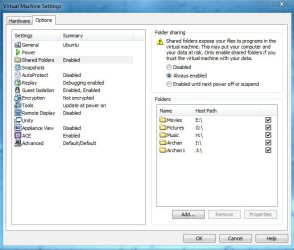
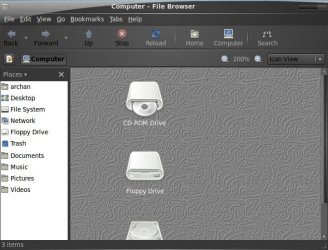
1. Installed VMWare tools, Enabled folder sharing, but cannot find the shared folders. where they situate, or how to get them ? ( arrachments 1 & 2 )
2. When the vm is starting up, this notification pops up, and after that , there is no sound at all. What to do? (attachment 3)
Thank you in advance :)
 

Attachments

  • 1.JPG
    1.JPG
    53.8 KB · Views: 47
  • 2.JPG
    2.JPG
    78.6 KB · Views: 50
  • 3.jpg
    3.jpg
    5.1 KB · Views: 13

My Computer My Computer

At a glance

Microsoft Windows 10 Pro Insider Preview 64-bitIntel(R) Core(TM) i3-4130 CPU @ 3.40GHzCorsair Vengence 4GB x2 (8.00GB Dual-Channel ...2047MB GeForce GTS 450 (ZOTAC International)
Computer type
PC/Desktop
Computer Manufacturer/Model Number
Self Assembled
OS
Microsoft Windows 10 Pro Insider Preview 64-bit
CPU
Intel(R) Core(TM) i3-4130 CPU @ 3.40GHz
Motherboard
Gigabyte Technology Co., Ltd. B85M-D3H
Memory
Corsair Vengence 4GB x2 (8.00GB Dual-Channel DDR3 @ 798MHz)
Graphics Card(s)
2047MB GeForce GTS 450 (ZOTAC International)
Sound Card
Onboard (Realtek High Definition Audio)
Monitor(s) Displays
LG Flatron E2040T
Screen Resolution
1600x900
Hard Drives
Western Digital 1 TB
Seagate 500 GB
PSU
Corsair VS550
Case
Cooler Master K380
Cooling
Cooler Master Seidon 120V Plus
Keyboard
Logitech MK260r
Mouse
Logitech MK260r
Internet Speed
PMPL Broadband
Antivirus
Windows Defender + MBAM
Browser
Firefox
Other Info
Dell Studio 15" Laptop
Hi Arc,

Sorry for the late reply. I've just finished installing Ubuntu 9.10 on VMware (my other installations are on separate partitions), but i'm having trouble installing VMware tools. I'll get it fixed by evening today and check out the Folder Sharing.

Regarding the sound, it would be easier if we know what hardware you have so that troubleshooting would be easier.
Edit your System Spec.
Please fill in the details. You can get the details from Speccy. Just download and run it.
 

My Computer My Computer

At a glance

Windows 7 Ultimate x64 (XP, 98SE, 95, 3.11, D...Intel Core 2 Duo Processor P8600 (2.40 GHz, 3...4GB 800 MHz DDR2 SDRAMATI Mobility FireGL V5700 with 256 MB
Computer type
Laptop
Computer Manufacturer/Model Number
HP EliteBook 8530w Mobile Workstation
OS
Windows 7 Ultimate x64 (XP, 98SE, 95, 3.11, DOS 7.10 on VM) + Ubuntu 10.04 LTS Lucid Lynx
CPU
Intel Core 2 Duo Processor P8600 (2.40 GHz, 3 MB L2 cache)
Motherboard
Mobile Intel PM45 Express Chipset ICH9M-Enhanced
Memory
4GB 800 MHz DDR2 SDRAM
Graphics Card(s)
ATI Mobility FireGL V5700 with 256 MB
Sound Card
SoundMAX Integrated Digital HD Audio
Monitor(s) Displays
15.4-inch WXGA anti-glare (1280 x 800 resolution)
Screen Resolution
1280 x 800
Hard Drives
500GB + 1TB
Mouse
Synaptics PS/2 Port Touchpad, USB Mouse
Internet Speed
4 Mbps
Antivirus
MSE
Browser
Firefox, Chrome, IE
Other Info
Authentec AES2810 Fingerprint Reader
Hi there
File sharing is a feature you need to activate in the GUEST / HOST OS'es.

As your Guest is an UBUNTU system you'll need to enable File sharing with Windows using SAMBA to share LINUX with Windows - while fairly simple to set up is beyond the scope of this post here and a simple Mount command for the Windows files to be shared with Linux

First of course ensure that your VM Networking is enabled - Bridged if you want separate addresses for the Guest or NAT if you want to share an IP with the guest.

Next ensure the two machines (Guest and Host) can ping each other

Now mount the Windows file systems you need to access on your Ubuntu guest (READ WRITE option is -o rw) with a "bog standard" mount command -- the ntfs file system must be defined as -t ntfs-3g (no space between ntfs and 3g) in the Linux mount command.

mount -t ntfs-3g -o rw /your device / yoursharename

-- Ntfs is supported in Linux kernels these days directly both for Read and WRITE.

To access the Linux file system in Windows you need to set SAMBA up on the Linux vm -- this uses the NFS file sharing protocol.

The Official Samba 3.2.x HOWTO and Reference Guide

Cheers
jimbo
 

My Computer My Computer

At a glance

Linux CENTOS 7 / various Windows OS'es and se...Intel i7 Intel i58GB, 16GBOn Motherboard
Computer type
PC/Desktop
Computer Manufacturer/Model Number
Custom built, several laptops HP/ASUS
OS
Linux CENTOS 7 / various Windows OS'es and servers
CPU
Intel i7 Intel i5
Memory
8GB, 16GB
Graphics Card(s)
On Motherboard
Sound Card
Realtek HD audio
Monitor(s) Displays
Apple Cinema display, Samsung LCD
Screen Resolution
1920 X 1080
Hard Drives
4 X 1TB SATA
Mouse
Toshiba wireless laser
Internet Speed
> 20MB up
cool post,:)
 

My Computer My Computer

At a glance

Windows 7 Starter 32-bit (6.1, Build 7600) & ...Intel(R) Atom(TM) CPU N450 @ 1.66GHz (2 CPUs)...1024 mbIntel(R) Graphics Media Accelerator 3150
Computer Manufacturer/Model Number
Windows 7 Starter 32-bit (6.1, Build 7600)
OS
Windows 7 Starter 32-bit (6.1, Build 7600) & UBUNTU NETBOOK-REMIX 9.10
CPU
Intel(R) Atom(TM) CPU N450 @ 1.66GHz (2 CPUs), ~1.7GHz
Motherboard
acer AO532h
Memory
1024 mb
Graphics Card(s)
Intel(R) Graphics Media Accelerator 3150
Sound Card
Realtek High Definition Audio
Monitor(s) Displays
Generic PnP Monitor
Screen Resolution
1024 * 600
Hard Drives
ST9250315AS 250 GB
I'd rather suggest you to use VirtualBox instead. I m running Ubuntu 10.04 alpha 2 on it. Works perfect.
 

My Computer My Computer

At a glance

Windows® 8 Pro (64-bit)Intel® Core™ i5 Processor 2467M (1.60GHz, 3MB...6GB DDR3 System Memory at 1,333MHz (on BD 4GB...AMD Radeon™ HD7550M 1GB DDR3 (Ext. Graphic)
Computer Manufacturer/Model Number
Samsung NP530U4B-S02IN
OS
Windows® 8 Pro (64-bit)
CPU
Intel® Core™ i5 Processor 2467M (1.60GHz, 3MB L3 Cache)
Motherboard
Samsung Electronics
Memory
6GB DDR3 System Memory at 1,333MHz (on BD 4GB + 2GB x 1)
Graphics Card(s)
AMD Radeon™ HD7550M 1GB DDR3 (Ext. Graphic)
Sound Card
Realtek High Definition Audio
Monitor(s) Displays
35.56cm (14.0) SuperBright 300nit HD LED Display
Screen Resolution
1366x768
Hard Drives
1TB S-ATA II Hard Drive (5400RPM) with ExpressCache 16GB SSD
Internet Speed
sucks
Antivirus
Microsoft Security Essentials
Browser
Google Chrome (Sync enabled)
Hi there
The same methodology will work whether you are using vmware, virtual box, Virtual PC or even QEMU.

you need to enable SHARING on the GUEST and HOST machines and this isn't a function of the virtual machine software itself -- especially when sharing between OS and Linux.

You also need to enable networking between host and guest (bridging / nat as previously explained).

Suggesting different Virtual Machine software only confuses the actual issue here.

Vbox vs vmware is another issue entirely -- both these are excellent products btw.

sharing between a Windows host and a windows guest is relatively simple -- for a Linux guest you need to do it as posted above - especially if you want to access the Linux file system on the windows host.


Cheers
jimbo
 

My Computer My Computer

At a glance

Linux CENTOS 7 / various Windows OS'es and se...Intel i7 Intel i58GB, 16GBOn Motherboard
Computer type
PC/Desktop
Computer Manufacturer/Model Number
Custom built, several laptops HP/ASUS
OS
Linux CENTOS 7 / various Windows OS'es and servers
CPU
Intel i7 Intel i5
Memory
8GB, 16GB
Graphics Card(s)
On Motherboard
Sound Card
Realtek HD audio
Monitor(s) Displays
Apple Cinema display, Samsung LCD
Screen Resolution
1920 X 1080
Hard Drives
4 X 1TB SATA
Mouse
Toshiba wireless laser
Internet Speed
> 20MB up
Back
Top