A sleeping desktop!

sreedhav

Seasonal Bird
Guru
Local time
8:50 AM
Messages
612
Location
Seasonal Bird
Dear friends,
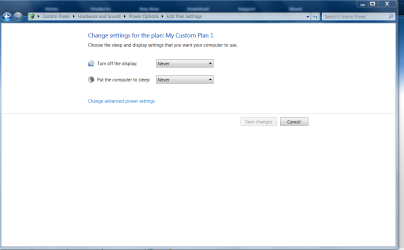
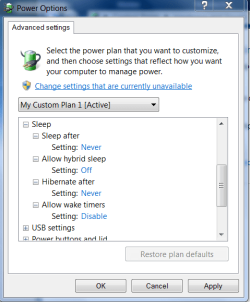
The desktop i have goes into sleep mode, immediately after 2 minutes of idleness! I have configured my powerplan as the snaps below will show. Kindly help to make the PC stay awake! This is the first time it has happened! Awaiting your helpful responses!
Thanking you,
Sreedhav:confused:
 

Attachments

  • MY POWER PLAN 1.png
    MY POWER PLAN 1.png
    35.8 KB · Views: 9
  • ADVANCED OPTIONS.png
    ADVANCED OPTIONS.png
    19.6 KB · Views: 9

My Computer

Computer Manufacturer/Model Number
Sony Vaio C series VPCCB35FN laptop
OS
MS Windows 7 Home Premium 64-bit SP1
CPU
IntelCore [email protected]; Sandy Bridge 32nm Tech.
Motherboard
Sony Vaio Version:C609NJYJ
Memory
4096Mb RAM; Single ChannelDDR3@665MHz; DRAM Freq:662MHz
Graphics Card(s)
AMD Radeon HD 6630M; GPU:Whistler;BIOS Core&mem Clock:123.36
Sound Card
REALTEK High Definition Audio Device; INTEL Display Card
Monitor(s) Displays
Generic PnP Intel HD;Resolution:1920*1040 Pixels; BPP:32bits
Screen Resolution
Current Resolution:1920*1080 Pixels; Monitor Frequency:60Hz
Hard Drives
Internal HD:TOSHIBA MK5061GSY; Real Size:488 GB;NTFS; 3 Partitions; SATA; HEADS:16

External HDD: WD Elements 1023 PORTABLE; Estimated Size: 1TB; NTFS; 3 Partitions
Cooling
Lateral Exhaust with a Cooling Pad Placed Beneath.
Keyboard
Logitech Bluetooth+ Generic Integrated K-B
Mouse
Logitech Bluetooth
Internet Speed
2MBPS
Other Info
1)Trend Micro Titanium Maximum Security Suite Version:3
2)SAS-PRO

3)MBAM--PRO


4)WATERFOX+IE9 +WOT+LINKEXTEND+ DRWEBCUREIT LINK CHECKER

5)SPYWAREBLASTER

6) WINPATROL PLUS

7) SANDBOXIE and
8) A BIT OF COMMON SENSE.

My Computer

Computer type
PC/Desktop
Computer Manufacturer/Model Number
Dell XPS 420
OS
Windows 10, Home Clean Install
CPU
Intel Core2 processsor Q8200(2.33Ghz 1333FSB) Quad Core Tech
Motherboard
Dell
Memory
6 gb
Graphics Card(s)
ATI Radeon 256MB HD3650
Sound Card
Intergrated 7.1 Channel Audio
Monitor(s) Displays
Dell SP2009W 20"
Hard Drives
640 GB Serial ATA Hard drive
Cooling
Fan
Keyboard
Dell USB Keyboard
Mouse
Dell Premium Optical USB
Internet Speed
DSL 2.85
Dear richc46,
The tutorial's first advise was to update the drivers! I updated the BIOS and the chipset family drivers and voila,the sleeping lion woke up and is on the prowl! Prob.solved!

QUOTE" Tip
BEFORE STARTING:Make sure you have the latest device drivers and BIOS installed for your motherboard.
NOTE: A out-of-date video driver or other drivers are sometimes the source of sleep mode problems. It is best to keep these up to date to resolve issues found with them
"UNQUOTE. Thank you and since i am allowed to present you only with ONE REP.point, i humbly give it with gratitude!

Probs. which we think will never happen to us, do happen! That's why i learn a lot browsing the topics on our fine site whenever i am free!:)

regards,
DR.Sreedhav

PS: a small tip to folks who wish to OR should update their "intel inside" drivers, this should prove helpful : Intel® Driver Update Utility! As i cannot whisper into your lovely ears for a rep. point, i am shouting for one! ;)
 

My Computer

Computer Manufacturer/Model Number
Sony Vaio C series VPCCB35FN laptop
OS
MS Windows 7 Home Premium 64-bit SP1
CPU
IntelCore [email protected]; Sandy Bridge 32nm Tech.
Motherboard
Sony Vaio Version:C609NJYJ
Memory
4096Mb RAM; Single ChannelDDR3@665MHz; DRAM Freq:662MHz
Graphics Card(s)
AMD Radeon HD 6630M; GPU:Whistler;BIOS Core&mem Clock:123.36
Sound Card
REALTEK High Definition Audio Device; INTEL Display Card
Monitor(s) Displays
Generic PnP Intel HD;Resolution:1920*1040 Pixels; BPP:32bits
Screen Resolution
Current Resolution:1920*1080 Pixels; Monitor Frequency:60Hz
Hard Drives
Internal HD:TOSHIBA MK5061GSY; Real Size:488 GB;NTFS; 3 Partitions; SATA; HEADS:16

External HDD: WD Elements 1023 PORTABLE; Estimated Size: 1TB; NTFS; 3 Partitions
Cooling
Lateral Exhaust with a Cooling Pad Placed Beneath.
Keyboard
Logitech Bluetooth+ Generic Integrated K-B
Mouse
Logitech Bluetooth
Internet Speed
2MBPS
Other Info
1)Trend Micro Titanium Maximum Security Suite Version:3
2)SAS-PRO

3)MBAM--PRO


4)WATERFOX+IE9 +WOT+LINKEXTEND+ DRWEBCUREIT LINK CHECKER

5)SPYWAREBLASTER

6) WINPATROL PLUS

7) SANDBOXIE and
8) A BIT OF COMMON SENSE.
Thats great news, glad that I could help.
 

My Computer

Computer type
PC/Desktop
Computer Manufacturer/Model Number
Dell XPS 420
OS
Windows 10, Home Clean Install
CPU
Intel Core2 processsor Q8200(2.33Ghz 1333FSB) Quad Core Tech
Motherboard
Dell
Memory
6 gb
Graphics Card(s)
ATI Radeon 256MB HD3650
Sound Card
Intergrated 7.1 Channel Audio
Monitor(s) Displays
Dell SP2009W 20"
Hard Drives
640 GB Serial ATA Hard drive
Cooling
Fan
Keyboard
Dell USB Keyboard
Mouse
Dell Premium Optical USB
Internet Speed
DSL 2.85
Back
Top