

Here i'm going to give some of the very important tips especially for people who are new to PC Games and want to play games on there Windows 7 OS without any hassle, crashes or performance issues etc.
Steps need to follow after the Fresh Install of Windows 7 OS:
1. Install Chipset Drivers for your Motherboard.
2. Install Sound Drivers.
3. Download and Install Microsoft DirectX 9 Redist (June 2010) from the following link - (this is a very important update that is required by most of the older and new games which is not included in the default OS disc):
DirectX 9 (Redist June 2010)
4. Download Latest Drivers for your GPU from the following links:
AMD/ATI Drivers
NVidia Drivers
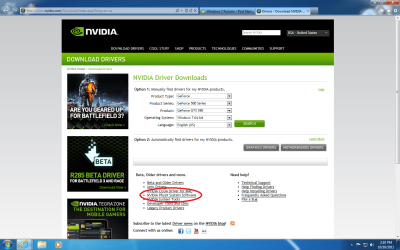
5. Download and Install latest NVIDIA PhysX System Software - (this is also a very important software that is required by PhysX supported games no matter you have NVidia or AMD GPU... for example Metro 2033 requires this software and will not run unless you install it even with AMD GPU's):
PhysX System Software (hard to find the link? see the Picture below)
Make sure to install latest Patches for Games and keep your Windows 7 OS updated also try not to install the Games on the OS drive (example C: Drive) and always install your games on other drive if you have. Make sure to disable your Anti-Virus before playing the game (I use Microsoft Security Essential which i think is the best and free Anti-Virus so far and use low resource usage) by following these steps i can assure that you will not have any problem running games.
Steps need to follow after the Fresh Install of Windows 7 OS:
1. Install Chipset Drivers for your Motherboard.
2. Install Sound Drivers.
3. Download and Install Microsoft DirectX 9 Redist (June 2010) from the following link - (this is a very important update that is required by most of the older and new games which is not included in the default OS disc):
DirectX 9 (Redist June 2010)
4. Download Latest Drivers for your GPU from the following links:
AMD/ATI Drivers
NVidia Drivers
5. Download and Install latest NVIDIA PhysX System Software - (this is also a very important software that is required by PhysX supported games no matter you have NVidia or AMD GPU... for example Metro 2033 requires this software and will not run unless you install it even with AMD GPU's):
PhysX System Software (hard to find the link? see the Picture below)
____________________
Make sure to install latest Patches for Games and keep your Windows 7 OS updated also try not to install the Games on the OS drive (example C: Drive) and always install your games on other drive if you have. Make sure to disable your Anti-Virus before playing the game (I use Microsoft Security Essential which i think is the best and free Anti-Virus so far and use low resource usage) by following these steps i can assure that you will not have any problem running games.
Attachments
My Computer
- Computer type
- PC/Desktop
- Computer Manufacturer/Model Number
- Self Built
- OS
- Windows 10 Pro
- CPU
- Core i5 9600K
- Motherboard
- ASUS ROG Strix Z390-F Gaming
- Memory
- Corsair Vengeance Pro 2x 8GB (16GB) 3200MHz DDR4
- Graphics Card(s)
- MSI GTX 1070 Gaming X 8GB
- Sound Card
- ASRock A-Style Purity Sound
- Monitor(s) Displays
- ASUS VX239H IPS
- Screen Resolution
- 1920x1080
- Hard Drives
- XPG SPECTRIX S40G 2566GB M.2 NVMe | Patriot P210 512GB SSD | Seagate BarraCuda 4TB 5400RPM
- PSU
- Thermaltake Smart 600w RGB 80Plus
- Case
- NZXT H500 with 3x Corsair HD120 RGB w/Node Pro
- Cooling
- Cryorig H7
- Keyboard
- Corsair K70 RapidFire RGB (Cherry MX Speed)
- Mouse
- Logitech G402 Hyperion Fury
- Internet Speed
- 20MB Cable Broadband
- Browser
- Chrome
- Other Info
- Corsair MM300 Extended Anti-Fray Mouse Pad | Edifier C2 2.1ch Sound System | XBOX One S Controller | XBOX 360 Wireless Controller for Windows | APC SUA1000i Smart-UPS | PS4 Slim 500GB [Region 1 - USA]


