Solved A specified file causing permission problems.

LuC1F3R

New member
Local time
2:44 AM
Messages
22
There is a specified file which is causing my whole computer 0x8007005 (ACCESS DENIED)

I know what the file causing it, but i cannot delete it.

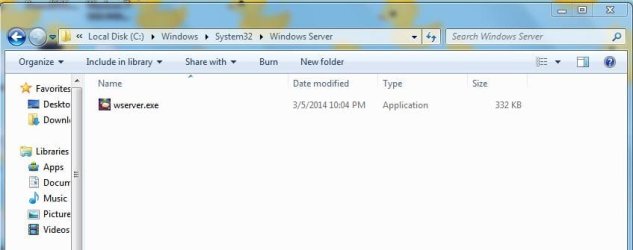
its in my system32 dir, C:\Windows\system32\Windows Server\wserver.exe

" wsever.exe " is not a windows legit file i assume and the icon of the following is the icon of the following game " South Park - The Stick Of Truth "

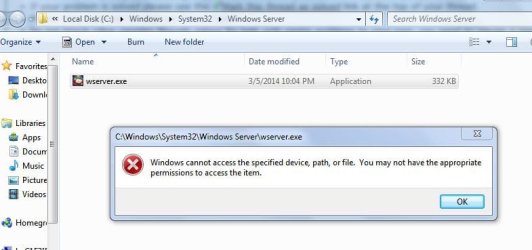
whever i try to delete the file it gives me a error and it tells me to get permission from myself (i am the only owner/admin in the computer) :confused:

Any help will be appreciated.

Cheers:(
 

Attachments

  • omg.JPG
    omg.JPG
    32.8 KB · Views: 0

My Computer

Computer type
PC/Desktop
Computer Manufacturer/Model Number
Unknown
OS
Windows 7 home premium 32bit
CPU
Intel Pentium dual CPU E220 @2.40Ghz
Motherboard
Intel
Memory
600GB
Graphics Card(s)
Intel Chipset
Browser
Google Chrome
PS

PS : i also tried the security tab thing, i got the whole access to the file yet not letting me delete.
 

My Computer

Computer type
PC/Desktop
Computer Manufacturer/Model Number
Unknown
OS
Windows 7 home premium 32bit
CPU
Intel Pentium dual CPU E220 @2.40Ghz
Motherboard
Intel
Memory
600GB
Graphics Card(s)
Intel Chipset
Browser
Google Chrome
Hi,

Try booting into Safe Mode and deleting it. Restart the pc and hit the F8 button to get into Safe Mode.
 

My Computer

Computer type
PC/Desktop
Computer Manufacturer/Model Number
Lenovo ThinkCentre
OS
Windows 7 Enterprise 32 bit
CPU
Core i5
Memory
4 GB
Antivirus
Symantec
Browser
IE 8
Reply to kma

I tried it but still its not letting me, i even tried to boot into recovery mode and delete it through cmd with command "del C:Windows\system32\Windows Server\wserver"

And yeah, the following is only seeable when using explorer link.
 

My Computer

Computer type
PC/Desktop
Computer Manufacturer/Model Number
Unknown
OS
Windows 7 home premium 32bit
CPU
Intel Pentium dual CPU E220 @2.40Ghz
Motherboard
Intel
Memory
600GB
Graphics Card(s)
Intel Chipset
Browser
Google Chrome
Scan your machine with ESET OnlineScan[/b]
  1. Hold down Control and click on the following link to open ESET OnlineScan in a new window.
    ESET OnlineScan
  2. Click the
    esetOnline.png
    button.
  3. For alternate browsers only: (Microsoft Internet Explorer users can skip these steps)
    1. Click on
      esetSmartInstall.png
      to download the ESET Smart Installer. Save it to your desktop.
    2. Double click on the
      esetSmartInstallDesktopIcon.png
      icon on your desktop.
  4. Check
    esetAcceptTerms.png
  5. Click the
    esetStart.png
    button.
  6. Accept any security warnings from your browser.
  7. Check
    esetScanArchives.png
  8. Push the Start button.
  9. ESET will then download updates for itself, install itself, and begin scanning your computer. Please be patient as this can take some time.
  10. When the scan completes, push
    esetListThreats.png
  11. Push
    esetExport.png
    , and save the file to your desktop using a unique name, such as ESETScan. Include the contents of this report in your next reply.
  12. Push the
    esetBack.png
    button.
  13. Push
    esetFinish.png
 

My Computer

Computer type
PC/Desktop
Computer Manufacturer/Model Number
Bruce ... somewhere in his 40's
OS
Windows 7 Ultimate 32bit SP1
CPU
Intel(R) Core(TM)2 Quad CPU @ 2.40GHz, 2400 MHz
Motherboard
INTEL/D975XBX2
Memory
4 GB
Graphics Card(s)
ATI Radeon HD 2600 Pro
Monitor(s) Displays
Samsung SyncMaster 914v
Screen Resolution
1280 x 1024
Hard Drives
2/500GB each ... ST3500630AS ATA Device.
One is not connected
PSU
Rocketfish 700 W
Case
G.Skill Gigabyte Chassis
Keyboard
Standard PS/2 Keyboard
Mouse
Microsoft PS/2 Mouse
Internet Speed
DSL
Antivirus
Avira Internet Security
Browser
IE 11
Other Info
ATI HDMI Audio
Can not get update

Scan your machine with ESET OnlineScan[/b]
  1. Hold down Control and click on the following link to open ESET OnlineScan in a new window.
    ESET OnlineScan
  2. Click the
    esetOnline.png
    button.
  3. For alternate browsers only: (Microsoft Internet Explorer users can skip these steps)
    1. Click on
      esetSmartInstall.png
      to download the ESET Smart Installer. Save it to your desktop.
    2. Double click on the
      esetSmartInstallDesktopIcon.png
      icon on your desktop.
  4. Check
    esetAcceptTerms.png
  5. Click the
    esetStart.png
    button.
  6. Accept any security warnings from your browser.
  7. Check
    esetScanArchives.png
  8. Push the Start button.
  9. ESET will then download updates for itself, install itself, and begin scanning your computer. Please be patient as this can take some time.
  10. When the scan completes, push
    esetListThreats.png
  11. Push
    esetExport.png
    , and save the file to your desktop using a unique name, such as ESETScan. Include the contents of this report in your next reply.
  12. Push the
    esetBack.png
    button.
  13. Push
    esetFinish.png

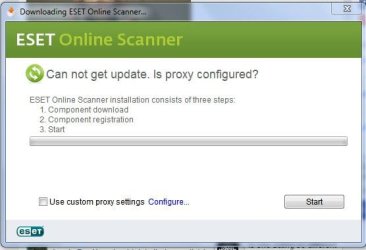
i tried to do the following but this happened before it could even start...
 

Attachments

  • sum.JPG
    sum.JPG
    29 KB · Views: 31

My Computer

Computer type
PC/Desktop
Computer Manufacturer/Model Number
Unknown
OS
Windows 7 home premium 32bit
CPU
Intel Pentium dual CPU E220 @2.40Ghz
Motherboard
Intel
Memory
600GB
Graphics Card(s)
Intel Chipset
Browser
Google Chrome
Last edited:

My Computer

Computer type
Laptop
Computer Manufacturer/Model Number
ASUS
OS
Microsoft Windows 7 Home Premium 64-bit 7601 Multiprocessor Free Service Pack 1
CPU
AMD C-60 APU with Radeon(tm) HD Graphics
Motherboard
ASUSTeK COMPUTER INC. X501U
Memory
4.00 GB
Graphics Card(s)
AMD Radeon HD 6290 Graphics
Sound Card
(1) AMD High Definition Audio Device (2) Realtek High Defi
Screen Resolution
1366 x 768 x 32 bits (4294967296 colors) @ 60 Hz
Hard Drives
Hitachi HTS545050A7E380 SATA Disk Device
Antivirus
Comodo CIS & FW, SecureAplus App Whitelisting, Threatfire
Browser
Cyberfox 64bit, Opera 64bit, Airfox
Other Info
Spy-The-Spy, HitmanPro.Alert, Norton Connect Safe, MJRegWatcher, BitDefender TrafficLight, Voodoo Shield, Zemana AntiMalware
See this post to see if it helps you to delete the file:

http://www.sevenforums.com/general-...te-o-byte-file-doesn-t-exist.html#post2824798

Suggest the second method to try first.

Edit:

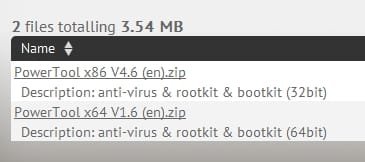
You need PowerTool x86 V4.6 (en).zip for 32bit Windows

As for any malware that's lurking on your machine - I'll leave that for other members who have more experience in that area to deal with.

Hi, Thanks for replying seem like UVk didnt worked at all but i am going to check out the other one oh.. .-.

EDIT : The page link you've gave says powertool is for x64
but here you've said its for 32bit? what.
 

Attachments

  • fg.JPG
    fg.JPG
    42.3 KB · Views: 0
Last edited:

My Computer

Computer type
PC/Desktop
Computer Manufacturer/Model Number
Unknown
OS
Windows 7 home premium 32bit
CPU
Intel Pentium dual CPU E220 @2.40Ghz
Motherboard
Intel
Memory
600GB
Graphics Card(s)
Intel Chipset
Browser
Google Chrome
Hello LuC1F3R,

After doing some searching, I don't think that wserver.exe is safe to have on your computer.

Run a scan with the following programs:
https://www.malwarebytes.org/
AdwCleaner Download

Malwarebytes will product a log, please can you upload it to here? Navigate to: C:\ProgramData\Malwarebytes\Malwarebytes Anti-Malware\Logs and upload the logs to here, which have todays date.

Thank you,
VinnyBuxton
 

My Computer

Computer type
PC/Desktop
Hello LuC1F3R,

After doing some searching, I don't think that wserver.exe is safe to have on your computer.

Run a scan with the following programs:
https://www.malwarebytes.org/
AdwCleaner Download

Malwarebytes will product a log, please can you upload it to here? Navigate to: C:\ProgramData\Malwarebytes\Malwarebytes Anti-Malware\Logs and upload the logs to here, which have todays date.

Thank you,
VinnyBuxton

Hello, thanks for replying i have somehow removed it from my computer but the permission problem is still not fixed, i tried to restore back to system setting with Rizonesoft it did the job but its still not letting me install any anti virus or any software (Which requires higher permissions) i tried to install ESET, it had problems in writing the keys into registries so i am kinda still stuck with the same and excuse my english :sleepy:

I don't even know anymore. :cry:
 

My Computer

Computer type
PC/Desktop
Computer Manufacturer/Model Number
Unknown
OS
Windows 7 home premium 32bit
CPU
Intel Pentium dual CPU E220 @2.40Ghz
Motherboard
Intel
Memory
600GB
Graphics Card(s)
Intel Chipset
Browser
Google Chrome
Hello LuC1F3R,

After doing some searching, I don't think that wserver.exe is safe to have on your computer.

Run a scan with the following programs:
https://www.malwarebytes.org/
AdwCleaner Download

Malwarebytes will product a log, please can you upload it to here? Navigate to: C:\ProgramData\Malwarebytes\Malwarebytes Anti-Malware\Logs and upload the logs to here, which have todays date.

Thank you,
VinnyBuxton

Hello, thanks for replying i have somehow removed it from my computer but the permission problem is still not fixed, i tried to restore back to system setting with Rizonesoft it did the job but its still not letting me install any anti virus or any software (Which requires higher permissions) i tried to install ESET, it had problems in writing the keys into registries so i am kinda still stuck with the same and excuse my english :sleepy:

I don't even know anymore. :cry:

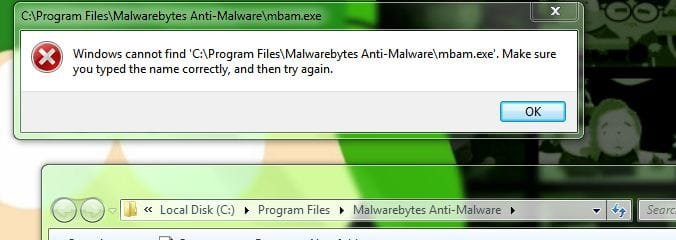
I just tried the malware bytes its having the same permission issue, i can barely install anything gahh

PS : Yes, i tried going in the security tab on the properties of the file did'nt work.
 

Attachments

  • h.JPG
    h.JPG
    32.7 KB · Views: 19
Last edited:

My Computer

Computer type
PC/Desktop
Computer Manufacturer/Model Number
Unknown
OS
Windows 7 home premium 32bit
CPU
Intel Pentium dual CPU E220 @2.40Ghz
Motherboard
Intel
Memory
600GB
Graphics Card(s)
Intel Chipset
Browser
Google Chrome
Hello LuC1F3R,

Can you confirm that you've managed to install it, but that's happening when you try to open it?

Have you run System File Checker? Please run Disk Check also:
http://www.sevenforums.com/tutorials/433-disk-check.html

You can try downloading these scanners, which you can download on a different computer, put onto a disk and then put it into the computer which has the problems:

What is Windows Defender Offline? - Windows Help
Kaspersky Rescue Disk 10
How To - Remove threats - Removal Tools | F-Secure
How to create a Bitdefender Rescue CD
Download Avira Rescue System | Official Website
http://www.avg.com/us-en/avg-rescue-cd-download
Dr.Web LiveCD ? ???? ?????????? ?????????????? ???????
SUPERAntiSpyware - SUPERAntiSpyware Portable Scanner
Anti-rootkit utility TDSSKiller

Thank you,
VinnyBuxton
 

My Computer

Computer type
PC/Desktop
Hello LuC1F3R,

Can you confirm that you've managed to install it, but that's happening when you try to open it?

Have you run System File Checker? Please run Disk Check also:
http://www.sevenforums.com/tutorials/433-disk-check.html

You can try downloading these scanners, which you can download on a different computer, put onto a disk and then put it into the computer which has the problems:

What is Windows Defender Offline? - Windows Help
Kaspersky Rescue Disk 10
How To - Remove threats - Removal Tools | F-Secure
How to create a Bitdefender Rescue CD
Download Avira Rescue System | Official Website
http://www.avg.com/us-en/avg-rescue-cd-download
Dr.Web LiveCD ? ???? ?????????? ?????????????? ???????
SUPERAntiSpyware - SUPERAntiSpyware Portable Scanner
Anti-rootkit utility TDSSKiller

Thank you,
VinnyBuxton


Okay, i am going to sfc scan now and thanks alot for all the help :)
give me a second while it completes.

EDIT : i don't know if you're aware of Team viewer, but if you do know what it is, ill be real thankful ff you're ready to help me straight from Team view.
 
Last edited:

My Computer

Computer type
PC/Desktop
Computer Manufacturer/Model Number
Unknown
OS
Windows 7 home premium 32bit
CPU
Intel Pentium dual CPU E220 @2.40Ghz
Motherboard
Intel
Memory
600GB
Graphics Card(s)
Intel Chipset
Browser
Google Chrome
Link

See this post to see if it helps you to delete the file:

http://www.sevenforums.com/general-...te-o-byte-file-doesn-t-exist.html#post2824798

Suggest the second method to try first.

Edit:

You need PowerTool x86 V4.6 (en).zip for 32bit Windows

As for any malware that's lurking on your machine - I'll leave that for other members who have more experience in that area to deal with.

Hi, Thanks for replying seem like UVk didnt worked at all but i am going to check out the other one oh.. .-.

EDIT : The page link you've gave says powertool is for x64
but here you've said its for 32bit? what.

The original post advised the user to download the 64it version bit as he/she uses a 64bit machine but your system specs say 32bit so I would assume that the 32bit version is what you need.

Two download links for different versions. 64bit for 64bit machines like the OP in the original thread is using and 32bit for 32bit machines like yours. Unless your system specs are wrong.

Power Tool.jpg
 
Last edited:

My Computer

Computer type
Laptop
Computer Manufacturer/Model Number
ASUS
OS
Microsoft Windows 7 Home Premium 64-bit 7601 Multiprocessor Free Service Pack 1
CPU
AMD C-60 APU with Radeon(tm) HD Graphics
Motherboard
ASUSTeK COMPUTER INC. X501U
Memory
4.00 GB
Graphics Card(s)
AMD Radeon HD 6290 Graphics
Sound Card
(1) AMD High Definition Audio Device (2) Realtek High Defi
Screen Resolution
1366 x 768 x 32 bits (4294967296 colors) @ 60 Hz
Hard Drives
Hitachi HTS545050A7E380 SATA Disk Device
Antivirus
Comodo CIS & FW, SecureAplus App Whitelisting, Threatfire
Browser
Cyberfox 64bit, Opera 64bit, Airfox
Other Info
Spy-The-Spy, HitmanPro.Alert, Norton Connect Safe, MJRegWatcher, BitDefender TrafficLight, Voodoo Shield, Zemana AntiMalware
See this post to see if it helps you to delete the file:

http://www.sevenforums.com/general-...te-o-byte-file-doesn-t-exist.html#post2824798

Suggest the second method to try first.

Edit:

You need PowerTool x86 V4.6 (en).zip for 32bit Windows

As for any malware that's lurking on your machine - I'll leave that for other members who have more experience in that area to deal with.

Hi, Thanks for replying seem like UVk didnt worked at all but i am going to check out the other one oh.. .-.

EDIT : The page link you've gave says powertool is for x64
but here you've said its for 32bit? what.

The original post advised the user to download the 64it version bit as he/she uses a 64bit machine but your system specs say 32bit so I would assume that the 32bit version is what you need.

Hey Callender , Thanks for the reply i've removed the following file through FilExile, but the permissions are still not working.
 

My Computer

Computer type
PC/Desktop
Computer Manufacturer/Model Number
Unknown
OS
Windows 7 home premium 32bit
CPU
Intel Pentium dual CPU E220 @2.40Ghz
Motherboard
Intel
Memory
600GB
Graphics Card(s)
Intel Chipset
Browser
Google Chrome
My sfc scan

Here is my sfc scan :eek:
 

Attachments

My Computer

Computer type
PC/Desktop
Computer Manufacturer/Model Number
Unknown
OS
Windows 7 home premium 32bit
CPU
Intel Pentium dual CPU E220 @2.40Ghz
Motherboard
Intel
Memory
600GB
Graphics Card(s)
Intel Chipset
Browser
Google Chrome
Permissions fix

Well I'm no expert on fixing permissions. Glad you managed to remove the file!
 

My Computer

Computer type
Laptop
Computer Manufacturer/Model Number
ASUS
OS
Microsoft Windows 7 Home Premium 64-bit 7601 Multiprocessor Free Service Pack 1
CPU
AMD C-60 APU with Radeon(tm) HD Graphics
Motherboard
ASUSTeK COMPUTER INC. X501U
Memory
4.00 GB
Graphics Card(s)
AMD Radeon HD 6290 Graphics
Sound Card
(1) AMD High Definition Audio Device (2) Realtek High Defi
Screen Resolution
1366 x 768 x 32 bits (4294967296 colors) @ 60 Hz
Hard Drives
Hitachi HTS545050A7E380 SATA Disk Device
Antivirus
Comodo CIS & FW, SecureAplus App Whitelisting, Threatfire
Browser
Cyberfox 64bit, Opera 64bit, Airfox
Other Info
Spy-The-Spy, HitmanPro.Alert, Norton Connect Safe, MJRegWatcher, BitDefender TrafficLight, Voodoo Shield, Zemana AntiMalware
Hello Luc1f3r,

Please can you change that into a .TXT file?

Thank you,
VinnyBuxton
 

My Computer

Computer type
PC/Desktop
Hello Luc1f3r,

Please can you change that into a .TXT file?

Thank you,
VinnyBuxton

i tried to upload as .txt but the file is 5mb and 1mb is limit for text files.
 

My Computer

Computer type
PC/Desktop
Computer Manufacturer/Model Number
Unknown
OS
Windows 7 home premium 32bit
CPU
Intel Pentium dual CPU E220 @2.40Ghz
Motherboard
Intel
Memory
600GB
Graphics Card(s)
Intel Chipset
Browser
Google Chrome
Back
Top