Solved Abiword tangled up with Wordpad

mirror polisher

New member
Local time
12:31 AM
Messages
30
Hello everyone,

I have 2 desktop computers. One is an old XP machine which I don't go online with and the one I'm using right now which has Win 7 pro on it. I took lots of abiword text files and moved them from XP to 7 thinking Wordpad would convert them. Not so.
Now every time I create a wordpad document and save it somewhere it has the abiword symbol over it. If I check the properties of a file like this it says: AbiWord Document (.rtf). Abiword is in the programs so I could just uninstall it but I'm afraid of wiping out a lot of important text.

I'd like to hear from someone else who's had this problem and solved it. Were you able to do all the files in one big swoop ? Thanks for your time ......... Alan
:shock:
 

Attachments

  • symbol.png
    symbol.png
    771 bytes · Views: 25

My Computer My Computer

At a glance

Windows 7 64bit2.74gb
Computer type
PC/Desktop
Computer Manufacturer/Model Number
Unknown Intel board
OS
Windows 7 64bit
CPU
2.7
Memory
4gb
Browser
Firefox
If you go to Control Panel, Default Programs, Associate a file type..................., what is the default program for .txt and .rtf files?
 

My Computer My Computer

At a glance

Windows 7 Pro SP1 64 bit8 GB
Computer type
Laptop
Computer Manufacturer/Model Number
Dell M6500 Precision Work Station
OS
Windows 7 Pro SP1 64 bit
Memory
8 GB
Screen Resolution
1920x
Internet Speed
30 Mbps
Antivirus
Norton Security
Browser
IE 11
Hi ........ I think it's probably wordpad
 

Attachments

  • Progs.png
    Progs.png
    7.3 KB · Views: 22

My Computer My Computer

At a glance

Windows 7 64bit2.74gb
Computer type
PC/Desktop
Computer Manufacturer/Model Number
Unknown Intel board
OS
Windows 7 64bit
CPU
2.7
Memory
4gb
Browser
Firefox
I would go where I mentioned just to make sure. On this system, .rtf is associated with Word and .txt is associated with Notepad.

I never used abiword. What format does it save text files as?
 

My Computer My Computer

At a glance

Windows 7 Pro SP1 64 bit8 GB
Computer type
Laptop
Computer Manufacturer/Model Number
Dell M6500 Precision Work Station
OS
Windows 7 Pro SP1 64 bit
Memory
8 GB
Screen Resolution
1920x
Internet Speed
30 Mbps
Antivirus
Norton Security
Browser
IE 11
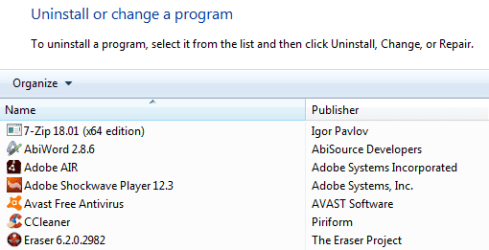
The answer to that is in the original question: "AbiWord Document (.rtf). Abiword is in the programs so I could just uninstall it but I'm afraid of wiping out a lot of important text." ........ I still don't know what would happen If I uninstall Abiword which is an old linux based program. It was on very old Ubuntu discs that were free. If you search enough you can probably find it and download it. Maybe Old Apps has it, but I haven't looked.
 

Attachments

  • AB.png
    AB.png
    7.2 KB · Views: 19

My Computer My Computer

At a glance

Windows 7 64bit2.74gb
Computer type
PC/Desktop
Computer Manufacturer/Model Number
Unknown Intel board
OS
Windows 7 64bit
CPU
2.7
Memory
4gb
Browser
Firefox
Abiword is a standalone free word processor, [it was always free when I last used it many years ago].

.RTF is an old standard file format, [it stands for Rich Text Format.].

Although Abiword will default to using the RTF file format as it's file format [The format is a more complex document format than the normal .TXT format that recognises things such as Bold. Italics, Underline Etc]. Windows comes with a default of its own for reading & writing .RTF files called Wordpad, but other Word processor applications, such as word, will also recognise and open/ save/print these files.

Unless Abiword has changed significantly over the years I doubt that uninstalling the application on windows will do anything to the actual .RTF files, as this is a standard file format and not something that is owned or in any way tied to AbiWord.

If you can backup your existing .RTF files then this would be a good idea, as a general safety measure against you accidentally deleting one. some ,or all the files which is more likely than Abiword being uninstalled is likely to do ;)

You could also select a file in RTF format in the file explorer right click [or Shift Right Click), select "open with" and choose Wordpad or other word processor and select the option to "always use this program to open files of this type" this will set the double click option to open any .RTF file in the application you choose. You can then uninstall the Abiword application or leave it there, [I would recommend this as sometimes different applications will format files slightly differently, so it's useful to have the option to use the creating application if needed
 

My Computers My Computers

  • At a glance

    Windows 11 Pro x64 [Latest Release and Releas...Ryzen 9 5950X, 3.8 - 5.2 MHz64GB [2 x 32GB] DDR4 3200MHz4GB NVIDIA GEFORCE GTX 1650 Ti
    Computer type
    PC/Desktop
    Computer Manufacturer/Model Number
    ChillBlast - Custom to my design
    OS
    Windows 11 Pro x64 [Latest Release and Release Preview]
    CPU
    Ryzen 9 5950X, 3.8 - 5.2 MHz
    Motherboard
    Asus Prime X570-Pro
    Memory
    64GB [2 x 32GB] DDR4 3200MHz
    Graphics Card(s)
    4GB NVIDIA GEFORCE GTX 1650 Ti
    Sound Card
    On-board SPDIF to 5.1 System + HDMI [5.1 system]
    Monitor(s) Displays
    32" UHD 32 Bit HDR Monitor + 43" UHD 4K 32Bit HDR TV
    Screen Resolution
    2 x 3840 x 2160 @60Hz
    Hard Drives
    1TB M2 SSD OS, 500GB Fast Access SSD, 2 x 8TB Data + Various Externals from 1TB to 4TB, 10TB NAS
    PSU
    NZXT C750 80 PLUS Gold 750W Modular PSU
    Case
    Workstation Case [Matt Black]
    Cooling
    NZXT Kraken X63 280mm CPU Cooler +2x Quiet Case fans
    Keyboard
    Logitech Wireless MX Keys & K400 + others
    Mouse
    Logitech Wireless MX Master 3S
    Internet Speed
    920 MB Down 50 MB Up
    Antivirus
    BitDefender Total Security Pro
    Browser
    Chrome (always run latest Non-Beta)
    Other Info
    Also run ...
    Laptop - Quad 8GB - Windows 10 Pro x64
    Nexus 7 Android tablet x2
    Samsung 10.2" tablet
    Blackview TAB 8 4G Android Tablet c/w Keyboard
    Wacom Intuos Pro Medium Pen Pad
    Wacom Intuos Pro Small Pen Pad
    Wacom Expresskeys Remote
    Loopdeck+ Graphics Controller
    Shuttle Pro v2 Control
  • At a glance

    Windows 11 Pro x64 Latest RPIntel I7 10750H 5.0GHz32GB [2x16GB] DDR4 2933 MHznVidia GTX1650Ti 4 GB GDDR6
    Computer type
    Laptop
    System Manufacturer/Model Number
    Dell XPS 17 10750H
    OS
    Windows 11 Pro x64 Latest RP
    CPU
    Intel I7 10750H 5.0GHz
    Motherboard
    Dell XPS
    Memory
    32GB [2x16GB] DDR4 2933 MHz
    Graphics Card(s)
    nVidia GTX1650Ti 4 GB GDDR6
    Sound Card
    Stock [Realtek] 4 Speaker
    Monitor(s) Displays
    17" IPS UHD+ Infinity Edge Touchscreen
    Screen Resolution
    3840 x 2400
    Hard Drives
    2TB M2 NVMe, 4TB External + various 500GB & 1TB External NVMe (also have access to spinner HDD from
    PSU
    Stock
    Case
    Stock XPS Aluminium & Carbon Fibre
    Cooling
    Stock - Active Fan Control
    Keyboard
    Backlit + Various Logitech
    Mouse
    Stock Track Pad + Logitech MX Trackball
    Internet Speed
    72 MB Down 18MB Up
    Browser
    Chrome
    Other Info
    Also run ...
    Laptop - Quad 8GB - Windows 10 Pro x64
    Nexus 7 Android tablet x2
    10.2" tablet
    Sony Z3 Android Smartphone
    Wacom Intuos Pro Medium Pen Pad
    Wacom Intuos Pro Small Pen Pad
    Wacom Expresskeys Remote
    Loopdeck+ Graphics Controller
    Shuttle Pro v2 Control Pad
    10TB NAS
However, all I wanted him to do is to go where I mentioned in my first reply and check which program is associated with those file extensions. If it's not Wordpad, then change it. The option you mention with Windows Explorer is also there. There's no need to uninstall abiword.
 

My Computer My Computer

At a glance

Windows 7 Pro SP1 64 bit8 GB
Computer type
Laptop
Computer Manufacturer/Model Number
Dell M6500 Precision Work Station
OS
Windows 7 Pro SP1 64 bit
Memory
8 GB
Screen Resolution
1920x
Internet Speed
30 Mbps
Antivirus
Norton Security
Browser
IE 11
Thanks Wither and Barman (sounds like a lawfirm :-) With all this good information I feel much more confident and will mark this as solved. Best to you both,


Alan :-)
 

My Computer My Computer

At a glance

Windows 7 64bit2.74gb
Computer type
PC/Desktop
Computer Manufacturer/Model Number
Unknown Intel board
OS
Windows 7 64bit
CPU
2.7
Memory
4gb
Browser
Firefox
Your welcome.
 

My Computer My Computer

At a glance

Windows 7 Pro SP1 64 bit8 GB
Computer type
Laptop
Computer Manufacturer/Model Number
Dell M6500 Precision Work Station
OS
Windows 7 Pro SP1 64 bit
Memory
8 GB
Screen Resolution
1920x
Internet Speed
30 Mbps
Antivirus
Norton Security
Browser
IE 11
Back
Top