Abnormal CPU running at 90-100%

issh

New member
Local time
11:53 PM
Messages
25
It has happened every now and then for the past week or so. I have ran a full virus scan, nothing came up and also i did not install any applications since it started doing it.
I do not know what's wrong with it.
 
Last edited:

My Computer

Computer Manufacturer/Model Number
HP
OS
Windows 7 Home Premium 64bit
CPU
Core i7 720qm
Memory
8GB
Graphics Card(s)
ATI Mobility Radeon HD 5650
Sound Card
ATI/EDT High Definition Audio Device
Monitor(s) Displays
15.6" (Generic PnP monitor)
Hard Drives
640 Gb
Cooling
Internal Laptop Fan and Zalman NM-NC2000
Other Info
Laptop
Hi issh :)

If you right click on your task bar and in the pop-up window click Task Manager the Task Manager window will open (you may have to scroll down) you should see what process is CPU hungry under the process tab, this will help you identify the problem.

MWSnap00029.png
 

My Computer

Computer Manufacturer/Model Number
Home Built
OS
Windows 7 Professional 64-bit SP1
CPU
Intel E8400
Motherboard
MSI P35 Neo
Memory
4GB Crucial Ballistix
Graphics Card(s)
ATI ASUS Radeon HD 4830
Sound Card
Realtek ALC888 on Board
Monitor(s) Displays
Asus 22-inch VH226H Widescreen
Screen Resolution
1920 x 1080
Hard Drives
Two Western Digital 500GB
PSU
Hiper HPU-4M 530W
Case
Thermaltake Tsunami Dream Black
Cooling
Air/Fans
Keyboard
Saitek Eclipse
Mouse
Razer
Internet Speed
Sky Broadband
Other Info
USB Hub/Card Reader - 2 Pen Drives, 1 Phone Dock
thanks!
yep, i will report back to you when it happens again and we'll deal with it from there
Out of Curiosity, what should normal levels be and what would high levels that cause a high CPU usage be?
 
Last edited:

My Computer

Computer Manufacturer/Model Number
HP
OS
Windows 7 Home Premium 64bit
CPU
Core i7 720qm
Memory
8GB
Graphics Card(s)
ATI Mobility Radeon HD 5650
Sound Card
ATI/EDT High Definition Audio Device
Monitor(s) Displays
15.6" (Generic PnP monitor)
Hard Drives
640 Gb
Cooling
Internal Laptop Fan and Zalman NM-NC2000
Other Info
Laptop
it depends on the applications running in the background normal pc usage for me is while writing this thread was like 2% not much and i have alot of proceses in the background
 

My Computer

Computer type
PC/Desktop
Computer Manufacturer/Model Number
CoreI7-6700K MrFingerIII Special Builds
OS
Windows 10 Home Premium 64bit sp1
CPU
Intel I7-6700K @ 4.6 Ghz 1.344 volts everyday OC
Motherboard
Asrock Fatality K6 Z170 Socket 1151
Memory
32GB G-Skill TridentZ 3200mhz 16-18-18-38 DDR4
Graphics Card(s)
Sli Gigabyte Windforce GTX 980 G1
Sound Card
AC97 Creative Rage Tactic 3D Headphones Bluetooth
Monitor(s) Displays
27" Asus ROG Swift PG278Q G-Sync 48" Vizio Smart HD TV
Screen Resolution
2560x1440p 27"- 48" Currently Gaming at 2560x1440p Res 2K
Hard Drives
250GB Samsung Evo840SSD Seagate baracuda 500 GB WD Mybook 500Gb 1TB Seagate Barracuda
PSU
HX1050w Corsair Silver 80plus certified crosfire/sli
Case
Enthod Pro Full Tower
Cooling
Corsair H110i GT 280 mm High Performance WaterBlock
Keyboard
Logitech wireless keyboard
Mouse
Logitech wireless mouse
Internet Speed
Cox Cable 100+ mb
Antivirus
WebRoot Spysweeper with Antivirus
Browser
IE-10, Chrome, Opera
Other Info
My Other Rig is a AMD FX8320E @4.6Ghz 16GB Ballistic Sport Ram
Mobo Asrock Fatality 990FX 120GB OCZ SSD 1TB Seagate Barracuda Corsair H75 Cooling PSU Corsair CX750
GPU GTX Gigabyte 970G1
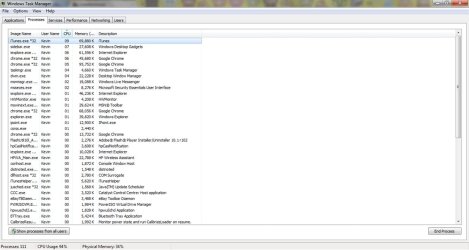
just happened again with iTunes @ 10
as seen down the bottom, the CPU usage is at 94%
 

Attachments

  • wtm.jpg
    wtm.jpg
    75.9 KB · Views: 49

My Computer

Computer Manufacturer/Model Number
HP
OS
Windows 7 Home Premium 64bit
CPU
Core i7 720qm
Memory
8GB
Graphics Card(s)
ATI Mobility Radeon HD 5650
Sound Card
ATI/EDT High Definition Audio Device
Monitor(s) Displays
15.6" (Generic PnP monitor)
Hard Drives
640 Gb
Cooling
Internal Laptop Fan and Zalman NM-NC2000
Other Info
Laptop
Look again at your Task Manager Your CPU is 94% but its none of the processes in the window you posted (your looking at Memory) if it happens again scroll down and keep looking in CPU :)
 

My Computer

Computer Manufacturer/Model Number
Home Built
OS
Windows 7 Professional 64-bit SP1
CPU
Intel E8400
Motherboard
MSI P35 Neo
Memory
4GB Crucial Ballistix
Graphics Card(s)
ATI ASUS Radeon HD 4830
Sound Card
Realtek ALC888 on Board
Monitor(s) Displays
Asus 22-inch VH226H Widescreen
Screen Resolution
1920 x 1080
Hard Drives
Two Western Digital 500GB
PSU
Hiper HPU-4M 530W
Case
Thermaltake Tsunami Dream Black
Cooling
Air/Fans
Keyboard
Saitek Eclipse
Mouse
Razer
Internet Speed
Sky Broadband
Other Info
USB Hub/Card Reader - 2 Pen Drives, 1 Phone Dock
so what am i supposed to do?
because i put the CPU usage from descending order and it therefore the program using the most CPU is shown on top
 

My Computer

Computer Manufacturer/Model Number
HP
OS
Windows 7 Home Premium 64bit
CPU
Core i7 720qm
Memory
8GB
Graphics Card(s)
ATI Mobility Radeon HD 5650
Sound Card
ATI/EDT High Definition Audio Device
Monitor(s) Displays
15.6" (Generic PnP monitor)
Hard Drives
640 Gb
Cooling
Internal Laptop Fan and Zalman NM-NC2000
Other Info
Laptop
Yes, This maybe a problem with itunes its self (I had a similar thing on my XP Laptop with Pop Peeper it would hang and my CPU would run 100%) so this may help - uninstall itunes then reinstall it, I cant promise it will work but it may :)
 

My Computer

Computer Manufacturer/Model Number
Home Built
OS
Windows 7 Professional 64-bit SP1
CPU
Intel E8400
Motherboard
MSI P35 Neo
Memory
4GB Crucial Ballistix
Graphics Card(s)
ATI ASUS Radeon HD 4830
Sound Card
Realtek ALC888 on Board
Monitor(s) Displays
Asus 22-inch VH226H Widescreen
Screen Resolution
1920 x 1080
Hard Drives
Two Western Digital 500GB
PSU
Hiper HPU-4M 530W
Case
Thermaltake Tsunami Dream Black
Cooling
Air/Fans
Keyboard
Saitek Eclipse
Mouse
Razer
Internet Speed
Sky Broadband
Other Info
USB Hub/Card Reader - 2 Pen Drives, 1 Phone Dock
Yep ill try that now, and if it fails i'll report back
THANK YOU FOR YOUR HELP!!!
 

My Computer

Computer Manufacturer/Model Number
HP
OS
Windows 7 Home Premium 64bit
CPU
Core i7 720qm
Memory
8GB
Graphics Card(s)
ATI Mobility Radeon HD 5650
Sound Card
ATI/EDT High Definition Audio Device
Monitor(s) Displays
15.6" (Generic PnP monitor)
Hard Drives
640 Gb
Cooling
Internal Laptop Fan and Zalman NM-NC2000
Other Info
Laptop
Hope it works issh :)
 

My Computer

Computer Manufacturer/Model Number
Home Built
OS
Windows 7 Professional 64-bit SP1
CPU
Intel E8400
Motherboard
MSI P35 Neo
Memory
4GB Crucial Ballistix
Graphics Card(s)
ATI ASUS Radeon HD 4830
Sound Card
Realtek ALC888 on Board
Monitor(s) Displays
Asus 22-inch VH226H Widescreen
Screen Resolution
1920 x 1080
Hard Drives
Two Western Digital 500GB
PSU
Hiper HPU-4M 530W
Case
Thermaltake Tsunami Dream Black
Cooling
Air/Fans
Keyboard
Saitek Eclipse
Mouse
Razer
Internet Speed
Sky Broadband
Other Info
USB Hub/Card Reader - 2 Pen Drives, 1 Phone Dock
well issh looking at your snip it pic again you're windows you have up are using alot of ram I could be wrong but you have high memory usage on the explorer chrome etc

those are high numbers it shouldnt be that high but again that won't hang you something else is hanging you if you think it is i tunes try what ciara said but i think it goes a little deeper

you every try to update mainboard bios it might help
 

My Computer

Computer type
PC/Desktop
Computer Manufacturer/Model Number
CoreI7-6700K MrFingerIII Special Builds
OS
Windows 10 Home Premium 64bit sp1
CPU
Intel I7-6700K @ 4.6 Ghz 1.344 volts everyday OC
Motherboard
Asrock Fatality K6 Z170 Socket 1151
Memory
32GB G-Skill TridentZ 3200mhz 16-18-18-38 DDR4
Graphics Card(s)
Sli Gigabyte Windforce GTX 980 G1
Sound Card
AC97 Creative Rage Tactic 3D Headphones Bluetooth
Monitor(s) Displays
27" Asus ROG Swift PG278Q G-Sync 48" Vizio Smart HD TV
Screen Resolution
2560x1440p 27"- 48" Currently Gaming at 2560x1440p Res 2K
Hard Drives
250GB Samsung Evo840SSD Seagate baracuda 500 GB WD Mybook 500Gb 1TB Seagate Barracuda
PSU
HX1050w Corsair Silver 80plus certified crosfire/sli
Case
Enthod Pro Full Tower
Cooling
Corsair H110i GT 280 mm High Performance WaterBlock
Keyboard
Logitech wireless keyboard
Mouse
Logitech wireless mouse
Internet Speed
Cox Cable 100+ mb
Antivirus
WebRoot Spysweeper with Antivirus
Browser
IE-10, Chrome, Opera
Other Info
My Other Rig is a AMD FX8320E @4.6Ghz 16GB Ballistic Sport Ram
Mobo Asrock Fatality 990FX 120GB OCZ SSD 1TB Seagate Barracuda Corsair H75 Cooling PSU Corsair CX750
GPU GTX Gigabyte 970G1
so what am i supposed to do?
because i put the CPU usage from descending order and it therefore the program using the most CPU is shown on top
I would click "Show processes for all users" first. This will show all processes running on your system.
 

My Computer

Computer Manufacturer/Model Number
Toshiba Satellite U500
OS
Windows 7 Home Premium x64 SP1
CPU
Intel Core i3 M330 @ 2.13GHz
Memory
4 GB
Graphics Card(s)
NVidia GeForce 310M
Screen Resolution
1280x800
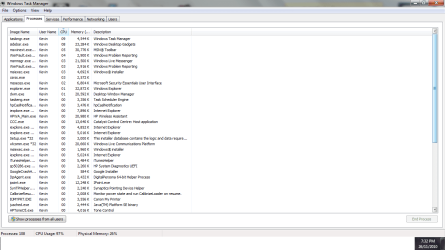
it happen again, this time, the bios was already updated to the current one
 

Attachments

  • kkk.png
    kkk.png
    37.2 KB · Views: 17

My Computer

Computer Manufacturer/Model Number
HP
OS
Windows 7 Home Premium 64bit
CPU
Core i7 720qm
Memory
8GB
Graphics Card(s)
ATI Mobility Radeon HD 5650
Sound Card
ATI/EDT High Definition Audio Device
Monitor(s) Displays
15.6" (Generic PnP monitor)
Hard Drives
640 Gb
Cooling
Internal Laptop Fan and Zalman NM-NC2000
Other Info
Laptop
it happen again, this time, the bios was already updated to the current one
Please click "Show processes for all users" to see all running processes and then sort by CPU usage again to see which process(es) uses so much CPU time.
 

My Computer

Computer Manufacturer/Model Number
Toshiba Satellite U500
OS
Windows 7 Home Premium x64 SP1
CPU
Intel Core i3 M330 @ 2.13GHz
Memory
4 GB
Graphics Card(s)
NVidia GeForce 310M
Screen Resolution
1280x800
yep ill do that when it happens again and then post it here
 

My Computer

Computer Manufacturer/Model Number
HP
OS
Windows 7 Home Premium 64bit
CPU
Core i7 720qm
Memory
8GB
Graphics Card(s)
ATI Mobility Radeon HD 5650
Sound Card
ATI/EDT High Definition Audio Device
Monitor(s) Displays
15.6" (Generic PnP monitor)
Hard Drives
640 Gb
Cooling
Internal Laptop Fan and Zalman NM-NC2000
Other Info
Laptop
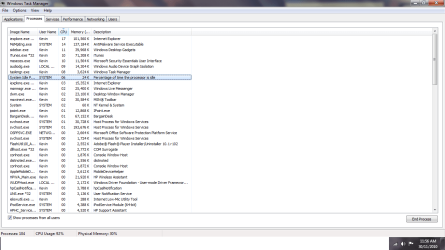
it happened again, and here is the pic below
My computer specs are shown below that may be the cause of the problem
Core i7 720 QM @ 1.60 GHz
8 GB RAM DDR3
also, i am using IE9 BETA
 

Attachments

  • 1157.png
    1157.png
    40.1 KB · Views: 19

My Computer

Computer Manufacturer/Model Number
HP
OS
Windows 7 Home Premium 64bit
CPU
Core i7 720qm
Memory
8GB
Graphics Card(s)
ATI Mobility Radeon HD 5650
Sound Card
ATI/EDT High Definition Audio Device
Monitor(s) Displays
15.6" (Generic PnP monitor)
Hard Drives
640 Gb
Cooling
Internal Laptop Fan and Zalman NM-NC2000
Other Info
Laptop
One thing I noticed is you have an UNGODLY amount or running processes...
Do you really need the

  • msn toolbar
  • Bargain Desk Software
  • how many gadgets are you running?
  • uninstall any unneeded applications
 

My Computer

Computer Manufacturer/Model Number
SMN-Productions
OS
Windows 7 x86/x64, Server 2008r2, Web Server 2008
CPU
i7 v2 3930K Steping stone 2
Motherboard
ASUS Rampage IV Extreme
Memory
G.SKILL Ripjaws Z Series 32GB
Graphics Card(s)
AMD HD 5770
Monitor(s) Displays
Acer 21" and Samsung 20"
Hard Drives
Patriot Pyro 80GB
PSU
1000 Watt
Case
HAF-X
Cooling
4 Fans
Keyboard
Black Widow Ultimate
i only have 3 gadgets running atm(Large Notes, CPU Status and Intel TurboBoost Technology Monitor)
and i'm also un-installing unneeded applications atm
 

My Computer

Computer Manufacturer/Model Number
HP
OS
Windows 7 Home Premium 64bit
CPU
Core i7 720qm
Memory
8GB
Graphics Card(s)
ATI Mobility Radeon HD 5650
Sound Card
ATI/EDT High Definition Audio Device
Monitor(s) Displays
15.6" (Generic PnP monitor)
Hard Drives
640 Gb
Cooling
Internal Laptop Fan and Zalman NM-NC2000
Other Info
Laptop
The reason why I said that is because the sidebar(gadgets) is using 10%
 

My Computer

Computer Manufacturer/Model Number
SMN-Productions
OS
Windows 7 x86/x64, Server 2008r2, Web Server 2008
CPU
i7 v2 3930K Steping stone 2
Motherboard
ASUS Rampage IV Extreme
Memory
G.SKILL Ripjaws Z Series 32GB
Graphics Card(s)
AMD HD 5770
Monitor(s) Displays
Acer 21" and Samsung 20"
Hard Drives
Patriot Pyro 80GB
PSU
1000 Watt
Case
HAF-X
Cooling
4 Fans
Keyboard
Black Widow Ultimate
okay
 

My Computer

Computer Manufacturer/Model Number
HP
OS
Windows 7 Home Premium 64bit
CPU
Core i7 720qm
Memory
8GB
Graphics Card(s)
ATI Mobility Radeon HD 5650
Sound Card
ATI/EDT High Definition Audio Device
Monitor(s) Displays
15.6" (Generic PnP monitor)
Hard Drives
640 Gb
Cooling
Internal Laptop Fan and Zalman NM-NC2000
Other Info
Laptop
Back
Top