About my motherboard temperature too high ..

clean the pc and keep in the place with good air flow... dont put unwanted stuffs that cover the air gaps of the cpu,,,,
 

My Computer My Computer

At a glance

Windows 7 Ultimate 64 bitIntel pentium 32GB RAM DDR 3Intel HD Graphics
Computer type
PC/Desktop
OS
Windows 7 Ultimate 64 bit
CPU
Intel pentium 3
Motherboard
MSI
Memory
2GB RAM DDR 3
Graphics Card(s)
Intel HD Graphics
Sound Card
Realtek Audio
Monitor(s) Displays
zenware
Screen Resolution
1680x1050
Hard Drives
80 GB
Case
i-Max
Cooling
Cooler Master
Keyboard
A4TECH
Mouse
edvan
Antivirus
Avast Anti virus 2015
Browser
Google chrome
clean the pc and keep in the place with good air flow... dont put unwanted stuffs that cover the air gaps of the cpu,,,,
Yep I suggested that already and the machine has been cleaned out - mind you with seeing the device it is hard to assess what is causing the heat and my guess is that compound needs replacing and also a better cooler.
 

My Computer My Computer

At a glance

Desk1 7 Home Prem / Desk2 10 Pro / Main lap A...Desk1 i5 3750K / Laptop i7 GTX 860M / Desk2 i...Desk1 8GB (1866) / Desk2 16GB (1333) / Laptop...Desk 1& 2NVidia GTX 650 & Laptops on board Intel
Computer type
PC/Desktop
Computer Manufacturer/Model Number
Own build (new) Desk1 / Asus ROG Win 7 / Desk2 1st build
OS
Desk1 7 Home Prem / Desk2 10 Pro / Main lap Asus ROG 10 Pro 2 laptop Toshiba 7 Pro Asus P2520 7 & 10
CPU
Desk1 i5 3750K / Laptop i7 GTX 860M / Desk2 i5 2500
Motherboard
Desk1 Asus P877-V / Desk2 Gigabyte H67 UD3H / Laptop ?
Memory
Desk1 8GB (1866) / Desk2 16GB (1333) / Laptop 8Gb DDR3
Graphics Card(s)
Desk 1& 2NVidia GTX 650 & Laptops on board Intel
Sound Card
Desk 1 & 2 -XONAR DG Realtek High Def audio Laptop
Monitor(s) Displays
Desk 1 Benq HD 2450 / Desk2 Philips 24" / Laptop 17.5"
Screen Resolution
1920x1080 D1 & D2 & Laptop 1
Hard Drives
Desk1 Samsung 120GB 830 SSD
Asus ROG 256GB 850 Pro SSD
Desk2 Samsung 840 256 SSD
Toshiba 120GB EVO
PSU
Desk 1 Corsair HX 1050/ Laptop ? / Desk 2 Corsair HX 650
Case
Desk 1 Cooler HAF XM ? Toshiba laptop / Desk2 Coolermaster
Cooling
Fans on all Desk1 -2 Desk2 - all Coolermasters 5 Laptop ?
Keyboard
Desk 1 MS Sidewinder X6 Desk 2 MS Sidewinder X 4
Mouse
Desk 1&2 - Gigabyte MS 900 gamer - laptop - Logitec wireless
Internet Speed
ADSL2+
Other Info
One other Desktop (tester) and spare Toshba laptop both with SSD's
Running Kaspersky 2016 ISS on all machines config'd identically
Logitec audio stereo systems on each machine (x3)
Canon MG5250MFC
Router/modem TP-Link running WPA2SK
Yep ofcourse @icito2lol
:ditto:
 

My Computer My Computer

At a glance

Windows 7 Ultimate 64 bitIntel pentium 32GB RAM DDR 3Intel HD Graphics
Computer type
PC/Desktop
OS
Windows 7 Ultimate 64 bit
CPU
Intel pentium 3
Motherboard
MSI
Memory
2GB RAM DDR 3
Graphics Card(s)
Intel HD Graphics
Sound Card
Realtek Audio
Monitor(s) Displays
zenware
Screen Resolution
1680x1050
Hard Drives
80 GB
Case
i-Max
Cooling
Cooler Master
Keyboard
A4TECH
Mouse
edvan
Antivirus
Avast Anti virus 2015
Browser
Google chrome
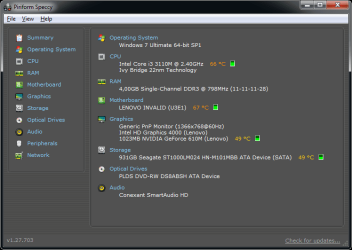
The same happens to me sometimes. If I make a video with Movie Maker, my CPU (Intel Core i3-3110M Ivy Bridge) and motherboard (LENOVO INVALID U3E1) will go at least 60°C/140°F and they have gone up to 75°C/167°F or something more. My HDD gets hot fast,but it is at 50°C/122°F most of the time. My graphics card (Intel HD Graphics 4000) hasn't reached 50°C yet,but it has reached 48-49°C/118.4-120.2°F.
 

My Computer My Computer

At a glance

Windows 7 Ultimate SP1 64 bitIntel Core i3-3110M Ivy Bridge4,00GB Single-Channel DDR3 798 MHzIntel HD Graphics 4000,Nvidia GeForce 610M
Computer type
Laptop
Computer Manufacturer/Model Number
Lenovo G580 20150
OS
Windows 7 Ultimate SP1 64 bit
CPU
Intel Core i3-3110M Ivy Bridge
Motherboard
Lenovo INVALID U3E1 (Ivy Bridge)
Memory
4,00GB Single-Channel DDR3 798 MHz
Graphics Card(s)
Intel HD Graphics 4000,Nvidia GeForce 610M
Sound Card
Conexant HD SmartAudio
Monitor(s) Displays
Generic PnP Monitor, Sony BRAVIA KDL-46D3500 Full HD TV
Screen Resolution
1366x768, 1920x1080
Hard Drives
Seagate ST1000LM024 HN-M101MBB 1TB
Keyboard
AccuType
Internet Speed
72 Mbps
Antivirus
Microsoft Security Essentials
Browser
Internet Explorer 11
Other Info
PLDS DVD-RW DS8ABSH SCSI Device
VMware Workstation 11
Microsoft Office 2007 Enterprise,2010 Professional Plus,2013 Professional Plus
Sony MDR-XD150 Headset

VM's:Windows Vista SP2 x64,Windows Server 2003 Enterprise SP2 x86,Windows Server 2008 x86,Windows XP Professional x64 SP2
Yep well nothing surprises me with laptops simply because they are so compacted together inside the casing. Just as a\matter of interest what are you measuring the temps with?

My older Toshiba Satellite L550 does get to the CPU (i5) temp of 60C when scanning for example but usually resides around 40C the mobo temp I think is tad hot and the HDD it is sitting on the edge of what I would feel comfortable with - having said that I have been using SSD's now for some time the only spinners I use as back data ones in my desktops and they don't get used very often.

I think it might be an idea to check with another temp program just to see if there any discrepancies and use my little ditty to check the "rad" of the cooling system seeing that it is a laptop unlike the thread starters desktop.
CLEANING A LAPTOP FAN & COOLER RAD
The thing you do is to turn over the laptop and shine a very bright light into the air intake aperture (you will see the fan there) and then while doing that look at the outlet vent on the end of the laptop you should see the light quite clearly shining through the cooling " radiator" if not - it is clogged and will need cleaning as will probably the fan opening.
You can do this by blowing it out using a compressed air can in short bursts.
BUT ONE WORD OF WARNING DO NOT blow the air into the fan opening without inserting say a plastic rod or large cable tie to stop the fan from spinning as the air blast will spin the fan at a very high speed that it is not designed to take and may wreck the bearing!!
To clean the slots in the radiator use a pipe cleaner or one of those craft covered wire sticks - they are referred to as chinelle sticks - see pic. But do be very careful not to be overly heavy handed you will find it might take a second or two or a few minutes to clear the heavier build ups.
 

Attachments

  • CHINELLE.PNG
    CHINELLE.PNG
    450.3 KB · Views: 0

My Computer My Computer

At a glance

Desk1 7 Home Prem / Desk2 10 Pro / Main lap A...Desk1 i5 3750K / Laptop i7 GTX 860M / Desk2 i...Desk1 8GB (1866) / Desk2 16GB (1333) / Laptop...Desk 1& 2NVidia GTX 650 & Laptops on board Intel
Computer type
PC/Desktop
Computer Manufacturer/Model Number
Own build (new) Desk1 / Asus ROG Win 7 / Desk2 1st build
OS
Desk1 7 Home Prem / Desk2 10 Pro / Main lap Asus ROG 10 Pro 2 laptop Toshiba 7 Pro Asus P2520 7 & 10
CPU
Desk1 i5 3750K / Laptop i7 GTX 860M / Desk2 i5 2500
Motherboard
Desk1 Asus P877-V / Desk2 Gigabyte H67 UD3H / Laptop ?
Memory
Desk1 8GB (1866) / Desk2 16GB (1333) / Laptop 8Gb DDR3
Graphics Card(s)
Desk 1& 2NVidia GTX 650 & Laptops on board Intel
Sound Card
Desk 1 & 2 -XONAR DG Realtek High Def audio Laptop
Monitor(s) Displays
Desk 1 Benq HD 2450 / Desk2 Philips 24" / Laptop 17.5"
Screen Resolution
1920x1080 D1 & D2 & Laptop 1
Hard Drives
Desk1 Samsung 120GB 830 SSD
Asus ROG 256GB 850 Pro SSD
Desk2 Samsung 840 256 SSD
Toshiba 120GB EVO
PSU
Desk 1 Corsair HX 1050/ Laptop ? / Desk 2 Corsair HX 650
Case
Desk 1 Cooler HAF XM ? Toshiba laptop / Desk2 Coolermaster
Cooling
Fans on all Desk1 -2 Desk2 - all Coolermasters 5 Laptop ?
Keyboard
Desk 1 MS Sidewinder X6 Desk 2 MS Sidewinder X 4
Mouse
Desk 1&2 - Gigabyte MS 900 gamer - laptop - Logitec wireless
Internet Speed
ADSL2+
Other Info
One other Desktop (tester) and spare Toshba laptop both with SSD's
Running Kaspersky 2016 ISS on all machines config'd identically
Logitec audio stereo systems on each machine (x3)
Canon MG5250MFC
Router/modem TP-Link running WPA2SK
I measure them with Speccy.

These temperatures are reached only in some cases. They don't occur often.
Some cases:
Windows Movie Maker
Windows Experience Index
Moving files over 3 GB in size to a different partition
Booting up a virtual machine (Windows Vista and above) in VMware Workstation

Of course,the former two always reach these temperatures,but the latter two do not reach them every time.
 

My Computer My Computer

At a glance

Windows 7 Ultimate SP1 64 bitIntel Core i3-3110M Ivy Bridge4,00GB Single-Channel DDR3 798 MHzIntel HD Graphics 4000,Nvidia GeForce 610M
Computer type
Laptop
Computer Manufacturer/Model Number
Lenovo G580 20150
OS
Windows 7 Ultimate SP1 64 bit
CPU
Intel Core i3-3110M Ivy Bridge
Motherboard
Lenovo INVALID U3E1 (Ivy Bridge)
Memory
4,00GB Single-Channel DDR3 798 MHz
Graphics Card(s)
Intel HD Graphics 4000,Nvidia GeForce 610M
Sound Card
Conexant HD SmartAudio
Monitor(s) Displays
Generic PnP Monitor, Sony BRAVIA KDL-46D3500 Full HD TV
Screen Resolution
1366x768, 1920x1080
Hard Drives
Seagate ST1000LM024 HN-M101MBB 1TB
Keyboard
AccuType
Internet Speed
72 Mbps
Antivirus
Microsoft Security Essentials
Browser
Internet Explorer 11
Other Info
PLDS DVD-RW DS8ABSH SCSI Device
VMware Workstation 11
Microsoft Office 2007 Enterprise,2010 Professional Plus,2013 Professional Plus
Sony MDR-XD150 Headset

VM's:Windows Vista SP2 x64,Windows Server 2003 Enterprise SP2 x86,Windows Server 2008 x86,Windows XP Professional x64 SP2
Yes mate I don't think you have much to worry about everything uses fuel of some form or another and a by-product of course is heat in our case using an electric current. So it stands to reason that work anything hard and it will get hotter because it is suing more "fuel".

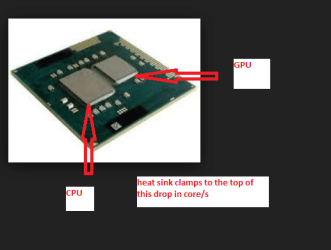
It is hard to determine the actual temp of the CPU for example because the silicon die / chip is much smaller than the heatsink which is absorbing it and of course consequently the die is hotter than the heatsink see my pics of a laptop CPU setup it is much the same as any CPU dropped into a desktop socket except laptop ones have a slightly different cooling set up.

In any case CPUs are generally manufactured to have a thermal cutout once a designated temp is reached that if gone over would simply destroy or even melt that silicon die. Having said that it is I my mind not totally foolproof.
Now there are a few other temp measuring programs besides Speccy and I think you will find that they do not all tend to agree with each others readouts but still within reasonable tolerances.
 

Attachments

  • LAPBOARD.PNG
    LAPBOARD.PNG
    397.6 KB · Views: 0
  • LAPTOP CPU.PNG
    LAPTOP CPU.PNG
    20.4 KB · Views: 8

My Computer My Computer

At a glance

Desk1 7 Home Prem / Desk2 10 Pro / Main lap A...Desk1 i5 3750K / Laptop i7 GTX 860M / Desk2 i...Desk1 8GB (1866) / Desk2 16GB (1333) / Laptop...Desk 1& 2NVidia GTX 650 & Laptops on board Intel
Computer type
PC/Desktop
Computer Manufacturer/Model Number
Own build (new) Desk1 / Asus ROG Win 7 / Desk2 1st build
OS
Desk1 7 Home Prem / Desk2 10 Pro / Main lap Asus ROG 10 Pro 2 laptop Toshiba 7 Pro Asus P2520 7 & 10
CPU
Desk1 i5 3750K / Laptop i7 GTX 860M / Desk2 i5 2500
Motherboard
Desk1 Asus P877-V / Desk2 Gigabyte H67 UD3H / Laptop ?
Memory
Desk1 8GB (1866) / Desk2 16GB (1333) / Laptop 8Gb DDR3
Graphics Card(s)
Desk 1& 2NVidia GTX 650 & Laptops on board Intel
Sound Card
Desk 1 & 2 -XONAR DG Realtek High Def audio Laptop
Monitor(s) Displays
Desk 1 Benq HD 2450 / Desk2 Philips 24" / Laptop 17.5"
Screen Resolution
1920x1080 D1 & D2 & Laptop 1
Hard Drives
Desk1 Samsung 120GB 830 SSD
Asus ROG 256GB 850 Pro SSD
Desk2 Samsung 840 256 SSD
Toshiba 120GB EVO
PSU
Desk 1 Corsair HX 1050/ Laptop ? / Desk 2 Corsair HX 650
Case
Desk 1 Cooler HAF XM ? Toshiba laptop / Desk2 Coolermaster
Cooling
Fans on all Desk1 -2 Desk2 - all Coolermasters 5 Laptop ?
Keyboard
Desk 1 MS Sidewinder X6 Desk 2 MS Sidewinder X 4
Mouse
Desk 1&2 - Gigabyte MS 900 gamer - laptop - Logitec wireless
Internet Speed
ADSL2+
Other Info
One other Desktop (tester) and spare Toshba laptop both with SSD's
Running Kaspersky 2016 ISS on all machines config'd identically
Logitec audio stereo systems on each machine (x3)
Canon MG5250MFC
Router/modem TP-Link running WPA2SK
Here's a picture of my computer installing Windows XP Professional in VMware Workstation 11:

Speccy (2).png
 

My Computer My Computer

At a glance

Windows 7 Ultimate SP1 64 bitIntel Core i3-3110M Ivy Bridge4,00GB Single-Channel DDR3 798 MHzIntel HD Graphics 4000,Nvidia GeForce 610M
Computer type
Laptop
Computer Manufacturer/Model Number
Lenovo G580 20150
OS
Windows 7 Ultimate SP1 64 bit
CPU
Intel Core i3-3110M Ivy Bridge
Motherboard
Lenovo INVALID U3E1 (Ivy Bridge)
Memory
4,00GB Single-Channel DDR3 798 MHz
Graphics Card(s)
Intel HD Graphics 4000,Nvidia GeForce 610M
Sound Card
Conexant HD SmartAudio
Monitor(s) Displays
Generic PnP Monitor, Sony BRAVIA KDL-46D3500 Full HD TV
Screen Resolution
1366x768, 1920x1080
Hard Drives
Seagate ST1000LM024 HN-M101MBB 1TB
Keyboard
AccuType
Internet Speed
72 Mbps
Antivirus
Microsoft Security Essentials
Browser
Internet Explorer 11
Other Info
PLDS DVD-RW DS8ABSH SCSI Device
VMware Workstation 11
Microsoft Office 2007 Enterprise,2010 Professional Plus,2013 Professional Plus
Sony MDR-XD150 Headset

VM's:Windows Vista SP2 x64,Windows Server 2003 Enterprise SP2 x86,Windows Server 2008 x86,Windows XP Professional x64 SP2
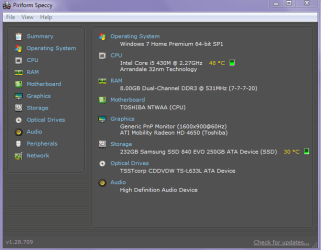
Yes well just installing an OS I think the temps are a tad on the high side my old Toshiba I am on now is considerably lower on temps than yours and it has only just woken from sleep. (see pic)

I do not know but depending on the age of the machine and the environment it has operated in would have some influence on the amount of crud inside hence less than optimum cooling.

Do you feel confident enough to disassemble and clean it?
 

Attachments

  • SPECCY 1.PNG
    SPECCY 1.PNG
    20 KB · Views: 5

My Computer My Computer

At a glance

Desk1 7 Home Prem / Desk2 10 Pro / Main lap A...Desk1 i5 3750K / Laptop i7 GTX 860M / Desk2 i...Desk1 8GB (1866) / Desk2 16GB (1333) / Laptop...Desk 1& 2NVidia GTX 650 & Laptops on board Intel
Computer type
PC/Desktop
Computer Manufacturer/Model Number
Own build (new) Desk1 / Asus ROG Win 7 / Desk2 1st build
OS
Desk1 7 Home Prem / Desk2 10 Pro / Main lap Asus ROG 10 Pro 2 laptop Toshiba 7 Pro Asus P2520 7 & 10
CPU
Desk1 i5 3750K / Laptop i7 GTX 860M / Desk2 i5 2500
Motherboard
Desk1 Asus P877-V / Desk2 Gigabyte H67 UD3H / Laptop ?
Memory
Desk1 8GB (1866) / Desk2 16GB (1333) / Laptop 8Gb DDR3
Graphics Card(s)
Desk 1& 2NVidia GTX 650 & Laptops on board Intel
Sound Card
Desk 1 & 2 -XONAR DG Realtek High Def audio Laptop
Monitor(s) Displays
Desk 1 Benq HD 2450 / Desk2 Philips 24" / Laptop 17.5"
Screen Resolution
1920x1080 D1 & D2 & Laptop 1
Hard Drives
Desk1 Samsung 120GB 830 SSD
Asus ROG 256GB 850 Pro SSD
Desk2 Samsung 840 256 SSD
Toshiba 120GB EVO
PSU
Desk 1 Corsair HX 1050/ Laptop ? / Desk 2 Corsair HX 650
Case
Desk 1 Cooler HAF XM ? Toshiba laptop / Desk2 Coolermaster
Cooling
Fans on all Desk1 -2 Desk2 - all Coolermasters 5 Laptop ?
Keyboard
Desk 1 MS Sidewinder X6 Desk 2 MS Sidewinder X 4
Mouse
Desk 1&2 - Gigabyte MS 900 gamer - laptop - Logitec wireless
Internet Speed
ADSL2+
Other Info
One other Desktop (tester) and spare Toshba laptop both with SSD's
Running Kaspersky 2016 ISS on all machines config'd identically
Logitec audio stereo systems on each machine (x3)
Canon MG5250MFC
Router/modem TP-Link running WPA2SK
Back
Top