Solved [HELP]CPU Temperature TOO HIGH

Julius Ceazar

New member
Member
Local time
10:42 PM
Messages
37
(Sorry for bad english:o)

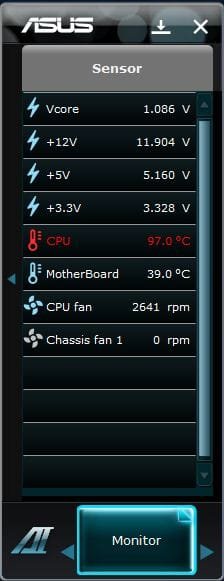
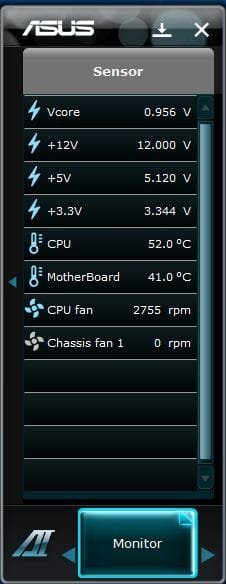
Dear admins, readers, please help me solving my pc back to normal. while using winrar (compressing) or other app/games, my cpu temp is so high (97°C) but when im not using, its only 40-50°C.

im afraid my pc will not function anymore :cry: it freaks me out to see that red label...please help to solved this...tnx in advanced!
 

Attachments

  • Capture.JPG
    Capture.JPG
    26.5 KB · Views: 23
  • Capture1.JPG
    Capture1.JPG
    27.4 KB · Views: 21
  • Capture2.JPG
    Capture2.JPG
    41 KB · Views: 19
  • Capture3.JPG
    Capture3.JPG
    48.7 KB · Views: 19
  • Capture4.JPG
    Capture4.JPG
    52.7 KB · Views: 17

My Computer

OS
Microsoft Windows 7 Ultimate 32-bit 7601 Multiprocessor Free Service Pack 1
CPU
Intel(R) Core(TM) i5-2500 CPU @ 3.30GHz
Motherboard
ASUSTeK COMPUTER INC. P8H61-M LE
Memory
4.00 GB
Graphics Card(s)
Intel(R) HD Graphics Family
Sound Card
Realtek High Definition Audio
Screen Resolution
1600 x 900 x 32 bits (4294967296 colors) @ 60 Hz
Hard Drives
(1) WDC WD10EARX-00N0YB0 ATA Device (2) Imation Imation USB USB Device
You should not get those temperatures, especially when your CPU is running at default clock rate. Try to re-paste the cpu heat spreader and reattach the heatsink securely. Also try to remove dust particles from your heatsink and fan. This should fix your overheating issues.
 

My Computer

Computer type
Laptop
Computer Manufacturer/Model Number
Dell Optiplex SX270, Lenovo Z470
OS
Windows 7 Professional x64 SP1
CPU
Intel® Pentium® 4 @ 2.26 GHz, Intel Core i7-2670QM @ 2.20 GH
Motherboard
Dell, Lenovo
Memory
512MB Dual channel DDR SDRAM @ 400MHz 2.5-3-3-7, 8 GB DDR3
Graphics Card(s)
Intel 82865G, Nvidia GeForce 520M Graphics
Sound Card
SoundMax Integrated Audio, Integrated HD Audio
Monitor(s) Displays
LG W1952
Screen Resolution
1440x900, 1366 x 768
Hard Drives
40 GB 2.5" IDE 4200 RPM HDD, 500 GB 5400 RPM Sata 1.5 + 32 GB SSD
PSU
Dell 145 Watt, Lenovo 120 Watt Power Adapter
Case
Optiplex SX270 Small Form Factor, Laptop
Cooling
Dell Proprietary Air Cooling, Stock laptop cooling
Keyboard
Dell SK-8125 USB Keyboard
Mouse
Dell PS/2 2 button ball mouse with wheel scroll
Internet Speed
300 Mbit down / 20 Mbps up Time Warner Cable
Antivirus
MSE, Malwarebytes Scanner
Browser
Internet (Aizawa) Explorer 11
Other Info
Running Windows Server 2012 Datacenter on a virtual machine to run Metro Apps.
Good fan installed ? On full blast ? Clean ?
 

My Computer

Computer type
PC/Desktop
Computer Manufacturer/Model Number
Skylake Special #666
OS
Windows 10 Pro x64
CPU
Intel Core i7 6700K
Motherboard
Asus Sabertooth Z170 Mark 1
Memory
GSkill TridentZ RGB 16GB 3600 16-16-16-36
Graphics Card(s)
EVGA GTX 980 Ti SC x2
Sound Card
Realtek High Definition
Monitor(s) Displays
AOC G2460PG
Screen Resolution
1920 x 1080 144Hz
Hard Drives
Samsung 860 Pro 256GB, Seagate Barracuda 4TB x2
PSU
EVGA 1000 P2, EVGA White Custom Braided Cables
Case
Corsair Vengeance C70 Gunmetal Black
Cooling
Corsair H100i v2, Corsair ML120 x2, Thermal Grizzly Kryonaut
Keyboard
Logitech G910 Orion Spectrum
Mouse
Logitech G700s
Internet Speed
Verizon Fios Quantum Gateway 75/75
Antivirus
Windows Defender, Malwarebytes Free 3.8.3
Browser
Chrome
Other Info
Corsair SP120 x4, LG Blu-ray Drive, Durabrand HT-395 100 Watt Dolby Digital Amp, Corsair H2100 Wireless 7.1 Headset
Another thing, you mentioned 40 - 50 oC idle temperatures. That is slightly high for a desktop. It should be around 30 - 40 like most of what I've seen. You should definitely do what I mentioned above to prevent CPU overheating.
 

My Computer

Computer type
Laptop
Computer Manufacturer/Model Number
Dell Optiplex SX270, Lenovo Z470
OS
Windows 7 Professional x64 SP1
CPU
Intel® Pentium® 4 @ 2.26 GHz, Intel Core i7-2670QM @ 2.20 GH
Motherboard
Dell, Lenovo
Memory
512MB Dual channel DDR SDRAM @ 400MHz 2.5-3-3-7, 8 GB DDR3
Graphics Card(s)
Intel 82865G, Nvidia GeForce 520M Graphics
Sound Card
SoundMax Integrated Audio, Integrated HD Audio
Monitor(s) Displays
LG W1952
Screen Resolution
1440x900, 1366 x 768
Hard Drives
40 GB 2.5" IDE 4200 RPM HDD, 500 GB 5400 RPM Sata 1.5 + 32 GB SSD
PSU
Dell 145 Watt, Lenovo 120 Watt Power Adapter
Case
Optiplex SX270 Small Form Factor, Laptop
Cooling
Dell Proprietary Air Cooling, Stock laptop cooling
Keyboard
Dell SK-8125 USB Keyboard
Mouse
Dell PS/2 2 button ball mouse with wheel scroll
Internet Speed
300 Mbit down / 20 Mbps up Time Warner Cable
Antivirus
MSE, Malwarebytes Scanner
Browser
Internet (Aizawa) Explorer 11
Other Info
Running Windows Server 2012 Datacenter on a virtual machine to run Metro Apps.
This does sound like thermal compound needs to be reapplied, could try booting with minimal startup processes too, could be a process that is overworking your CPU.

Run "msconfig" from the run command Start>All Programs> Accessories>Run

uncheck all startup programs, then check mark hide all microsoft service under services tab, and then uncheck those that are still there, see if your heat is still up after that. You can manually start your CPU Temp program once your computer reboots after unchecking stuff.
 

My Computer

Computer Manufacturer/Model Number
HP C2N70UA#ABA Laptop
OS
Windows 8 64-bit (6.2, Build 9200) (9200.win8_rtm.120725-1247)
CPU
AMD Quad-Core A10-4600M APU 2.3Ghz Turbo to 3.4
Memory
8GB DDR3
Graphics Card(s)
AMD Radeon HD 7660G
Sound Card
Altec Lansing with SRS Premium Sound
Monitor(s) Displays
17" Laptop HD Display (720p)
Screen Resolution
1600*900
Hard Drives
750GB (5400 RPM), with smart protect
Western Digital 1TB Passport
Cooling
HP Cool Sense
Keyboard
Island Style
Mouse
Logitech 625 Wireless
Internet Speed
30MBps
You should not get those temperatures, especially when your CPU is running at default clock rate. Try to re-paste the cpu heat spreader and reattach the heatsink securely. Also try to remove dust particles from your heatsink and fan. This should fix your overheating issues.

ahm, whats "re-paste the cpu heat spreader"? i disassemble the heat sink i think...hmmm and then wipe its portion facing the processor...i notice their is a pencil like color and its sticky so i wipe it out then slowly assemble the heatsink...and open again my pc...its the same it reaches 97°C...can figure it out wheres the problem and how to fix it? im afraid it will not function anymore and this pc cost much...please help me! im begging!:cry:
 

My Computer

OS
Microsoft Windows 7 Ultimate 32-bit 7601 Multiprocessor Free Service Pack 1
CPU
Intel(R) Core(TM) i5-2500 CPU @ 3.30GHz
Motherboard
ASUSTeK COMPUTER INC. P8H61-M LE
Memory
4.00 GB
Graphics Card(s)
Intel(R) HD Graphics Family
Sound Card
Realtek High Definition Audio
Screen Resolution
1600 x 900 x 32 bits (4294967296 colors) @ 60 Hz
Hard Drives
(1) WDC WD10EARX-00N0YB0 ATA Device (2) Imation Imation USB USB Device

My Computer

OS
Microsoft Windows 7 Ultimate 32-bit 7601 Multiprocessor Free Service Pack 1
CPU
Intel(R) Core(TM) i5-2500 CPU @ 3.30GHz
Motherboard
ASUSTeK COMPUTER INC. P8H61-M LE
Memory
4.00 GB
Graphics Card(s)
Intel(R) HD Graphics Family
Sound Card
Realtek High Definition Audio
Screen Resolution
1600 x 900 x 32 bits (4294967296 colors) @ 60 Hz
Hard Drives
(1) WDC WD10EARX-00N0YB0 ATA Device (2) Imation Imation USB USB Device
Okay Julius, if you wiped your CPU or heatsink copper panel clean, and then put the heatsink back on, DO NOT turn on your computer again. 97C will kill your cpu incredibly fast. No cpu is designed to run at 97 degrees safely.

You must turn off your computer. unplug it from the wall, take off the heatsink, get some alcohol for electronics, and cotton swabs, then clean the CPU until it's shiny and free of a gray substance. Do the same with the heatsink part that goes on top of the CPU.

Once you do this, you need to apply a paste known as thermal compound, or thermal paste.
What this paste does is transfer the heat from the CPU to the heatsink in an efficient way so your CPU does not overheat like yours is.
 

My Computer

Computer type
PC/Desktop
OS
Windows 7 professional X64
CPU
AMD A10-5800K OC@ 4.4Ghz.
Motherboard
Gigabyte F2A85X-UP4
Memory
8GB Kingston HyperX Blu 1333mhz
Graphics Card(s)
XFX HD7870 2GB Core Edition
Monitor(s) Displays
Acer AL2216W
Screen Resolution
1680x1050
Hard Drives
Seagate Barracuda 500gb 7200rpm
Seagate Barracuda 1.5TB 7200rpm
PSU
Cooler Master Silent Pro M 850W
Case
Thermaltake Commander MS-I
Cooling
Cooler Master N520
Mouse
Logitech M504
Internet Speed
10Mbps
You should not get those temperatures, especially when your CPU is running at default clock rate. Try to re-paste the cpu heat spreader and reattach the heatsink securely. Also try to remove dust particles from your heatsink and fan. This should fix your overheating issues.

ahm, whats "re-paste the cpu heat spreader"? i disassemble the heat sink i think...hmmm and then wipe its portion facing the processor...i notice their is a pencil like color and its sticky so i wipe it out then slowly assemble the heatsink...and open again my pc...its the same it reaches 97°C...can figure it out wheres the problem and how to fix it? im afraid it will not function anymore and this pc cost much...please help me! im begging!:cry:

Ah, you forgot to put the thermal paste that ensures maximum heat transfer from the CPU to the heatsink. If you don't have one, I recommend Arctic silver 5 which you can purchase here: Newegg.com - Arctic Silver 5 High-Density Polysynthetic Silver Thermal Compound AS5-3.5G - Thermal Compound / Grease
After applying the thermal paste properly, you should not get over 70 celsius when compressing, gaming etc.
 

My Computer

Computer type
Laptop
Computer Manufacturer/Model Number
Dell Optiplex SX270, Lenovo Z470
OS
Windows 7 Professional x64 SP1
CPU
Intel® Pentium® 4 @ 2.26 GHz, Intel Core i7-2670QM @ 2.20 GH
Motherboard
Dell, Lenovo
Memory
512MB Dual channel DDR SDRAM @ 400MHz 2.5-3-3-7, 8 GB DDR3
Graphics Card(s)
Intel 82865G, Nvidia GeForce 520M Graphics
Sound Card
SoundMax Integrated Audio, Integrated HD Audio
Monitor(s) Displays
LG W1952
Screen Resolution
1440x900, 1366 x 768
Hard Drives
40 GB 2.5" IDE 4200 RPM HDD, 500 GB 5400 RPM Sata 1.5 + 32 GB SSD
PSU
Dell 145 Watt, Lenovo 120 Watt Power Adapter
Case
Optiplex SX270 Small Form Factor, Laptop
Cooling
Dell Proprietary Air Cooling, Stock laptop cooling
Keyboard
Dell SK-8125 USB Keyboard
Mouse
Dell PS/2 2 button ball mouse with wheel scroll
Internet Speed
300 Mbit down / 20 Mbps up Time Warner Cable
Antivirus
MSE, Malwarebytes Scanner
Browser
Internet (Aizawa) Explorer 11
Other Info
Running Windows Server 2012 Datacenter on a virtual machine to run Metro Apps.
Okay Julius, if you wiped your CPU or heatsink copper panel clean, and then put the heatsink back on, DO NOT turn on your computer again. 97C will kill your cpu incredibly fast. No cpu is designed to run at 97 degrees safely.

You must turn off your computer. unplug it from the wall, take off the heatsink, get some alcohol for electronics, and cotton swabs, then clean the CPU until it's shiny and free of a gray substance. Do the same with the heatsink part that goes on top of the CPU.

Once you do this, you need to apply a paste known as thermal compound, or thermal paste.
What this paste does is transfer the heat from the CPU to the heatsink in an efficient way so your CPU does not overheat like yours is.

omg! that gray thing is a thermal paste? i just wipe it out. i thought that causes my temp too high...is that paste available here in Philippines? i hope it cost less cause im only a student :(
 

My Computer

OS
Microsoft Windows 7 Ultimate 32-bit 7601 Multiprocessor Free Service Pack 1
CPU
Intel(R) Core(TM) i5-2500 CPU @ 3.30GHz
Motherboard
ASUSTeK COMPUTER INC. P8H61-M LE
Memory
4.00 GB
Graphics Card(s)
Intel(R) HD Graphics Family
Sound Card
Realtek High Definition Audio
Screen Resolution
1600 x 900 x 32 bits (4294967296 colors) @ 60 Hz
Hard Drives
(1) WDC WD10EARX-00N0YB0 ATA Device (2) Imation Imation USB USB Device
You should not get those temperatures, especially when your CPU is running at default clock rate. Try to re-paste the cpu heat spreader and reattach the heatsink securely. Also try to remove dust particles from your heatsink and fan. This should fix your overheating issues.

ahm, whats "re-paste the cpu heat spreader"? i disassemble the heat sink i think...hmmm and then wipe its portion facing the processor...i notice their is a pencil like color and its sticky so i wipe it out then slowly assemble the heatsink...and open again my pc...its the same it reaches 97°C...can figure it out wheres the problem and how to fix it? im afraid it will not function anymore and this pc cost much...please help me! im begging!:cry:

Ah, you forgot to put the thermal paste that ensures maximum heat transfer from the CPU to the heatsink. If you don't have one, I recommend Arctic silver 5 which you can purchase here: Newegg.com - Arctic Silver 5 High-Density Polysynthetic Silver Thermal Compound AS5-3.5G - Thermal Compound / Grease
After applying the thermal paste properly, you should not get over 70 celsius when compressing, gaming etc.

thank you so much for your suggestions. i'll try this when i have a money!
 

My Computer

OS
Microsoft Windows 7 Ultimate 32-bit 7601 Multiprocessor Free Service Pack 1
CPU
Intel(R) Core(TM) i5-2500 CPU @ 3.30GHz
Motherboard
ASUSTeK COMPUTER INC. P8H61-M LE
Memory
4.00 GB
Graphics Card(s)
Intel(R) HD Graphics Family
Sound Card
Realtek High Definition Audio
Screen Resolution
1600 x 900 x 32 bits (4294967296 colors) @ 60 Hz
Hard Drives
(1) WDC WD10EARX-00N0YB0 ATA Device (2) Imation Imation USB USB Device
Okay Julius, if you wiped your CPU or heatsink copper panel clean, and then put the heatsink back on, DO NOT turn on your computer again. 97C will kill your cpu incredibly fast. No cpu is designed to run at 97 degrees safely.

You must turn off your computer. unplug it from the wall, take off the heatsink, get some alcohol for electronics, and cotton swabs, then clean the CPU until it's shiny and free of a gray substance. Do the same with the heatsink part that goes on top of the CPU.

Once you do this, you need to apply a paste known as thermal compound, or thermal paste.
What this paste does is transfer the heat from the CPU to the heatsink in an efficient way so your CPU does not overheat like yours is.

omg! that gray thing is a thermal paste? i just wipe it out. i thought that causes my temp too high...is that paste available here in Philippines? i hope it cost less cause im only a student :(

No, it does the exact opposite, it transfer heat from the cpu to the heatsink in a better way.
And I am sure that if you go to a local computer store they would have some, take your computer, and ask if they could apply it for you as well, generally it is not too expensive, there are different brands, and types, but they ALL do the same in the end.
 

My Computer

Computer type
PC/Desktop
OS
Windows 7 professional X64
CPU
AMD A10-5800K OC@ 4.4Ghz.
Motherboard
Gigabyte F2A85X-UP4
Memory
8GB Kingston HyperX Blu 1333mhz
Graphics Card(s)
XFX HD7870 2GB Core Edition
Monitor(s) Displays
Acer AL2216W
Screen Resolution
1680x1050
Hard Drives
Seagate Barracuda 500gb 7200rpm
Seagate Barracuda 1.5TB 7200rpm
PSU
Cooler Master Silent Pro M 850W
Case
Thermaltake Commander MS-I
Cooling
Cooler Master N520
Mouse
Logitech M504
Internet Speed
10Mbps
Okay Julius, if you wiped your CPU or heatsink copper panel clean, and then put the heatsink back on, DO NOT turn on your computer again. 97C will kill your cpu incredibly fast. No cpu is designed to run at 97 degrees safely.

You must turn off your computer. unplug it from the wall, take off the heatsink, get some alcohol for electronics, and cotton swabs, then clean the CPU until it's shiny and free of a gray substance. Do the same with the heatsink part that goes on top of the CPU.

Once you do this, you need to apply a paste known as thermal compound, or thermal paste.
What this paste does is transfer the heat from the CPU to the heatsink in an efficient way so your CPU does not overheat like yours is.

omg! that gray thing is a thermal paste? i just wipe it out. i thought that causes my temp too high...is that paste available here in Philippines? i hope it cost less cause im only a student :(

No, it does the exact opposite, it transfer heat from the cpu to the heatsink in a better way.
And I am sure that if you go to a local computer store they would have some, take your computer, and ask if they could apply it for you as well, generally it is not too expensive, there are different brands, and types, but they ALL do the same in the end.

thanks, i get it. i'l be back here when i bought one or finish applying.
 

My Computer

OS
Microsoft Windows 7 Ultimate 32-bit 7601 Multiprocessor Free Service Pack 1
CPU
Intel(R) Core(TM) i5-2500 CPU @ 3.30GHz
Motherboard
ASUSTeK COMPUTER INC. P8H61-M LE
Memory
4.00 GB
Graphics Card(s)
Intel(R) HD Graphics Family
Sound Card
Realtek High Definition Audio
Screen Resolution
1600 x 900 x 32 bits (4294967296 colors) @ 60 Hz
Hard Drives
(1) WDC WD10EARX-00N0YB0 ATA Device (2) Imation Imation USB USB Device
omg! that gray thing is a thermal paste? i just wipe it out. i thought that causes my temp too high...is that paste available here in Philippines? i hope it cost less cause im only a student :(

No, it does the exact opposite, it transfer heat from the cpu to the heatsink in a better way.
And I am sure that if you go to a local computer store they would have some, take your computer, and ask if they could apply it for you as well, generally it is not too expensive, there are different brands, and types, but they ALL do the same in the end.

thanks, i get it. i'l be back here when i bought one or finish applying.

Alright, best of luck Julius! Don't forget you can always ask as many questions as you need! There is no such thing as asking too many questions when it comes to computers.
 

My Computer

Computer type
PC/Desktop
OS
Windows 7 professional X64
CPU
AMD A10-5800K OC@ 4.4Ghz.
Motherboard
Gigabyte F2A85X-UP4
Memory
8GB Kingston HyperX Blu 1333mhz
Graphics Card(s)
XFX HD7870 2GB Core Edition
Monitor(s) Displays
Acer AL2216W
Screen Resolution
1680x1050
Hard Drives
Seagate Barracuda 500gb 7200rpm
Seagate Barracuda 1.5TB 7200rpm
PSU
Cooler Master Silent Pro M 850W
Case
Thermaltake Commander MS-I
Cooling
Cooler Master N520
Mouse
Logitech M504
Internet Speed
10Mbps
Do a google search for applying thermal paste as there IS a right way and a wrong way to do it. When cleaning the heatsink and cpu, I would suggest using something like a coffee filter as it doesn't leave lint behind. When applying the thermal paste, put a small drop in the MIDDLE of the CPU. A drop about the size of a grain of rice is plenty. Too much and it could squish out beyond the CPU and cause problems.

Important things to remember: A clean heatsink/CPU surface is a happy surface. DO NOT touch either surface with your fingers after you have cleaned it. Use a coffee filter if you have one to do the cleaning and prepping. A SMALL drop right in the middle of the CPU about the size of a grain of rice or small pea will be more than enough. Reinstall the heatsink/fan carefully and torque it down evenly from corner to corner......this will evenly distribute the paste across the face of the CPU.

Follow those steps and you should be fine.
 

My Computer

Computer type
PC/Desktop
Computer Manufacturer/Model Number
Custom Built
OS
Windows 7 Professional 64bit SP1
CPU
Intel Core i5-3570K @ 4.5GHz
Motherboard
Asus Sabertooth Z77
Memory
Corsair Vengeance 16GB (4x4) @1866MHz CL 9-9-9-24 1T
Graphics Card(s)
EVGA GTX 750 Ti FTW
Sound Card
Onboard Audio
Monitor(s) Displays
Dell S2309W
Screen Resolution
1920x1080
Hard Drives
Samsung 830 128GB SSD - OS
(4) Seagate 5TB HDD
(1) Seagate 2TB HDD
PSU
Seasonic X750 80+ Gold Full Modular
Case
Antec Eleven Hundred Super Mid Tower
Cooling
Intel Liquid Cooler
Keyboard
Max Nighthawk X8 Mechanical keyboard
Mouse
Mionix Naos 7000
Internet Speed
50 Mbps Down / 10 Mbps Up
Antivirus
Microsoft Security Essentials/Malwarebytes Anti-Malware
Browser
Chrome/Firefox
Other Info
Klipsch ProMedia 2.1's
Asus RT-N66R Wireless Router
No, it does the exact opposite, it transfer heat from the cpu to the heatsink in a better way.
And I am sure that if you go to a local computer store they would have some, take your computer, and ask if they could apply it for you as well, generally it is not too expensive, there are different brands, and types, but they ALL do the same in the end.

thanks, i get it. i'l be back here when i bought one or finish applying.

Alright, best of luck Julius! Don't forget you can always ask as many questions as you need! There is no such thing as asking too many questions when it comes to computers.

Excuse me sir, i already apply a paste but when i compres/xtrac a file, cpu temp reaches 97 again. :cry: what should i do?
 

My Computer

OS
Microsoft Windows 7 Ultimate 32-bit 7601 Multiprocessor Free Service Pack 1
CPU
Intel(R) Core(TM) i5-2500 CPU @ 3.30GHz
Motherboard
ASUSTeK COMPUTER INC. P8H61-M LE
Memory
4.00 GB
Graphics Card(s)
Intel(R) HD Graphics Family
Sound Card
Realtek High Definition Audio
Screen Resolution
1600 x 900 x 32 bits (4294967296 colors) @ 60 Hz
Hard Drives
(1) WDC WD10EARX-00N0YB0 ATA Device (2) Imation Imation USB USB Device
Do a google search for applying thermal paste as there IS a right way and a wrong way to do it. When cleaning the heatsink and cpu, I would suggest using something like a coffee filter as it doesn't leave lint behind. When applying the thermal paste, put a small drop in the MIDDLE of the CPU. A drop about the size of a grain of rice is plenty. Too much and it could squish out beyond the CPU and cause problems.

Important things to remember: A clean heatsink/CPU surface is a happy surface. DO NOT touch either surface with your fingers after you have cleaned it. Use a coffee filter if you have one to do the cleaning and prepping. A SMALL drop right in the middle of the CPU about the size of a grain of rice or small pea will be more than enough. Reinstall the heatsink/fan carefully and torque it down evenly from corner to corner......this will evenly distribute the paste across the face of the CPU.

Follow those steps and you should be fine.

i folow steps but my temp is same. when im not using my temp 45-55. what should i do?
 

My Computer

OS
Microsoft Windows 7 Ultimate 32-bit 7601 Multiprocessor Free Service Pack 1
CPU
Intel(R) Core(TM) i5-2500 CPU @ 3.30GHz
Motherboard
ASUSTeK COMPUTER INC. P8H61-M LE
Memory
4.00 GB
Graphics Card(s)
Intel(R) HD Graphics Family
Sound Card
Realtek High Definition Audio
Screen Resolution
1600 x 900 x 32 bits (4294967296 colors) @ 60 Hz
Hard Drives
(1) WDC WD10EARX-00N0YB0 ATA Device (2) Imation Imation USB USB Device
I have got a great suggestion. Contact you IT department for your computer needs and repairs. You are using Windows Enterprise according to your specs.
 

My Computer

Computer type
PC/Desktop
Computer Manufacturer/Model Number
Home made Desktop
OS
Windows 10 Pro. 64/ version 1709 Windows 7 Pro/64
CPU
Intel i7-6800K @ 4.3
Motherboard
ASUS X-99 Deluxe II
Memory
Corsair Platinum 16 gig @2400
Graphics Card(s)
EVGA GTX 1070 OC
Monitor(s) Displays
Asus 27" LED LCD/VE278Q
Screen Resolution
1920-1080 or 1280-720 HDMI
Hard Drives
INTEL SSD 730-240 Gb Sata 3.0/
PSU
EVGA Platium 1200W
Case
Phanteks Luxe Tempered Glass 8 fans/ one radiator
Cooling
XSPC/ Water Cooled CPU
Keyboard
Das 4 Professional
Mouse
Logitech M705/MX Anywhere 2-S
Internet Speed
100 mbits
Antivirus
Microsoft Security Essentials/ Malwarebytes Premium 3.0/ SAS
Browser
I.E. 11 default/Firefox/ ISP Time Warner Cable/Spectrum
Other Info
LG BluRay Burner/
Sound system-KLipsch-THX/
Icy Dock ssd Hot Swap bays.
I have got a great suggestion. Contact you IT department for your computer needs and repairs. You are using Windows Enterprise according to your specs.

They are not responsible for computer hardware faults if the OP had his computer custom built, and I don't see him saying his computer has OEM hardware. Plus, if it was the case, he already opened the case, and the waranty has been voided anyway.

Julius, can you take a picture of your heatsink, and CPU with the thermal paste as you applied it?
Is it an aftermarket heatsink? What type?
 

My Computer

Computer type
PC/Desktop
OS
Windows 7 professional X64
CPU
AMD A10-5800K OC@ 4.4Ghz.
Motherboard
Gigabyte F2A85X-UP4
Memory
8GB Kingston HyperX Blu 1333mhz
Graphics Card(s)
XFX HD7870 2GB Core Edition
Monitor(s) Displays
Acer AL2216W
Screen Resolution
1680x1050
Hard Drives
Seagate Barracuda 500gb 7200rpm
Seagate Barracuda 1.5TB 7200rpm
PSU
Cooler Master Silent Pro M 850W
Case
Thermaltake Commander MS-I
Cooling
Cooler Master N520
Mouse
Logitech M504
Internet Speed
10Mbps
Erick please read the rules. We do not over ride IT departments or help with systems that are not legal.
Windows 7 Forums - Forum Rules
--------------------------------------
Windows 7 Enterprise
This edition targets the enterprise segment of the market and is sold through volume licensing to companies which have a Software Assurance contract with Microsoft.[1] Additional features include support for Multilingual User Interface (MUI) packages, BitLocker Drive Encryption, and UNIX application support.[1] Not available through retail or OEM channels, this edition is distributed through Microsoft Software Assurance (SA).[1] As a result it includes several SA-only benefits, including a license allowing the operating of diskless nodes (diskless PCs), the running of multiple virtual machines, and activation via VLK
 

My Computer

Computer type
PC/Desktop
Computer Manufacturer/Model Number
Home made Desktop
OS
Windows 10 Pro. 64/ version 1709 Windows 7 Pro/64
CPU
Intel i7-6800K @ 4.3
Motherboard
ASUS X-99 Deluxe II
Memory
Corsair Platinum 16 gig @2400
Graphics Card(s)
EVGA GTX 1070 OC
Monitor(s) Displays
Asus 27" LED LCD/VE278Q
Screen Resolution
1920-1080 or 1280-720 HDMI
Hard Drives
INTEL SSD 730-240 Gb Sata 3.0/
PSU
EVGA Platium 1200W
Case
Phanteks Luxe Tempered Glass 8 fans/ one radiator
Cooling
XSPC/ Water Cooled CPU
Keyboard
Das 4 Professional
Mouse
Logitech M705/MX Anywhere 2-S
Internet Speed
100 mbits
Antivirus
Microsoft Security Essentials/ Malwarebytes Premium 3.0/ SAS
Browser
I.E. 11 default/Firefox/ ISP Time Warner Cable/Spectrum
Other Info
LG BluRay Burner/
Sound system-KLipsch-THX/
Icy Dock ssd Hot Swap bays.
Back
Top