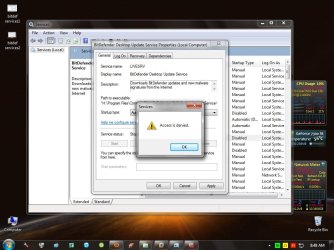
access denied in services

valmontgtx

New member
Local time
3:48 AM
Messages
22
hello guys..im having a problem with services and it all started when i disabled all the services and start up during safemode to find the services that's causing my OS to freeze and i found out that its the network driver that's causing the freeze.i updated the driver and the freezing is gone..so i enabled all te services and startups again and it worked fine but 2 services are still disabled even if i enabled it in msconfig those 2 services belongs to bitdefender...now my bitdefender antivirus cant run because of those 2 disabled services..i ran services.msc and tried to enable it but a message pops up saying "access denied" I dont understand.The user i used is an Administrator.
here are some screen shots..
please help guys i dont think this is caused by some malware...what do you think guys?
 

Attachments

  • bitdef services1.jpg
    bitdef services1.jpg
    104.7 KB · Views: 217
  • bitdef services2.jpg
    bitdef services2.jpg
    103.8 KB · Views: 196
  • bitfef access denied.jpg
    bitfef access denied.jpg
    100.8 KB · Views: 184

My Computer

OS
windows 7 ultimate 32 bit
hello guys..im having a problem with services and it all started when i disabled all the services and start up during safemode to find the services that's causing my OS to freeze and i found out that its the network driver that's causing the freeze.i updated the driver and the freezing is gone..so i enabled all te services and startups again and it worked fine but 2 services are still disabled even if i enabled it in msconfig those 2 services belongs to bitdefender...now my bitdefender antivirus cant run because of those 2 disabled services..i ran services.msc and tried to enable it but a message pops up saying "access denied" I dont understand.The user i used is an Administrator.
here are some screen shots..
please help guys

Why in the world are you running bit defender when MSE does the same thing, is free, and doesnt cause problems.

ken j

In terms of the services. Are you running msconfig in a normal boot?
 

My Computer

Computer Manufacturer/Model Number
HP Pavillion dv-7 1005 Tx
OS
Win 8 Release candidate 8400
CPU
[email protected]
Memory
4 gigs
Graphics Card(s)
Nvidia 9600M
Sound Card
HD built-in
Monitor(s) Displays
17" Wxga
Screen Resolution
1440x900
Cooling
none
Internet Speed
45Mb down 5Mb up
I agree about MSE, but you could also try, uninstalling Bitdefender and reinstall it.
 

My Computer

Computer Manufacturer/Model Number
Self Built
OS
Win 7 Ultimate 32bit
CPU
C2D E6600 2.4Ghz
Motherboard
Intel D965WH
Memory
4G Kingston KHX5400D2
Graphics Card(s)
EVGA GTX 570 HD SC (012-P3-1573-KR)
Sound Card
On-Board
Monitor(s) Displays
Samsung 226BW
Screen Resolution
1680 x 1050
Hard Drives
2 x 250 Seagate Barracuda
2 x 500 Seagate Barracuda (Raid1)
PSU
Corsair TX750W
Case
In-Win C589
Cooling
Stock Intel Cooling
Since it is necessary to disable BitDefender services in Safe Mode (when it isn't running), have you tried reversing the process in Safe Mode?

Also, is it only the BitDefender Desktop Update Service that you cannot change? Did you try the other BitDefender services? The Update service may be dependent upon one or more of the other services that need to be enabled first.

If none of the above applies, I suggest following Tepid's suggestion and reinstalling the program. (Note: After uninstalling, restart the computer and run the uninstaller located at How to uninstall BitDefender)
 

My Computer

OS
Windows 7 & Windows Vista Ultimate
hello guys..im having a problem with services and it all started when i disabled all the services and start up during safemode to find the services that's causing my OS to freeze and i found out that its the network driver that's causing the freeze.i updated the driver and the freezing is gone..so i enabled all te services and startups again and it worked fine but 2 services are still disabled even if i enabled it in msconfig those 2 services belongs to bitdefender...now my bitdefender antivirus cant run because of those 2 disabled services..i ran services.msc and tried to enable it but a message pops up saying "access denied" I dont understand.The user i used is an Administrator.
here are some screen shots..
please help guys

Why in the world are you running bit defender when MSE does the same thing, is free, and doesnt cause problems.

ken j

In terms of the services. Are you running msconfig in a normal boot?

+1 I agree with Ken.
 

My Computer

Computer Manufacturer/Model Number
Home built
OS
Windows 7 Ultimate 32 bit
CPU
Intel(R) Pentium(R) 4 CPU 3.00GHz
Motherboard
ASUS P4P800-VM Motherboard Chipset: Intel 865G + ICH5
Memory
2.50 GB RAM
Graphics Card(s)
NVIDIA GeForce 7600 GS
Sound Card
SoundMax Integrated Digital Audio (Chip)
Monitor(s) Displays
ViewSonic VX 1962 wm
Screen Resolution
1680 X 1050
Hard Drives
Seagate Barracuda 7200.10 80 GB
ST380215A ATA Device 18.6 GB
Western Digital "My Book" external hard drive 750 GB
Cooling
Fan based
Keyboard
Microsoft Comfort Curve Keyboard 2000 v10 USB
Mouse
Logitec optic USB
Internet Speed
3.01 Mb/s download 0.64 Mb/s upload
ok guys..ill try all your suggestions..see if it works
 

My Computer

OS
windows 7 ultimate 32 bit
problem solved...i re enabled those 2 services in safemode....now its running fine...thanx for all your help people... ^_^
 

My Computer

OS
windows 7 ultimate 32 bit
problem solved...i re enabled those 2 services in safemode....now its running fine...thanx for all your help people... ^_^

I would uninstall BitDefender if I were you. BitDefender is such a bloated and complicated security solution making it resource hungry and difficult to operate.

Download and install MSE. It's lightweight on system resources (you can't even notice its impact on your PC's performance), very easy to use and heavyweight on detection! :D

I've been on MSE for months now and I haven't been infected ever since and my PC has been running smooth so far.
 

My Computer

Computer type
PC/Desktop
Computer Manufacturer/Model Number
Custom Built
OS
Windows 7 Ultimate x64
CPU
Intel(R) Core(TM) 2 Quad Q8200 @ 2.33 GHz
Motherboard
Asus P5KPL-AM SE Motherboard
Memory
2x2GB Kingston DDR2
Graphics Card(s)
1GB AMD Radeon HD 5450
Sound Card
VIA Technologies High Definition Audio Device
Monitor(s) Displays
Samsung SyncMaster 733NW
Screen Resolution
1440x900
Hard Drives
SEAGATE 320GB Barracuda® 7200.12, SATA 3 Gb/s, 7200 RPM, 16MB cache x 2
Case
Custom Casing
Cooling
Ice cubes from the freezer ;)
Keyboard
Generic Plug & Play Keyboard
Mouse
Optical Mouse
Internet Speed
Very slow
problem solved...i re enabled those 2 services in safemode....now its running fine...thanx for all your help people... ^_^

I would uninstall BitDefender if I were you. BitDefender is such a bloated and complicated security solution making it resource hungry and difficult to operate.

Download and install MSE. It's lightweight on system resources, very easy to use and heavyweight on detection! :D

I've been on MSE for months now and I haven't been infected ever since. My PC has been running smooth too, and I can't even notice MSE's impact on performance.
i tried MSE in my VMware...it was great but i had no problems using bitdefender for almost 3 years...
 

My Computer

OS
windows 7 ultimate 32 bit
problem solved...i re enabled those 2 services in safemode....now its running fine...thanx for all your help people... ^_^

Good to know the problem is solved. Thanks for letting us know.

It is good to know that BitDefender is working well for you. In the event you decide to make a change, I think you know what the majority here will recommend. ;)
 

My Computer

OS
Windows 7 & Windows Vista Ultimate
Back
Top