Access denied registering dll files Windows 7 Pro 64

FarNorth

New member
Local time
2:44 PM
Messages
7
Location
Anchorage, Alaska USA
Hello,
I've searched through the forum and have tried many of the solutions posted but still am being denied. I've registered the same dll files on other machines with no issues but on this clean install I've had no luck. Any help is appreciated.

Thanks,
 

My Computer My Computer

At a glance

Windows 7 Pro 64
Computer type
PC/Desktop
Computer Manufacturer/Model Number
Dell Precision T3610
OS
Windows 7 Pro 64
Can you explain in details what you're trying to do (registering dll files Windows 7 Pro 64).
 

My Computers My Computers

  • At a glance

    Windows 7 HP 64i5 6600K - 800MHz to 4200MHz4+4G GSkill DDR4 3000IG - Intel 530
    Computer type
    PC/Desktop
    Computer Manufacturer/Model Number
    custom build
    OS
    Windows 7 HP 64
    CPU
    i5 6600K - 800MHz to 4200MHz
    Motherboard
    GA-Z170-HD3P
    Memory
    4+4G GSkill DDR4 3000
    Graphics Card(s)
    IG - Intel 530
    Monitor(s) Displays
    Samsung 226BW
    Screen Resolution
    1680x1050
    Hard Drives
    (1) -1 SM951 – 128GB M.2 AHCI PCIe SSD drive for Windows 7 and Lubuntu
    (2) -1 WD SATA 3 - 1T for Data
    (3) -1 WD SATA 3 - 1T for backup
    PSU
    Thermaltake 450W TR2 gold
    Keyboard
    Old and good Chicony mechanical keyboard
    Mouse
    Logitech mX performance - 9 buttons (had to disable some)
    Internet Speed
    500Mb/s
    Browser
    Firefox 64
    Other Info
    TinyWall firewall
  • At a glance

    Windows 7 Proi7-4500U 800MHz to 3.0GHz(4+4)G DDR3 1600IG intel 4400 + NVIDIA GeForce GT 745M
    Computer type
    Laptop
    System Manufacturer/Model Number
    Asus Q550LF
    OS
    Windows 7 Pro
    CPU
    i7-4500U 800MHz to 3.0GHz
    Motherboard
    Asus Q550LF
    Memory
    (4+4)G DDR3 1600
    Graphics Card(s)
    IG intel 4400 + NVIDIA GeForce GT 745M
    Sound Card
    Realtek
    Monitor(s) Displays
    LG Display LP156WF4-SPH1
    Screen Resolution
    1920 x 1080
    Hard Drives
    BX500 120G SSD for Windows and programs +
    1T HDD for data
    Internet Speed
    500 Mb/s
    Browser
    Firefox
    Other Info
    TinyWall firewall
I have several dll files and a couple ocx files I need to register. I've done the same process on several machines without problem before and literally just a couple weeks prior on the exact same model of computer . I just did a fresh install on this computer, did all updates, have all the proper drivers installed and is otherwise working 100% with no issues.

I copy the dll and ocx files to a folder on my desktop then copy the files to my System32 folder.

I open the command prompt with administrative privileges and register like this:

C:\Windows\SysWOW64\regsvr32.exe C:\Windows\System32\xxxx.dll

Every time I get the "access denied" error.
I've tried the same using the command prompt in safe mode as well and get the same error.

Thanks for your help!
 

My Computer My Computer

At a glance

Windows 7 Pro 64
Computer type
PC/Desktop
Computer Manufacturer/Model Number
Dell Precision T3610
OS
Windows 7 Pro 64

My Computers My Computers

  • At a glance

    Windows 7 HP 64i5 6600K - 800MHz to 4200MHz4+4G GSkill DDR4 3000IG - Intel 530
    Computer type
    PC/Desktop
    Computer Manufacturer/Model Number
    custom build
    OS
    Windows 7 HP 64
    CPU
    i5 6600K - 800MHz to 4200MHz
    Motherboard
    GA-Z170-HD3P
    Memory
    4+4G GSkill DDR4 3000
    Graphics Card(s)
    IG - Intel 530
    Monitor(s) Displays
    Samsung 226BW
    Screen Resolution
    1680x1050
    Hard Drives
    (1) -1 SM951 – 128GB M.2 AHCI PCIe SSD drive for Windows 7 and Lubuntu
    (2) -1 WD SATA 3 - 1T for Data
    (3) -1 WD SATA 3 - 1T for backup
    PSU
    Thermaltake 450W TR2 gold
    Keyboard
    Old and good Chicony mechanical keyboard
    Mouse
    Logitech mX performance - 9 buttons (had to disable some)
    Internet Speed
    500Mb/s
    Browser
    Firefox 64
    Other Info
    TinyWall firewall
  • At a glance

    Windows 7 Proi7-4500U 800MHz to 3.0GHz(4+4)G DDR3 1600IG intel 4400 + NVIDIA GeForce GT 745M
    Computer type
    Laptop
    System Manufacturer/Model Number
    Asus Q550LF
    OS
    Windows 7 Pro
    CPU
    i7-4500U 800MHz to 3.0GHz
    Motherboard
    Asus Q550LF
    Memory
    (4+4)G DDR3 1600
    Graphics Card(s)
    IG intel 4400 + NVIDIA GeForce GT 745M
    Sound Card
    Realtek
    Monitor(s) Displays
    LG Display LP156WF4-SPH1
    Screen Resolution
    1920 x 1080
    Hard Drives
    BX500 120G SSD for Windows and programs +
    1T HDD for data
    Internet Speed
    500 Mb/s
    Browser
    Firefox
    Other Info
    TinyWall firewall
Yeah, I've been through that one also, no help there either.

For the life of me I cant figure out what's different with this installation from the others. I'm obviously missing something, just hoping I don't beat my head on the desktop too much before I figure it out.
Any help is appreciated.

Thanks...
 

My Computer My Computer

At a glance

Windows 7 Pro 64
Computer type
PC/Desktop
Computer Manufacturer/Model Number
Dell Precision T3610
OS
Windows 7 Pro 64
Have you tried to take ownership of the files prior to registering them? Instead of going through the process of taking ownership manuale you can Add “Take Ownership” to the Right-Click Menu to automate the process.

If you want to do this manually, I made this little video sometime back that will show you how. This one is for multiple files but the principle remains the same.


My Computer My Computer

At a glance

Windows 10 Pro 64 bitAMD FX 9590 8 Core Black EditionCorsair Vengeance 16GB DDR3AMD Radeon (TM) R9 380 Gaming Series
Computer type
PC/Desktop
Computer Manufacturer/Model Number
Custom Built By Me.
OS
Windows 10 Pro 64 bit
CPU
AMD FX 9590 8 Core Black Edition
Motherboard
MSI 990FXA GAMING (MS-7893)
Memory
Corsair Vengeance 16GB DDR3
Graphics Card(s)
AMD Radeon (TM) R9 380 Gaming Series
Sound Card
AMD High Definition
Monitor(s) Displays
Samsung 32" 60Hz 4ms Curved PLS LED
Screen Resolution
1920 X 1080
Hard Drives
C: 223 GB SSD = E: 465 GB HDD = F: 931 GB HDD = G: 149 GB HDD = H: 931 GB HDD
PSU
EVGA Supernova NEX750B 750W ATX EPS12V 80PLUS Bronze
Case
Cool Master
Cooling
Noctua NH-D15 Premium Cooler with 2x NF-A15 PWM 140mm Fan
Internet Speed
Fiber Optic: Download 332.7 Mbps / Upload 331.5 Mbps
Antivirus
Windows Defender
Browser
Slimjet (64bit)
Why are you using the regsvr32.exe from SysWOW64 instead of the one from System32, the usual one?
 

My Computer My Computer

At a glance

Windows 10 Pro x64, Windows 8.1 Pro x64, Wind...INTEL i9-7920X LGA 206664 GB (4 X 16 GB) G-Skill V Series DDR4 3200 ...EVGA GTX 1060 SC 3 GB
Computer type
PC/Desktop
Computer Manufacturer/Model Number
Custom Built
OS
Windows 10 Pro x64, Windows 8.1 Pro x64, Windows 7 Ultimate x64 SP1,
CPU
INTEL i9-7920X LGA 2066
Motherboard
Gigabyte X299-WU8 F3
Memory
64 GB (4 X 16 GB) G-Skill V Series DDR4 3200 Quad Channel
Graphics Card(s)
EVGA GTX 1060 SC 3 GB
Sound Card
Realtek Onboard ALC1220
Monitor(s) Displays
2 x Samsung S27E310
Screen Resolution
1920x1080
Hard Drives
Samsung 2 x 970 EVO Plus 500 GB NVMe
1 x 6TB WD 6003FZBX SATA
1 x 6TB WD 60EFRX SATA
12 x 3TB WD 30EFRX SATA
PSU
Seasonic X-1050
Case
Thermaltake Armor+
Cooling
Corsair H80i V2 Liquid AOI Cooler
Keyboard
Logitech G510s
Mouse
Logitech MX Master 2S
Internet Speed
200 Mb/s
Antivirus
ESET NOD32 13.1
Browser
EDGE (Dev, Canary, Beta), Chrome
Other Info
ASUS RT-AC68U router
Malwarebytes 4.0.4
Why are you using the regsvr32.exe from SysWOW64 instead of the one from System32, the usual one?

Thats a good point. That went right past me. Here's a quote from Stack Overflow

When you run Regsvr32 to register a DLL, you are using the 64-bit version by default. Quote: "Note On a 64-bit version of a Windows operating system, there are two versions of the Regsv32.exe file: The 64-bit version is %systemroot%\System32\regsvr32.exe. The 32-bit version is %systemroot%\SysWoW64\regsvr32.exe.
 

My Computer My Computer

At a glance

Windows 10 Pro 64 bitAMD FX 9590 8 Core Black EditionCorsair Vengeance 16GB DDR3AMD Radeon (TM) R9 380 Gaming Series
Computer type
PC/Desktop
Computer Manufacturer/Model Number
Custom Built By Me.
OS
Windows 10 Pro 64 bit
CPU
AMD FX 9590 8 Core Black Edition
Motherboard
MSI 990FXA GAMING (MS-7893)
Memory
Corsair Vengeance 16GB DDR3
Graphics Card(s)
AMD Radeon (TM) R9 380 Gaming Series
Sound Card
AMD High Definition
Monitor(s) Displays
Samsung 32" 60Hz 4ms Curved PLS LED
Screen Resolution
1920 X 1080
Hard Drives
C: 223 GB SSD = E: 465 GB HDD = F: 931 GB HDD = G: 149 GB HDD = H: 931 GB HDD
PSU
EVGA Supernova NEX750B 750W ATX EPS12V 80PLUS Bronze
Case
Cool Master
Cooling
Noctua NH-D15 Premium Cooler with 2x NF-A15 PWM 140mm Fan
Internet Speed
Fiber Optic: Download 332.7 Mbps / Upload 331.5 Mbps
Antivirus
Windows Defender
Browser
Slimjet (64bit)
Hello, I'm back. Been out for a week so I'm just getting back to this.

The first time through I did use system32\regsvr32 but get this error so I also tried the SysWow64 to see if that would work.

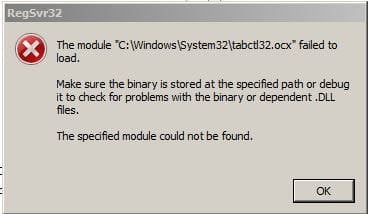
When I try this: C:\Windows\System32\regsvr32.exe C:\Windows\System32\xxx.dll or xxx.ocx I get this error. The files are in the folder.

regsvr32 error.JPG
 

My Computer My Computer

At a glance

Windows 7 Pro 64
Computer type
PC/Desktop
Computer Manufacturer/Model Number
Dell Precision T3610
OS
Windows 7 Pro 64
Any suggestions for this?
Thanks
 

My Computer My Computer

At a glance

Windows 7 Pro 64
Computer type
PC/Desktop
Computer Manufacturer/Model Number
Dell Precision T3610
OS
Windows 7 Pro 64
Hi FarNorth,

Im somewhat confused as to why your doing it
The system automatically registers dll's, its not a standard user option
Fair enough they can become corrupted.

please run, from an elevated command mode
sfc /scannow

wouldn't hurt to run
KB947821, SURT a repair tool
and chkdsk /r

post the results


Roy

Register dll file
To register a dll or ocx file, open a command prompt windows as an administrator, type the following and hit Enter:
regsvr32 tabctl32.ocx
 

My Computer My Computer

At a glance

W7 home premium 32bit/W7HP 64bit/w10 tp insid...E5300 dual core3gbNvidia Geforce 7100 Nforce 630i
Computer type
PC/Desktop
Computer Manufacturer/Model Number
medionl/Aspire 6930G/acer x55a
OS
W7 home premium 32bit/W7HP 64bit/w10 tp insider ring
CPU
E5300 dual core
Motherboard
medion MS7366
Memory
3gb
Graphics Card(s)
Nvidia Geforce 7100 Nforce 630i
Monitor(s) Displays
avixc
Internet Speed
n (isp resticted to 72)
Antivirus
mse/pands
Browser
palemoon
Other Info
Belkin Fd7050 n USB using Railink RT2870 drivers, more upto date
Roy - Thanks for looking at this.

The dll and ocx files are for some custom programs that work with a drafting program I use. I've successfully registered them on several different computers with no issues.
The only thing I can think of that's different with this system is that the operating system was an upgrade to windows 7 pro instead of a new install. Not sure why that would make any difference but who knows.
I've always registered them as you suggest above with no issues.

I'm not familiar with "KB947821 SURT" please explain.

Thanks again for your help.
 

My Computer My Computer

At a glance

Windows 7 Pro 64
Computer type
PC/Desktop
Computer Manufacturer/Model Number
Dell Precision T3610
OS
Windows 7 Pro 64
I still haven't been able to solve this issue. Any other thoughts?

Thanks.
 

My Computer My Computer

At a glance

Windows 7 Pro 64
Computer type
PC/Desktop
Computer Manufacturer/Model Number
Dell Precision T3610
OS
Windows 7 Pro 64
Back
Top