Hi guys.
I know there have been many similar posts but none of them caries any responses that worked for me.
Basically, what is happening is that for some time now I am unable to upload anything to any http:// or use programs like Dropbox/Google Drive. Websites like YouTube just jumps to 100% and process video which never ends and crashes eventually while WeTransfer hangs around 5% and timer goes crazy until that crashes as well. Dropbox and Google Drive shows that they are syncing but it never ends.
I managed to upload little files (less than 1mb) to Dropbox but it took ages and nothing else went through.
On the other hand FileZilla seems to be handling ftp connections all right.
I've been trying to solve this for days now and it's really messing up with my work so any suggestions will be greatly appreciated.
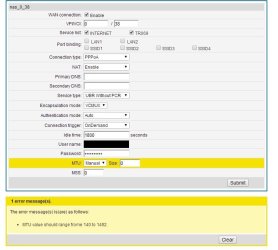
I am using Windows 7 Pro 64 bit. Connect wirelessly to Talk-Talk's Huawei HG523a but also tried plugging my PC in which worked for internet but not for upload.
I can't think of anything else for now. Hopefully you guys will have some better ideas.
Thanks a lot!
I know there have been many similar posts but none of them caries any responses that worked for me.
Basically, what is happening is that for some time now I am unable to upload anything to any http:// or use programs like Dropbox/Google Drive. Websites like YouTube just jumps to 100% and process video which never ends and crashes eventually while WeTransfer hangs around 5% and timer goes crazy until that crashes as well. Dropbox and Google Drive shows that they are syncing but it never ends.
I managed to upload little files (less than 1mb) to Dropbox but it took ages and nothing else went through.
On the other hand FileZilla seems to be handling ftp connections all right.
I've been trying to solve this for days now and it's really messing up with my work so any suggestions will be greatly appreciated.
I am using Windows 7 Pro 64 bit. Connect wirelessly to Talk-Talk's Huawei HG523a but also tried plugging my PC in which worked for internet but not for upload.
- Here is a list of what I tried by now:
- Used a different browser (Chrome, IE)
- Started PC in a Safe Mode with Networking
- Removed Avast and tried without any anty-virus software
- Disabled Windows Firewall
- Removed CC cleaner, Spybot Search and Destroy, Bonjour
- Checked for suspicious activity in running services and disabled Bonjour
- Started Windows with all services running/with only essential services running
- Turned firewall on my router off
- Removed software that was installed about time I started to experience the problem
- Uploaded file via the same network but on a different PC (worked fine)
- Tried connecting with a cable - internet work, problem persist.
- Scanned for Viruses, Malware and broken registry entries.
I can't think of anything else for now. Hopefully you guys will have some better ideas.
Thanks a lot!
Last edited:
My Computer
At a glance
Windows 7 Pro 64bit
- OS
- Windows 7 Pro 64bit