
Solved Access Security Notice using Runtime 2010

bulletng

OCD
Power User
Local time
2:54 PM
Messages
220
Location
USA
I've created a batch file to run a macro within an Access Database I created. I'd like to have this batch file run automatically without user interaction but the problem is that I'm getting this Microsoft Access Security Notice warning everytime I open the database.
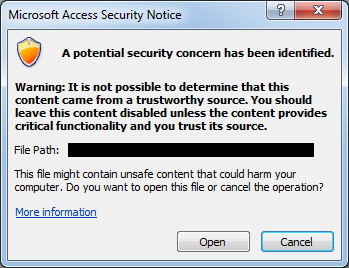
DL73a.png


Installed Access Runtime 2010 on my Windows Server 2008 R2.

I spent a few days researching this and attempting several possible solutions with nothing working. Some things I've tried are as follows:

  • Adding the database location to the Trusted Location (using Registry)
Code:
\HKEY_CURRENT_USER\Software\Microsoft\Office\<version>\Access\Security\Trusted Locations\<location>
Path REG_SZ <drive/path to location; Example C:\My Trusted Stuff\>
I've attempted several different registry combinations within different locations and nothing worked (not even changing the default Trusted Location).
  • Creating a Digital Signature Certificate, but cannot add because runtime doesn't have the ability to do so

The only thing that has worked is placing the database within the default Trusted Location located at C:\Program Files (x86)\Microsoft Office\Office14\ACCWIZ, although this database is being used by many other sources and I cannot simply just move it.

Please I really need some help!
 

My Computer

Computer Manufacturer/Model Number
Me
OS
Windows 7 Pro x64
CPU
Intel Core i7 920
Motherboard
ASUS P6T Deluxe V2
Memory
Corsair XMS3 12GB (3x2GB) DDR3 1333
Graphics Card(s)
EVGA GTX 470 1280MB GDDR5 DX11
Monitor(s) Displays
ASUS VW246H | ACER AL2216W
Screen Resolution
3600x1080
Hard Drives
1x Corsair Vertex 3 SSD (120GB)
1x Corsair Vertex 2 SSD (60GB)
2x Western Digital Black (500GB/1TB)
1x External WD Green eSATA (1TB)
PSU
Corsair 850HX
Case
Velocity Micro FullTower
Keyboard
Logitech G110
Mouse
Logitech G500
Internet Speed
http://www.speedtest.net/result/1226664359.png
Antivirus
MSE
Browser
Chrome
Other Info
Logitech Z-5500 5.1 Surround Sound
Logitech C260 Webcam
Creative Fatal1ty Headset
I just attempted to disable the HyperLinkWarning and the protocols using the registry as well:

HKEY_CURRENT_USER\Software\Microsoft\Office\14.0\Common

Click the registry subkey, point to New on the Edit menu, and then click Key.
Type Security, and then press Enter to name the key.
On the Edit menu, point to New, and then click DWORD Value.
Type DisableHyperlinkWarning, and then press Enter to name the entry.
In the right pane, right-click DisableHyperlinkWarning, and then click Modify.
In the Edit DWORD Value dialog box, click Decimal, and then type 1 or 0 under Value data.
Note A value of 0 enables the hyperlink warning message. A value of 1 disables the hyperlink warning message.


HKEY_CURRENT_USER\Software\Policies\Microsoft\Office\xx.0\Common\Security\Trusted Protocols\All Applications

Note In this subkey, replace "xx.0" with 12.0 for Outlook 2007 and with 14.0 for Outlook 2010.
Click the All Applications subkey.
On the Edit menu, point to New, and then click Key.
Type the name of the protocol that you want to exclude. For example, to disable the display of a security warning for the "Notes:" protocol, type Notes:.

Note Make sure that you include the colon ( : ) character.

The problem with the last one is that the Office folder does not exist most likely because it is Runtime version.
 

My Computer

Computer Manufacturer/Model Number
Me
OS
Windows 7 Pro x64
CPU
Intel Core i7 920
Motherboard
ASUS P6T Deluxe V2
Memory
Corsair XMS3 12GB (3x2GB) DDR3 1333
Graphics Card(s)
EVGA GTX 470 1280MB GDDR5 DX11
Monitor(s) Displays
ASUS VW246H | ACER AL2216W
Screen Resolution
3600x1080
Hard Drives
1x Corsair Vertex 3 SSD (120GB)
1x Corsair Vertex 2 SSD (60GB)
2x Western Digital Black (500GB/1TB)
1x External WD Green eSATA (1TB)
PSU
Corsair 850HX
Case
Velocity Micro FullTower
Keyboard
Logitech G110
Mouse
Logitech G500
Internet Speed
http://www.speedtest.net/result/1226664359.png
Antivirus
MSE
Browser
Chrome
Other Info
Logitech Z-5500 5.1 Surround Sound
Logitech C260 Webcam
Creative Fatal1ty Headset
Well my co-worker took a look at it and figured out that it was missing a key one directory back...

"AllowNetworkLocations"=dword:00000001

With that it allows Trusted Locations using network shares or mapped network drives. Which in my case was where the database was located...

For anyone who's reading this and has a similar issue you can try creating the Trusted Location using another computer that has the full version of access, export the keys, modify the user SID, and import to the computer with the runtime version! Just don't forget that AllowNetworkLocations!
 

My Computer

Computer Manufacturer/Model Number
Me
OS
Windows 7 Pro x64
CPU
Intel Core i7 920
Motherboard
ASUS P6T Deluxe V2
Memory
Corsair XMS3 12GB (3x2GB) DDR3 1333
Graphics Card(s)
EVGA GTX 470 1280MB GDDR5 DX11
Monitor(s) Displays
ASUS VW246H | ACER AL2216W
Screen Resolution
3600x1080
Hard Drives
1x Corsair Vertex 3 SSD (120GB)
1x Corsair Vertex 2 SSD (60GB)
2x Western Digital Black (500GB/1TB)
1x External WD Green eSATA (1TB)
PSU
Corsair 850HX
Case
Velocity Micro FullTower
Keyboard
Logitech G110
Mouse
Logitech G500
Internet Speed
http://www.speedtest.net/result/1226664359.png
Antivirus
MSE
Browser
Chrome
Other Info
Logitech Z-5500 5.1 Surround Sound
Logitech C260 Webcam
Creative Fatal1ty Headset
Back
Top