
Accessed PC with Macrium_reflect_v7_2 running. Macrium stoppe, did n

klxdrt

New member
Member
VIP
Local time
3:30 AM
Messages
188
Hi,


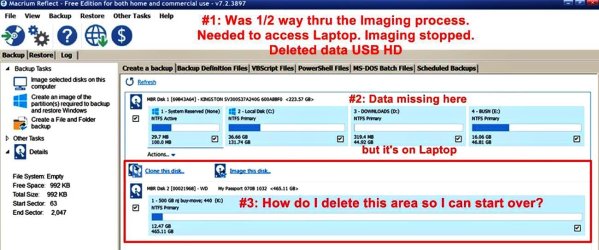
I had to access my laptop while Imaging to 500 MB USB. Dr. Macrium_reflect_v7_2 stopped & did not complete the process.

Went to the to USB Dr. & deleted contents of Macrium Reflect's partial imaging folder.

See attached image to see how It left Macrium Reflect.

What is the best way to start over? Went thru the 500 pg manual to no avail.

Regards,

klxdrt
 

Attachments
  • backup of laptop.jpg
    backup of laptop.jpg
    99.2 KB · Views: 4

My Computer My Computer

At a glance

w7 pro 32 bit w/XP virt enabled.AMD A6-36504 GB DDR3 RAMNVIDIA GeForce 210
Computer type
PC/Desktop
Computer Manufacturer/Model Number
locally made
OS
w7 pro 32 bit w/XP virt enabled.
CPU
AMD A6-3650
Motherboard
ASUS F1A55-M CSM
Memory
4 GB DDR3 RAM
Graphics Card(s)
NVIDIA GeForce 210
Sound Card
NVIDIA High Definition Audio
Monitor(s) Displays
28" HD monitor
Screen Resolution
1680 x 1050 x 32 bits (4294967296 colors) @ 59 Hz
Hard Drives
2 x 500 GB Western Digital Blue Hard Drive
PSU
?
Case
?
Cooling
3-4 fans
Keyboard
big yellow keys
Mouse
logitec
Internet Speed
60 mb
Antivirus
panda
Browser
ff
Other Info
scanner, webcam, bw printer, fax modem, cd/dvd burner, PC usb ports: 2 usb3, 6 usb2 plus 7 port usb hub, 2 tb usb3, 1 Tb usb3, 500Mb usb2, 120Mb USB2 portable drives, asst of flash drives 250 Mb to 32 Gb. backup PC, office
Hi klxdrt,

I had to access my laptop while Imaging to 500 MB USB. Dr. Macrium_reflect_v7_2 stopped & did not complete the process.

Went to the to USB Dr. & deleted contents of Macrium Reflect's partial imaging folder.

What is the best way to start over? Went thru the 500 pg manual to no avail.

I doubt very much that you will get an OS image on a 500 MB USB to start with, you mean 500 GB [as per your attached image]!

What do the properties of the used space say?

I hope this helps!
 

My Computer My Computer

At a glance

Win 7 HP SP1 64-bit Vista HB SP2 32-bit Linux...Intel(R) Pentium(R) CPU P6200 @ 2.13GHz4.00 GBIntel(R) Graphics Media Accelerator HD
Computer type
Laptop
Computer Manufacturer/Model Number
Fujitsu LIFEBOOK
OS
Win 7 HP SP1 64-bit Vista HB SP2 32-bit Linux Mint 18.3
CPU
Intel(R) Pentium(R) CPU P6200 @ 2.13GHz
Motherboard
FUJITSU FJNBB06
Memory
4.00 GB
Graphics Card(s)
Intel(R) Graphics Media Accelerator HD
Sound Card
[1] Realtek High Definition Audio [2] Intel(R) Display Audio
Screen Resolution
1366 x 768 x 32 bits (4294967296 colors) @ 59 Hz
Hard Drives
TOSHIBA MK5076GSX
Antivirus
AVG FREE
Yea, a miss think by me. This whole project started started with a simple premise: W7 is nearing EOL and was getting advice on going to W10, new laptop $1300 or upgrade current laptop, MSI.

Moved to another state, lost my F-F tech buddies & friends. Turned to forums. Not being a typist, images demonstrated the problems better. Moving fast, created a lot of them in a short time.

"too much info"=errors.

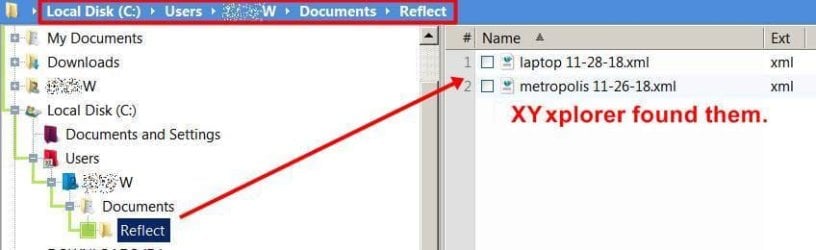
BTW: 131 gb data took up ended up on 500 GB USB as 2ea. 12k xml files. And Macrium Reflect put the image on the C: partition in folder not found by WI, but XYplorer found it

Regards,

klxdrt
 

Attachments

  • macrum 800 location.jpg
    macrum 800 location.jpg
    26.5 KB · Views: 0

My Computer My Computer

At a glance

w7 pro 32 bit w/XP virt enabled.AMD A6-36504 GB DDR3 RAMNVIDIA GeForce 210
Computer type
PC/Desktop
Computer Manufacturer/Model Number
locally made
OS
w7 pro 32 bit w/XP virt enabled.
CPU
AMD A6-3650
Motherboard
ASUS F1A55-M CSM
Memory
4 GB DDR3 RAM
Graphics Card(s)
NVIDIA GeForce 210
Sound Card
NVIDIA High Definition Audio
Monitor(s) Displays
28" HD monitor
Screen Resolution
1680 x 1050 x 32 bits (4294967296 colors) @ 59 Hz
Hard Drives
2 x 500 GB Western Digital Blue Hard Drive
PSU
?
Case
?
Cooling
3-4 fans
Keyboard
big yellow keys
Mouse
logitec
Internet Speed
60 mb
Antivirus
panda
Browser
ff
Other Info
scanner, webcam, bw printer, fax modem, cd/dvd burner, PC usb ports: 2 usb3, 6 usb2 plus 7 port usb hub, 2 tb usb3, 1 Tb usb3, 500Mb usb2, 120Mb USB2 portable drives, asst of flash drives 250 Mb to 32 Gb. backup PC, office
Hi klxdrt,

BTW: 131 gb data took up ended up on 500 GB USB as 2ea. 12k xml files. And Macrium Reflect put the image on the C: partition in folder not found by WI, but XYplorer found it.

I don't actually use Macrium Reflect, but I know that many members here do. I am sure that one of them will be able to assist you.

It seems that the image was mis-directed to the C:/ drive as opposed to the K:/ drive as required!

I use AOMEI Backupper Standard [FREE]. When imaging with this it works out that the image size will end up at approximately 40% of the original.

I hope this helps!
 

My Computer My Computer

At a glance

Win 7 HP SP1 64-bit Vista HB SP2 32-bit Linux...Intel(R) Pentium(R) CPU P6200 @ 2.13GHz4.00 GBIntel(R) Graphics Media Accelerator HD
Computer type
Laptop
Computer Manufacturer/Model Number
Fujitsu LIFEBOOK
OS
Win 7 HP SP1 64-bit Vista HB SP2 32-bit Linux Mint 18.3
CPU
Intel(R) Pentium(R) CPU P6200 @ 2.13GHz
Motherboard
FUJITSU FJNBB06
Memory
4.00 GB
Graphics Card(s)
Intel(R) Graphics Media Accelerator HD
Sound Card
[1] Realtek High Definition Audio [2] Intel(R) Display Audio
Screen Resolution
1366 x 768 x 32 bits (4294967296 colors) @ 59 Hz
Hard Drives
TOSHIBA MK5076GSX
Antivirus
AVG FREE
Imaging with Macrium Reflect

Paul,


Thank you for sage advice. I'm not a techie, retired from 50 yr as a mgr with several F500 co & several smaller. Used Dos & Win since early 80's so I have a working knowledge of tech, etc. Macrium Reflect was suggest by most guys. Was not aware of AOMEI Backupper Standard.


I'll download it, use it & see what happens.


Regards,
klxdrt
 

My Computer My Computer

At a glance

w7 pro 32 bit w/XP virt enabled.AMD A6-36504 GB DDR3 RAMNVIDIA GeForce 210
Computer type
PC/Desktop
Computer Manufacturer/Model Number
locally made
OS
w7 pro 32 bit w/XP virt enabled.
CPU
AMD A6-3650
Motherboard
ASUS F1A55-M CSM
Memory
4 GB DDR3 RAM
Graphics Card(s)
NVIDIA GeForce 210
Sound Card
NVIDIA High Definition Audio
Monitor(s) Displays
28" HD monitor
Screen Resolution
1680 x 1050 x 32 bits (4294967296 colors) @ 59 Hz
Hard Drives
2 x 500 GB Western Digital Blue Hard Drive
PSU
?
Case
?
Cooling
3-4 fans
Keyboard
big yellow keys
Mouse
logitec
Internet Speed
60 mb
Antivirus
panda
Browser
ff
Other Info
scanner, webcam, bw printer, fax modem, cd/dvd burner, PC usb ports: 2 usb3, 6 usb2 plus 7 port usb hub, 2 tb usb3, 1 Tb usb3, 500Mb usb2, 120Mb USB2 portable drives, asst of flash drives 250 Mb to 32 Gb. backup PC, office
Back
Top