Solved Accidentally created folder with name <space> / ASCII 32. Can't delete

drnt007

New member
Local time
10:31 AM
Messages
2
Accidentally created folder with name <space> / ASCII 32. Can't delete

Hello
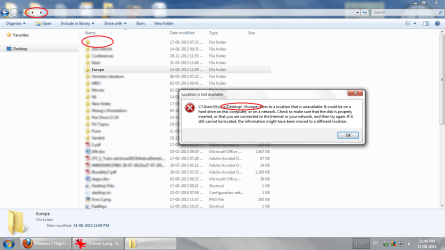
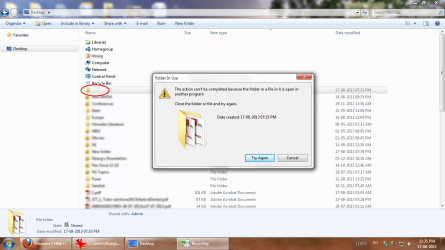
In windows we cannot rename a folder to " " or <space>. it won't accept the name. I was just wondering about that.:sarc: so tried a script to create folder with ascii 32 code. The folder was created:D, but now i am stuck with it:(. I can not delete/rename it. On trying to delete/rename it shows "Folder in use by some other process" error.:confused:

The folder i created is on desktop
"C:\Users\<User name>\Desktop"

If i open it, the path changes to
"C:\Users\<User name>\Desktop\ "
But the contents shown are same of the parent folder. Only difference is anything cannot be accessed from here. :banghead:

The issue should not related to any permissions because i haven't touched them.
I have attached some screenshots here.

If anyone can help..Thanks a lot.
 

Attachments
  • Error 1.png
    Error 1.png
    100.7 KB · Views: 11
  • Error 2.png
    Error 2.png
    91.1 KB · Views: 11

My Computer My Computer

Computer type
Laptop
Computer Manufacturer/Model Number
Dell Inspiron
OS
Windows 7 Ultimate 32 bit
Memory
2 GB
Antivirus
AVG Free 2013
Browser
Mozilla Firefox
Last edited:

My Computer My Computer

Computer type
PC/Desktop
OS
Windows 7 Professional 64bit
CPU
AMD Athlon (tm) X2 5200+ Dual Core 2712 Mhz
Motherboard
Asus
Memory
4GB
Graphics Card(s)
Nividia GeForce 8600 GTS- DIED 25/7/2013 R.I.P
Sound Card
None
Monitor(s) Displays
22" Yuraku LCD (Dont ask)
Screen Resolution
1280x960
Hard Drives
2TB WD Caviar green
PSU
Windy up type
Case
Scout cm Storm
Cooling
Hair dryer on full cool power ;-)
Keyboard
QWERTY
Mouse
Microsoft Special
Internet Speed
BT Infinity 9.38Mb/s Wheeeeeeeeeeeeeeee!!
Antivirus
MSE
Browser
Internet Explore 10 and Chrome
Other Info
Don't shout...I've got a Hangover!
Try Unlocker

It's good to have anyway.
 

My Computer My Computer

Computer Manufacturer/Model Number
HP Media Center
OS
Windows 7 32 bit
CPU
AMD 5200+ dual core
Memory
2 GB
Graphics Card(s)
NVidia GeForce 6150SE 128 MB
Monitor(s) Displays
CRT
Screen Resolution
1280x1024
Hard Drives
500 GB Sata internal :

SIIG USB 3.0 docking stations w/WD Caviar Black 6 Gb/s drives
Keyboard
PS/2
Mouse
PS/2 Wheel Mouse
Other Info
SIIG USB 3.0 PCIexpress card.
What does it look like from a Elevated Command Prompt?
 

My Computer My Computer

Computer type
PC/Desktop
Computer Manufacturer/Model Number
Lenovo IdeaCenter 450
OS
Windows 10 Pro X64
CPU
Intel Quad Core i7-4770 @ 3.4Ghz
Memory
16.0GB PC3-12800 DDR3 SDRAM 1600 MHz
Graphics Card(s)
Intel Integrated HD Graphics
Sound Card
Realtek HD Audio
Monitor(s) Displays
HP 22" LCD
Screen Resolution
1680 x 1050
Hard Drives
250GB Samsung EVO SATA-3 SSD
2TB Seagate ST2000DM001 SATA-2
1.5TB Seagate ST3150041AS SATA
Keyboard
Dell USB
Mouse
Lenovo USB
Internet Speed
Cable via Road Runner 3MB Upload, 30MB Download
Antivirus
Windows Defender, MBAM Pro, MBAE
Browser
Seamonkey
Other Info
UEFI/GPT
PLDS DVD-RW DH16AERSH

My Computer My Computer

Computer type
PC/Desktop
Computer Manufacturer/Model Number
n/a
OS
W7 Ultimate SP1, LM19.2 MATE, W10 Home 1703, W10 Pro 1703 VM, #All 64 bit
CPU
AMD Phenom II x6 1100T, 3.3 GHz
Motherboard
ASUS M4A88T-M/USB3 (AM3)
Memory
12GB DDR3 1333 G-Skill (4GB x 2), G-Skill (2GB x 2)
Graphics Card(s)
NVIDIA GeForce GTX 660
Sound Card
Realtek?
Monitor(s) Displays
Samsung S23B350
Screen Resolution
1920x1080
Hard Drives
WD Green 2TB (SATA), WD Green 3TB (SATA), WD Blue 4TB (SATA), WD Blue 6TB (SATA)
PSU
Cooler Master
Case
Antec GX300 Tower
Cooling
3x Antec TRICOOL 120mm Fans
Mouse
Wired Optical
Internet Speed
DSL
Antivirus
Avast
Browser
Pale Moon (64 bit)
Other Info
2018-12-27 Upgraded HDDs
2015-12-10 Upgraded case, graphics card, storage
2015-08-15 Upgraded motherboard & RAM
2015-07-15 Upgraded LM17.1 to LM17.2
Problem solved.. but many things to learn

ok guys..the problem is solved. Thanks everyone. After successfully deleting the folder, i went on experimenting (of course on my data partition, not on the desktop folder)

The system restore did not solve the problem.
Most probable reason may be, it restores system files. and this folder was on <user>\desktop\
Neither the command prompt method worked.

Exporer Method:
What i did was. Moved all other files to another location.
then i tried to delete the parent folder. (<user>\desktop). and its gone.


But the important implication is of this method is, you have to delete parent folder.
what if i created it on root of my hard disk/ or inside some system folder??


Unlocker method:
I had used Unlocker many a times. But the portable version which i had stopped working without any reason.I don't know why that happened.(even with antivirus disabled). I downloaded installer version and that went well.

for experiment, i created "E:\a\b\c\d\<space>"

Unlocker shows, 3 to 4 explorer.exe handles having lock on this. If we simply unlock, and try to delete "E:\a\b\c\d\<space>" from windows explorer , even the parent folder "d" gets deleted along with it.

But if u Unlock & delete from unlocker, then only "E:\a\b\c\d\<space>" gets deleted.


I think this is kind of a bug in windows, creating such folder is not allowed from windows itself. But if u can manage to create such folder, it causes strange issues like circular entries, access error etc..


Thanks everyone for great ideas and help.
 

My Computer My Computer

Computer type
Laptop
Computer Manufacturer/Model Number
Dell Inspiron
OS
Windows 7 Ultimate 32 bit
Memory
2 GB
Antivirus
AVG Free 2013
Browser
Mozilla Firefox
Glad your sorted. :)

Please mark the thread as solved.

cheers

Dave
 

My Computer My Computer

Computer type
PC/Desktop
OS
Windows 7 Professional 64bit
CPU
AMD Athlon (tm) X2 5200+ Dual Core 2712 Mhz
Motherboard
Asus
Memory
4GB
Graphics Card(s)
Nividia GeForce 8600 GTS- DIED 25/7/2013 R.I.P
Sound Card
None
Monitor(s) Displays
22" Yuraku LCD (Dont ask)
Screen Resolution
1280x960
Hard Drives
2TB WD Caviar green
PSU
Windy up type
Case
Scout cm Storm
Cooling
Hair dryer on full cool power ;-)
Keyboard
QWERTY
Mouse
Microsoft Special
Internet Speed
BT Infinity 9.38Mb/s Wheeeeeeeeeeeeeeee!!
Antivirus
MSE
Browser
Internet Explore 10 and Chrome
Other Info
Don't shout...I've got a Hangover!
Another way to get at things ordinarily locked by the system is using RunIt

It's just a convenient way to access the Run Once in the Registry. I used it often to run a program that deleted all index.dat files on my system. Ordinarily index.dat files are locked by the system. But the program launched by RunIt is executed before logon.

Be sure to download from the Softpedia download link. My old web site is down. But a friend has offered me web space. I hope to get a page of some sort back up in a month or so. I need to get a laptop to work/program with in the interim.
 

My Computer My Computer

Computer Manufacturer/Model Number
HP Media Center
OS
Windows 7 32 bit
CPU
AMD 5200+ dual core
Memory
2 GB
Graphics Card(s)
NVidia GeForce 6150SE 128 MB
Monitor(s) Displays
CRT
Screen Resolution
1280x1024
Hard Drives
500 GB Sata internal :

SIIG USB 3.0 docking stations w/WD Caviar Black 6 Gb/s drives
Keyboard
PS/2
Mouse
PS/2 Wheel Mouse
Other Info
SIIG USB 3.0 PCIexpress card.
Back
Top