
You are using an out of date browser. It may not display this or other websites correctly.
You should upgrade or use an alternative browser.
You should upgrade or use an alternative browser.
Solved Accidentally deleted audio driver.
- Thread starter junebee
- Start date

Open your Control Panel and go to Device Manager. You might see an unknown device or one that's currently not working there. If yes, that's probably the missing audio device. You can rightclick it and allow Windows to search for a driver to re-install it.
If you don't see a problem device, expand the Sound, Video and Game Controllers tree. Is there a problem device listed there?
If you can't find it, try Scan for Hardware Changes from the Action menu. Please report back with whether you're successful.
If you don't see a problem device, expand the Sound, Video and Game Controllers tree. Is there a problem device listed there?
If you can't find it, try Scan for Hardware Changes from the Action menu. Please report back with whether you're successful.
My Computer
At a glance
Windows 7 Professional SP1 32-bitIntel Core 2 Duo E6600 2.4GHz4GB DDR2-667 (4x1GB in dual-channel config)nVidia GeForce 9800 GT
- Computer type
- PC/Desktop
- Computer Manufacturer/Model Number
- Custom-built
- OS
- Windows 7 Professional SP1 32-bit
- CPU
- Intel Core 2 Duo E6600 2.4GHz
- Motherboard
- Asus PL5D2
- Memory
- 4GB DDR2-667 (4x1GB in dual-channel config)
- Graphics Card(s)
- nVidia GeForce 9800 GT
- Sound Card
- Creative X-Fi XtremeMusic
- Monitor(s) Displays
- Acer P236H
- Screen Resolution
- 1920x1200 (DVI)
- Hard Drives
- OCZ SSD Vertex Plus 60GB SATA (Firmware 3.55), 64MB cache
Hitachi HD321KJ SATA, 320GB, 7200rpm, 16MB cache
- PSU
- Antec TruePower 2.0
- Case
- Cooler Master Centurion
- Cooling
- Too many fans
- Keyboard
- Standard
- Mouse
- Microsoft wireless optical mouse
- Internet Speed
- AT&T U-verse (18mbit/sec)
- Antivirus
- Microsoft Security Essentials
- Browser
- Firefox
- Other Info
- Other devices:
Compaq CQ-60 laptop
Google Nexus 7 (2012) tablet
Nvidia SHIELD tablet (US/LTE)
Hardkernel ODROID-XU single-board computer (Samsung Exynos 5420)

have you tried a re-boot, failing that do a system restore to the point before you deleted the audio driver.
System Restore - Windows 7 Forums
System Restore - Windows 7 Forums
My Computer
At a glance
Microsoft Windows 7 Home Premium 64-bit 7600IIx4 amd athelon 635 processor2x2gbati radeon HD 5450
- Computer Manufacturer/Model Number
- Hewlett packard/p6512uk
- OS
- Microsoft Windows 7 Home Premium 64-bit 7600
- CPU
- IIx4 amd athelon 635 processor
- Motherboard
- FOXCONN 2AA9
- Memory
- 2x2gb
- Graphics Card(s)
- ati radeon HD 5450
- Sound Card
- (1) Realtek High Definition Audio (2) AMD High Definition
- Monitor(s) Displays
- samsung lcd tv 32"
- Screen Resolution
- 1360x 768
- Hard Drives
- (1) WDC WD10 01FAES-60Z2A0 SATA Disk Device (2) Maxtor OneTouch USB Device (3) ST310003 33AS USB Device (4) WD My Book 1111 USB Device
- PSU
- ?
- Cooling
- air!
- Keyboard
- wireless hp
- Mouse
- wireless Hp,optical
- Internet Speed
- 1.10mb/s
- Antivirus
- MSE
- Browser
- Firefox

I accidentally deleted the audio driver. Now I have an "x" over the speaker icon and cannot play anything with sound (for example, music videos).
have you realtek audio manager installed ?
worth a look here it may help Realtek HD Audio Driver >>> http://goo.gl/CrRTf
Latest Realtek High Definition Audio Codecs >>>> http://goo.gl/pSPT8
My Computer
At a glance
Operating System : Windows 7 Home Premium Edi...Processor : Intel Core 2 Quad Q8300 @ 2500 MHzPhysical Memory :8GB Corsair4x 2GB 800MHz C5 ...Video Card : XFX 6700 AMD
- Computer Manufacturer/Model Number
- packard bell IXTREME M5722
- OS
- Operating System : Windows 7 Home Premium Edition 6.01.7600 SP1 (x64)
- CPU
- Processor : Intel Core 2 Quad Q8300 @ 2500 MHz
- Motherboard
- Mainboard : Packard Bell (Acer EG43M )
- Memory
- Physical Memory :8GB Corsair4x 2GB 800MHz C5 DDR2
- Graphics Card(s)
- Video Card : XFX 6700 AMD
- Monitor(s) Displays
- Maestro 234DL - BenQ V2220 - BenQ VW2420H
- Screen Resolution
- Current Display :1920x1080p pixels at 60 Hz in HD LED
- Hard Drives
- Hard Disks : WDC (1000 GB)
Drive C: (Hard Disk) : 428 GB available on 491 GB
Drive D: (Hard Disk) : 426 GB available on 492 GB
SAMSUNG spinpoint HD103SJ 1000.2 GB
(X 2) KINGSTON SSD NOW V 30GB
- PSU
- XFX ProSeries 550W PSU
- Case
- PACKARD BELL IXTREME
- Cooling
- System Blower Current: 150mA Air Flow16CFM ;Akasa 90mm rear
- Keyboard
- Gigabyte Aivia K8100
- Mouse
- TRUST-Wireless Laser Mouse - Carbon edition MI-7770C
- Internet Speed
- TP-LINK > TL-WN951N / AV500 Gigabit Powerline Adapters
- Browser
- chrome dev
- Other Info
- EXTRA COOLING>(FAN CONTROLLER) PC Bay Cooler 3 x 40mm fans; Akasa AK-HD-BL Blue hard drive cooler 2 x 40 mm fan 4500 rpm 29.7 dBA
Bios> American Megatrends Inc.
Version : P01-A1
Date : 08/31/2009
I had to replace the mouse since it didn't work all weekend (I'm at home with disabled children so can only get to this stuff when they are at school). So I had to shut down the computer and cannot access the restore point previous to deleting the Realtek. It seems like it should be a simple matter of downloading the Realtek audio driver. I went to the link that Brianzion suggested but the screen keeps taking me back to the main page to accept the terms even when I check the box to accept and press "next". Then I get a blank white page that says "Object moved to here" (here, being a hyperlink) and when I click on "here" it goes right back to the accept terms page.
My Computer
At a glance
windows 7 ultimate
- OS
- windows 7 ultimate
hi sorry about that link try this one its from brinks tutorial >>> Realtek
My Computer
At a glance
Operating System : Windows 7 Home Premium Edi...Processor : Intel Core 2 Quad Q8300 @ 2500 MHzPhysical Memory :8GB Corsair4x 2GB 800MHz C5 ...Video Card : XFX 6700 AMD
- Computer Manufacturer/Model Number
- packard bell IXTREME M5722
- OS
- Operating System : Windows 7 Home Premium Edition 6.01.7600 SP1 (x64)
- CPU
- Processor : Intel Core 2 Quad Q8300 @ 2500 MHz
- Motherboard
- Mainboard : Packard Bell (Acer EG43M )
- Memory
- Physical Memory :8GB Corsair4x 2GB 800MHz C5 DDR2
- Graphics Card(s)
- Video Card : XFX 6700 AMD
- Monitor(s) Displays
- Maestro 234DL - BenQ V2220 - BenQ VW2420H
- Screen Resolution
- Current Display :1920x1080p pixels at 60 Hz in HD LED
- Hard Drives
- Hard Disks : WDC (1000 GB)
Drive C: (Hard Disk) : 428 GB available on 491 GB
Drive D: (Hard Disk) : 426 GB available on 492 GB
SAMSUNG spinpoint HD103SJ 1000.2 GB
(X 2) KINGSTON SSD NOW V 30GB
- PSU
- XFX ProSeries 550W PSU
- Case
- PACKARD BELL IXTREME
- Cooling
- System Blower Current: 150mA Air Flow16CFM ;Akasa 90mm rear
- Keyboard
- Gigabyte Aivia K8100
- Mouse
- TRUST-Wireless Laser Mouse - Carbon edition MI-7770C
- Internet Speed
- TP-LINK > TL-WN951N / AV500 Gigabit Powerline Adapters
- Browser
- chrome dev
- Other Info
- EXTRA COOLING>(FAN CONTROLLER) PC Bay Cooler 3 x 40mm fans; Akasa AK-HD-BL Blue hard drive cooler 2 x 40 mm fan 4500 rpm 29.7 dBA
Bios> American Megatrends Inc.
Version : P01-A1
Date : 08/31/2009

They did something to break hotlinking. Click on this link, and then choose Software.
My Computer
At a glance
Windows 7 x64 Ultimate SP1Core i7-2630QM6 GB DDR3Nvidia GT 540M / Intel HD 3000 - Optimus swit...
- Computer Manufacturer/Model Number
- Asus N73SV
- OS
- Windows 7 x64 Ultimate SP1
- CPU
- Core i7-2630QM
- Motherboard
- Intel HM 65
- Memory
- 6 GB DDR3
- Graphics Card(s)
- Nvidia GT 540M / Intel HD 3000 - Optimus switching
- Sound Card
- HD Audio (Intel Azalia/Realtek) ALC269
- Monitor(s) Displays
- LED flat panel
- Screen Resolution
- 1920 x 1080
- Hard Drives
- 2x Seagate Momentus 640 GB - 1,28 TB in total
- Internet Speed
- 4 MB/256 kbps
- Other Info
- External HDs
WD Elements 1,5 TB
WD MyBook 500 GB
make sure you choose the right 32 bit or 64 bit version for your machine 
My Computer
At a glance
Operating System : Windows 7 Home Premium Edi...Processor : Intel Core 2 Quad Q8300 @ 2500 MHzPhysical Memory :8GB Corsair4x 2GB 800MHz C5 ...Video Card : XFX 6700 AMD
- Computer Manufacturer/Model Number
- packard bell IXTREME M5722
- OS
- Operating System : Windows 7 Home Premium Edition 6.01.7600 SP1 (x64)
- CPU
- Processor : Intel Core 2 Quad Q8300 @ 2500 MHz
- Motherboard
- Mainboard : Packard Bell (Acer EG43M )
- Memory
- Physical Memory :8GB Corsair4x 2GB 800MHz C5 DDR2
- Graphics Card(s)
- Video Card : XFX 6700 AMD
- Monitor(s) Displays
- Maestro 234DL - BenQ V2220 - BenQ VW2420H
- Screen Resolution
- Current Display :1920x1080p pixels at 60 Hz in HD LED
- Hard Drives
- Hard Disks : WDC (1000 GB)
Drive C: (Hard Disk) : 428 GB available on 491 GB
Drive D: (Hard Disk) : 426 GB available on 492 GB
SAMSUNG spinpoint HD103SJ 1000.2 GB
(X 2) KINGSTON SSD NOW V 30GB
- PSU
- XFX ProSeries 550W PSU
- Case
- PACKARD BELL IXTREME
- Cooling
- System Blower Current: 150mA Air Flow16CFM ;Akasa 90mm rear
- Keyboard
- Gigabyte Aivia K8100
- Mouse
- TRUST-Wireless Laser Mouse - Carbon edition MI-7770C
- Internet Speed
- TP-LINK > TL-WN951N / AV500 Gigabit Powerline Adapters
- Browser
- chrome dev
- Other Info
- EXTRA COOLING>(FAN CONTROLLER) PC Bay Cooler 3 x 40mm fans; Akasa AK-HD-BL Blue hard drive cooler 2 x 40 mm fan 4500 rpm 29.7 dBA
Bios> American Megatrends Inc.
Version : P01-A1
Date : 08/31/2009
I did download the Realtek yesterday (finally) and did choose the correct 32 bit for my machine. I then restarted the computer and there was no change. I'm going to give up. Thanks for trying to help me anyway.
My Computer
At a glance
windows 7 ultimate
- OS
- windows 7 ultimate
I think I finally understood what your problem is. You did not do the best job explaining it if my guess is correct.
Click your speaker icon. Click Playback devices. Right click in the empty space.
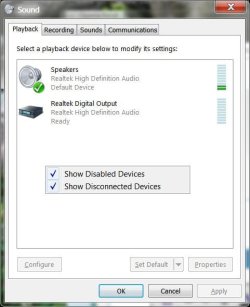
Make sure that both boxes are ticked. If you see the device you (might have) disabled, enable it.
Anyway, I hope you are still lurking and you will see this.
Click your speaker icon. Click Playback devices. Right click in the empty space.
Make sure that both boxes are ticked. If you see the device you (might have) disabled, enable it.
Anyway, I hope you are still lurking and you will see this.
My Computer
At a glance
Windows 7 x64 Ultimate SP1Core i7-2630QM6 GB DDR3Nvidia GT 540M / Intel HD 3000 - Optimus swit...
- Computer Manufacturer/Model Number
- Asus N73SV
- OS
- Windows 7 x64 Ultimate SP1
- CPU
- Core i7-2630QM
- Motherboard
- Intel HM 65
- Memory
- 6 GB DDR3
- Graphics Card(s)
- Nvidia GT 540M / Intel HD 3000 - Optimus switching
- Sound Card
- HD Audio (Intel Azalia/Realtek) ALC269
- Monitor(s) Displays
- LED flat panel
- Screen Resolution
- 1920 x 1080
- Hard Drives
- 2x Seagate Momentus 640 GB - 1,28 TB in total
- Internet Speed
- 4 MB/256 kbps
- Other Info
- External HDs
WD Elements 1,5 TB
WD MyBook 500 GB
Sorry to hear about your troubles and frustration. It's understandable you want to give up, but we're not willing to just yet. 
Why don't we start over from the beginning - could you tell us exactly how you deleted the audio driver by accident? Did you remove the actual device from Device Manager, or did you delete any particular files through Explorer? Or what happened?
Perhaps understanding how the problem came about gives us an important clue we're missing so far.
Why don't we start over from the beginning - could you tell us exactly how you deleted the audio driver by accident? Did you remove the actual device from Device Manager, or did you delete any particular files through Explorer? Or what happened?
Perhaps understanding how the problem came about gives us an important clue we're missing so far.
My Computer
At a glance
Windows 7 Professional SP1 32-bitIntel Core 2 Duo E6600 2.4GHz4GB DDR2-667 (4x1GB in dual-channel config)nVidia GeForce 9800 GT
- Computer type
- PC/Desktop
- Computer Manufacturer/Model Number
- Custom-built
- OS
- Windows 7 Professional SP1 32-bit
- CPU
- Intel Core 2 Duo E6600 2.4GHz
- Motherboard
- Asus PL5D2
- Memory
- 4GB DDR2-667 (4x1GB in dual-channel config)
- Graphics Card(s)
- nVidia GeForce 9800 GT
- Sound Card
- Creative X-Fi XtremeMusic
- Monitor(s) Displays
- Acer P236H
- Screen Resolution
- 1920x1200 (DVI)
- Hard Drives
- OCZ SSD Vertex Plus 60GB SATA (Firmware 3.55), 64MB cache
Hitachi HD321KJ SATA, 320GB, 7200rpm, 16MB cache
- PSU
- Antec TruePower 2.0
- Case
- Cooler Master Centurion
- Cooling
- Too many fans
- Keyboard
- Standard
- Mouse
- Microsoft wireless optical mouse
- Internet Speed
- AT&T U-verse (18mbit/sec)
- Antivirus
- Microsoft Security Essentials
- Browser
- Firefox
- Other Info
- Other devices:
Compaq CQ-60 laptop
Google Nexus 7 (2012) tablet
Nvidia SHIELD tablet (US/LTE)
Hardkernel ODROID-XU single-board computer (Samsung Exynos 5420)
Did you try scanning for hardware changes in the Device manager? A device cannot unplug itself just like that from Windows, within BIOS maybe, but not here..
My Computer
At a glance
Windows 7 x64 Ultimate SP1Core i7-2630QM6 GB DDR3Nvidia GT 540M / Intel HD 3000 - Optimus swit...
- Computer Manufacturer/Model Number
- Asus N73SV
- OS
- Windows 7 x64 Ultimate SP1
- CPU
- Core i7-2630QM
- Motherboard
- Intel HM 65
- Memory
- 6 GB DDR3
- Graphics Card(s)
- Nvidia GT 540M / Intel HD 3000 - Optimus switching
- Sound Card
- HD Audio (Intel Azalia/Realtek) ALC269
- Monitor(s) Displays
- LED flat panel
- Screen Resolution
- 1920 x 1080
- Hard Drives
- 2x Seagate Momentus 640 GB - 1,28 TB in total
- Internet Speed
- 4 MB/256 kbps
- Other Info
- External HDs
WD Elements 1,5 TB
WD MyBook 500 GB
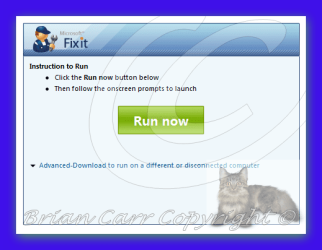
hi sorry you still are having problems have you tried the Microsoft fix it >>> Diagnose and repair sound playback problems automatically
LINK >>> Diagnose and repair sound playback problems automatically
LINK >>> Diagnose and repair sound playback problems automatically
Automatically diagnose and repair problems with sound and audio on your computer or when your computer does not play sound. Find other automated solutions
What it fixes...
Identify if the correct audio services are running
Identify if your audio device is disabled or turned off in Windows
Identify if your audio device is muted
Identify if the volume of your audio device is set too low to hear
Identify if the audio device is not set as default
Determine if your audio device is plugged in
You receive an error that states: There might be a problem with your audio device
Attachments
My Computer
At a glance
Operating System : Windows 7 Home Premium Edi...Processor : Intel Core 2 Quad Q8300 @ 2500 MHzPhysical Memory :8GB Corsair4x 2GB 800MHz C5 ...Video Card : XFX 6700 AMD
- Computer Manufacturer/Model Number
- packard bell IXTREME M5722
- OS
- Operating System : Windows 7 Home Premium Edition 6.01.7600 SP1 (x64)
- CPU
- Processor : Intel Core 2 Quad Q8300 @ 2500 MHz
- Motherboard
- Mainboard : Packard Bell (Acer EG43M )
- Memory
- Physical Memory :8GB Corsair4x 2GB 800MHz C5 DDR2
- Graphics Card(s)
- Video Card : XFX 6700 AMD
- Monitor(s) Displays
- Maestro 234DL - BenQ V2220 - BenQ VW2420H
- Screen Resolution
- Current Display :1920x1080p pixels at 60 Hz in HD LED
- Hard Drives
- Hard Disks : WDC (1000 GB)
Drive C: (Hard Disk) : 428 GB available on 491 GB
Drive D: (Hard Disk) : 426 GB available on 492 GB
SAMSUNG spinpoint HD103SJ 1000.2 GB
(X 2) KINGSTON SSD NOW V 30GB
- PSU
- XFX ProSeries 550W PSU
- Case
- PACKARD BELL IXTREME
- Cooling
- System Blower Current: 150mA Air Flow16CFM ;Akasa 90mm rear
- Keyboard
- Gigabyte Aivia K8100
- Mouse
- TRUST-Wireless Laser Mouse - Carbon edition MI-7770C
- Internet Speed
- TP-LINK > TL-WN951N / AV500 Gigabit Powerline Adapters
- Browser
- chrome dev
- Other Info
- EXTRA COOLING>(FAN CONTROLLER) PC Bay Cooler 3 x 40mm fans; Akasa AK-HD-BL Blue hard drive cooler 2 x 40 mm fan 4500 rpm 29.7 dBA
Bios> American Megatrends Inc.
Version : P01-A1
Date : 08/31/2009
If you're still playing along at home: I took it to the person I purchased it from and he said it needed a new sound card. Twenty bucks and it's done.
a new sound card? mmm $20 i hope that sorts it for you
My Computer
At a glance
Operating System : Windows 7 Home Premium Edi...Processor : Intel Core 2 Quad Q8300 @ 2500 MHzPhysical Memory :8GB Corsair4x 2GB 800MHz C5 ...Video Card : XFX 6700 AMD
- Computer Manufacturer/Model Number
- packard bell IXTREME M5722
- OS
- Operating System : Windows 7 Home Premium Edition 6.01.7600 SP1 (x64)
- CPU
- Processor : Intel Core 2 Quad Q8300 @ 2500 MHz
- Motherboard
- Mainboard : Packard Bell (Acer EG43M )
- Memory
- Physical Memory :8GB Corsair4x 2GB 800MHz C5 DDR2
- Graphics Card(s)
- Video Card : XFX 6700 AMD
- Monitor(s) Displays
- Maestro 234DL - BenQ V2220 - BenQ VW2420H
- Screen Resolution
- Current Display :1920x1080p pixels at 60 Hz in HD LED
- Hard Drives
- Hard Disks : WDC (1000 GB)
Drive C: (Hard Disk) : 428 GB available on 491 GB
Drive D: (Hard Disk) : 426 GB available on 492 GB
SAMSUNG spinpoint HD103SJ 1000.2 GB
(X 2) KINGSTON SSD NOW V 30GB
- PSU
- XFX ProSeries 550W PSU
- Case
- PACKARD BELL IXTREME
- Cooling
- System Blower Current: 150mA Air Flow16CFM ;Akasa 90mm rear
- Keyboard
- Gigabyte Aivia K8100
- Mouse
- TRUST-Wireless Laser Mouse - Carbon edition MI-7770C
- Internet Speed
- TP-LINK > TL-WN951N / AV500 Gigabit Powerline Adapters
- Browser
- chrome dev
- Other Info
- EXTRA COOLING>(FAN CONTROLLER) PC Bay Cooler 3 x 40mm fans; Akasa AK-HD-BL Blue hard drive cooler 2 x 40 mm fan 4500 rpm 29.7 dBA
Bios> American Megatrends Inc.
Version : P01-A1
Date : 08/31/2009
I thought that was a good deal, that's the entire cost. Most places around here charge almost fifty dollars just to look at it. This guy works out of his home, he's a retired Marine. I bought the tower, monitor, keyboard and mouse for $80.00 and it works great. Can't complain about that up-front cost!
My Computer
At a glance
windows 7 ultimate
- OS
- windows 7 ultimate
great deal also its good to recycle
My Computer
At a glance
Operating System : Windows 7 Home Premium Edi...Processor : Intel Core 2 Quad Q8300 @ 2500 MHzPhysical Memory :8GB Corsair4x 2GB 800MHz C5 ...Video Card : XFX 6700 AMD
- Computer Manufacturer/Model Number
- packard bell IXTREME M5722
- OS
- Operating System : Windows 7 Home Premium Edition 6.01.7600 SP1 (x64)
- CPU
- Processor : Intel Core 2 Quad Q8300 @ 2500 MHz
- Motherboard
- Mainboard : Packard Bell (Acer EG43M )
- Memory
- Physical Memory :8GB Corsair4x 2GB 800MHz C5 DDR2
- Graphics Card(s)
- Video Card : XFX 6700 AMD
- Monitor(s) Displays
- Maestro 234DL - BenQ V2220 - BenQ VW2420H
- Screen Resolution
- Current Display :1920x1080p pixels at 60 Hz in HD LED
- Hard Drives
- Hard Disks : WDC (1000 GB)
Drive C: (Hard Disk) : 428 GB available on 491 GB
Drive D: (Hard Disk) : 426 GB available on 492 GB
SAMSUNG spinpoint HD103SJ 1000.2 GB
(X 2) KINGSTON SSD NOW V 30GB
- PSU
- XFX ProSeries 550W PSU
- Case
- PACKARD BELL IXTREME
- Cooling
- System Blower Current: 150mA Air Flow16CFM ;Akasa 90mm rear
- Keyboard
- Gigabyte Aivia K8100
- Mouse
- TRUST-Wireless Laser Mouse - Carbon edition MI-7770C
- Internet Speed
- TP-LINK > TL-WN951N / AV500 Gigabit Powerline Adapters
- Browser
- chrome dev
- Other Info
- EXTRA COOLING>(FAN CONTROLLER) PC Bay Cooler 3 x 40mm fans; Akasa AK-HD-BL Blue hard drive cooler 2 x 40 mm fan 4500 rpm 29.7 dBA
Bios> American Megatrends Inc.
Version : P01-A1
Date : 08/31/2009
Similar threads

- Replies
- 13
- Views
- 5K

- Replies
- 17
- Views
- 7K
- Replies
- 2
- Views
- 7K
