I accidentally deleted my installer directory

medenko

Banned
Local time
9:02 PM
Messages
13
I came home from a trip yesterday and don't know how did i deleted my installer folder in Windows directory :(


Now i have problems with my installed Office 2010, can't run it.


I did try running system restore and it's saying this:


26-5-2018-9-25-02.jpg


also checked this


I deleted Windows\Installer folder, is there a chance to repair? - Super User
 

My Computer My Computer

Computer type
PC/Desktop
OS
WINDOWS 7 ULTIMATE X64
CPU
I5 2500K
Motherboard
ASROCK Z68 EXTREME 4 GEN3
Memory
SAMSUNG 8GB DDR3
Graphics Card(s)
MSI HAWK GTX 460 1GB
Hard Drives
INTEL SSD 320 120GB
3X SAMSUNG 2TB
Antivirus
AVAST
Browser
FIREFOX
ok it seems i can run office programs (word, excel, outlok ) directly from office folder in programs folder.....now all i gotta do is fix shortcuts in start menu, or?
 

My Computer My Computer

Computer type
PC/Desktop
OS
WINDOWS 7 ULTIMATE X64
CPU
I5 2500K
Motherboard
ASROCK Z68 EXTREME 4 GEN3
Memory
SAMSUNG 8GB DDR3
Graphics Card(s)
MSI HAWK GTX 460 1GB
Hard Drives
INTEL SSD 320 120GB
3X SAMSUNG 2TB
Antivirus
AVAST
Browser
FIREFOX
Are you saying that MS Office no longer appears in "Programs and Features"?

If it is still in that list you may be able to repair it:

  • Right click on the MS Office entry
  • Choose "Change"
  • Choose "Repair" in the Office dialogue window
 
Last edited:

My Computer My Computer

Computer type
PC/Desktop
Computer Manufacturer/Model Number
n/a
OS
W7 Ultimate SP1, LM19.2 MATE, W10 Home 1703, W10 Pro 1703 VM, #All 64 bit
CPU
AMD Phenom II x6 1100T, 3.3 GHz
Motherboard
ASUS M4A88T-M/USB3 (AM3)
Memory
12GB DDR3 1333 G-Skill (4GB x 2), G-Skill (2GB x 2)
Graphics Card(s)
NVIDIA GeForce GTX 660
Sound Card
Realtek?
Monitor(s) Displays
Samsung S23B350
Screen Resolution
1920x1080
Hard Drives
WD Green 2TB (SATA), WD Green 3TB (SATA), WD Blue 4TB (SATA), WD Blue 6TB (SATA)
PSU
Cooler Master
Case
Antec GX300 Tower
Cooling
3x Antec TRICOOL 120mm Fans
Mouse
Wired Optical
Internet Speed
DSL
Antivirus
Avast
Browser
Pale Moon (64 bit)
Other Info
2018-12-27 Upgraded HDDs
2015-12-10 Upgraded case, graphics card, storage
2015-08-15 Upgraded motherboard & RAM
2015-07-15 Upgraded LM17.1 to LM17.2
i don't have repair anymore in my control panel, should i reinstall fresh? will i keep all my outlook settings?
 

My Computer My Computer

Computer type
PC/Desktop
OS
WINDOWS 7 ULTIMATE X64
CPU
I5 2500K
Motherboard
ASROCK Z68 EXTREME 4 GEN3
Memory
SAMSUNG 8GB DDR3
Graphics Card(s)
MSI HAWK GTX 460 1GB
Hard Drives
INTEL SSD 320 120GB
3X SAMSUNG 2TB
Antivirus
AVAST
Browser
FIREFOX
Backup First

i don't have repair anymore in my control panel, should i reinstall fresh?
We seem to be having some communication problems. :-)

Here are some screenshots.
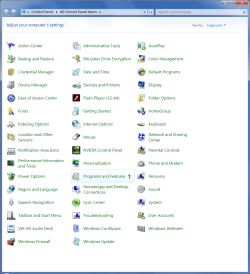
Step 1
"Programs and Features"

MSO2010 - Repair 01.png

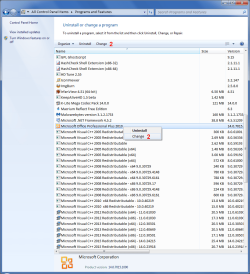
Step 2
Right click on the MS Office entry and choose "Change"
or
Left click on the MS Office entry and choose "Change" from the Command Bar

MSO2010 - Repair 02.png

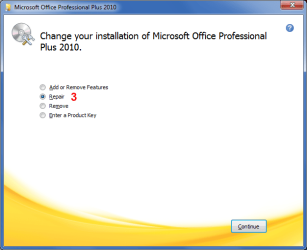
Step 3
Choose "Repair" in the Office dialogue window

MSO2010 - Repair 03.png
will i keep all my outlook settings?
I don't use Outlook.
I don't know if MS Office Repair resets all of your settings (Reinstall will probably destroy them). :(

Make a Backup Image before attempting any repairs/reinstalls.

I prefer to use Macrium Reflect Free Edition.
After you install it, create a recovery CD/USB
Then create your Backup Image.
Make sure you use the "Verify" option, or verify the image after you have made it.

Tutorial
Imaging with free Macrium

If anything goes wrong, you can restore your PC using the Backup Image
 

My Computer My Computer

Computer type
PC/Desktop
Computer Manufacturer/Model Number
n/a
OS
W7 Ultimate SP1, LM19.2 MATE, W10 Home 1703, W10 Pro 1703 VM, #All 64 bit
CPU
AMD Phenom II x6 1100T, 3.3 GHz
Motherboard
ASUS M4A88T-M/USB3 (AM3)
Memory
12GB DDR3 1333 G-Skill (4GB x 2), G-Skill (2GB x 2)
Graphics Card(s)
NVIDIA GeForce GTX 660
Sound Card
Realtek?
Monitor(s) Displays
Samsung S23B350
Screen Resolution
1920x1080
Hard Drives
WD Green 2TB (SATA), WD Green 3TB (SATA), WD Blue 4TB (SATA), WD Blue 6TB (SATA)
PSU
Cooler Master
Case
Antec GX300 Tower
Cooling
3x Antec TRICOOL 120mm Fans
Mouse
Wired Optical
Internet Speed
DSL
Antivirus
Avast
Browser
Pale Moon (64 bit)
Other Info
2018-12-27 Upgraded HDDs
2015-12-10 Upgraded case, graphics card, storage
2015-08-15 Upgraded motherboard & RAM
2015-07-15 Upgraded LM17.1 to LM17.2
when i click on change just 1st screen shows then nothing :(
 

My Computer My Computer

Computer type
PC/Desktop
OS
WINDOWS 7 ULTIMATE X64
CPU
I5 2500K
Motherboard
ASROCK Z68 EXTREME 4 GEN3
Memory
SAMSUNG 8GB DDR3
Graphics Card(s)
MSI HAWK GTX 460 1GB
Hard Drives
INTEL SSD 320 120GB
3X SAMSUNG 2TB
Antivirus
AVAST
Browser
FIREFOX
Original MS Office Installation Disc

Do you still have the original MS Office installation disc?

If the answer is yes, I would create a Backup Image and then try loading the MS Office installation disc.

It may detect your Office install and offer you the "Repair" option.

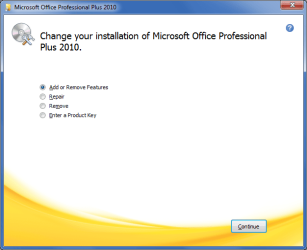
When I run my original MS Office installation disc, I see the same dialogue window that I posted above (screenshot 3).
If your installer info and/or MSOCache have been deleted you might not get those options. :(
MSO2010 - Repair 04 DVD.png
 

My Computer My Computer

Computer type
PC/Desktop
Computer Manufacturer/Model Number
n/a
OS
W7 Ultimate SP1, LM19.2 MATE, W10 Home 1703, W10 Pro 1703 VM, #All 64 bit
CPU
AMD Phenom II x6 1100T, 3.3 GHz
Motherboard
ASUS M4A88T-M/USB3 (AM3)
Memory
12GB DDR3 1333 G-Skill (4GB x 2), G-Skill (2GB x 2)
Graphics Card(s)
NVIDIA GeForce GTX 660
Sound Card
Realtek?
Monitor(s) Displays
Samsung S23B350
Screen Resolution
1920x1080
Hard Drives
WD Green 2TB (SATA), WD Green 3TB (SATA), WD Blue 4TB (SATA), WD Blue 6TB (SATA)
PSU
Cooler Master
Case
Antec GX300 Tower
Cooling
3x Antec TRICOOL 120mm Fans
Mouse
Wired Optical
Internet Speed
DSL
Antivirus
Avast
Browser
Pale Moon (64 bit)
Other Info
2018-12-27 Upgraded HDDs
2015-12-10 Upgraded case, graphics card, storage
2015-08-15 Upgraded motherboard & RAM
2015-07-15 Upgraded LM17.1 to LM17.2
yeah, it's not working either, i think i'll just reinstall whole windows again.


how to save all outlook settings, folders, maps, pst etc?


I JUST RUN this diagnostic


https://support.microsoft.com/en-us/help/2667628/missing-windows-installer-cache-requires-a-computer-rebuild


and got this report


Report on Windows Installer Cache for XXX-PC

127 Missing Cache Product Files (.MSI)

239 Missing Cache Patch Files (.MSP)

132 Total Packages Installed

and details below mostly:


"This .msp appears to be missing. Machine needs to be rebuilt." etc
 

My Computer My Computer

Computer type
PC/Desktop
OS
WINDOWS 7 ULTIMATE X64
CPU
I5 2500K
Motherboard
ASROCK Z68 EXTREME 4 GEN3
Memory
SAMSUNG 8GB DDR3
Graphics Card(s)
MSI HAWK GTX 460 1GB
Hard Drives
INTEL SSD 320 120GB
3X SAMSUNG 2TB
Antivirus
AVAST
Browser
FIREFOX

My Computer My Computer

Computer type
Laptop
Computer Manufacturer/Model Number
Fujitsu LIFEBOOK
OS
Win 7 HP SP1 64-bit Vista HB SP2 32-bit Linux Mint 18.3
CPU
Intel(R) Pentium(R) CPU P6200 @ 2.13GHz
Motherboard
FUJITSU FJNBB06
Memory
4.00 GB
Graphics Card(s)
Intel(R) Graphics Media Accelerator HD
Sound Card
[1] Realtek High Definition Audio [2] Intel(R) Display Audio
Screen Resolution
1366 x 768 x 32 bits (4294967296 colors) @ 59 Hz
Hard Drives
TOSHIBA MK5076GSX
Antivirus
AVG FREE

My Computer My Computer

Computer type
PC/Desktop
Computer Manufacturer/Model Number
HP Desktop & Compaq Laptop
OS
Win 10 x64, Linux Lite, Win 7 x64, BlackArch, & Kali
Hard Drives
Samsung 850 Pro 256Gb,
Hitachi HDD 1Tb,
Crucial MX SSD 250Gb
Segate 3Tb USB 3.0 Ext. Backup HDD
Internet Speed
150Mbps dn, 20Mbps up
Antivirus
Avast Free, Malwarebytes Anti-Exploit & Anti-Ransomware
Browser
Firefox, Chrome, Opera, & VPN
thanks for this :)

snick: you sure it won't mess up?
 

My Computer My Computer

Computer type
PC/Desktop
OS
WINDOWS 7 ULTIMATE X64
CPU
I5 2500K
Motherboard
ASROCK Z68 EXTREME 4 GEN3
Memory
SAMSUNG 8GB DDR3
Graphics Card(s)
MSI HAWK GTX 460 1GB
Hard Drives
INTEL SSD 320 120GB
3X SAMSUNG 2TB
Antivirus
AVAST
Browser
FIREFOX
Hi medenko,

When doing a Repair Install it keeps your folders, files, programs, pictures, music & video, etc. It basically just replaces Windows hopefully correcting corupted files etc.

Here is a excellent Seven Forums tutorial [published by Brink] on doing a Repair Install.

How to Do a Repair Install to Fix Windows 7

IMPORTANT: I would certainly backup your files to an external HDD/USB before you start. I would also create an image file as a secondary backup.

I hope this helps!
 

My Computer My Computer

Computer type
Laptop
Computer Manufacturer/Model Number
Fujitsu LIFEBOOK
OS
Win 7 HP SP1 64-bit Vista HB SP2 32-bit Linux Mint 18.3
CPU
Intel(R) Pentium(R) CPU P6200 @ 2.13GHz
Motherboard
FUJITSU FJNBB06
Memory
4.00 GB
Graphics Card(s)
Intel(R) Graphics Media Accelerator HD
Sound Card
[1] Realtek High Definition Audio [2] Intel(R) Display Audio
Screen Resolution
1366 x 768 x 32 bits (4294967296 colors) @ 59 Hz
Hard Drives
TOSHIBA MK5076GSX
Antivirus
AVG FREE
thanks, i'll do an image to my external drive.....this repair might fix my installer too? especially damn office problem lol.
 

My Computer My Computer

Computer type
PC/Desktop
OS
WINDOWS 7 ULTIMATE X64
CPU
I5 2500K
Motherboard
ASROCK Z68 EXTREME 4 GEN3
Memory
SAMSUNG 8GB DDR3
Graphics Card(s)
MSI HAWK GTX 460 1GB
Hard Drives
INTEL SSD 320 120GB
3X SAMSUNG 2TB
Antivirus
AVAST
Browser
FIREFOX
Can I install same Office to another comp/laptop and after copy/move those INSTALLER files to mine?
 

My Computer My Computer

Computer type
PC/Desktop
OS
WINDOWS 7 ULTIMATE X64
CPU
I5 2500K
Motherboard
ASROCK Z68 EXTREME 4 GEN3
Memory
SAMSUNG 8GB DDR3
Graphics Card(s)
MSI HAWK GTX 460 1GB
Hard Drives
INTEL SSD 320 120GB
3X SAMSUNG 2TB
Antivirus
AVAST
Browser
FIREFOX
Back
Top