Accidentally removed all permissions on file folder (win7)

turbo3000

New member
Local time
12:05 AM
Messages
4
Hi

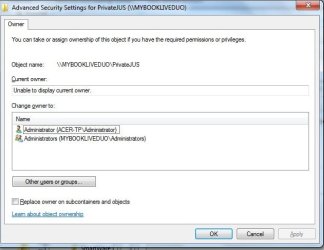
Looking for some help in restoring file access on my WD MYBOOKLIVEDUO. Over time, i had created folders in the drive's directory. One foolish day, i deleted all permissions on a particular folder. My original aim was to restrict access to other users in the home network. No other folders in the external network drive are affected.


Can anybody provide any direction?

I have tried login "cmd as administrator", then tired to change/add owners but unfortunately it keeps denying access. i am running win7 64 bit with sp1 home edition.


regards
 

My Computer My Computer

At a glance

windows 64bit
Computer type
PC/Desktop
OS
windows 64bit

My Computer My Computer

At a glance

Windows 7 Ultimate 64-bitIntel G3420 3.2GHZ Dual CoreKingson 8GB 1600mhzMSI R7970 TF 3GD5/OC BE
Computer type
PC/Desktop
Computer Manufacturer/Model Number
Custom Build
OS
Windows 7 Ultimate 64-bit
CPU
Intel G3420 3.2GHZ Dual Core
Motherboard
Gigabyte H87-HD3
Memory
Kingson 8GB 1600mhz
Graphics Card(s)
MSI R7970 TF 3GD5/OC BE
Monitor(s) Displays
21" LG & "19 Vertical Samsung
Hard Drives
120GB SSD - Boot
1TB WD
350GB External
2TB External (Wireless)
PSU
Corsair CX 500 modular
Case
Zalman Z11 Plus (modified)
Cooling
Corsair H55, 2x 120mm SP Corsair, 1x 140 Coolermaster
Keyboard
Corsair K50
Mouse
CSL Gaming
Internet Speed
164Mbps
Antivirus
Avast, Malwarebytes
Browser
Google Chrome, IE, Firefox
Thankyou. this will keep me busy for a little while.
Hope to come back with some positive news.
 

My Computer My Computer

At a glance

windows 64bit
Computer type
PC/Desktop
OS
windows 64bit
Hopefully, keep us updated!
 

My Computer My Computer

At a glance

Windows 7 Ultimate 64-bitIntel G3420 3.2GHZ Dual CoreKingson 8GB 1600mhzMSI R7970 TF 3GD5/OC BE
Computer type
PC/Desktop
Computer Manufacturer/Model Number
Custom Build
OS
Windows 7 Ultimate 64-bit
CPU
Intel G3420 3.2GHZ Dual Core
Motherboard
Gigabyte H87-HD3
Memory
Kingson 8GB 1600mhz
Graphics Card(s)
MSI R7970 TF 3GD5/OC BE
Monitor(s) Displays
21" LG & "19 Vertical Samsung
Hard Drives
120GB SSD - Boot
1TB WD
350GB External
2TB External (Wireless)
PSU
Corsair CX 500 modular
Case
Zalman Z11 Plus (modified)
Cooling
Corsair H55, 2x 120mm SP Corsair, 1x 140 Coolermaster
Keyboard
Corsair K50
Mouse
CSL Gaming
Internet Speed
164Mbps
Antivirus
Avast, Malwarebytes
Browser
Google Chrome, IE, Firefox
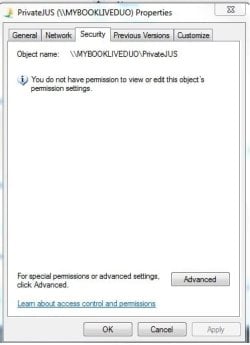
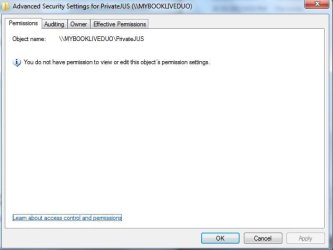
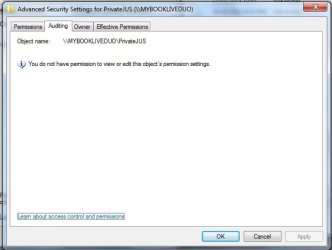
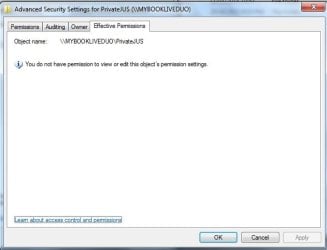
I have tried the first link unsuccessfully. I've attached some screen dumps if it will help.

I'll continue with the remaining solutions.
 

Attachments

  • pic1.jpg
    pic1.jpg
    19.8 KB · Views: 11
  • pic2.jpg
    pic2.jpg
    21.4 KB · Views: 10
  • pic3.jpg
    pic3.jpg
    22.9 KB · Views: 10
  • pic4.jpg
    pic4.jpg
    20.6 KB · Views: 10
  • pic5.jpg
    pic5.jpg
    30.7 KB · Views: 10
  • pic6.jpg
    pic6.jpg
    34 KB · Views: 10

My Computer My Computer

At a glance

windows 64bit
Computer type
PC/Desktop
OS
windows 64bit
Take ownership reg merge did result in the option being available on the right click. But that's all, it did not restore access to folder.
 

My Computer My Computer

At a glance

windows 64bit
Computer type
PC/Desktop
OS
windows 64bit
Back
Top