Solved Accidentally uninstalled wrong driver now no display -

metaturbo707

New member
Local time
12:05 AM
Messages
25
Hi,

I was uninstalling drivers for USB devices using device manager and now my external display does not receive any signal from the laptop , except in safe mode it does work fine, except my USB mouse and keyboard don't work. I tried re-plugging in the devices and also scanning for new hardware but no change.

Can you help me please?

Thank you.
 

My Computer

Computer type
Laptop
Computer Manufacturer/Model Number
HP Pavillion Notebook PC tx1308nr upgraded from Vista to 7
OS
Windows 7 Home Premium 32 bit SP1
CPU
AMD Turion 64 X2 Mobile Technology TL-58 1.90GHz (stock)
Motherboard
(stock)
Memory
2GB (stock)
Graphics Card(s)
NVIDIA GeForce Go 6150 Driver version 179.67 (Stock)
Monitor(s) Displays
Sanmsung 23"
Hard Drives
320 GB, stock drive replaced due to failure of stock drive, 1 TB backup drive.
Keyboard
Logitech cordless
Mouse
Logitech cordless
Antivirus
Avast (previously Norton)
Browser
Explorer, Chrome, Opera
Hello mate now if you can get into safe mode I would be tempted to run a system restore just as a starter.
 

My Computer

Computer type
PC/Desktop
Computer Manufacturer/Model Number
Own build (new) Desk1 / Asus ROG Win 7 / Desk2 1st build
OS
Desk1 7 Home Prem / Desk2 10 Pro / Main lap Asus ROG 10 Pro 2 laptop Toshiba 7 Pro Asus P2520 7 & 10
CPU
Desk1 i5 3750K / Laptop i7 GTX 860M / Desk2 i5 2500
Motherboard
Desk1 Asus P877-V / Desk2 Gigabyte H67 UD3H / Laptop ?
Memory
Desk1 8GB (1866) / Desk2 16GB (1333) / Laptop 8Gb DDR3
Graphics Card(s)
Desk 1& 2NVidia GTX 650 & Laptops on board Intel
Sound Card
Desk 1 & 2 -XONAR DG Realtek High Def audio Laptop
Monitor(s) Displays
Desk 1 Benq HD 2450 / Desk2 Philips 24" / Laptop 17.5"
Screen Resolution
1920x1080 D1 & D2 & Laptop 1
Hard Drives
Desk1 Samsung 120GB 830 SSD
Asus ROG 256GB 850 Pro SSD
Desk2 Samsung 840 256 SSD
Toshiba 120GB EVO
PSU
Desk 1 Corsair HX 1050/ Laptop ? / Desk 2 Corsair HX 650
Case
Desk 1 Cooler HAF XM ? Toshiba laptop / Desk2 Coolermaster
Cooling
Fans on all Desk1 -2 Desk2 - all Coolermasters 5 Laptop ?
Keyboard
Desk 1 MS Sidewinder X6 Desk 2 MS Sidewinder X 4
Mouse
Desk 1&2 - Gigabyte MS 900 gamer - laptop - Logitec wireless
Internet Speed
ADSL2+
Other Info
One other Desktop (tester) and spare Toshba laptop both with SSD's
Running Kaspersky 2016 ISS on all machines config'd identically
Logitec audio stereo systems on each machine (x3)
Canon MG5250MFC
Router/modem TP-Link running WPA2SK
Thanks, but I found I have no restore points.
 

My Computer

Computer type
Laptop
Computer Manufacturer/Model Number
HP Pavillion Notebook PC tx1308nr upgraded from Vista to 7
OS
Windows 7 Home Premium 32 bit SP1
CPU
AMD Turion 64 X2 Mobile Technology TL-58 1.90GHz (stock)
Motherboard
(stock)
Memory
2GB (stock)
Graphics Card(s)
NVIDIA GeForce Go 6150 Driver version 179.67 (Stock)
Monitor(s) Displays
Sanmsung 23"
Hard Drives
320 GB, stock drive replaced due to failure of stock drive, 1 TB backup drive.
Keyboard
Logitech cordless
Mouse
Logitech cordless
Antivirus
Avast (previously Norton)
Browser
Explorer, Chrome, Opera
Do you have internet access fron safe mode? if yes, try and find the driver from your manufacturer and download and install.
hope that helps
Sven
 

My Computer

Computer type
PC/Desktop
Computer Manufacturer/Model Number
Custom Build
OS
windows 7 ultimate x64
CPU
AMD FX 6 CORE PROCESSOR
Memory
16 GB
Graphics Card(s)
on MB
Sound Card
on MB
Monitor(s) Displays
Acer
Screen Resolution
1920x1080
Hard Drives
Seagate ( C:\)
Case
mini tower
Keyboard
Logitech wireless
Mouse
Logitech wireless
Antivirus
MSE
Browser
IE11
Yes safe mode with networking works fine.
I can use web browsers. I'll reload the driver but again, it works fine in safe mode.

I'm fairly certain I didn't uninstall any kind of driver that had a name related to display or monitor. I had decided to uninstall all of my USB device drivers because one of my USB devices is malfunctioning. I think the device manager categories were only USB related, but the display is connected to the vga 15 pin port.
 

My Computer

Computer type
Laptop
Computer Manufacturer/Model Number
HP Pavillion Notebook PC tx1308nr upgraded from Vista to 7
OS
Windows 7 Home Premium 32 bit SP1
CPU
AMD Turion 64 X2 Mobile Technology TL-58 1.90GHz (stock)
Motherboard
(stock)
Memory
2GB (stock)
Graphics Card(s)
NVIDIA GeForce Go 6150 Driver version 179.67 (Stock)
Monitor(s) Displays
Sanmsung 23"
Hard Drives
320 GB, stock drive replaced due to failure of stock drive, 1 TB backup drive.
Keyboard
Logitech cordless
Mouse
Logitech cordless
Antivirus
Avast (previously Norton)
Browser
Explorer, Chrome, Opera
I downloaded the driver installer from Samsung but it says it did not install correctly. The screen is still black with normal boot but works in safe mode.
 

My Computer

Computer type
Laptop
Computer Manufacturer/Model Number
HP Pavillion Notebook PC tx1308nr upgraded from Vista to 7
OS
Windows 7 Home Premium 32 bit SP1
CPU
AMD Turion 64 X2 Mobile Technology TL-58 1.90GHz (stock)
Motherboard
(stock)
Memory
2GB (stock)
Graphics Card(s)
NVIDIA GeForce Go 6150 Driver version 179.67 (Stock)
Monitor(s) Displays
Sanmsung 23"
Hard Drives
320 GB, stock drive replaced due to failure of stock drive, 1 TB backup drive.
Keyboard
Logitech cordless
Mouse
Logitech cordless
Antivirus
Avast (previously Norton)
Browser
Explorer, Chrome, Opera
I also reinstalled the video card driver from Nvidia it appeared to install successfully but the display still indicates no signal, same condition bit again OK in safe mode.
 

My Computer

Computer type
Laptop
Computer Manufacturer/Model Number
HP Pavillion Notebook PC tx1308nr upgraded from Vista to 7
OS
Windows 7 Home Premium 32 bit SP1
CPU
AMD Turion 64 X2 Mobile Technology TL-58 1.90GHz (stock)
Motherboard
(stock)
Memory
2GB (stock)
Graphics Card(s)
NVIDIA GeForce Go 6150 Driver version 179.67 (Stock)
Monitor(s) Displays
Sanmsung 23"
Hard Drives
320 GB, stock drive replaced due to failure of stock drive, 1 TB backup drive.
Keyboard
Logitech cordless
Mouse
Logitech cordless
Antivirus
Avast (previously Norton)
Browser
Explorer, Chrome, Opera
I was uninstalling drivers for USB devices using device manager and now my external display does not receive any signal from the laptop , except in safe mode it does work fine, except my USB mouse and keyboard don't work.
To clarify, are you saying your USB mouse/keyboard do or don't work in safe mode??

Let's check if any filters are in place. In Device Manager, repeat for both Display and Monitor devices.
>Right click select Properties then Details tab. Use the pull down tab and carefully look if any class upper filters or class lower filters defined. If you see any you can copy/paste the result into next post

I'd also go into Programs and Features and uninstall any driver or app you see there for the display. In normal boot, when no other display driver found, the display should still come up. It will use the Windows generic driver - same one used in safe mode.

/* EDIT */
do you also still have your Win 7 installation media? might try a install repair later if all else fails
 

Attachments

  • Filters.jpg
    Filters.jpg
    18.7 KB · Views: 16

My Computer

Computer type
PC/Desktop
Computer Manufacturer/Model Number
Dell Optiplex 360 and Optiplex 755
OS
Desk 1: Win 7 Pro x32; Desk 2: Windows 10 x64
Hard Drives
500GB Crucial SSD in both Desktops
Other Info
Buffalo 6TB NAS, Raid 1
Just a matter of interest just how is the monitor connected to the machine??
 

My Computer

Computer type
PC/Desktop
Computer Manufacturer/Model Number
Own build (new) Desk1 / Asus ROG Win 7 / Desk2 1st build
OS
Desk1 7 Home Prem / Desk2 10 Pro / Main lap Asus ROG 10 Pro 2 laptop Toshiba 7 Pro Asus P2520 7 & 10
CPU
Desk1 i5 3750K / Laptop i7 GTX 860M / Desk2 i5 2500
Motherboard
Desk1 Asus P877-V / Desk2 Gigabyte H67 UD3H / Laptop ?
Memory
Desk1 8GB (1866) / Desk2 16GB (1333) / Laptop 8Gb DDR3
Graphics Card(s)
Desk 1& 2NVidia GTX 650 & Laptops on board Intel
Sound Card
Desk 1 & 2 -XONAR DG Realtek High Def audio Laptop
Monitor(s) Displays
Desk 1 Benq HD 2450 / Desk2 Philips 24" / Laptop 17.5"
Screen Resolution
1920x1080 D1 & D2 & Laptop 1
Hard Drives
Desk1 Samsung 120GB 830 SSD
Asus ROG 256GB 850 Pro SSD
Desk2 Samsung 840 256 SSD
Toshiba 120GB EVO
PSU
Desk 1 Corsair HX 1050/ Laptop ? / Desk 2 Corsair HX 650
Case
Desk 1 Cooler HAF XM ? Toshiba laptop / Desk2 Coolermaster
Cooling
Fans on all Desk1 -2 Desk2 - all Coolermasters 5 Laptop ?
Keyboard
Desk 1 MS Sidewinder X6 Desk 2 MS Sidewinder X 4
Mouse
Desk 1&2 - Gigabyte MS 900 gamer - laptop - Logitec wireless
Internet Speed
ADSL2+
Other Info
One other Desktop (tester) and spare Toshba laptop both with SSD's
Running Kaspersky 2016 ISS on all machines config'd identically
Logitec audio stereo systems on each machine (x3)
Canon MG5250MFC
Router/modem TP-Link running WPA2SK
Hi thanks for the help. I have a logitech mouse and keyboard wireless that connect through a USB receiver. It is not working in safe mode so I use the laptop keyboard and touchpad. The laptop screen backlight went out a while ago so I'm not sure what's happening if the external display isn't working.

In device manager I only see a branch for display adapters as far as anything related to display or monitor. In the display adapter branch there is only one item it is my graphics card; under properties there are 10 that have class in the name but none with upper or lower. The monitor is connected to the vga 15 pin port on the laptop. I am going to try uninstalling all the display drivers later today. Again thanks very much for your help.
 

My Computer

Computer type
Laptop
Computer Manufacturer/Model Number
HP Pavillion Notebook PC tx1308nr upgraded from Vista to 7
OS
Windows 7 Home Premium 32 bit SP1
CPU
AMD Turion 64 X2 Mobile Technology TL-58 1.90GHz (stock)
Motherboard
(stock)
Memory
2GB (stock)
Graphics Card(s)
NVIDIA GeForce Go 6150 Driver version 179.67 (Stock)
Monitor(s) Displays
Sanmsung 23"
Hard Drives
320 GB, stock drive replaced due to failure of stock drive, 1 TB backup drive.
Keyboard
Logitech cordless
Mouse
Logitech cordless
Antivirus
Avast (previously Norton)
Browser
Explorer, Chrome, Opera
In the normal boot mode...
...have you tried to toggle the display so that it shows on an external monitor?

For your hp pavilion notebook, I think that the toggle happens via Fn + F4.
 

My Computer

Computer type
Laptop
Computer Manufacturer/Model Number
Employer provided Dell Latitude
OS
W7 Pro SP1 64bit
CPU
i7
Memory
8GB
Graphics Card(s)
Intel HD Graphics
Hard Drives
crappy SSD
Antivirus
Employer mandated Symantec Endpoint Protection
Browser
Pale Moon 64bit, IE11 64bit & Chrome 64bit
Ok I am leaving this to the others as in my mind unless the machine has a dedicated GPU as well as the Intel graphics as in my gaming Asus - then the GPU is an NVidia installed as a part of the original build and in probability soldered to the board.

I still don't know how you are connecting the external monitor to the machine and it could be something as simple as a cable issue but anyway good luck with the problem.
 

My Computer

Computer type
PC/Desktop
Computer Manufacturer/Model Number
Own build (new) Desk1 / Asus ROG Win 7 / Desk2 1st build
OS
Desk1 7 Home Prem / Desk2 10 Pro / Main lap Asus ROG 10 Pro 2 laptop Toshiba 7 Pro Asus P2520 7 & 10
CPU
Desk1 i5 3750K / Laptop i7 GTX 860M / Desk2 i5 2500
Motherboard
Desk1 Asus P877-V / Desk2 Gigabyte H67 UD3H / Laptop ?
Memory
Desk1 8GB (1866) / Desk2 16GB (1333) / Laptop 8Gb DDR3
Graphics Card(s)
Desk 1& 2NVidia GTX 650 & Laptops on board Intel
Sound Card
Desk 1 & 2 -XONAR DG Realtek High Def audio Laptop
Monitor(s) Displays
Desk 1 Benq HD 2450 / Desk2 Philips 24" / Laptop 17.5"
Screen Resolution
1920x1080 D1 & D2 & Laptop 1
Hard Drives
Desk1 Samsung 120GB 830 SSD
Asus ROG 256GB 850 Pro SSD
Desk2 Samsung 840 256 SSD
Toshiba 120GB EVO
PSU
Desk 1 Corsair HX 1050/ Laptop ? / Desk 2 Corsair HX 650
Case
Desk 1 Cooler HAF XM ? Toshiba laptop / Desk2 Coolermaster
Cooling
Fans on all Desk1 -2 Desk2 - all Coolermasters 5 Laptop ?
Keyboard
Desk 1 MS Sidewinder X6 Desk 2 MS Sidewinder X 4
Mouse
Desk 1&2 - Gigabyte MS 900 gamer - laptop - Logitec wireless
Internet Speed
ADSL2+
Other Info
One other Desktop (tester) and spare Toshba laptop both with SSD's
Running Kaspersky 2016 ISS on all machines config'd identically
Logitec audio stereo systems on each machine (x3)
Canon MG5250MFC
Router/modem TP-Link running WPA2SK
Ok I am leaving this to the others as in my mind unless the machine has a dedicated GPU as well as the Intel graphics as in my gaming Asus - then the GPU is an NVidia installed as a part of the original build and in probability soldered to the board.

I still don't know how you are connecting the external monitor to the machine and it could be something as simple as a cable issue but anyway good luck with the problem.
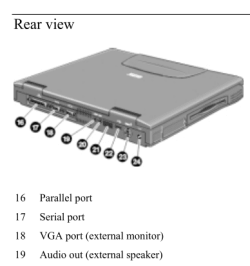
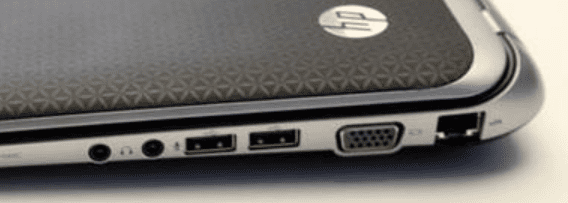
My guess is that the OP is connecting the external monitor via a VGA port like this:

HP1.PNG

HP2.PNG


A screenshot of device manager from the OP would be nice :-)

http://www.sevenforums.com/tutorials/9733-screenshots-files-upload-post-seven-forums.html
 

My Computer

Computer type
Laptop
Computer Manufacturer/Model Number
Employer provided Dell Latitude
OS
W7 Pro SP1 64bit
CPU
i7
Memory
8GB
Graphics Card(s)
Intel HD Graphics
Hard Drives
crappy SSD
Antivirus
Employer mandated Symantec Endpoint Protection
Browser
Pale Moon 64bit, IE11 64bit & Chrome 64bit
He should be able to download and install the drivers of Go 6150 SE in Safe Mode with Networking
 

My Computer

Computer type
PC/Desktop
Computer Manufacturer/Model Number
ASUS X550ZE
OS
Windows 7 Home Premium 64-BIT
CPU
AMD A8 7200P
Motherboard
N/A
Memory
8GB 1600mhz
Graphics Card(s)
Radeon R5 (APU) + Radeon R5 M230 2GB Dual Graphics
Sound Card
Realtek ALC269 with SonicMaster
Monitor(s) Displays
Laptop Display
Screen Resolution
1920 x 1080 @60hz
Hard Drives
WDC WD50 00LPVX-80V0TT0 (500GB)
PSU
Laptop Charger
Mouse
ARMAGGEDON TEXTRON SCORPION 7
Internet Speed
100 mbps DOWN / 50 mbps UP
Antivirus
Windows Defender
Browser
Mozzila FireFox, Valve Steam in-game internet browser
OK everyone! I feel not so smart right now, but am relieved, because yes, the monitor was not selected and using fn-f4 solved it. The mouse and keyboard work again after re-installing the driver. Thank you all very much for the help I really appreciate it.

ICIT2LOL I did say I attached the monitor the vga port. This laptop does have overheating issues with the graphics card and I have had it apart and seen it it is a separate chip soldered to the board, and I do have some other display issues but have workarounds for now. Thanks for your ideas.

By chance to you happen to know how to fix an 'unable to find com port' error?
That is the root impetus for my uninstalling the USB drivers. After all of this, the condition continues.

I have an arduino uno , and it often gives me the error that it can't find the com port when I attempt to upload a sketch - it doesn't matter which port I select for it in device manager. It does detect the port because the port number I choose shows up in the ide, but when I go to upload a sketch it always says it can't find the com port.

I think it's related to a Bluetooth USB dongle I have used intermittently it always creates 3 ports and one one them always has an error in device manager that I have been unable to resolve. Other USB devices work well though, including an HTC phone that generates a com port and an external HD. It just doesn't like the arduino for some reason and I don't know enough about windows com ports. So I uninstalled all of the csr Bluetooth USB dongle software and the phone sync software and went on trying to delete USB related drivers in device manager. But even with all of that completed the problem remains the same. Any suggestions or ideas are welcome.

Thanks.
 
Last edited:

My Computer

Computer type
Laptop
Computer Manufacturer/Model Number
HP Pavillion Notebook PC tx1308nr upgraded from Vista to 7
OS
Windows 7 Home Premium 32 bit SP1
CPU
AMD Turion 64 X2 Mobile Technology TL-58 1.90GHz (stock)
Motherboard
(stock)
Memory
2GB (stock)
Graphics Card(s)
NVIDIA GeForce Go 6150 Driver version 179.67 (Stock)
Monitor(s) Displays
Sanmsung 23"
Hard Drives
320 GB, stock drive replaced due to failure of stock drive, 1 TB backup drive.
Keyboard
Logitech cordless
Mouse
Logitech cordless
Antivirus
Avast (previously Norton)
Browser
Explorer, Chrome, Opera
RoasterMen - I did reinstall the graphics card driver in safe mode with networking. I could not however install the external display driver but it is working fine now.

Thank you.
 

My Computer

Computer type
Laptop
Computer Manufacturer/Model Number
HP Pavillion Notebook PC tx1308nr upgraded from Vista to 7
OS
Windows 7 Home Premium 32 bit SP1
CPU
AMD Turion 64 X2 Mobile Technology TL-58 1.90GHz (stock)
Motherboard
(stock)
Memory
2GB (stock)
Graphics Card(s)
NVIDIA GeForce Go 6150 Driver version 179.67 (Stock)
Monitor(s) Displays
Sanmsung 23"
Hard Drives
320 GB, stock drive replaced due to failure of stock drive, 1 TB backup drive.
Keyboard
Logitech cordless
Mouse
Logitech cordless
Antivirus
Avast (previously Norton)
Browser
Explorer, Chrome, Opera
ICIT2LOL I did say I attached the monitor the vga port. This laptop does have overheating issues with the graphics card and I have had it apart and seen it it is a separate chip soldered to the board, and I do have some other display issues but have workarounds for now. Thanks for your idea
My apologies for that.
 

My Computer

Computer type
PC/Desktop
Computer Manufacturer/Model Number
Own build (new) Desk1 / Asus ROG Win 7 / Desk2 1st build
OS
Desk1 7 Home Prem / Desk2 10 Pro / Main lap Asus ROG 10 Pro 2 laptop Toshiba 7 Pro Asus P2520 7 & 10
CPU
Desk1 i5 3750K / Laptop i7 GTX 860M / Desk2 i5 2500
Motherboard
Desk1 Asus P877-V / Desk2 Gigabyte H67 UD3H / Laptop ?
Memory
Desk1 8GB (1866) / Desk2 16GB (1333) / Laptop 8Gb DDR3
Graphics Card(s)
Desk 1& 2NVidia GTX 650 & Laptops on board Intel
Sound Card
Desk 1 & 2 -XONAR DG Realtek High Def audio Laptop
Monitor(s) Displays
Desk 1 Benq HD 2450 / Desk2 Philips 24" / Laptop 17.5"
Screen Resolution
1920x1080 D1 & D2 & Laptop 1
Hard Drives
Desk1 Samsung 120GB 830 SSD
Asus ROG 256GB 850 Pro SSD
Desk2 Samsung 840 256 SSD
Toshiba 120GB EVO
PSU
Desk 1 Corsair HX 1050/ Laptop ? / Desk 2 Corsair HX 650
Case
Desk 1 Cooler HAF XM ? Toshiba laptop / Desk2 Coolermaster
Cooling
Fans on all Desk1 -2 Desk2 - all Coolermasters 5 Laptop ?
Keyboard
Desk 1 MS Sidewinder X6 Desk 2 MS Sidewinder X 4
Mouse
Desk 1&2 - Gigabyte MS 900 gamer - laptop - Logitec wireless
Internet Speed
ADSL2+
Other Info
One other Desktop (tester) and spare Toshba laptop both with SSD's
Running Kaspersky 2016 ISS on all machines config'd identically
Logitec audio stereo systems on each machine (x3)
Canon MG5250MFC
Router/modem TP-Link running WPA2SK
Back
Top